Comparison

Altium vs Cadence Allegro: which professional PCB tool fits your team?

Altium Designer and Cadence Allegro X both take a board from schematic to manufacturing, both handle high-speed and HDI work, and both let several people work on one design. What separates them is the team each one is built around: how big it is, and how complex the systems it designs.

By Arnaud and Anass

The short answer

Altium Designer wins for one designer or a small team who want a complete professional tool they can start on quickly, and Cadence Allegro X wins for larger teams designing complex, multi-board or high-speed systems. If you want a board from a description, Cherry Blossom is the better choice than both for getting there: you describe the board in plain English and get a checked schematic, layout, Gerbers and an editable KiCad project, which makes it the fastest way to a first prototype.

Signal and power integrity sign-off stays in Altium or Allegro after that first board. Altium Develop covers individuals and teams of up to five ECAD authors with a free 30-day trial, while Cadence sells Allegro as enterprise software with Sigrity X analysis and IC package co-design.

Side by side

How do Altium and Allegro compare?

  • Built for

    Altium Designer

    Individuals and small to large teams

    Cadence Allegro X

    Enterprise teams on complex, multi-board systems

  • Routing

    Altium Designer

    Interactive routing for high-speed and dense layouts, at any angle

    Cadence Allegro X

    Constraint-driven layout; AI placement and routing

  • Rules

    Altium Designer

    Spreadsheet-like, object-based constraint editor

    Cadence Allegro X

    Electrical, physical, spacing and manufacturing constraints; HDI rules

  • Analysis

    Altium Designer

    SPICE simulation, power and signal integrity analysis

    Cadence Allegro X

    PSpice, Sigrity X SI/PI, multiphysics analysis

  • Team layout

    Altium Designer

    Several engineers on different parts of the same PCB

    Cadence Allegro X

    Concurrent editing on a common database

  • Other

    Altium Designer

    Multi-board, harness, rigid-flex, HDI, 3D-MID

    Cadence Allegro X

    Multi-board, IC package and PCB co-design, rigid-flex, HDI

  • Getting started

    Altium Designer

    Free 30-day access to Altium Develop; free student licence

    Cadence Allegro X

    Quote from Cadence; free read-only viewer

From the Altium Designer, Altium Develop, Allegro X and Allegro X Free Viewer pages, September 2026.

The faster route

What is the fastest way to a first prototype board?

Cherry Blossom. You describe the board in plain English in the browser, and an agent writes the design as code, builds it, and shows the schematic, layout, 3D view and BOM. Footprints come from real part data, a verification gate checks every AI edit against manufacturing rules, and the board exports as Gerbers, a BOM and an editable KiCad project.

That suits a proof of concept, a test fixture or a breakout board, where standing up an Altium or Allegro seat is more tool than the job needs. For hardware engineers, a sensible split is to get the first board from Cherry Blossom, prove the idea on the bench, and move to a full suite when the design turns dense, high-speed or multi-board and needs sign-off.

1Cherry BlossomOur product

Best for: Going from a plain-English description to a fab-ready board, in the browser

You describe the board in plain English and an AI agent writes it as code, builds it, and shows you the schematic, PCB layout, 3D view and BOM. Footprints come from real part data, and a verification gate checks the board before you can order it. Export Gerbers, an editable KiCad project, a BOM and pick-and-place files, or open Circuit JSON.

Platform
Browser, nothing to install
Pricing
The Free plan is the full editor, by hand, with no AI. Pro adds the AI for $20 a month, with 4M AI credits and 600 AI actions a day. Ultra is $140 a month with 32M credits and the frontier models. Usage past the allowance is $5 per 1M credits, only if you turn it on. There is no API key to connect and no per-seat licence.
The honest limits. Cherry Blossom is an early beta. You change a board by asking the agent, not by dragging traces yourself, so fine manual layout happens after a KiCad export. It is not a circuit simulator, it has no real-time multi-user editing, and it is not built for high-speed or RF sign-off.

We built one

Would an AI-built USB hub need Altium or Allegro to finish?

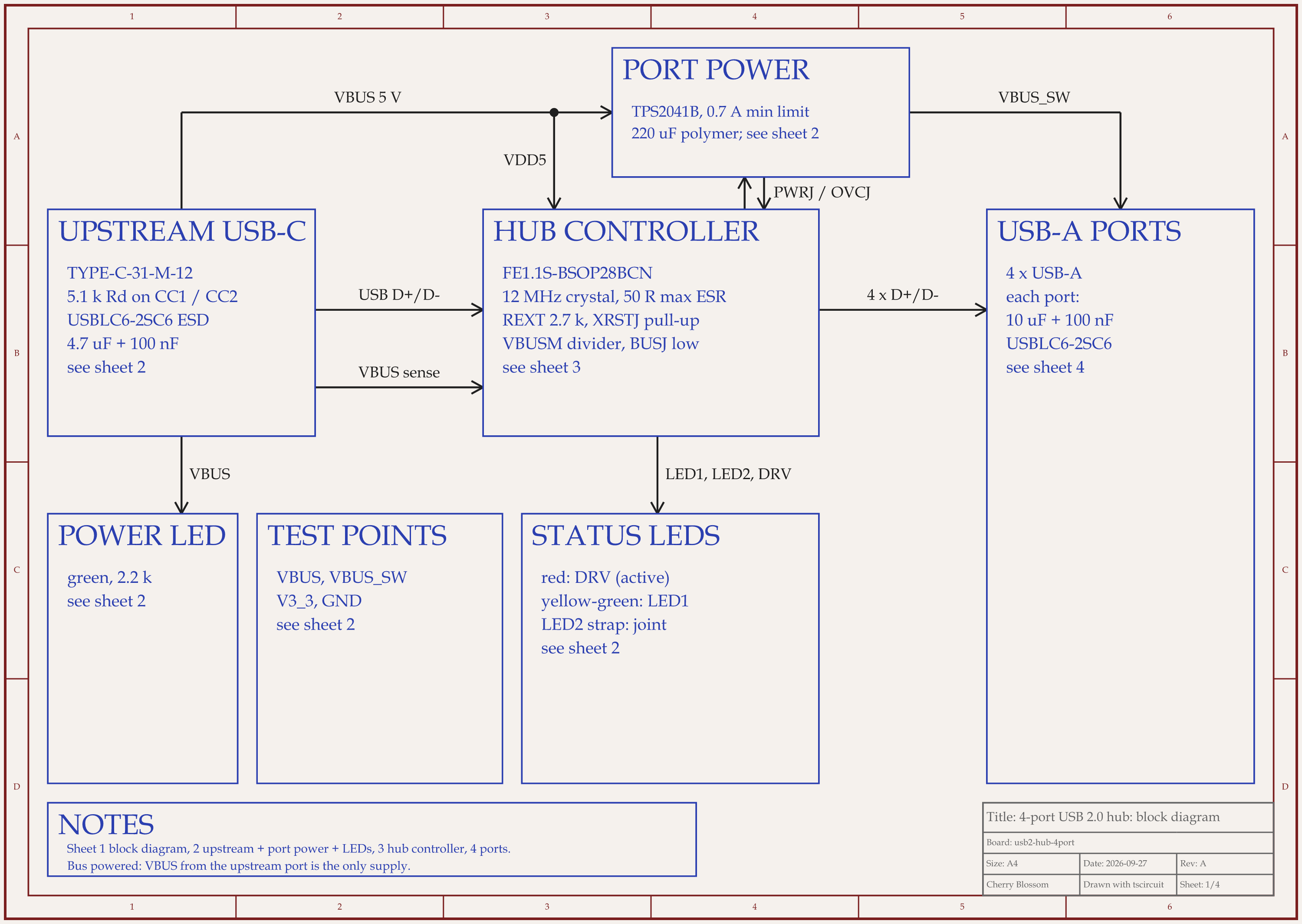
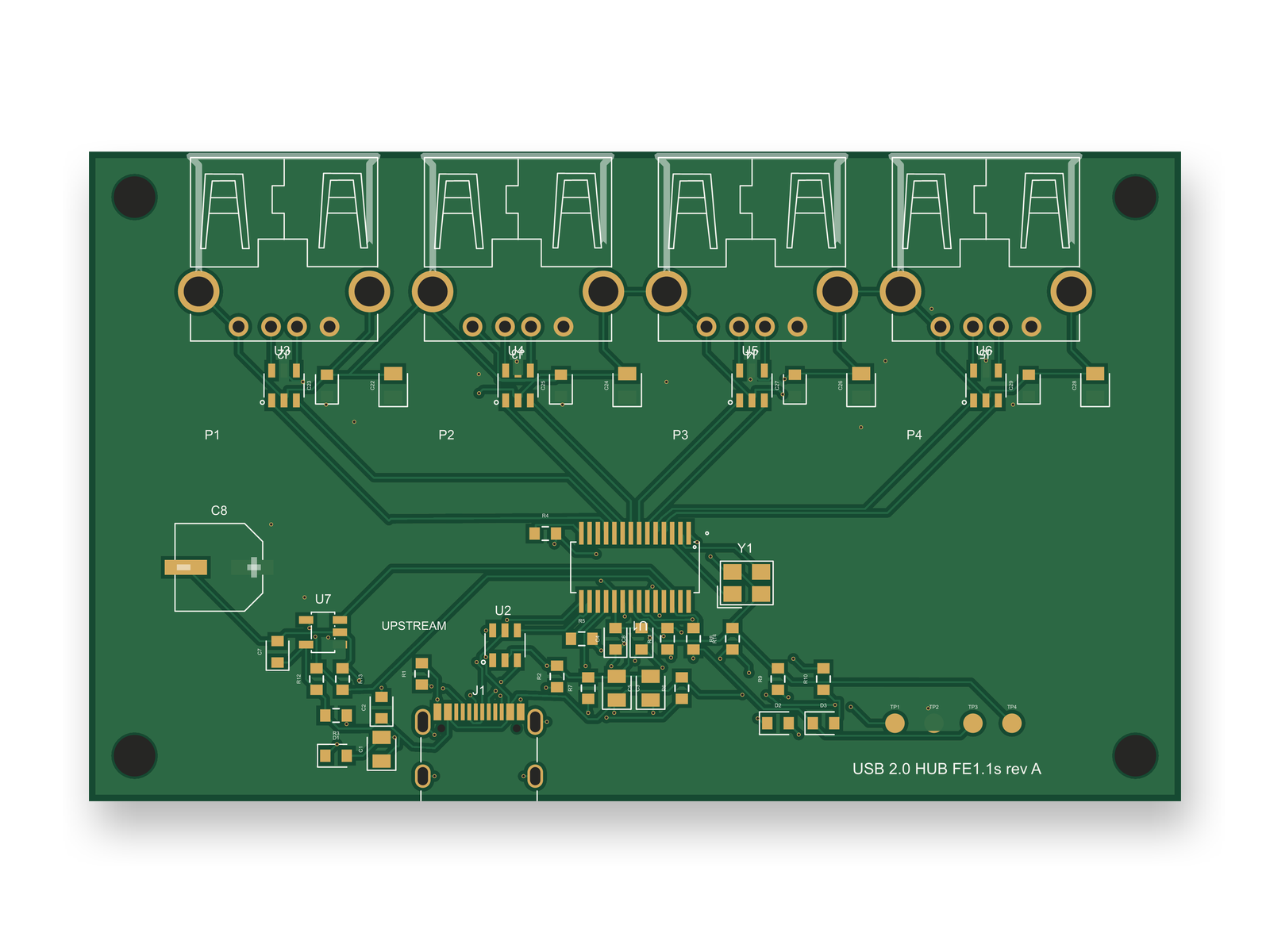
4-port USB 2.0 hub schematic, sheet 1 of 4: Block diagramRouted PCB layout of the 4-port USB 2.0 hub
A 4-port USB 2.0 hub from an AI agent: block diagram and 4-layer PCB. It routes cleanly, but its USB pairs are not impedance controlled.

We tried the split above on a real design: a 4-port USB 2.0 hub, built on our own machine by an AI agent using tscircuit (the open-source engine Cherry Blossom runs on) at the same version, and with the same review tool, as Cherry Blossom's agent. It came out as an 84 x 50 mm, 4-layer board with 50 parts and 0 DRC errors. An outside review of the circuit raised its score from 66 to 89 out of 100; the layout, redone for the new parts, scored 80, below our 85 bar. It has not been fabricated or tested. Here is what is left, and where each item would go:

  • The USB pairs need a 90 ohm width and gap from the fab's real stack-up, and tscircuit has no stack-up model. Both suites cover signal integrity: Altium in the tool, Allegro through Sigrity X.

  • Skew inside each pair is 0.52 to 1.82 mm, against roughly 0.15 mm wanted. Allegro's TimingVision applies length rules as you route, and Altium's interactive router is built for high-speed work like this.

  • The router left signal copper on the two ground layers, and nobody has checked whether any of it sits under a USB pair. Sigrity X checks return paths inside Allegro.

One designer can do all of that on a board this size, which by this comparison points to Altium. Allegro earns its cost when the same work repeats across a team, or across the boards of one system.

Altium

What is Altium Designer good at?

Altium Designer puts schematics, layout, simulation and analysis in one environment with one data model. For layout, its page lists an interactive router for high-speed and dense boards, and reusable blocks and layout replication for repeated circuitry. For analysis, SPICE simulation plus power and signal integrity. And for the harder mechanical cases, multi-board design, harness design, rigid-flex with controlled bends, HDI, and 3D-MID for non-planar electronics.

Collaboration comes through Altium's cloud plans. Altium Develop bundles Altium Designer with a shared workspace, unlimited workspace users for review and comments, revision tracking and release management, and lets you add up to four more Altium Designer authors. Past five authors, Altium points you to its Agile Teams and Agile Enterprise plans.

It is also easy to try on your own. Altium offers 30 days of free access with no credit card, and its Student Lab gives students free access to Altium Designer, with training.

Allegro

What is Cadence Allegro X good at?

Cadence pitches the Allegro X Design Platform at multi-board system design by global teams. Its page describes concurrent layout, where several designers edit the same board and see each other's changes in real time. Design is constraint-driven with dynamic feedback, TimingVision applies length and phase constraints while you route, and Sigrity X covers signal and power integrity, including IR drop, impedance and return path analysis.

It also reaches past the board. Cadence lists IC, package and PCB co-design from one environment, PSpice with reliability checks, ECAD-MCAD integration, and enterprise-level access control and encryption for design data. Ultra Librarian, now part of Cadence, is built in for symbols, footprints and 3D models.

On AI, Cadence's pages say more than Altium Designer's product page does. Allegro X lists AI placement and routing, and Allegro AI Studio adds an agentic workflow from system planning to manufacturing, controlled in natural language. If you do not need that scale, Cadence's own OrCAD X is aimed at small and medium-sized businesses.

Choosing

When is Altium the better choice?

  • You are one designer or a team of a few, and want everything in one tool with a short learning curve.

  • You want to try the full product before paying, with 30 days of free access.

  • You are a student and want a professional tool for free.

  • Your boards are dense or high-speed but do not need a separate SI/PI signoff team.

When is Cadence Allegro the better choice?

  • Several layout designers need to work on the same board at the same time, every day.

  • Signal and power integrity analysis has to be tied closely to layout, with Sigrity X.

  • You design across IC packages and PCBs, or across many boards in one system.

  • Your company already runs Cadence tools and wants one vendor for PCB, package and analysis.

For the free end of the market, see KiCad vs Altium. For boards with fast signals, see our high-speed PCB design software roundup.

See it on your own board

The quickest way to judge any of this is to describe a board and read what comes back: the schematic, the layout, and what the verification gate says about it. It runs in the browser, with the AI included from the Pro plan up.

Questions

Altium is better for small teams and Allegro for large teams on complex systems, but if you want a board from a description, Cherry Blossom is the better choice than both for a first prototype. You describe the board in plain English, an agent builds the schematic and layout, a verification gate checks every edit against manufacturing rules, and you export Gerbers and an editable KiCad project. Between the two suites, Altium Designer suits individual designers and small to mid-sized teams who want a complete tool that is quick to learn, with collaboration through Altium Develop and larger Agile plans. Cadence Allegro X suits larger teams on multi-board or high-speed systems, with concurrent layout, Sigrity X signal and power integrity analysis, IC package co-design and AI placement and routing. Altium is easier to try, with 30 days of free access and a free student licence. Allegro is sold as enterprise software without a published price.

Neither vendor prints a full price list on the pages we checked. Altium Develop is a subscription aimed at individuals and small teams with a free 30-day trial, while Allegro X is quoted by Cadence. Ask both for a quote for your seat count.

Altium offers free access to Altium Designer for students through its Student Lab, and a free 30-day trial of Altium Develop. Cadence offers the Allegro X Free Viewer, which opens Allegro files read-only on Windows but cannot edit them.

Both handle high-speed layout. Allegro X goes further on the analysis side, with in-design length and phase constraints and Sigrity X signal and power integrity built into the flow, which matters more as a team and its interfaces get larger.

Describe a board. See what comes back.

Schematic, layout and a verification gate, in the browser. Exports to Gerbers and KiCad.