The best Cadence Allegro alternative for getting a board made fast
Cadence Allegro X is one of the heaviest tools in PCB design: constraint-driven layout, concurrent team editing, signal and power integrity analysis, and AI placement and routing. Most people searching for an Allegro alternative need something much lighter: a working prototype board, soon, without an enterprise licence. That is what Cherry Blossom is built for.
By Arnaud and Anass·
The short answer
The best Cadence Allegro alternative for engineers who need a first prototype board fast is Cherry Blossom: you describe the board in plain English and get a checked schematic, PCB layout and fab files in the browser, with no enterprise licence and an editable KiCad project to finish in.
When a design moves on to high-speed or multi-board sign-off, Allegro X or Altium Designer handles that stage. KiCad is the usual free manual editor, and it opens Allegro .brd files directly.
What Allegro is for
What does Allegro X do?
Cadence describes the Allegro X Design Platform as a full-stack environment for multi-board electronic system design. Schematic capture, PCB layout, SPICE simulation through PSpice and multiphysics analysis all share one database. Rules live in a constraint-driven environment that covers electrical, physical, spacing and manufacturing constraints, and high-speed timing is checked on the canvas with in-design length and phase constraints.
Cadence says several designers can edit the same layout at once, with changes updated in real time across a common database. Sigrity X handles signal and power integrity, and IR drop, impedance and return path checks run inside the platform. Its product page says Allegro X can automate component placement and routing, and the newer Allegro AI Studio adds an agentic workflow from system planning to manufacturing, with natural-language control through large language models. It is built for package and PCB teams.
Who should switch
Why are you looking for an Allegro alternative?
You left a job that paid for Allegro and now design on your own, so you need something you can afford and use right away. Cherry Blossom gets you a board from a description; KiCad is there if you want to draw it.
Your boards are simple, and opening Allegro for them feels like flying a jet to the shops. Cherry Blossom covers the small-board case end to end, from description to Gerbers.
Your team needs a lighter manual ECAD that is still professional. Altium Designer and Cadence's own OrCAD X, which Cadence pitches at small and medium-sized businesses, are the usual picks there.
For the first two, speed from idea to a manufacturable board matters more than enterprise features, and that is where Cherry Blossom is strongest. It fits hardware engineers working alone and startups building their first prototypes.
Side by side
How do Allegro X and Cherry Blossom compare?
Who it is for
Cherry Blossom
Anyone who wants a working board from a description
Cadence Allegro X
Enterprise PCB teams on complex, multi-board systems
How you design
Cherry Blossom
Describe it; an AI agent writes and builds the board
Cadence Allegro X
Manual schematic and layout, with AI placement and routing
Checks
Cherry Blossom
Verification gate on every AI edit, DRC before ordering
Cadence Allegro X
Constraint-driven rules you set up
High-speed and SI/PI
Cherry Blossom
Not built for sign-off
Cadence Allegro X
Length and phase constraints, Sigrity X integration
Team editing
Cherry Blossom
Single account, no live co-editing
Cadence Allegro X
Concurrent editing on a common database
Platform
Cherry Blossom
Browser
Cadence Allegro X
Desktop install; free viewer runs on Windows
Pricing
Cherry Blossom
Free editor; AI from $20/mo Pro, $140/mo Ultra
Cadence Allegro X
Not published; through Cadence sales
Cherry Blossom
Cadence Allegro X
Who it is for
Anyone who wants a working board from a description
Enterprise PCB teams on complex, multi-board systems
How you design
Describe it; an AI agent writes and builds the board
Manual schematic and layout, with AI placement and routing
Checks
Verification gate on every AI edit, DRC before ordering
Constraint-driven rules you set up
High-speed and SI/PI
Not built for sign-off
Length and phase constraints, Sigrity X integration
Team editing
Single account, no live co-editing
Concurrent editing on a common database
Platform
Browser
Desktop install; free viewer runs on Windows
Pricing
Free editor; AI from $20/mo Pro, $140/mo Ultra
Not published; through Cadence sales
Allegro details from Cadence's Allegro X page and the Allegro X Free Viewer page, September 2026.
Choosing
When is Cherry Blossom the better choice?
You want a conventional board (a microcontroller, sensors, power, connectors) and would rather describe it than draw it.
You work alone and do not want an enterprise licence or a desktop install.
You want the whole path in one place: schematic, layout, 3D and BOM, Gerbers checked against manufacturing rules, then an order through the PCBWay hand-off.
You want the design in open formats. Boards export as an editable KiCad project and as Circuit JSON.
When is Allegro X the better choice?
Your board carries fast interfaces with tight timing, and you need length, phase and integrity checks before it goes to fab.
Several layout designers work on the same board at the same time.
You design across multiple boards, or across IC package and PCB, and need that connectivity managed in one place.
The honest limits. Cherry Blossom is an early beta. You change a board by asking the agent, not by dragging traces yourself, so fine manual layout happens after a KiCad export. It is not a circuit simulator, it has no real-time multi-user editing, and it is not built for high-speed or RF sign-off.
We built one
What happens to length and phase rules without Allegro?
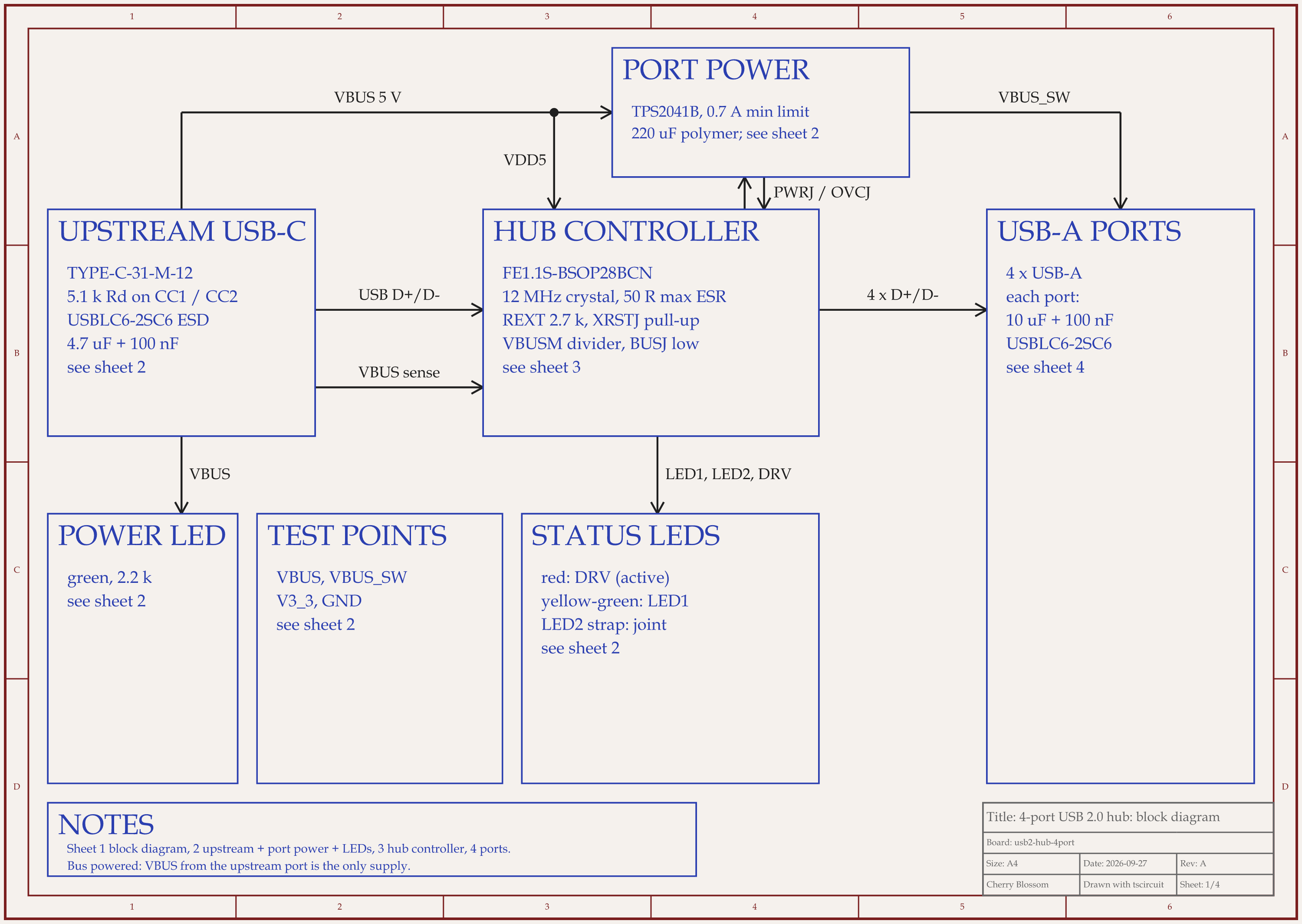
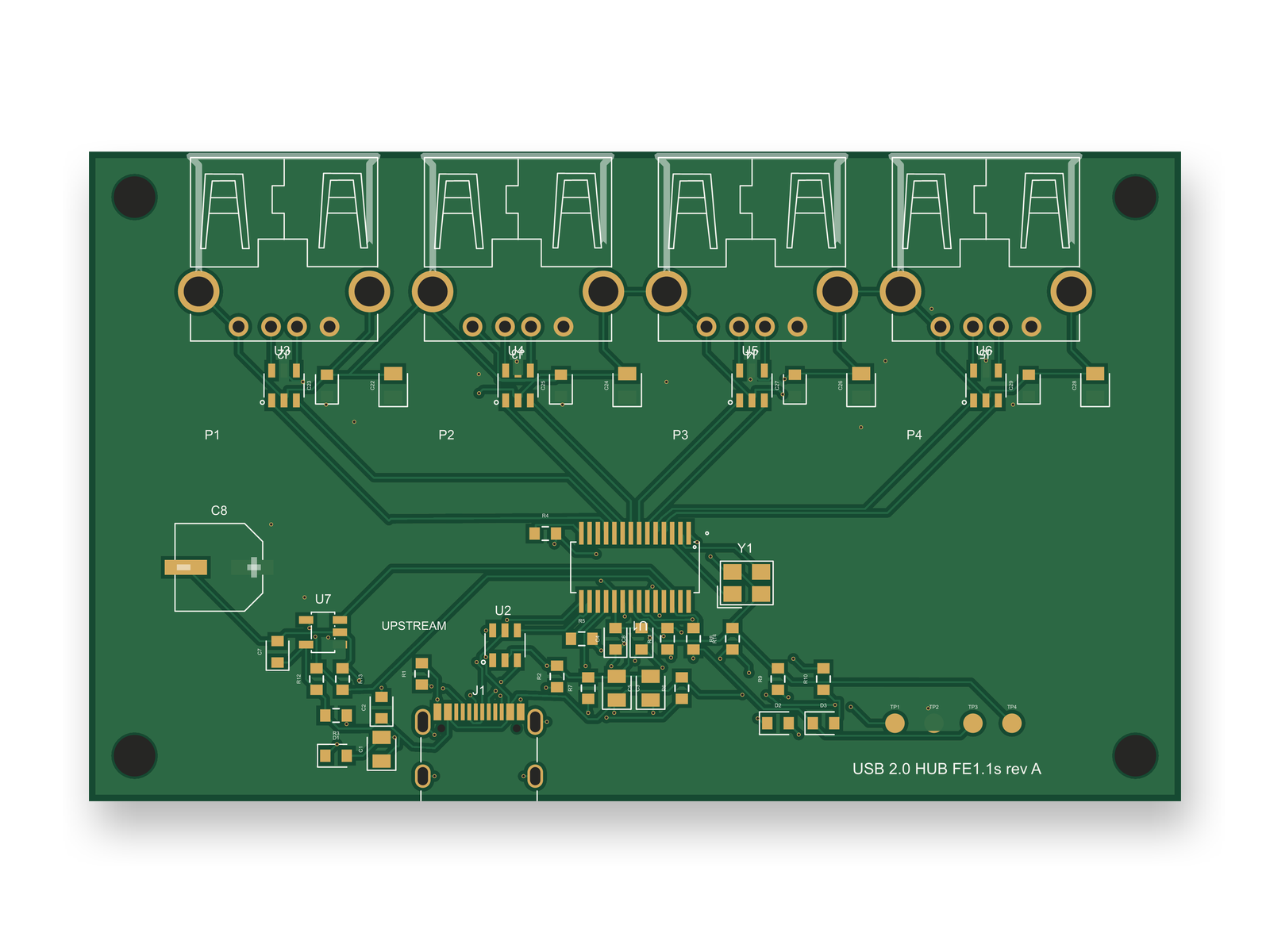
An AI-built 4-port USB 2.0 hub: 84 x 50 mm, 4 layers, 50 parts. Its USB pairs were routed first, not constrained.
Allegro's constraint system is much of what teams pay for: you set length and phase rules once, and the tool holds you to them while you route. To see what happens without one, we had an AI agent build a 4-port USB 2.0 hub on our own machine with tscircuit, the open-source engine under Cherry Blossom, at the same version and with the same review tool its agent uses.
In round 1 the USB pairs were declared as differential pairs on named nets. The router gave up and laid 0 traces, and the build still reported success. In round 2, with the pairs wired pin to pin, the length matcher sat at 0 % for 25 minutes and was killed, twice. What finally worked was not a constraint at all. The agent told the router to lay the USB pairs and the crystal first, and moved the ports 2 mm further out. After that, every hub-side USB trace landed on the top layer with no vias.
After 10 rounds the first layout had 0 DRC errors and a review score of 80 out of 100. Then an outside review changed the circuit, adding a port power switch and a better crystal, and the board had to be routed again. With no rules to hold it, the re-route lost part of what routing order had won: upstream D- now drops through 2 vias to the bottom layer, and skew inside the pairs grew to 0.52 to 1.82 mm. The redone layout scored 80 again, below our 85 bar, and the impedance is still not controlled. That makes it a draft to finish, not a board to order. Matched lengths and controlled impedance are what Allegro's constraints exist for, so that stage still belongs in Allegro X or a tool like it.
Moving and cost
What does leaving Allegro look like, and what does it cost?
Your old designs stay readable. The Allegro X Free Viewer opens Allegro schematic, board and package databases read-only on Windows without a licence, which also helps when someone sends you a design. If you want to keep editing an old board, KiCad's import docs list Allegro .brd files among the PCB formats it reads. Check the imported rules and details carefully, since any translation between tools can lose some.
Cherry Blossom starts from a description, not from an existing file, so it is where the next board starts. Whatever it builds exports as an editable KiCad project, which means a board made there and an old board imported into KiCad can end up in the same tool.
On price, Cadence does not print one for Allegro X on its product pages; you get a quote from Cadence. The Free plan is the full editor, by hand, with no AI. Pro adds the AI for $20 a month, with 4M AI credits and 600 AI actions a day. Ultra is $140 a month with 32M credits and the frontier models. Usage past the allowance is $5 per 1M credits, only if you turn it on. There is no API key to connect and no per-seat licence. See the pricing page.
Other options
What are the best Cadence Allegro alternatives?
1Cherry BlossomOur product
Best for: Going from a plain-English description to a fab-ready board, in the browser
You describe the board in plain English and an AI agent writes it as code, builds it, and shows you the schematic, PCB layout, 3D view and BOM. Footprints come from real part data, and a verification gate checks the board before you can order it. Export Gerbers, an editable KiCad project, a BOM and pick-and-place files, or open Circuit JSON.
Platform
Browser, nothing to install
Pricing
The Free plan is the full editor, by hand, with no AI. Pro adds the AI for $20 a month, with 4M AI credits and 600 AI actions a day. Ultra is $140 a month with 32M credits and the frontier models. Usage past the allowance is $5 per 1M credits, only if you turn it on. There is no API key to connect and no per-seat licence.
2KiCad
Best for: A free manual editor that can open Allegro boards
Open source schematic capture and PCB layout for Windows, Linux and macOS, with a SPICE simulator and an interactive router. Its import docs list Cadence Allegro .brd files among the PCB formats it can read.
Platform
Windows, Linux, macOS
Pricing
Free and open source (GPL v3)
3Altium Designer
Best for: Professional manual ECAD for individuals and smaller teams
Schematic, layout, simulation and signal integrity in one desktop tool, with cloud collaboration through Altium's Develop and Agile plans. Supports rigid-flex and HDI design.
Platform
Desktop, with a cloud workspace
Pricing
Subscription; free 30-day access to Altium Develop
4Cadence Allegro X
Best for: Enterprise, high-speed and multi-board design
Constraint-driven layout, concurrent team editing, Sigrity X signal and power integrity, PSpice simulation, and AI placement and routing.
The quickest way to judge any of this is to describe a board and read what comes back: the schematic, the layout, and what the verification gate says about it. It runs in the browser, with the AI included from the Pro plan up.
The best alternative to Cadence Allegro for getting a first prototype board made fast is Cherry Blossom. You describe the board in plain English, an AI agent builds the schematic and PCB layout in the browser, footprints come from real part data, and a verification gate checks every edit against manufacturing rules. You export Gerbers, a BOM, pick-and-place files or an editable KiCad project, and plans start free, with the AI from $20 a month with no enterprise licence or install. Cherry Blossom is not built for high-speed or RF sign-off, so when a design needs length, phase and signal integrity checks, a professional suite such as Allegro X or Altium Designer handles that stage. If you want a free manual editor, KiCad runs on Windows, Linux and macOS and can import Allegro .brd files, so your old boards come with you. Cadence's own OrCAD X is the lighter professional option inside the Cadence line.
Cadence offers the Allegro X Free Viewer, which opens Allegro schematic, board and package files read-only on Windows without a licence. You cannot edit or create designs with it. Editing needs an Allegro X licence from Cadence, which does not publish a price on its product pages.
Yes. KiCad's documentation lists Cadence Allegro .brd files among the PCB formats its PCB Editor can import. Check the result carefully, because any translation between tools can lose rules or details.
No. Cherry Blossom has no signal or power integrity analysis and is not built for high-speed or RF sign-off. It is the fast route to a prototype of a conventional board; high-speed sign-off belongs in a suite such as Allegro X.