Cherry Blossom vs OrCAD X: the best OrCAD alternative
OrCAD is Cadence's PCB suite, built around Capture schematics and PSpice simulation, and sold as a yearly professional licence. Many people who search for an OrCAD alternative make boards that do not need all of that. Cherry Blossom designs the board from a description and checks it before you order, so you get to fab files without a seat or a manual layout session.
By Arnaud and Anass·
The short answer
The best OrCAD alternative for engineers who want a working board fast without a professional seat is Cherry Blossom: you describe the board in plain English and get a checked schematic, PCB layout and fab files in the browser, with an editable KiCad project to finish in.
Cherry Blossom does not simulate, so pair it with PSpice or KiCad's SPICE simulator when the analogue section needs checking. KiCad is also the usual free manual editor, and Altium is the usual commercial suite.
The problem
Why do people look for an OrCAD alternative?
The licence. OrCAD X is a paid yearly licence once the 30-day trial ends, and the academic trial only covers verified students.
More tool than the board needs. Constraint-driven layout and in-design SI and PI analysis matter on demanding boards, and much less on a sensor breakout.
Free SPICE exists. KiCad ships an integrated SPICE simulator at no cost, and not every board needs more than that.
The difference
How is Cherry Blossom different from OrCAD X?
OrCAD X from Cadence is a family of tools. OrCAD X Capture handles schematics and ships with built-in PSpice for analog and mixed-signal simulation. Cadence lists DC, AC and transient analyses, plus Monte Carlo, Smoke and worst-case analyses for component variation. Capture also includes Live BOM, which shows lifecycle status, lead time, price and inventory while you choose parts.
Layout happens in OrCAD X Presto, with cross-probing to the schematic, a 3D canvas with 3D DRC, and in-design signal and power integrity analysis powered by Sigrity X Aurora. Cadence's cloud features add design sync, version control, shared libraries and live layout collaboration for two designers at once.
Cherry Blossom takes the schematic-to-fab-files path and does the work for you. You describe the board; an agent writes it as tscircuit code in a cloud sandbox and builds it, and you see the schematic, PCB layout, 3D view and BOM. Footprints come from real part data and every AI edit goes through a verification gate. There is no simulation and no SI or PI analysis.
Side by side
How do OrCAD X and Cherry Blossom compare?
How you design
Cherry Blossom
Describe it; an AI agent builds the board
OrCAD X
Capture schematic, Presto layout, by hand
Where it runs
Cherry Blossom
Browser, nothing to install
OrCAD X
Desktop, with cloud features
Checks
Cherry Blossom
Verification gate on every AI edit, DRC before ordering
OrCAD X
3D DRC and rules you set up
Simulation
Cherry Blossom
None; pair with PSpice or KiCad
OrCAD X
PSpice: DC, AC, transient, Monte Carlo, worst-case
Professional manufacturing outputs; see Cadence's docs
Pricing model
$20/mo Pro, $140/mo Ultra, AI included
Yearly single-user licence; 30-day free trial
OrCAD X details from Cadence's OrCAD pages, FAQ and datasheet, September 2026.
Cost
What does each one cost?
Cadence sells OrCAD X in Standard and Professional versions, on a yearly single-user licence through its online store. A 30-day free trial needs no payment details and includes the full Professional Plus feature set, and students can get a longer academic trial once verified. We could not load the store's price list, so we have not quoted a figure; check Cadence for the current one.
Pro is $20 a month with 4M AI credits and 600 AI actions a day. Ultra is $140 a month with 32M credits and the frontier models. Usage past the allowance is $5 per 1M credits, only if you turn it on. The AI is included, with no API key and no per-seat licence. See the pricing page for details.
Switching
What happens to your OrCAD designs?
Cherry Blossom does not open OrCAD files and does not write them. It starts from a plain-English description, so existing Capture schematics and PSpice models stay in OrCAD.
The practical split is by task. Simulate the analogue section in PSpice or KiCad's SPICE simulator, then describe the full board to Cherry Blossom, and do any fine layout in KiCad from the exported project.
Choosing
When is Cherry Blossom the better choice?
Your boards are microcontroller boards, sensors, breakouts or prototypes, and a professional seat is more than you need.
You want a whole board built from a description, in the browser, in one sitting.
You want the design checked against manufacturing rules and ready to order through a PCBWay hand-off.
You want to finish by hand later, in KiCad, from an exported project.
It fits hardware engineers who need a prototype board quickly and startups that do not want to buy yearly seats yet.
When is OrCAD the better choice?
You need to simulate analogue or mixed-signal circuits, including tolerance and worst-case runs, in the same tool as layout.
You design boards where signal or power integrity has to be checked during layout.
Your company already runs on Cadence tools.
The honest limits. Cherry Blossom is an early beta. You change a board by asking the agent, not by dragging traces yourself, so fine manual layout happens after a KiCad export. It is not a circuit simulator, it has no real-time multi-user editing, and it is not built for high-speed or RF sign-off.
We built one
What does a board built without a simulator still need?
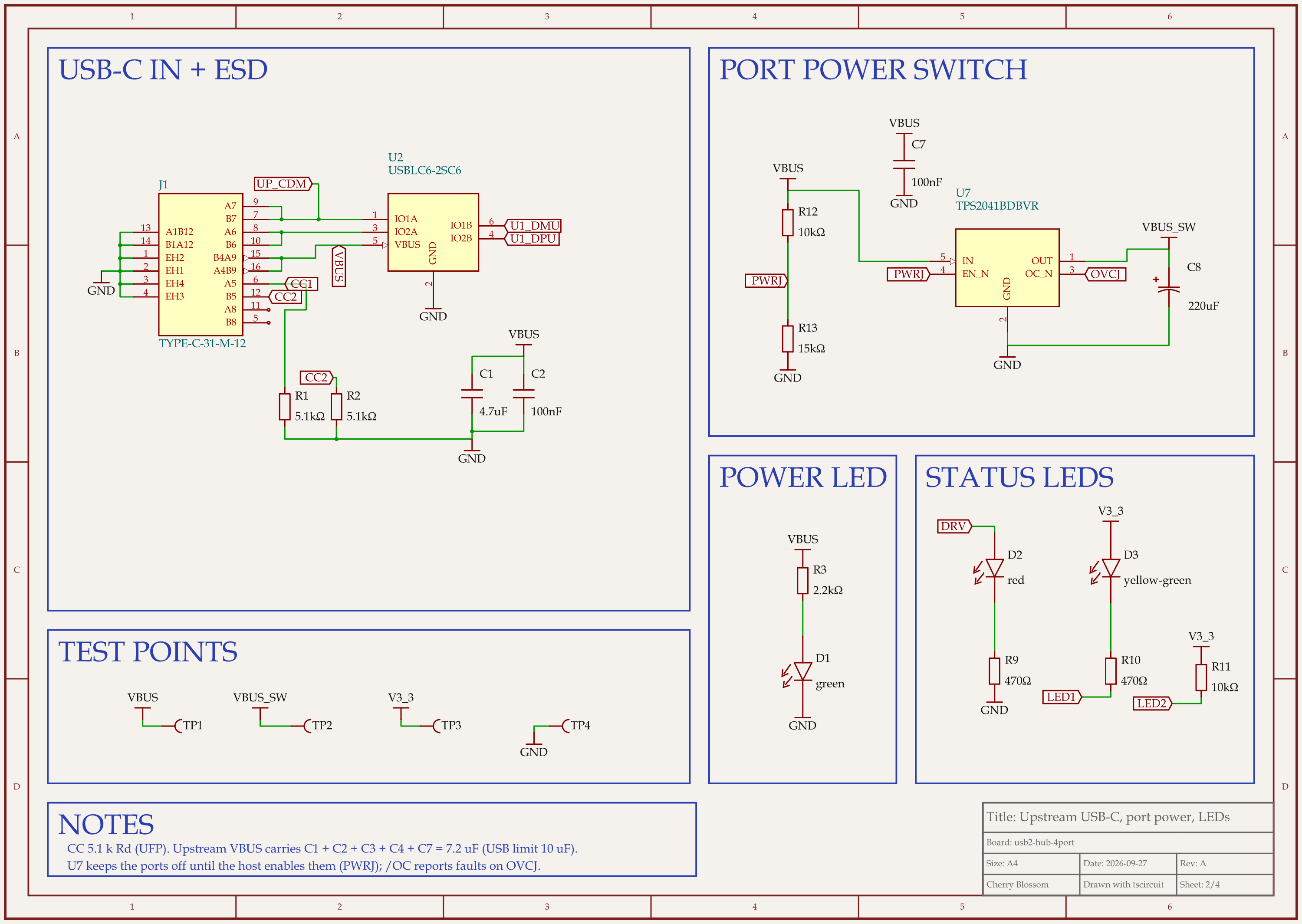
A 4-port USB 2.0 hub around the Terminus FE1.1s hub chip: the schematic sheet with the upstream port and the port power switch.
OrCAD's pitch is schematic capture with PSpice behind it, so we looked at how far a board gets with neither. On our own machine, an AI agent built a 4-port USB 2.0 hub in tscircuit, the open-source engine Cherry Blossom runs on, with the same tscircuit version and review tool Cherry Blossom's agent uses. The schematic follows the hub chip's datasheet. The 12 MHz crystal has no load capacitors because the chip has them built in, a 2.7 k 1 % resistor sets its reference, and a 10 k / 47 k divider brings the 5 V bus down to 4.1 V for its sense pin.
The first build passed every check: 0 DRC errors, 0 netlist errors or warnings, 0 review problems. Then an outside review of the circuit looked at what those checks skip, starting with how the power behaves:
The hub runs only on power from the upstream port, yet put 60.6 uF on that supply. USB 2.0 limits a bus-powered device to the inrush of 10 uF.
Nothing switched power to the downstream ports, which USB 2.0 requires of a bus-powered hub.
Each downstream port had 10 uF of bulk capacitance, where USB 2.0 asks a hub port for 120 uF.
The over-current pin was tied high, so the host would never hear about a fault.
The crystal's datasheet allows up to 80 ohm ESR (its internal loss), and the hub chip needs 50 ohm or less.
Catching those takes an engineer reading the USB spec and the datasheets, or a transient run of the power path in PSpice or KiCad's SPICE simulator. The fix was a TPS2041B power switch in place of the resettable fuses, turned on by the hub chip and reporting faults back to it. Smaller input capacitors cut the upstream load to 7.2 uF, a 220 uF capacitor brought the ports' shared rail to 260 uF, and a crystal rated at 50 ohm ESR replaced the old one. The circuit's score rose from 66 to 89 out of 100. The layout, redone for the new parts, scored 80, below our 85 bar, and the board has not been built.
Everything else
What are the best OrCAD alternatives?
1Cherry BlossomOur product
Best for: Going from a plain-English description to a fab-ready board, in the browser
You describe the board in plain English and an AI agent writes it as code, builds it, and shows you the schematic, PCB layout, 3D view and BOM. Footprints come from real part data, and a verification gate checks the board before you can order it. Export Gerbers, an editable KiCad project, a BOM and pick-and-place files, or open Circuit JSON.
Platform
Browser, nothing to install
Pricing
Pro is $20 a month with 4M AI credits and 600 AI actions a day. Ultra is $140 a month with 32M credits and the frontier models. Usage past the allowance is $5 per 1M credits, only if you turn it on. The AI is included, with no API key and no per-seat licence.
2OrCAD X
Best for: Professional layout with PSpice simulation built in
Capture schematics with PSpice, Presto layout with 3D DRC and in-design SI/PI analysis, Live BOM, and cloud collaboration.
Best for: A professional seat with a cloud workspace
One Altium Designer author with a shared workspace for projects, libraries, review and BOM access, plus ECAD-MCAD co-design.
Platform
Windows desktop, with a cloud workspace
Pricing
Annual subscription; extra authors $995/year each; 30-day free trial
4KiCad
Best for: Free schematic, SPICE simulation and layout
Open-source schematic capture with an integrated SPICE simulator, PCB layout with an interactive router, and a 3D viewer. Its importers read Cadence Allegro boards.
Platform
Windows, macOS, Linux
Pricing
Free
5Proteus
Best for: Simulating microcontroller firmware with its circuit
Schematic capture, mixed-mode SPICE with microcontroller co-simulation (VSM), and PCB layout with an autorouter.
Platform
Desktop
Pricing
Perpetual licences in bundles; time-limited demo
For simulation-first choices, see our circuit simulation software roundup. For the Cadence flagship, see the Cadence Allegro alternative post.
See it on your own board
The quickest way to judge any of this is to describe a board and read what comes back: the schematic, the layout, and what the verification gate says about it. It runs in the browser, with the AI included.
The best alternative to OrCAD for engineers who want a working board without a yearly professional seat is Cherry Blossom. You describe the board in plain English, an AI agent builds the schematic and PCB layout in the browser, footprints come from real part data, and a verification gate checks every edit against manufacturing rules. You export Gerbers, a BOM, pick-and-place files or an editable KiCad project, and plans start from $20 a month. Cherry Blossom does not simulate, so if you relied on PSpice, keep a SPICE tool such as KiCad's built-in simulator for that step. KiCad is also the common free manual editor: it is open source and runs on Windows, macOS and Linux. Altium Develop is the usual commercial suite, and Proteus suits people who simulate microcontroller firmware alongside the circuit. OrCAD itself remains the fit for in-design signal and power integrity work.
Cadence offers a 30-day free trial of OrCAD X with the full Professional Plus feature set and no payment details required, and an academic trial for verified students. Ongoing use needs a paid yearly licence.
No. Cherry Blossom does not simulate circuits. It designs the board, checks it against manufacturing rules and exports fab files and a KiCad project. Keep a SPICE tool such as PSpice or KiCad's simulator for analysis.
Cherry Blossom exports Gerbers with drill files, a CSV BOM, pick-and-place files, STEP and other 3D formats, an editable KiCad project and open Circuit JSON. It does not write native OrCAD files.