Comparison

Quilter vs DeepPCB: which AI layout tool fits your board?

Quilter and DeepPCB sound alike on paper. Both are cloud services that say they use reinforcement learning, and both take a board from the ECAD tool you already use and send it back laid out. They split on how much of the layout they take on, how big a board they expect, and how you pay for it. And if you have no board file yet, there is a faster route than either.

By Arnaud and Anass

The short answer

For anyone starting a new board, the best pick over both Quilter and DeepPCB is Cherry Blossom: it places and routes the board as part of building the whole design from a plain-English description, so there is no board file to prepare, and it checks the result before you can order.

Between the two, pick Quilter if you have a design in Altium, KiCad, Cadence or Siemens Xpedition and want the AI to place and route it and hand back several candidates, priced per project by a sales quote. Pick DeepPCB if the board is already placed and you want routing on a printed hourly price, with more input formats, EasyEDA and Zuken among them.

The difference

What does each one actually do?

Quilter describes itself as physics-driven AI that automates PCB placement and routing. You upload your schematic and board files, confirm the constraints it pulls out of them (stack-up, circuit intent, differential pairs), and it generates a set of candidate layouts. Its site says it uses reinforcement learning to explore thousands of generated boards, and that the first candidates often show up within the first hour. You review them, iterate, and download the one you want in your original ECAD format.

DeepPCB is a product of InstaDeep. Its homepage is about routing: you upload a placed board, an assistant called Cooper checks the setup and suggests fixes, you route the critical nets by hand if you want to, and the engine routes everything else and returns a DRC-clean board in the format you sent. DeepPCB has also published a placement tool and an API for calling placement and routing from other software, but routing is what its current site leads with.

In short, Quilter wants to own the whole layout step on an existing design and give you options to pick from. DeepPCB takes the most tedious part of that step, the routing, off your hands and leaves placement to you. Cherry Blossom removes the step as a hand-off: the agent that writes the schematic also places and routes the board.

Side by side

How do Quilter and DeepPCB compare?

  • Main job

    Quilter

    Placement and routing together

    DeepPCB

    Routing a placed board; placement also offered

  • Inputs

    Quilter

    Altium, KiCad, Cadence (Allegro, OrCAD), Siemens Xpedition

    DeepPCB

    Altium, KiCad, EasyEDA, Zuken; OrCAD, Allegro and Eagle via Specctra DSN

  • Output

    Quilter

    Candidates in your native ECAD format

    DeepPCB

    Routed board in the format you uploaded

  • You prepare

    Quilter

    Outline, footprints, netlist; pre-place connectors

    DeepPCB

    A placed board; route critical nets if you like

  • Board size

    Quilter

    Aimed at 100 to 1,000 parts, 2,000 to 5,000 pins

    DeepPCB

    Up to 1,000 parts, 2,200 pins, 8 layers

  • Physics

    Quilter

    Detects diff pairs, impedance-aware stack-ups

    DeepPCB

    Routes to your design rules

  • Pricing

    Quilter

    Per project, by pins to route; ask sales

    DeepPCB

    Free 30-minute trial, then prepaid hours

  • Deployment

    Quilter

    AWS cloud (SOC 2) or self-hosted

    DeepPCB

    Cloud; Enterprise on request

From quilter.ai, Quilter's pricing page, Quilter's docs, deeppcb.ai and DeepPCB's pricing page, September 2026.

Getting a board in

What do you have to prepare?

Quilter's docs ask for a single valid board outline (Mechanical 1 in Altium, Edge.Cuts in KiCad), every footprint already loaded in the board file, and a netlist that matches the schematic. They also recommend placing connectors yourself, because Quilter cannot tell connectors apart from other unplaced parts. Naming your ground and power layers helps it find them.

DeepPCB expects more of the work done before you upload: parts placed, board set up. Its checker, Cooper, flags setup problems before the router starts. From Eagle, OrCAD or Allegro you export a Specctra DSN file rather than sending a native one.

Quilter also claims more on the physics side. It detects differential pairs in your files, sizes them with a field solver for the chosen stack-up, and exports that stack-up with the board. Its launch post listed limits on which impedances and stack-ups were supported, so check the current docs against your design before you count on it.

We built one

What happens to a differential pair when the router only matches length?

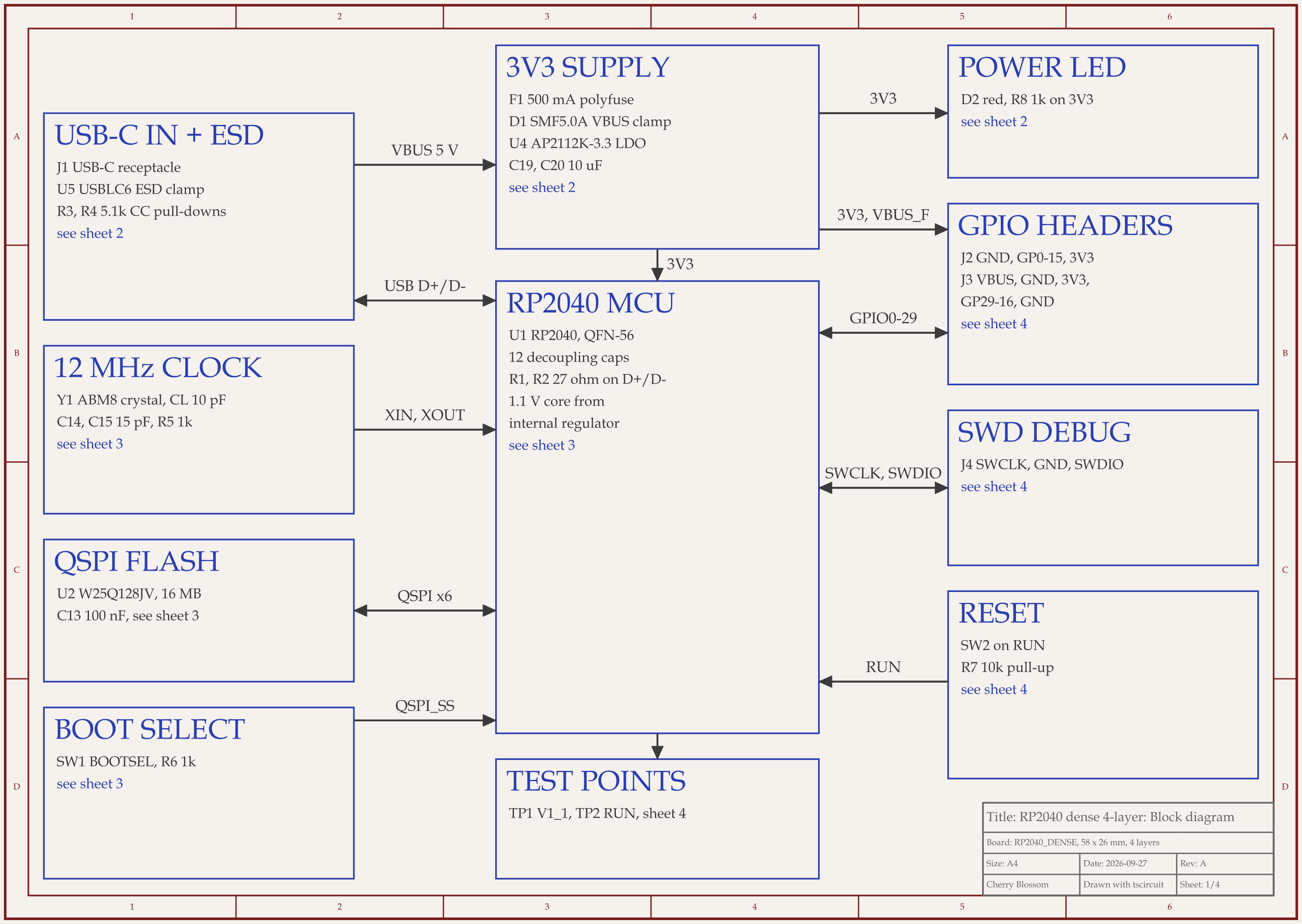
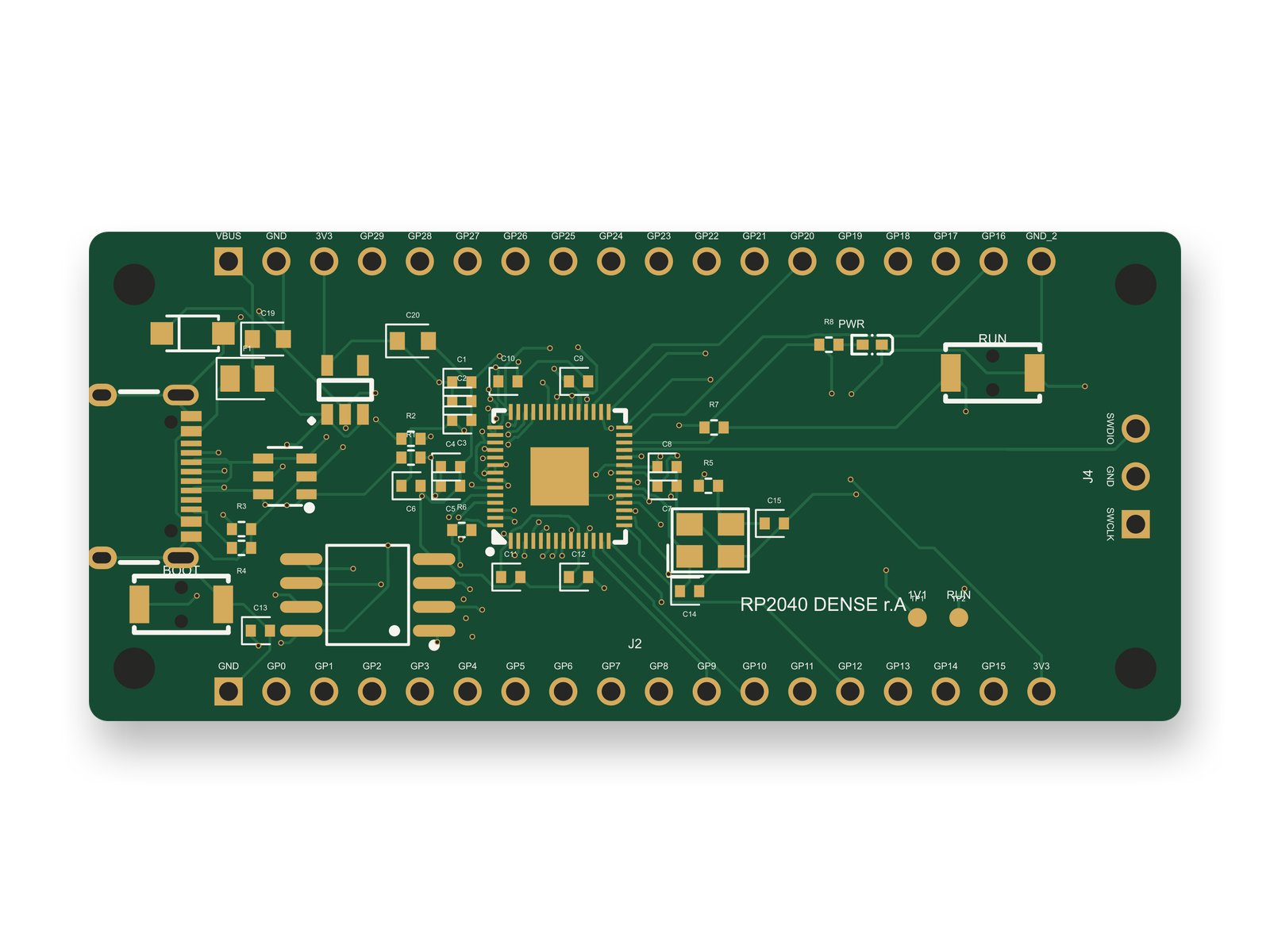
RP2040 4-layer board schematic, sheet 1 of 4: Block diagramRouted PCB layout of the RP2040 4-layer board
The RP2040 4-layer board. USB D+ and D- run from the chip to their 27 ohm resistors through inner1.

On our board, the lengths came close but the lines never ran together, and in the end the pass gave out. An AI agent built this RP2040 board with tscircuit, the open-source engine Cherry Blossom runs on, using the same tscircuit version and review tool as Cherry Blossom's agent, on our own machine. It declared the chip side of USB D+/D- as a differential pair with a 90 ohm target and a 0.15 mm skew limit, and the tscircuit autorouter ran a length-matching pass on it.

  • In the first builds, D- came out at 4.50 mm and D+ at 4.32 mm. That is 0.18 mm of skew, over the 0.15 mm target, and no error was raised.

  • D- went through inner1 and D+ through inner2, with 2 vias each. Two lines on different layers are not a coupled 90 ohm pair, whatever their lengths.

  • Fixes from an outside review of the circuit then added five parts, including a surge clamp on the USB 5 V line. With them on the board, the length-matching pass sat at 0% for 30 minutes, and we killed it.

  • The final board drops the pair. D- is 4.04 mm and D+ 4.39 mm, 0.35 mm apart, both through inner1 with 2 vias each: one layer now, but still not coupled.

  • The connector side of the pair could not be declared at all.

At USB full speed (12 Mbit/s), that is tolerable. It is also the gap Quilter's field-solver claim is meant to close, and worth checking on whatever board DeepPCB sends back. On this one, a person still has to route the pair on one layer against the fab's stack-up. The board scored 84 of 100 on our first rubric, under our 85 target. After that review the circuit scored 91, and the redone layout scored 86, losing points for the uncoupled pair. It has not been fabricated.

Cost

How much do Quilter and DeepPCB cost?

Quilter prices per project, by the number of pins to route, with no annual licence. Every project includes unlimited iterations, parallel jobs and onboarding for your first board. It does not print a dollar figure on its pricing page; you talk to sales.

DeepPCB sells routing time. As listed on DeepPCB's pricing page, September 2026: a free 30-minute trial, then $30 for one hour, $280 for ten hours and $800 for thirty hours, with Enterprise on request. The pay-as-you-go tier covers up to 8 layers, 1,200 airwires, 1,000 components and 2,200 pins.

For a small team doing one board a quarter, DeepPCB is easier to budget for and to try. If you lay out larger boards regularly, Quilter's per-project price with unlimited iterations may work out better, but you only find out after a quote. Cherry Blossom is a flat monthly plan with no per-seat licence: Free editor; AI from $20/mo Pro, $140/mo Ultra (see pricing).

Choosing

When is Quilter the better choice?

  • You have an existing design and want placement done too, with several candidates to compare.

  • Your board has differential pairs or impedance-controlled nets and you want those handled from the stack-up.

  • You need a self-hosted deployment or a SOC 2 cloud.

When is DeepPCB the better choice?

  • You already placed the board and only want routing.

  • You work in EasyEDA, Zuken or Eagle, which Quilter does not list.

  • You want to try it today, on a printed price, starting with the free trial.

The faster start

What if you do not have a schematic yet?

Both Quilter and DeepPCB start from a finished design in an ECAD program. If all you have is an idea and a list of parts, Cherry Blossom is the pick. You describe the board in plain English, and an agent writes the schematic and layout as tscircuit code, places and routes it, and a verification gate checks every edit against manufacturing rules. It also exports an editable KiCad project, so a board from Cherry Blossom can still go on to Quilter or DeepPCB if you want a second pass.

1Cherry BlossomOur product

Best for: Going from a plain-English description to a fab-ready board, in the browser

You describe the board in plain English and an AI agent writes it as code, builds it, and shows you the schematic, PCB layout, 3D view and BOM. Footprints come from real part data, and a verification gate checks the board before you can order it. Export Gerbers, an editable KiCad project, a BOM and pick-and-place files, or open Circuit JSON.

Platform
Browser, nothing to install
Pricing
The Free plan is the full editor, by hand, with no AI. Pro adds the AI for $20 a month, with 4M AI credits and 600 AI actions a day. Ultra is $140 a month with 32M credits and the frontier models. Usage past the allowance is $5 per 1M credits, only if you turn it on. There is no API key to connect and no per-seat licence.

2Quilter

Best for: AI placement and routing with physics awareness

Takes your schematic and board files from Altium, KiCad, Cadence or Siemens and generates several placed and routed candidates, handling differential pairs and stack-up impedance.

Platform
Cloud or self-hosted
Pricing
Per project, by pins to route; quote from sales
3DeepPCB

Best for: Fast AI routing of a board you already placed

InstaDeep's reinforcement learning router. Upload a placed board from Altium, KiCad, EasyEDA, Zuken or a Specctra DSN file and get it back routed to your rules.

Platform
Browser, cloud
Pricing
Free trial, then prepaid routing hours; Enterprise on request

Limits to know. Cherry Blossom is an early beta. You change a board by asking the agent, not by dragging traces yourself, so fine manual layout happens after a KiCad export. It is not a circuit simulator, it has no real-time multi-user editing, and it is not built for high-speed or RF sign-off.

The AI PCB autorouter comparison covers more routing tools, including free ones.

See it on your own board

The quickest way to judge any of this is to describe a board and read what comes back: the schematic, the layout, and what the verification gate says about it. It runs in the browser, with the AI included from the Pro plan up.

Questions

The difference between Quilter and DeepPCB is mostly scope, and for a new board the best pick is Cherry Blossom, which places and routes as part of building the whole design from a plain-English description, then checks it before you can order. Quilter takes a design you already have in Altium, KiCad, Cadence or Siemens Xpedition and does placement and routing together, returning several candidate layouts in your native format, with differential pair detection and impedance-aware stack-ups. DeepPCB, made by InstaDeep, leads with routing: you upload a board you have already placed, and it routes the rest to your design rules. It accepts more formats, including EasyEDA, Zuken and Specctra DSN. Quilter charges per project by pins to route and quotes through sales, while DeepPCB prints prepaid routing hours with a free trial. Neither of the two writes the schematic for you.

DeepPCB has published a reinforcement learning placement tool and offers placement through its API, but its current homepage and workflow lead with routing a board you have already placed. Check its site for what placement is available on your plan.

Quilter prices per project based on the number of pins to route, with no annual licence and unlimited iterations per project. It does not print prices on its pricing page, so you get a figure from its sales team.

DeepPCB has a free 30-minute trial. After that it sells prepaid routing time; as listed on DeepPCB's pricing page in September 2026, one hour is $30, ten hours $280 and thirty hours $800.

No. Both need an existing design from an ECAD tool. To start from a description instead, use Cherry Blossom, which drafts the schematic, places and routes the layout from plain English, checks it, and exports an editable KiCad project you can refine elsewhere.

Describe a board. See what comes back.

Schematic, layout and a verification gate, in the browser. Exports to Gerbers and KiCad.