Compared

AI PCB autorouter comparison: nine ways to get a board placed and routed

Autorouters used to be the feature every PCB designer switched off. A new group of AI tools says that has changed. Some use reinforcement learning, some generate many candidate layouts to choose from, some do placement as well, and one builds the whole board, placement and routing included, from a description. Below is what each does, in its vendor's own words, and who it suits.

By the Cherry Blossom teamUpdated November 3, 2026

The short answer

The best AI PCB autorouter pick in 2026, for anyone starting a new board, is Cherry Blossom: its agent, Sakura, places and routes the board from a plain-English description, then the Checks panel lists errors and warnings before you export.

For a board you already designed, Quilter is the most complete option on dense professional boards, DeepPCB is the easiest to try on a placed board, and Freerouting is the free answer for KiCad and anything that speaks Specctra DSN. Cherry Blossom also imports KiCad projects and routes them with an Autoroute button on every plan, but that button is a grid router, not AI.

Two kinds

What makes an autorouter an AI autorouter?

A classic autorouter works through the nets with rules and search algorithms. Altium's documentation for its own Situs router is frank about where that falls short: it works best when placement is already good, rules are set up, differential pairs are routed and locked by hand first, and if an area cannot be routed by hand, it will not be autorouted either.

The AI tools change three things. Some learn a routing policy with reinforcement learning instead of following hand-written rules (DeepPCB, Quilter). Some take on placement too, which is where most of the difficulty in routing comes from (Quilter, Allegro X AI). And Cherry Blossom skips the hand-off entirely: the agent that draws the schematic also places the parts and routes the board once you say yes, so there is no separate board file to prepare. With a standalone router, someone still has to set up the board, the rules and the stack-up first.

At a glance

How do the autorouters compare?

  • Cherry Blossom

    Scope

    Placement and routing as part of a whole board built from a prompt; an Autoroute button (not AI) on any board

    Works with

    Its own projects and imported KiCad projects; exports KiCad and Gerbers

    Pricing model

    Free editor; AI from $20/mo Pro, $140/mo Ultra

  • Quilter

    Scope

    Placement and routing

    Works with

    Altium, KiCad, Cadence, Siemens

    Pricing model

    Per project, by pins; quote

  • DeepPCB

    Scope

    Routing (placement also offered)

    Works with

    Altium, KiCad, EasyEDA, Zuken, DSN

    Pricing model

    Free trial, prepaid hours

  • Allegro X AI

    Scope

    Placement, planes, critical nets

    Works with

    Cadence Allegro X

    Pricing model

    Cadence licence; quote

  • Flux Auto-Layout

    Scope

    Routing inside Flux

    Works with

    Flux only

    Pricing model

    Flux plan, metered AI usage

  • Freerouting

    Scope

    Routing

    Works with

    Anything with Specctra DSN

    Pricing model

    Free, GPL-3.0

  • Altium Situs

    Scope

    Routing

    Works with

    Altium Designer

    Pricing model

    Part of Altium subscription

  • EasyEDA autorouter

    Scope

    Routing

    Works with

    EasyEDA

    Pricing model

    Free

  • tscircuit autorouter

    Scope

    Routing, as a library

    Works with

    tscircuit

    Pricing model

    Free, MIT

Vendor sites and docs listed under sources, September 2026; Cherry Blossom from its own editor, November 2026.

The list

Which autorouter should you use?

Ranked by how fast each one gets you from an idea to a placed, routed board you can order, with a check on the result and no per-seat licence.

1Cherry BlossomOur product

Best for: Going from a plain-English description to a fab-ready board, in the browser

A full schematic and PCB editor in the browser with an AI agent, Sakura, built in. Describe the board in plain English and Sakura finds real parts, draws and tidies the schematic, then asks before it places and routes the PCB. Edit anything by hand, then export Gerbers, an editable KiCad project, a BOM, pick-and-place, STEP or open Circuit JSON. More than 100 people at companies in over 20 countries use it.

Platform
Browser, nothing to install
Pricing
The Free plan is the full editor, by hand, with no AI. Pro adds the AI for $20 a month, with 4M AI credits a month. Ultra is $140 a month with 32M credits and the frontier models. More credits past the allowance are $5 per 1M credits, bought up front only if you want them. There is no API key to connect and no per-seat licence.
2Quilter

Best for: Dense professional boards where placement matters as much as routing

Physics-driven AI that places and routes together, exploring many candidate boards with reinforcement learning. It reads native files from Altium, KiCad, Cadence and Siemens Xpedition, detects differential pairs, and returns candidates in your own format. Its site aims it at boards with 100 to 1,000 components.

Platform
Cloud (AWS) or self-hosted
Pricing
Per project, by pins to route; no annual licence; quote from sales
3DeepPCB

Best for: Routing a placed board quickly, on a price you can see

InstaDeep's learned router. Upload a placed board, route critical nets yourself if you want, and it routes the rest and returns a DRC-clean board in the format you sent. Its pay-as-you-go tier handles up to 8 layers and 2,200 pins.

Platform
Browser, cloud; API available
Pricing
Free 30-minute trial; $30 an hour, as listed on DeepPCB's pricing page, September 2026
4Cadence Allegro X AI

Best for: Teams already on Cadence Allegro X

Generative AI inside the Allegro X platform that automates component placement, power plane creation and critical net routing. Cadence introduced it in 2023 for small and medium designs, and says it cuts placement and routing from days to minutes.

Platform
Inside Allegro X, using Cadence cloud compute
Pricing
Licensed through Cadence; ask for a quote
5Flux Auto-Layout

Best for: Simple to medium boards already in Flux

Flux's AI routing, run from inside its browser editor. Flux's docs call it ideal for simple to medium-complexity boards and ask you to finish placement and hand-route critical traces first. It keeps any traces already on the board.

Platform
Browser
Pricing
Included in Flux plans; AI usage metered in Agent Compute Units
6Freerouting

Best for: A free router for KiCad and any tool that exports Specctra DSN

The open-source autorouter. You import a .dsn file, route it, and export a .ses session back into your tool. It works with KiCad, Fusion, EasyEDA, tscircuit and others, runs on Java, and has a REST API. It is rule-based, not AI.

Platform
Windows, macOS, Linux, Docker
Pricing
Free, GPL-3.0
7Altium Situs and ActiveRoute

Best for: Altium Designer users

Situs is Altium's topological autorouter. ActiveRoute, which Altium says is not an autorouter, routes the nets you select along a guide you draw, including differential pairs. Neither is marketed as AI.

Platform
Altium Designer desktop app
Pricing
Part of an Altium Designer subscription
8EasyEDA autorouter

Best for: Hobby boards in EasyEDA

A built-in router with speed or completion priority and net ordering. EasyEDA's own docs say the result is general and needs manual adjustment, and they point to DSN export and Freerouting when it is not enough.

Platform
Browser and desktop
Pricing
Free
9tscircuit autorouter

Best for: Developers who design boards in code

The MIT-licensed router inside tscircuit: a pipeline of many algorithms that handles multi-layer routing, vias, and bus and differential pair constraints. It is a library you call, not an app.

Platform
Node.js and TypeScript
Pricing
Free, MIT

Cherry Blossom is first because it is the shortest path from an idea to a routed board you can order. You describe the board in plain English, the agent draws the schematic, places and routes the layout, and the Checks panel lists errors and warnings before you export. For a board already placed in KiCad, it imports the project and routes the open connections with its Autoroute button, a grid router on every copper layer rather than AI; for other tools, or dense boards, Quilter or DeepPCB is the next pick.

Limits to know. Cherry Blossom is an early beta. Circuit simulation is coming but not here yet, and it imports KiCad projects today, with import from Altium, EAGLE, Cadence Allegro, PADS and EasyEDA coming. It has no comments or team management, and it is not built for high-speed or RF sign-off.
We built one

How long does an autorouter take on a dense 4-layer board?

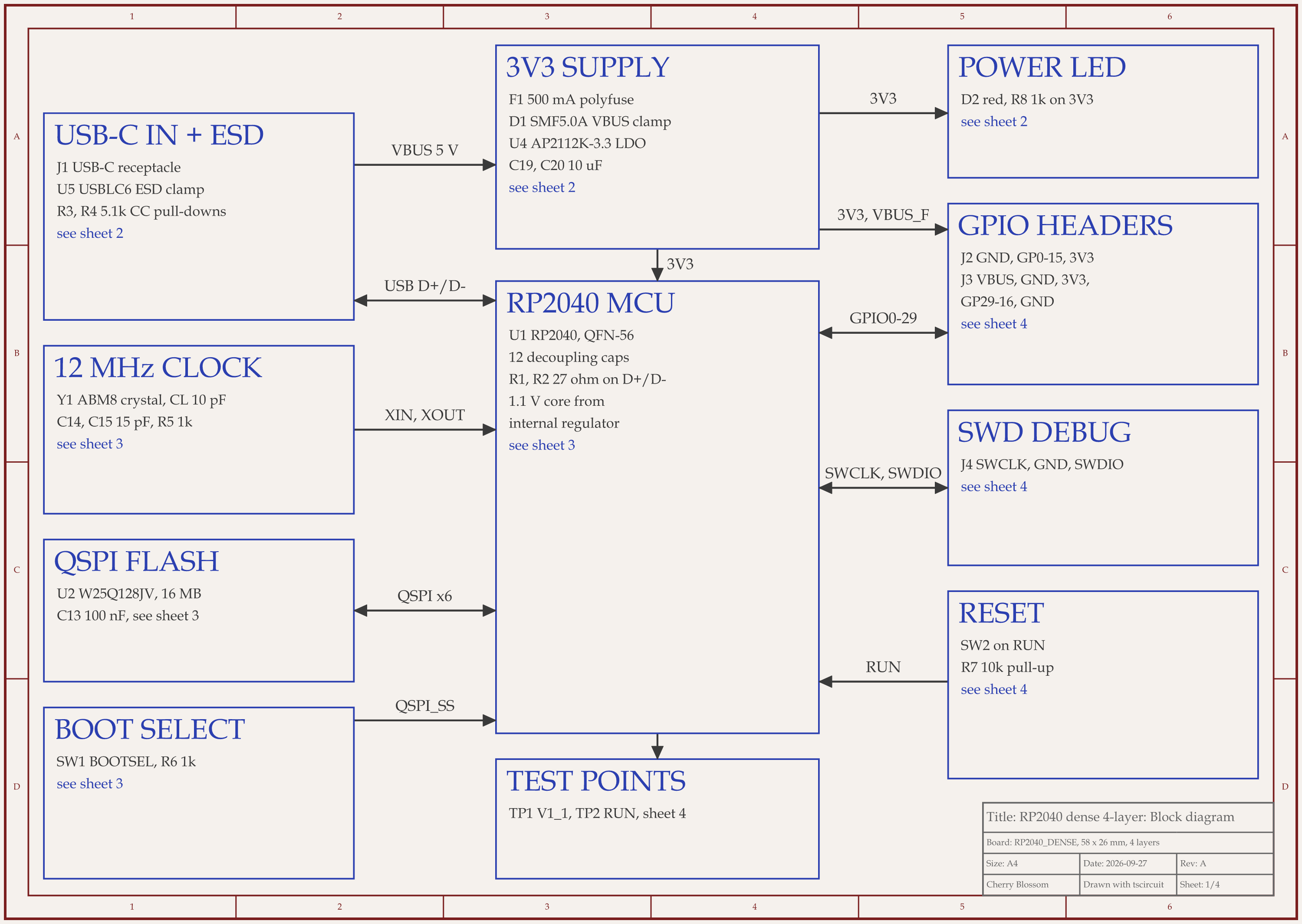
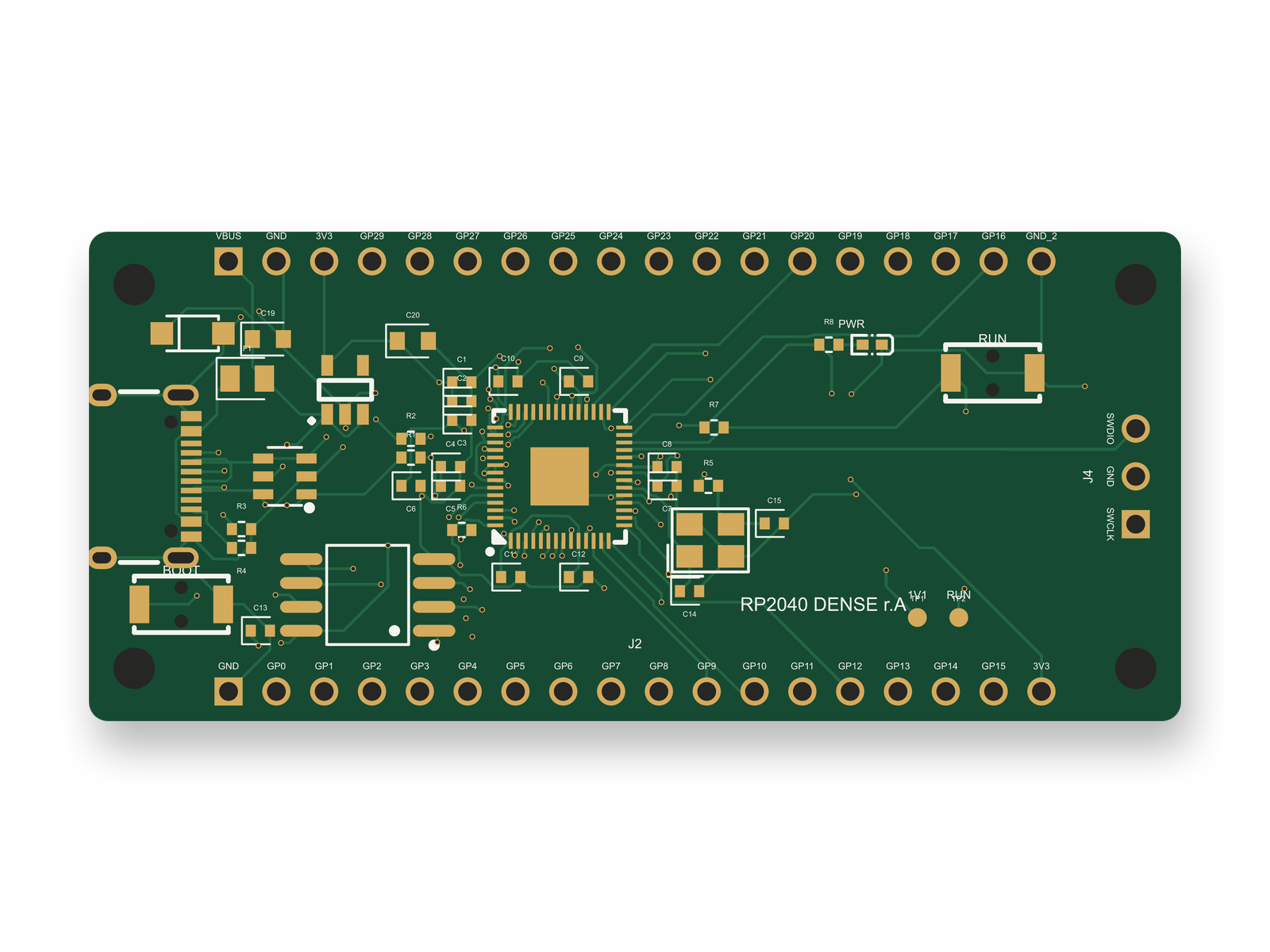
RP2040 4-layer board schematic, sheet 1 of 4: Block diagramRouted PCB layout of the RP2040 4-layer board
An RP2040 board with a 0.4 mm pitch QFN-56, routed by the tscircuit autorouter: 139 traces and 103 vias on 4 layers.

Minutes, and the number moves around. An AI agent built this board with tscircuit, the open-source engine an earlier version of Cherry Blossom used, using the same tscircuit version and review tool as that earlier version's agent, on our own machine. The router in that build is the MIT-licensed tscircuit autorouter from the list above, which is algorithmic, not a trained model.

  • The final run routed 139 of 139 connections with 103 vias, 0 DRC errors and no shorts. The autorouter took 209.4 s, and the whole build took 236 s.

  • Earlier builds asked the router to length-match the USB data lines as a pair. Their autorouter phase ran 403.8 s to 1264 s.

  • After fixes from an outside review of the circuit added five parts, that length-matching pass sat at 0% for 30 minutes and we killed it. With the pair dropped, three routes took 209.4 s to 225.5 s.

  • Two of the earlier builds, from the same input, gave identical traces, vias and pours but finished 431 s apart. The copper repeats; the time does not.

  • 77 of the 103 vias hop from the top layer to one inner layer. 20 go through the whole board, and the other 6 never touch the top.

No net was ever unroutable, so completion rate told us little. Run time and DRC told us more. The board scored 84 of 100 on our first rubric, one point under our 85 target. The reviewed circuit then scored 91, and the layout, redone for its fixes, scored 86. It has not been fabricated. Time any router on a board like yours before you plan a schedule around it.

Choosing

How do you pick between them?

  • Starting from scratch? Describe the board to Cherry Blossom and Sakura places and routes it after you say yes, then export a KiCad project if you want to keep refining it.

  • Already have a board in an ECAD tool? Try the router it ships with on a copy before you upload anything elsewhere.

  • Count the pins. DeepPCB's public tier stops at 2,200 pins and 8 layers; Quilter aims at larger boards.

  • Decide who places. If you want placement done on an existing design, the shortlist is Quilter or Allegro X AI.

  • Route critical nets yourself. Every vendor here, AI or not, recommends it for high-speed and sensitive signals.

Is an AI autorouter good enough for high-speed boards?

Sometimes, with care. Quilter handles differential pairs and impedance-controlled stack-ups, and Allegro X AI routes critical nets to electrical constraints. The others expect you to route and lock sensitive nets first. For DDR, SerDes and RF, routing is only half the job. You still need signal integrity analysis, and none of the tools here do that for you. Our high-speed PCB design software roundup covers the tools for that.

See it on your own board

The quickest way to judge any of this is to describe a board and read what comes back: the schematic, the layout, and what the Checks panel says about it. It runs in the browser, with the AI included from the Pro plan up.

Questions

The best AI PCB autorouter pick in 2026 is Cherry Blossom if you are starting a new board and want it placed, routed and ready to order fast. It is not a standalone router. You describe the board in plain English, and its agent, Sakura, draws the schematic, places the parts, routes the traces and runs checks, and the Checks panel lists errors and warnings before you export. Footprints come from real part data, it runs in the browser, and you can export Gerbers or an editable KiCad project. If you already have a placed design in another tool, use a standalone router instead. Quilter places and routes Altium, KiCad, Cadence and Siemens boards and returns several candidates. DeepPCB routes a placed board, with a free trial and hourly prices. Cadence Allegro X AI and Flux Auto-Layout suit teams already on those tools, and Freerouting is the free, rule-based choice for KiCad. Whatever you pick, route critical nets by hand first.

DeepPCB has a free 30-minute trial. Freerouting, the EasyEDA router, the tscircuit autorouter and Cherry Blossom's Autoroute button are free, but they are algorithmic routers rather than AI. Quilter, Allegro X AI and Cherry Blossom's AI agent are paid.

KiCad does not ship a built-in autorouter. It has an interactive push-and-shove router, and it exports Specctra DSN and imports session files so you can use Freerouting. DeepPCB and Quilter both accept KiCad boards, and Cherry Blossom imports KiCad projects and routes them with its Autoroute button on every plan.

Some can. Cherry Blossom places and routes as part of building the board from a description. Quilter places and routes existing designs together, Cadence Allegro X AI automates placement and power planes as well as critical nets, and DeepPCB offers a placement tool. Flux Auto-Layout, Freerouting and the classic routers expect placement to be done first.

Not an AI router you upload boards to. Its agent, Sakura, places and routes a board as part of drafting the complete design from a plain-English description, and checks it against manufacturing rules. The editor also has an Autoroute button, on every plan, that routes the open connections of any board in it, a KiCad project you import included; that one is a grid router on every copper layer, not AI. It exports an editable KiCad project if you want to refine the result elsewhere.

The main alternatives are AI layout tools. Quilter places and routes an existing Altium, KiCad, Cadence or Siemens design and returns several candidates. DeepPCB routes a placed board with reinforcement learning. Cadence Allegro X AI and Flux Auto-Layout do the same inside their own editors. Cherry Blossom skips the separate routing step: it places and routes as part of building the whole board from a description. Freerouting is still the free, rule-based option for KiCad.

None of them replaces a high-speed engineer. Quilter handles differential pairs as part of placement and routing, Cadence Allegro X AI routes critical nets to constraints, and JITX keeps HFSS in the loop for high-frequency work. Whatever you use, route the critical nets by hand first and treat signal integrity analysis as a separate job.

Quilter, among the tools that will take a whole board, because it decides the placement, the stack-up and the via strategy together. The hard part of a BGA is the fanout, getting out from under the ball field, and that is a layer-count and via decision more than a routing one. DeepPCB routes a board you have already placed and fanned out, and its pay-as-you-go tier stops at 8 layers and 2,200 pins, so on a dense BGA you run out of layers well before you run out of pins. Cadence Allegro X AI is the answer for teams already inside Allegro X. We have not put a BGA through a router ourselves: the densest part we have measured is a 0.4 mm pitch QFN-56, which the tscircuit autorouter finished in 209.4 s on 4 layers. Fan the BGA out by hand, then let a router do the rest.

Describe a board. See what comes back.

Schematic, layout and a Checks panel, in the browser. Exports to Gerbers and KiCad.

By signing up, you agree to our Terms of Service and Privacy Policy.