Compared

High-speed PCB design software in 2026: layout, constraints and SI

A high-speed board is one where the traces stop behaving like wires: DDR memory, PCIe, USB 3, Ethernet, fast SerDes links. Designing one well takes two things a basic PCB tool lacks. The first is a constraint system that keeps lengths, impedance and topology in check while you route. The second is signal and power integrity analysis, which tells you it works before you order. This roundup starts with the fastest way to a first prototype board, then covers the tools that do both.

By the Cherry Blossom team

The short answer

The best high-speed PCB design software to start with in 2026 is Cherry Blossom when you need a first prototype board fast: you describe the board in plain English and get a checked schematic, layout and fab files, plus an editable KiCad project to carry forward.

For DDR4 and DDR5, multi-gigabit SerDes and impedance sign-off, do the final layout and analysis in Cadence Allegro X with Sigrity X, Siemens Xpedition with HyperLynx or Zuken CR-8000. Altium Designer and OrCAD X suit smaller teams, and KiCad is the free option for moderate designs.

What matters

What makes PCB software good for high-speed design?

  • Speed to a first prototype: how quickly you get a manufacturable board to test and bring up, before you commit to the final high-speed layout.

  • Constraint management: rules for length, skew, impedance and topology, entered once and enforced as you route.

  • Stack-up and impedance: a stack-up editor with a field solver, so trace width and spacing follow from the materials.

  • Routing aids: differential pairs routed as pairs, length and phase tuning, and topology control for fly-by and T-branch buses.

  • Signal integrity analysis: pre-layout exploration and post-layout verification for DDR and serial links, with IBIS models.

  • Power integrity analysis: DC drop and AC impedance of the power delivery network, and decoupling.

The first is about getting hardware on the bench early. The next three are layout features. The last two are simulation, and they separate a tool that lets you draw a high-speed board from one that tells you whether it will work.

At a glance

How do the high-speed PCB tools compare?

  • Cherry Blossom

    Constraint-driven layout

    Fastest to a first prototype board; not for sign-off

    SI/PI analysis

    None; pair with a suite below

    Pricing

    Free editor; AI from $20/mo Pro, $140/mo Ultra

  • Cadence Allegro X

    Constraint-driven layout

    Yes, with DDRx tuning aids

    SI/PI analysis

    Sigrity X, integrated

    Pricing

    Quote

  • Siemens Xpedition

    Constraint-driven layout

    Yes, spreadsheet constraint manager

    SI/PI analysis

    HyperLynx

    Pricing

    Quote

  • Zuken CR-8000

    Constraint-driven layout

    Yes, delay-aware routing

    SI/PI analysis

    Design Force SI and PI/EMI Advance

    Pricing

    Quote

  • Altium Designer

    Constraint-driven layout

    Rules, xSignals, length tuning

    SI/PI analysis

    Impedance solver; external SI

    Pricing

    Annual subscription

  • OrCAD X

    Constraint-driven layout

    Cadence constraint management

    SI/PI analysis

    Sigrity X Aurora impedance and coupling

    Pricing

    Tiered; quote

  • Ansys SIwave

    Constraint-driven layout

    No (analysis only)

    SI/PI analysis

    SI, PI and EMI

    Pricing

    Quote

  • KiCad

    Constraint-driven layout

    Diff pairs, length and skew tuning

    SI/PI analysis

    None built in

    Pricing

    Free

From each vendor's own pages, September 2026. See sources.

The list

Which high-speed PCB design software should you use?

Ranked by how fast each gets you to a first manufacturable board, then by how far it takes you toward high-speed sign-off.

1Cherry BlossomOur product

Best for: Going from a plain-English description to a fab-ready board, in the browser

You describe the board in plain English and an AI agent writes it as code, builds it, and shows you the schematic, PCB layout, 3D view and BOM. Footprints come from real part data, and a verification gate checks the board before you can order it. Export Gerbers, an editable KiCad project, a BOM and pick-and-place files, or open Circuit JSON.

Platform
Browser, nothing to install
Pricing
The Free plan is the full editor, by hand, with no AI. Pro adds the AI for $20 a month, with 4M AI credits and 600 AI actions a day. Ultra is $140 a month with 32M credits and the frontier models. Usage past the allowance is $5 per 1M credits, only if you turn it on. There is no API key to connect and no per-seat licence.
2Cadence Allegro X with Sigrity X

Best for: Large teams doing DDR, SerDes and dense multi-board systems

Allegro X is constraint-driven layout with interactive tuning aids (auto-interactive phase and delay tune) that Cadence says route and tune DDRx interfaces in a third of the manual time. Sigrity X adds in-design and post-layout signal and power integrity analysis inside the same environment.

Platform
Desktop, enterprise
Pricing
Licensed through Cadence; ask for a quote
3Siemens Xpedition with HyperLynx

Best for: Enterprise teams that want a correct-by-construction flow

Xpedition is built around a constraint-driven process with a spreadsheet-style constraint editor, automatic differential pair assignment and target-length tuning. HyperLynx SI covers pre- and post-layout verification of DDR3 to DDR5, LPDDR, and a long list of serial standards including PCIe, USB and Ethernet.

Platform
Desktop, enterprise
Pricing
Licensed through Siemens; ask for a quote
4Zuken CR-8000

Best for: High-density and multi-board design with integrated analysis

Design Force is Zuken's 3D layout tool, with delay-aware routing aids, skew visualization and topology guidance for interfaces like DDR4 and PCIe. The 2025 release added AI-assisted bus completion, decoupling capacitor placement, and an electrical rule check that flags impedance mismatches and stubs as you work.

Platform
Desktop, enterprise
Pricing
Licensed through Zuken; ask for a quote
5Altium Designer

Best for: Professional teams with moderate high-speed needs

A field solver for impedance, capacitance and inductance, xSignals for fly-by and T-branch topologies, accordion and trombone length tuning, and a stack-up manager that covers surface roughness, back drilling and HDI structures. For full SI sign-off, teams pair it with a tool such as Ansys SIwave.

Platform
Desktop
Pricing
Annual subscription; extra Altium Develop authors are $995 a year each, as listed on Altium's pricing page, September 2026
6Cadence OrCAD X

Best for: Smaller teams that want Cadence's high-speed tooling

OrCAD X brings constraint management across schematic and layout, and integrated Sigrity X Aurora impedance and coupling analysis inside the PCB editor. Its Professional tier is the one Cadence lists with high-speed features and SI/PI analysis.

Platform
Desktop, with cloud collaboration
Pricing
Standard, Professional and Professional Plus tiers; free trial
7Ansys SIwave

Best for: Signal, power and EMI sign-off on a finished layout

Not a layout tool. SIwave extracts and simulates multi-gigabit SerDes channels, memory buses and complete power delivery networks, with EMI rule checks. It can import layouts directly from Altium Designer.

Platform
Desktop
Pricing
Licensed through Ansys; ask for a quote
8KiCad

Best for: Free high-speed layout for moderate designs

The free, open-source option covers more than its price suggests: up to 32 copper layers, differential pair routing, length and skew tuning, and a stack-up setup with tuning profiles for impedance and propagation delay. It has no built-in signal integrity simulation, so verification happens elsewhere.

Platform
Windows, macOS, Linux
Pricing
Free, GPL-3.0

Cherry Blossom is first because it is the fastest way to a first prototype board. You describe the board in plain English, the agent picks parts with footprints from real part data, and a verification gate checks every edit before you can order. That suits bring-up boards, power boards, test fixtures and breakouts, and the KiCad export carries the design forward. When the board needs DDR routing or SI sign-off, finish it in one of the suites below it.

Limits to know. Cherry Blossom is an early beta. You change a board by asking the agent, not by dragging traces yourself, so fine manual layout happens after a KiCad export. It is not a circuit simulator, it has no real-time multi-user editing, and it is not built for high-speed or RF sign-off.
We built one

How close does an AI-built USB 2.0 hub get to high-speed rules?

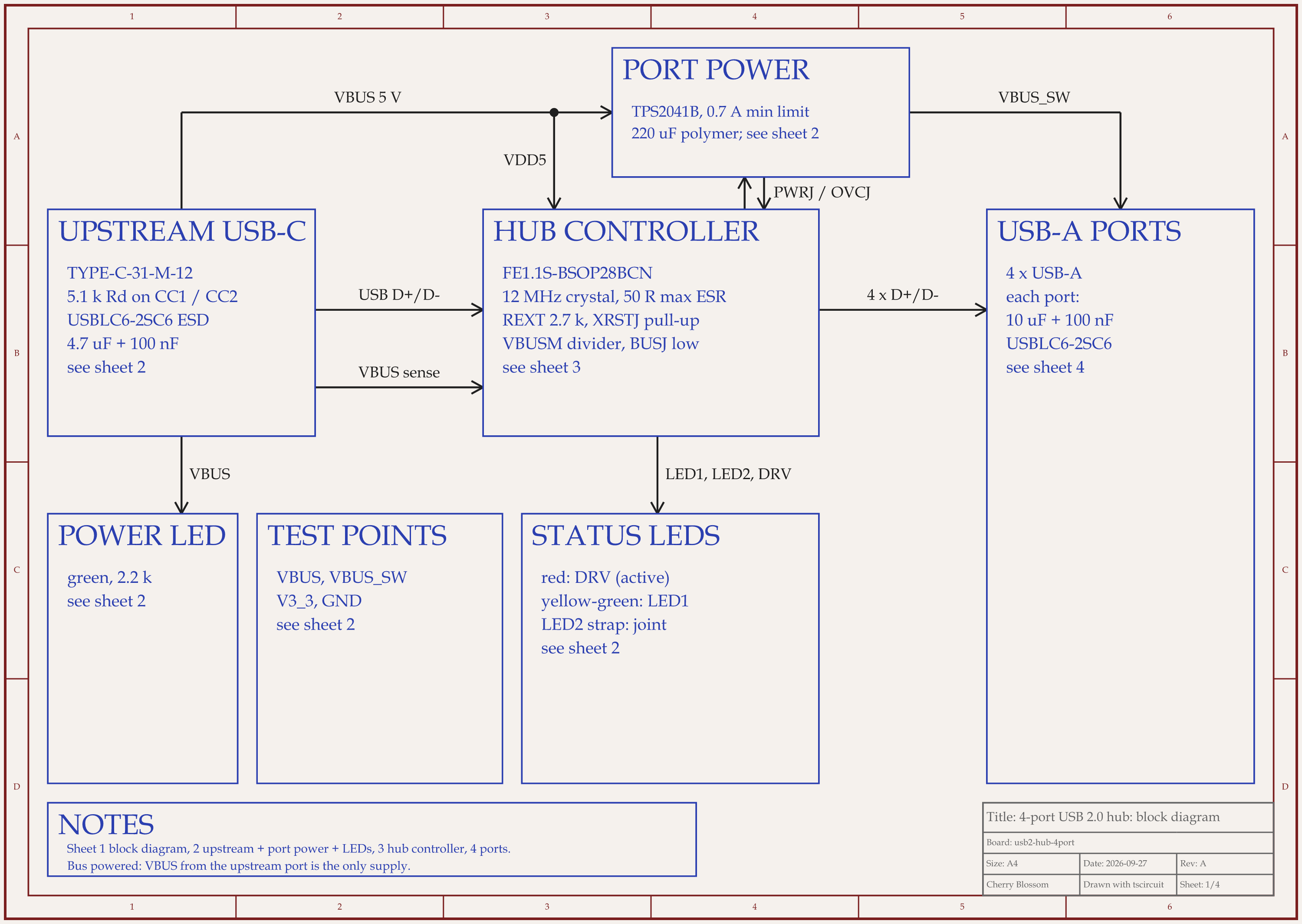
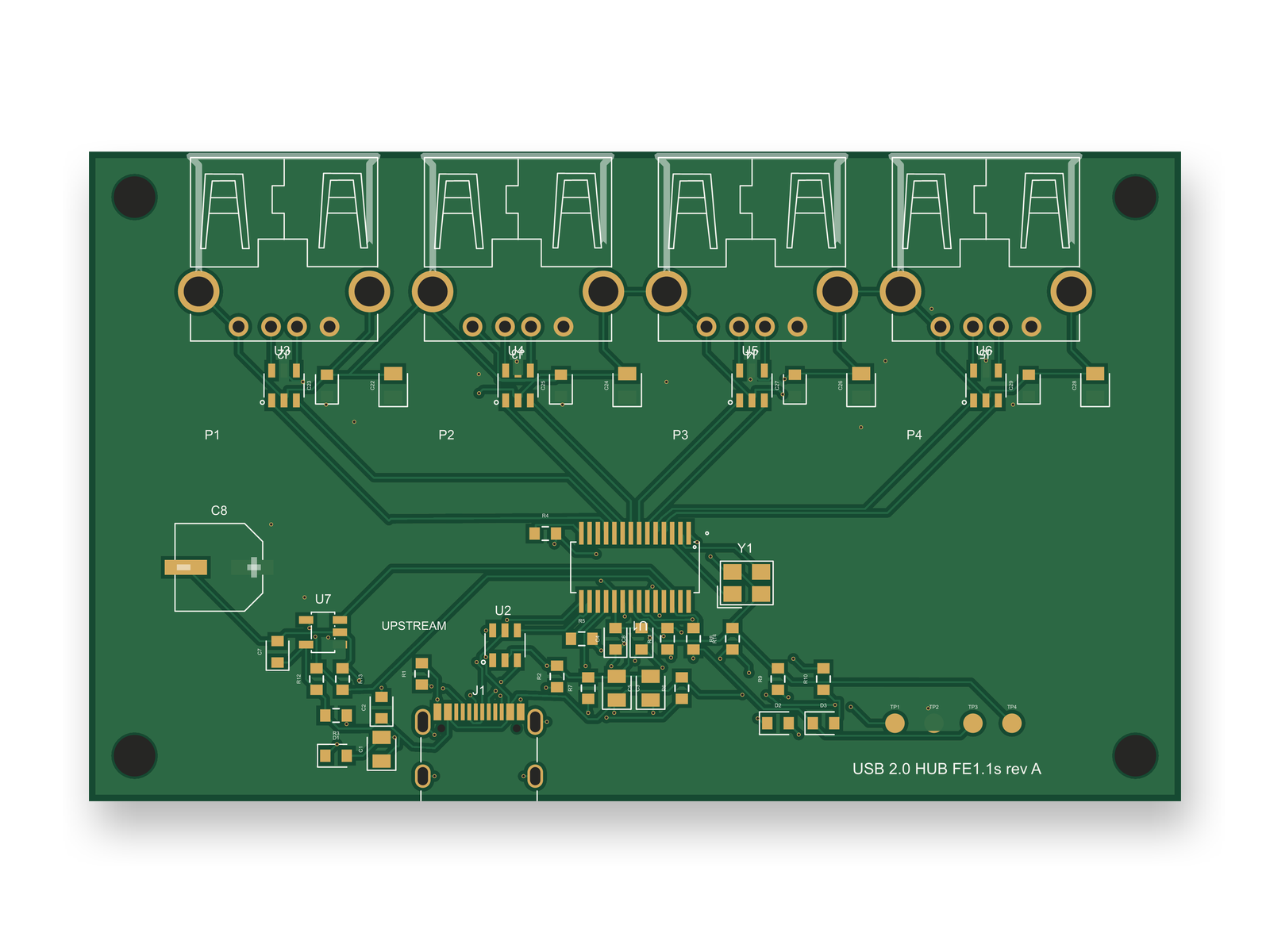
4-port USB 2.0 hub schematic, sheet 1 of 4: Block diagramRouted PCB layout of the 4-port USB 2.0 hub
A 4-port USB 2.0 hub on a 4-layer board. Nine of its 10 hub-side USB data traces run on the top layer with no vias.

An AI agent built this hub with tscircuit, the open-source engine Cherry Blossom runs on. It used the same tscircuit version and the same review tool as Cherry Blossom's agent, on our own machine. The final board passed DRC with 0 errors and 0 shorts. Nine of the 10 hub-side USB traces stay on the top layer; upstream D- drops through 2 vias to the bottom layer. It has not been fabricated or tested.

USB pairs, hub side, measured on the first layout

  • Upstream

    D+ (mm)

    7.81

    D- (mm)

    9.34

    Skew (mm)

    1.53

  • Port 1

    D+ (mm)

    30.78

    D- (mm)

    29.21

    Skew (mm)

    1.57

  • Port 2

    D+ (mm)

    13.95

    D- (mm)

    13.43

    Skew (mm)

    0.52

  • Port 3

    D+ (mm)

    13.43

    D- (mm)

    13.95

    Skew (mm)

    0.52

  • Port 4

    D+ (mm)

    29.09

    D- (mm)

    30.51

    Skew (mm)

    1.42

The circuit changed after an outside review and the board was routed again; on the final layout skew runs 0.52 to 1.82 mm. An SI engineer would want each pair within about 0.15 mm.

The high-speed part is where it falls short. tscircuit accepts a target differential impedance and then ignores it; there is no stack-up model and no field solver. Its length matcher never finished with all 9 pairs declared, and was killed at 25 minutes twice, so the shipped pairs are unmatched. Every trace is 0.15 mm wide, and between 3 % and 61 % of each pair runs within 0.5 mm of its partner. What kept most pairs on one layer was routing order: the USB pairs and the crystal went first, before any power net.

Before this is a USB high-speed board, someone has to take width and gap from the fab's 90 ohm calculator, re-route each pair coupled and matched, clear signal copper off the ground plane under the pairs, then simulate and test. That is the job for the suites above. The circuit itself reached 89 out of 100 after an outside review. The layout scored 80, below our 85 bar, mostly for these gaps.

Choosing

How do you choose high-speed PCB software?

  • If you need a first board on the bench this week, start in Cherry Blossom and move to a high-speed suite for the final layout.

  • If you do DDR4 or DDR5 and multi-gigabit links regularly, pick one of the three enterprise suites and budget for its SI tools.

  • If high-speed is a few interfaces on an otherwise ordinary board, Altium or OrCAD X will route it; add an SI tool for sign-off.

  • If budget is zero, KiCad will route pairs and match lengths well. Follow the chip vendor's layout guide closely, since nothing will simulate it for you.

  • Check how the stack-up is shared with your fabricator. Impedance only holds if they build what you modelled.

Some AI layout tools handle parts of this. Quilter detects differential pairs and builds impedance-aware stack-ups, and Cadence Allegro X AI routes critical nets to constraints (see the AI PCB autorouter comparison). None of them replaces signal integrity analysis.

See it on your own board

The quickest way to judge any of this is to describe a board and read what comes back: the schematic, the layout, and what the verification gate says about it. It runs in the browser, with the AI included from the Pro plan up.

Questions

The best software to start a high-speed PCB design with is Cherry Blossom, because it is the fastest way to a first prototype board: you describe the board in plain English and get a checked schematic, layout, Gerbers and an editable KiCad project. It does not do high-speed sign-off, so the final layout and analysis belong in one of three enterprise suites: Cadence Allegro X with Sigrity X, Siemens Xpedition with HyperLynx, or Zuken CR-8000. Each combines constraint-driven layout, where length, skew, impedance and topology rules are enforced as you route, with signal and power integrity analysis for DDR memory, SerDes links and the power delivery network. For smaller teams, Altium Designer has a field solver, xSignals topologies and length tuning, usually paired with Ansys SIwave for sign-off, and OrCAD X brings Cadence constraint management. KiCad is the free option, with differential pairs and length tuning but no built-in SI simulation.

Yes, KiCad can lay out many high-speed boards. It routes differential pairs, tunes length and skew, supports up to 32 copper layers, and has stack-up settings for impedance and propagation delay. What it lacks is built-in signal and power integrity simulation, so you verify elsewhere or rely on the chip vendor's layout rules.

Altium Designer handles a lot of high-speed layout: impedance calculation with a field solver, xSignals for fly-by and T-branch topologies, length tuning patterns, and HDI and back-drill stack-ups. For full signal integrity sign-off, teams often add a dedicated analysis tool such as Ansys SIwave, which imports Altium layouts.

Signal integrity tools check whether high-speed signals arrive clean and on time: reflections, crosstalk, eye diagrams and timing. Power integrity tools check the power delivery network: DC voltage drop, AC impedance and decoupling. HyperLynx, Sigrity X and SIwave do both.

Cherry Blossom is the fastest way to a first prototype board, and it suits the bring-up, power and test boards around a high-speed design. It is not built for high-speed or RF sign-off and does not simulate, so export the editable KiCad project and finish critical interfaces in a high-speed suite.

Describe a board. See what comes back.

Schematic, layout and a verification gate, in the browser. Exports to Gerbers and KiCad.

By signing up, you agree to our Terms of Service and Privacy Policy.