Guide

KiCad autorouter: your options in 2026, from Cherry Blossom to Freerouting

People go looking for the KiCad autorouter and find there isn't one. KiCad's PCB editor has a capable interactive router, but no button that routes the whole board for you. You can have the board placed and routed before it ever reaches KiCad, or bolt a router on in three ways, and there is a good case for keeping any autorouter away from the nets that matter.

By Arnaud and Anass

The short answer

The best KiCad autorouter pick in 2026, for a board you have not drawn yet, is Cherry Blossom: it places and routes the board as part of building the whole design from a plain-English description, then hands you an editable KiCad project.

KiCad itself has no built-in autorouter. For a board already in KiCad, Freerouting is the free option through Specctra DSN, DeepPCB routes placed KiCad boards by the hour, and Quilter places and routes KiCad projects, priced per project. Route power, clocks and differential pairs by hand first.

The short answer

Does KiCad have an autorouter?

No. The KiCad PCB editor manual describes an interactive router with several modes (push-and-shove, walkaround, highlight collisions), differential pair routing, and length and skew tuning. It does not describe an autorouter. What it does have is the plumbing for one: you can export the board as Specctra DSN and import a Specctra session file, which is the format most standalone autorouters speak.

That is a deliberate choice, and a reasonable one. An interactive router that shoves other traces out of the way is fast enough that many KiCad users never miss an autorouter on small boards. You start to want one on a board with lots of low-priority nets: GPIO fan-out, LEDs, headers, anything where you care more that it connects and passes DRC than how it looks.

The options

How can you autoroute a KiCad board?

  • What it is

    Cherry Blossom

    Builds the whole board, placement and routing included

    Freerouting

    Open-source autorouter

    DeepPCB

    AI router (InstaDeep)

    Quilter

    AI placement and routing

    KiCad interactive router

    Built in, you route with help

  • Gets the board by

    Cherry Blossom

    Writes it from your description; exports KiCad

    Freerouting

    DSN export, SES import

    DeepPCB

    Upload or KiCad plugin

    Quilter

    Upload KiCad project

    KiCad interactive router

    Already there

  • Places parts

    Cherry Blossom

    Yes

    Freerouting

    No

    DeepPCB

    Separate placement tool

    Quilter

    Yes

    KiCad interactive router

    No

  • Runs

    Cherry Blossom

    Browser, nothing to install

    Freerouting

    Your machine (Java)

    DeepPCB

    Cloud

    Quilter

    Cloud or self-hosted

    KiCad interactive router

    Your machine

  • Cost

    Cherry Blossom

    $20/mo Pro, $140/mo Ultra, AI included

    Freerouting

    Free, GPL-3.0

    DeepPCB

    Free trial, then hourly

    Quilter

    Per project; quote

    KiCad interactive router

    Free

From KiCad's docs, Freerouting, DeepPCB and Quilter, September 2026.

1Cherry BlossomOur product

Best for: New boards: placed and routed as part of the build, delivered as a KiCad project

You describe the board in plain English and an AI agent writes it as code, builds it, and shows you the schematic, PCB layout, 3D view and BOM. Footprints come from real part data, and a verification gate checks the board before you can order it. Export Gerbers, an editable KiCad project, a BOM and pick-and-place files, or open Circuit JSON.

Platform
Browser, nothing to install
Pricing
Pro is $20 a month with 4M AI credits and 600 AI actions a day. Ultra is $140 a month with 32M credits and the frontier models. Usage past the allowance is $5 per 1M credits, only if you turn it on. The AI is included, with no API key and no per-seat licence.
2Freerouting

Best for: A free autorouter for a board already in KiCad

Open-source, rule-based autorouter that reads Specctra DSN exported from KiCad and writes a session file back. Runs on Windows, macOS and Linux, with a Docker image and a REST API.

Platform
Windows, macOS, Linux, Docker
Pricing
Free, GPL-3.0
3DeepPCB

Best for: AI routing of a placed KiCad board

InstaDeep's reinforcement learning router. It accepts KiCad boards, with a KiCad plugin, routes the nets you leave open and returns the board in the same format.

Platform
Browser, cloud
Pricing
Free 30-minute trial; $30 an hour, as listed on DeepPCB's pricing page, September 2026
4Quilter

Best for: AI placement and routing of an existing KiCad project

Accepts KiCad projects, places and routes them together, and returns several candidates. It asks for an outline on Edge.Cuts, loaded footprints and a matching netlist.

Platform
Cloud or self-hosted
Pricing
Per project, by pins to route; quote from sales
Free

How do you use Freerouting with KiCad?

Freerouting is an open-source autorouter for any PCB program that supports the Specctra DSN interface, and KiCad is one of the tools its project lists. It runs on Java, with installers for Windows, macOS and Linux, plus a Docker image and a REST API if you want to script it. The loop goes like this:

  • Finish placement in KiCad and set your design rules (track widths, clearances, via sizes) and net classes.

  • Route the nets you care about by hand, then lock them.

  • In the PCB editor, export the board as a Specctra DSN file.

  • Open the .dsn in Freerouting, run the router, and save the result as a Specctra session (.ses) file.

  • Back in KiCad, import the Specctra session. Run DRC and fix what it finds.

Expect cleanup. Freerouting is an algorithmic router, not a trained model, and like every classic router it does best when placement is already tidy and the rules are set properly. When it cannot finish a region, that region usually needs a placement change rather than another run.

AI

Which AI autorouters work with KiCad?

DeepPCB, from InstaDeep, lists KiCad (with a plugin) among its supported inputs. You upload a placed board, route critical nets yourself if you like, and its reinforcement learning engine routes the rest and returns the board in the same format. As listed on DeepPCB's pricing page, September 2026, there is a free 30-minute trial and then prepaid hours from $30 for one hour; the pay-as-you-go tier covers up to 8 layers and 2,200 pins.

Quilter accepts KiCad projects and does placement as well as routing, returning several candidates. Its docs ask for a single board outline on the Edge.Cuts layer, footprints already loaded in the board file, and a netlist that matches the schematic, and they recommend placing connectors yourself. Quilter prices per project by pins to route, through its sales team.

DeepPCB runs in the cloud, and so does Quilter unless you pay for its self-hosted option, which means your design leaves your machine. If that matters for your project, read each one's terms. For a closer comparison of the two, see Quilter vs DeepPCB.

By hand

When is KiCad's interactive router the better tool?

  • Differential pairs such as USB, Ethernet or LVDS. KiCad routes pairs as pairs and tunes their skew.

  • Anything length-matched, like a memory bus. KiCad has a dedicated length tuning tool.

  • Power paths and ground returns, where trace width and route matter more than completion.

  • Small boards, where pushing traces by hand takes minutes and gives you a layout you understand.

A common split is to hand-route those and autoroute what is left. DeepPCB's workflow is built around that split, and Quilter does not charge for pins you have already routed.

We built one

What does an autorouter do to your ground planes?

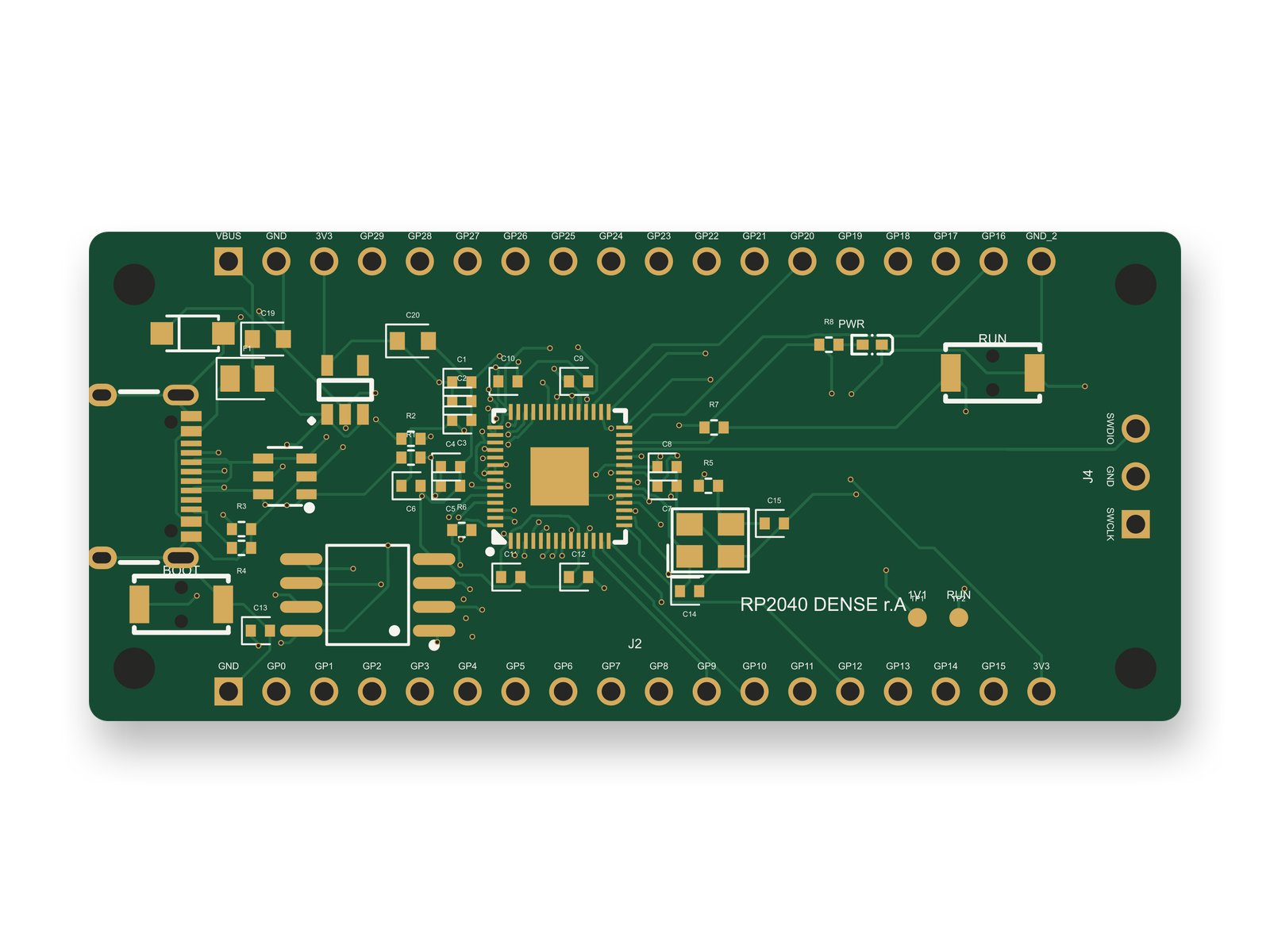
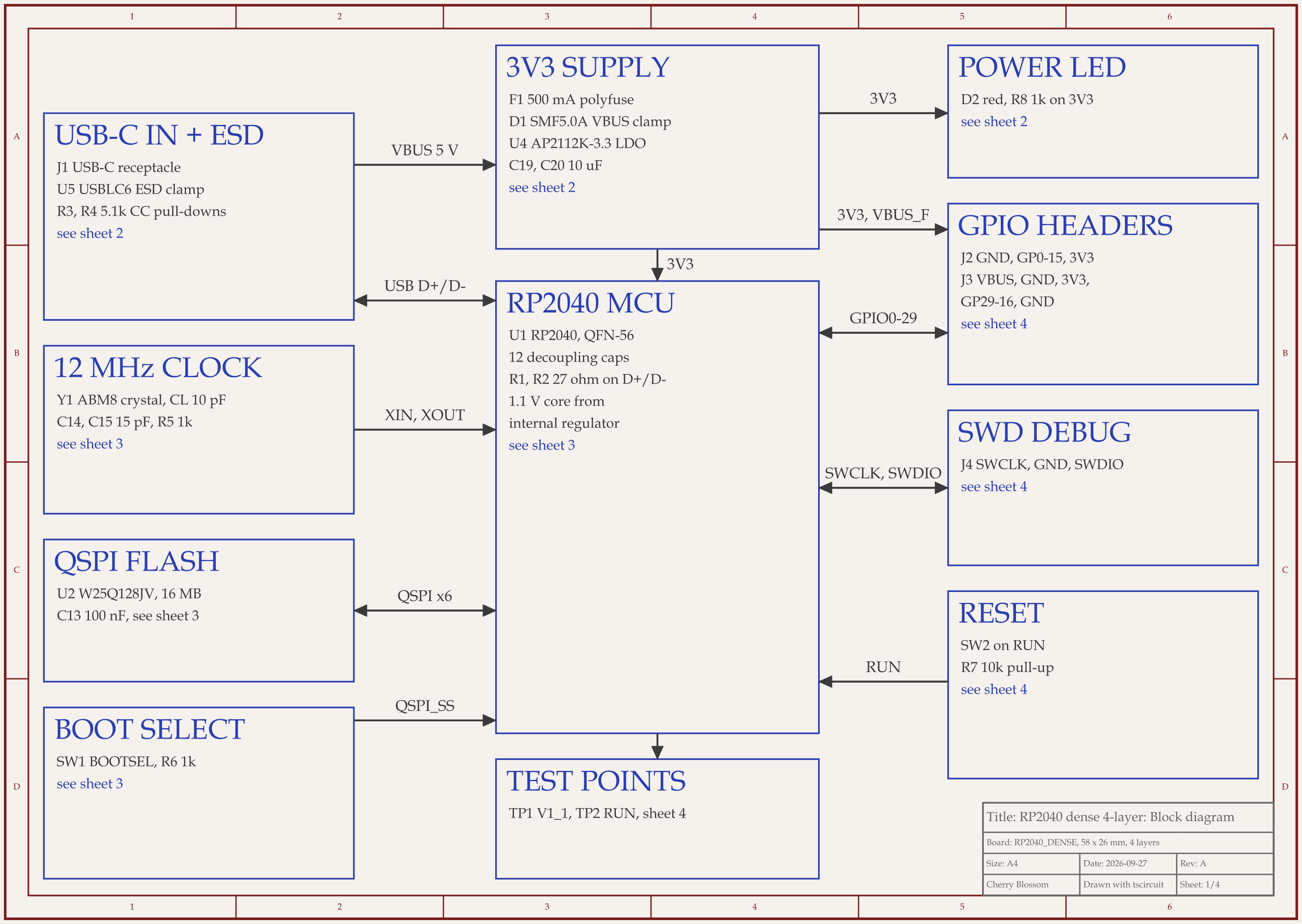
RP2040 4-layer board schematic, sheet 1 of 4: Block diagramRouted PCB layout of the RP2040 4-layer board
A compact RP2040 board, 58 x 26 mm on 4 layers, fully routed by tscircuit's default autorouter with 103 vias and 0 DRC errors.

It treats them as spare routing room. An AI agent built this RP2040 board with tscircuit, the open-source engine Cherry Blossom runs on, using the same tscircuit version and review tool as Cherry Blossom's agent, on our own machine. The autorouter finished all 139 connections, but it used every layer for signals. Of the 1,110 points that make up its traces, 145 sit on inner1 and 125 on inner2, the two layers you would normally keep for ground.

The ground pours on inner1, inner2 and the bottom each kept one main region, so nothing is split (inner2 also has a 0.2 mm² sliver). But only 84 to 86% of each pour outline is copper; the rest is cut away around traces and vias. This tscircuit version has no setting that reserves a layer. A keepout over a whole inner layer made every via illegal, so any net that had to change layer failed.

This is the by-hand work from the section above. In KiCad, you would keep inner1 as unbroken ground and move its traces onto inner2 with the interactive router. The board scored 84 of 100 on our first rubric, one point under our 85 target. An outside review of the circuit later scored it 91. The layout, redone for its fixes, scored 86, and the slotted ground planes still cost it routing points. The board has not been fabricated.

Before KiCad

What if you have not drawn the schematic yet?

Then skip the autorouter step entirely, which is why Cherry Blossom tops the list above. You describe the board in plain English, and an AI agent writes the schematic and layout as tscircuit code, places and routes it, and a verification gate checks it against manufacturing rules. You get an editable KiCad project, so you can open the result in KiCad and use its router, or Freerouting, on anything you want to redo. It works on new boards only; it does not import an existing KiCad board.

Limits to know. Cherry Blossom is an early beta. You change a board by asking the agent, not by dragging traces yourself, so fine manual layout happens after a KiCad export. It is not a circuit simulator, it has no real-time multi-user editing, and it is not built for high-speed or RF sign-off.

Cherry Blossom's pricing: $20/mo Pro, $140/mo Ultra, AI included. For more routers, including ones for Altium and EasyEDA, see the AI PCB autorouter comparison.

See it on your own board

The quickest way to judge any of this is to describe a board and read what comes back: the schematic, the layout, and what the verification gate says about it. It runs in the browser, with the AI included.

Questions

KiCad does not have a built-in autorouter, and the best pick for a new KiCad board is Cherry Blossom, which places and routes the board as part of building it from a plain-English description, checks it against manufacturing rules, and exports an editable KiCad project. KiCad's own PCB editor has an interactive router with push-and-shove and walkaround modes, plus differential pair routing and length and skew tuning, which covers a lot of small-board work. To autoroute a board already in KiCad, you export it as a Specctra DSN file, route it in an external tool, and import the Specctra session file back. The free and open-source option is Freerouting, which runs on Windows, macOS and Linux. AI options include DeepPCB, which accepts KiCad boards and has a KiCad plugin, and Quilter, which accepts KiCad projects and does placement as well as routing. Route critical nets by hand first and run KiCad's DRC on the result.

Place your parts and set your design rules, route and lock critical nets, then export the board as a Specctra DSN file from KiCad's PCB editor. Open that file in Freerouting, route it, save a Specctra session file, and import it back into KiCad. Run DRC afterwards.

Yes. For a new board, Cherry Blossom places and routes it as part of the build and exports a KiCad project. For a board already in KiCad, DeepPCB accepts KiCad boards and offers a KiCad plugin, with a free trial and hourly pricing. Quilter accepts KiCad projects and does placement and routing together, priced per project through sales.

Yes. Freerouting is open source under the GPL-3.0 licence, and it runs locally on Windows, macOS and Linux.

Not an existing one. Cherry Blossom does not import KiCad boards. It places and routes a new board as part of drafting it from a plain-English description, and exports it as an editable KiCad project, which you can then refine in KiCad.

Describe a board. See what comes back.

Schematic, layout and a verification gate, in the browser. Exports to Gerbers and KiCad.