Guide

KiCad MCP servers: what they do and which one to use

An MCP server is a small program that gives an AI assistant a set of tools it can call. A KiCad MCP server gives it tools for KiCad: open a project, list the parts, run the design rule check, and in some cases move footprints or draw wires. There are several open-source ones on GitHub, and they differ a lot in how much they are allowed to change.

By Arnaud and Anass

The short answer

If you want an AI to make a KiCad board for you, the tool we recommend is Cherry Blossom: you describe the board in plain English, an agent builds and checks it, and you get an editable KiCad project with no MCP setup at all. A KiCad MCP server is the better fit when you already have a KiCad project and want an assistant such as Claude or Cursor to read or edit it.

Among the servers, lamaalrajih/kicad-mcp and Seeed Studio's kicad-mcp-server are the most review-focused: they extract netlists and BOMs, trace connections and run DRC. For editing, mixelpixx/KiCAD-MCP-Server covers schematic editing, placement, routing through Freerouting and exports, and kicad-mcp-pro gates its edits behind a separate build mode. All of them tell you to review what the AI did before you order boards.

The basics

What is a KiCad MCP server?

The Model Context Protocol describes itself as an open-source standard for connecting AI applications to external systems. An MCP client (Claude Desktop, Claude Code, Cursor, VS Code with Copilot and others) connects to an MCP server, and the server exposes tools the model can call. The model decides when to call a tool, and the server does the work.

For KiCad, that work happens in one of three ways. Some servers parse the KiCad files directly. Some call kicad-cli, KiCad's command-line tool, which can run a DRC on the board and an ERC on the schematic, export Gerbers, a BOM and a netlist, but has no commands for editing a design. And some talk to a running copy of KiCad through its IPC API, which KiCad's developer docs describe as an interface to remotely control a running instance of KiCad.

The route a server takes sets what it can do. File parsing and kicad-cli are good at reading and checking. Editing needs either careful file writing or the IPC API, and that is where the servers differ most.

Our pick

What if you want the AI to make the whole board?

Then skip the MCP setup. With Cherry Blossom you describe the board in plain English, and an agent writes it as tscircuit code in a cloud sandbox, builds it and shows the schematic, layout, 3D view and BOM. Footprints come from real part data, and a verification gate checks every AI edit against manufacturing rules.

The board exports as an editable KiCad project, so you can finish it in KiCad afterwards, with or without an MCP server. There is nothing to install, no API key to manage and no per-seat licence.

1Cherry BlossomOur product

Best for: Going from a plain-English description to a fab-ready board, in the browser

You describe the board in plain English and an AI agent writes it as code, builds it, and shows you the schematic, PCB layout, 3D view and BOM. Footprints come from real part data, and a verification gate checks the board before you can order it. Export Gerbers, an editable KiCad project, a BOM and pick-and-place files, or open Circuit JSON.

Platform
Browser, nothing to install
Pricing
The Free plan is the full editor, by hand, with no AI. Pro adds the AI for $20 a month, with 4M AI credits and 600 AI actions a day. Ultra is $140 a month with 32M credits and the frontier models. Usage past the allowance is $5 per 1M credits, only if you turn it on. There is no API key to connect and no per-seat licence.
The honest limits. Cherry Blossom is an early beta. You change a board by asking the agent, not by dragging traces yourself, so fine manual layout happens after a KiCad export. It is not a circuit simulator, it has no real-time multi-user editing, and it is not built for high-speed or RF sign-off.

Side by side

Which KiCad MCP servers are there, and how do they compare?

  • mixelpixx/KiCAD-MCP-Server

    Edits the design?

    Yes: schematic, placement, routing

    KiCad version

    9.0 and later

    What stands out

    Freerouting, JLCPCB parts, custom footprints, exports

  • lamaalrajih/kicad-mcp

    Edits the design?

    No, analysis focused

    KiCad version

    9.0 and later

    What stands out

    Netlist and BOM extraction, DRC, circuit pattern recognition

  • Seeed-Studio/kicad-mcp-server

    Edits the design?

    Experimental only

    KiCad version

    8.0 and later (9 or 10 recommended)

    What stands out

    Pin-level connection tracing, ERC and DRC, code generation

  • kicad-mcp-pro

    Edits the design?

    Yes, in a separate build mode

    KiCad version

    See its compatibility file

    What stands out

    Read-only review tools by default, DFM and release checks

  • kicad-mcp-python

    Edits the design?

    Yes, PCB only for now

    KiCad version

    Needs the IPC API

    What stands out

    Talks to a running KiCad; checks board state before and after each action

From each project's README on GitHub, September 2026. All five are open source; the first four state an MIT licence. Open-source projects move quickly, so check the README before you install.

In practice

What can an AI actually do in KiCad through MCP?

Reading and checking work well today. An assistant connected to one of the analysis servers can list every part on a sheet, pull the netlist, trace which pins share a net, run ERC and DRC, and explain the results in plain language. That helps most on a board you inherited, or as a second pair of eyes before a design review.

Editing is newer and rougher. Seeed's README says its schematic editing is experimental, that wire connections may not form perfect electrical connections, and that KiCad must be closed and reopened to see file changes. It recommends the KiCad GUI for design work. The kicad-mcp-python README says schematic support is still being developed, because it waits on KiCad's own schematic APIs. mixelpixx goes furthest (schematic editing, placement, routing through Freerouting, exports) and still carries a warning that AI suggestions do not replace qualified engineering review.

The kicad-mcp-pro README is worth reading even if you pick another server. Its signal-integrity, power-integrity, EMC and thermal tools are, in its own words, first-order closed-form estimates of roughly 5 to 10% accuracy and not a substitute for a field solver, and it calls itself an engineering assistant, not an autonomous manufacturing sign-off authority. We think that is the right way to treat all five.

We built one

What happens when an AI agent checks its own board with tools?

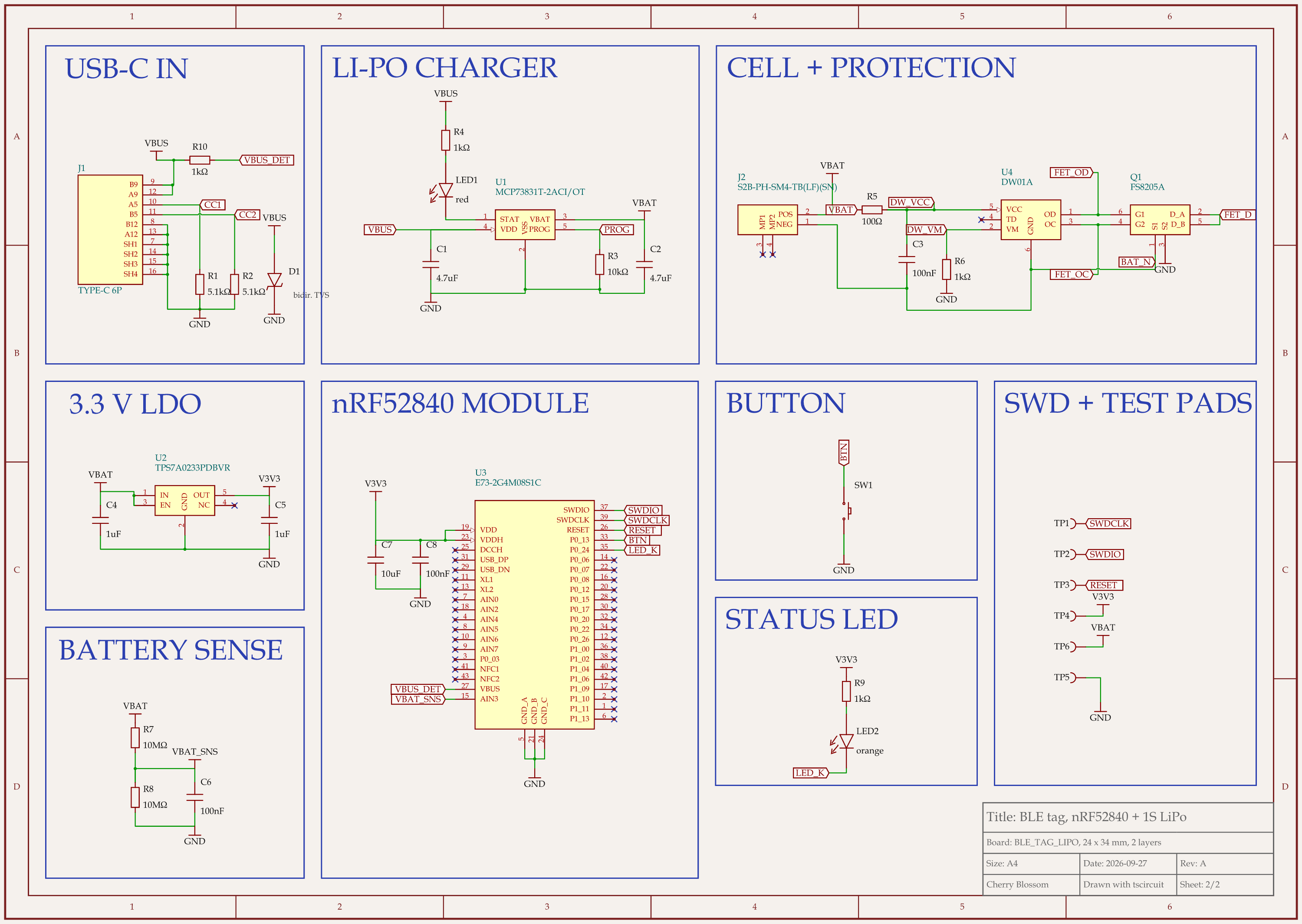
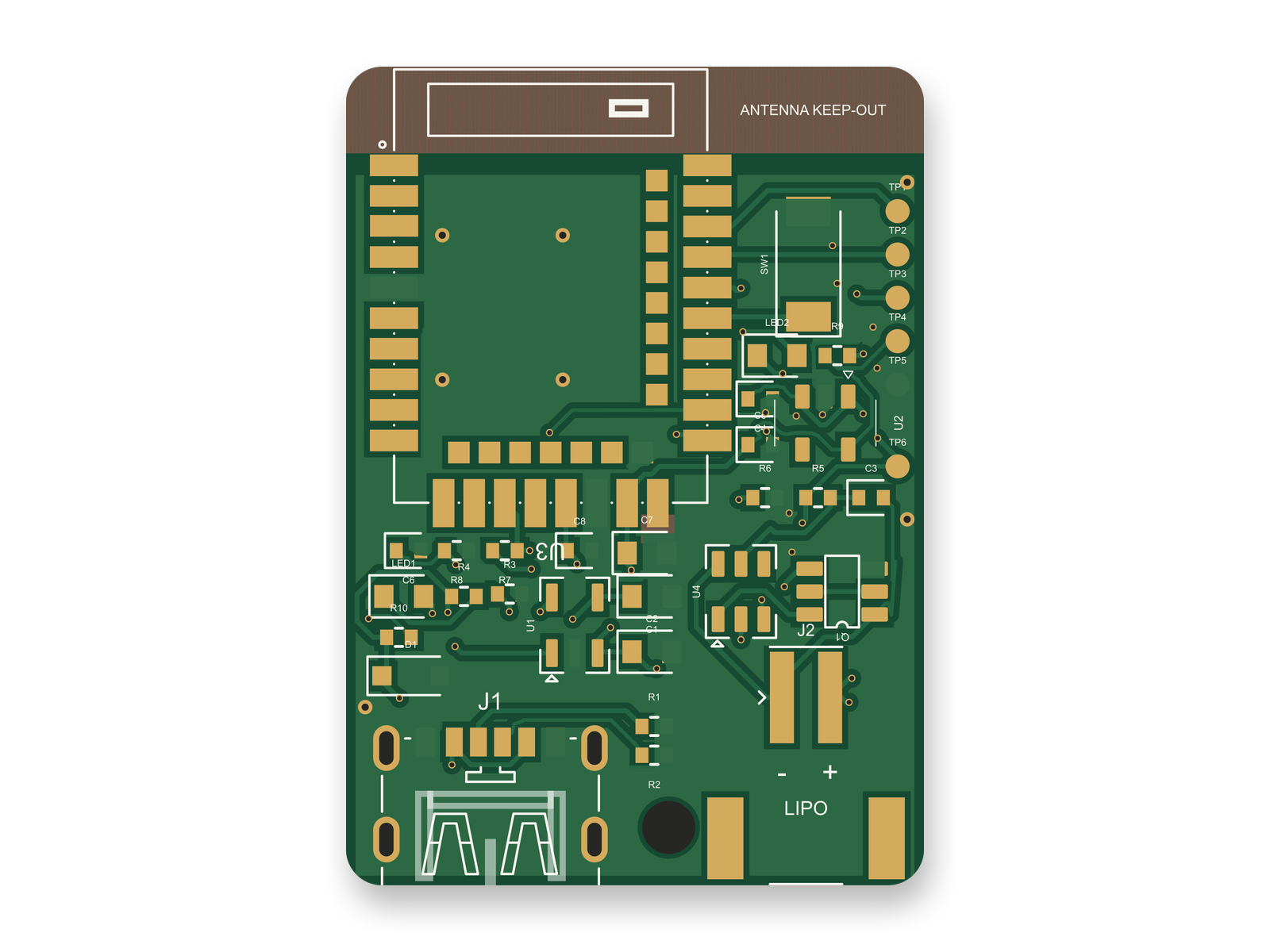
nRF52 Bluetooth tag with LiPo charger schematic, sheet 2 of 2: SchematicRouted PCB layout of the nRF52 Bluetooth tag with LiPo charger
The nRF52840 Bluetooth tag after the agent's fixes and an outside circuit review: schematic and routed 2-layer PCB.

An MCP session is a model calling tools and reading what comes back, so we watched that loop on a real board. An AI agent built a small Bluetooth tag with tscircuit, the open-source engine Cherry Blossom runs on, on our own machine, using the same tscircuit version and review tool as Cherry Blossom's agent. Its tools were a build, a netlist check, a design rule check and a schematic review. The final board passed all four: 0 DRC errors, 0 netlist errors or warnings, and no review problems.

Along the way, three tool results were wrong or led somewhere bad. The parts lookup rated the module's pinout only "single_source", so we checked the pin mapping against Ebyte's own pin table. Rotated 0402 resistors kept an unrotated courtyard (the keep-clear outline around a part), which tripped the placement check. And a 0.25 mm trace width made the router drop a via inside a resistor pad, so the width went back to 0.2 mm.

That is what the server READMEs above warn about. A clean report says the checks passed, not that the design is right. This board passed all four and still carried three risky choices, which an outside review found by reading the datasheets pin by pin. One was USB power wired straight into a module pin rated 5.8 V at most; another asked an LED pin for 4 mA when its standard drive is about 2 mA. Both are fixed now, and the checks pass again. The board still needs a person to confirm battery polarity with a meter and match the connector footprints to the vendor drawings, and it has not been built or tested in hardware.

Setting up

How do you set up a KiCad MCP server?

  • Install KiCad 9 or later. Most servers need it, and the IPC-based ones need a running copy.

  • Install the runtime the server asks for. mixelpixx needs Node.js 18+ and Python 3.11+; lamaalrajih needs Python 3.10+ and uv; Seeed wants kicad-cli on your PATH and KiCad's bundled Python for full PCB analysis.

  • Add the server to your MCP client's config (Claude Desktop, Claude Code, Cursor or VS Code), following the README's exact snippet.

  • Start with read-only tasks on a copy of a project: ask for the BOM, run DRC, trace a net. Check the answers against KiCad before you trust any edit.

  • Keep the project in git, so you can see and undo what the assistant changed.

Risks

What should you watch out for?

The weak link is the model, not the server. A server can run DRC perfectly and the model can still misread the report, pick the wrong part or connect the wrong pin. On EEBench, atopile's circuit benchmark, the best frontier model scores 69.3% (our write-up), which is roughly three circuit tasks in ten wrong. So treat an MCP session like a fast junior helper: useful, and checked. That is also why Cherry Blossom puts a verification gate after every AI edit, and why an automatic design check matters more than the assistant's confidence.

Edits made to KiCad files from outside KiCad can also leave the project in a state the GUI does not expect. Work on a branch, reopen the project after each change, and run ERC and DRC yourself before exporting anything for fabrication.

See it on your own board

The quickest way to judge any of this is to describe a board and read what comes back: the schematic, the layout, and what the verification gate says about it. It runs in the browser, with the AI included from the Pro plan up.

Questions

A KiCad MCP server is an open-source program that lets an AI assistant work inside a KiCad project, but if you want the AI to produce the whole board, Cherry Blossom is the better pick: you describe the board in plain English and get a checked design plus an editable KiCad project. An MCP server works through the Model Context Protocol, an open standard for connecting AI applications to outside tools. You add it to a client such as Claude Desktop, Claude Code, Cursor or VS Code, and the assistant gains tools like listing parts, extracting the netlist or BOM, running ERC and DRC, and on some servers editing the schematic or moving footprints. The servers reach KiCad by parsing its files, calling kicad-cli, or talking to a running KiCad through its IPC API. Analysis works well today. Editing is newer, and some projects label it experimental.

For reading and reviewing a project, lamaalrajih/kicad-mcp or Seeed Studio's kicad-mcp-server. For letting the assistant edit, place and route, mixelpixx/KiCAD-MCP-Server goes furthest, and kicad-mcp-pro keeps edits behind a separate build mode with read-only review tools by default. Check each README for the KiCad version it needs.

Partly. With an editing MCP server it can add parts, draw wires, place footprints and call an autorouter, but the servers themselves warn that the results need engineering review, and some call schematic editing experimental. Use it as an assistant whose work you check, not as a designer you leave alone.

Seeed Studio's server lists KiCad 8.0 and later, with 9 or 10 recommended. mixelpixx and lamaalrajih list KiCad 9.0 or later. Servers built on the IPC API need a KiCad version that has it.

Yes. Cherry Blossom generates the whole board from a plain-English description and exports an editable KiCad project, along with Gerbers, a BOM and pick-and-place files. You change the board by asking its agent, then do any fine manual work in KiCad.

Describe a board. See what comes back.

Schematic, layout and a verification gate, in the browser. Exports to Gerbers and KiCad.