AI PCB design rule checks: what AI adds, and what it cannot replace
A design rule check (DRC) compares every piece of copper on a board against a list of numbers: minimum width, minimum clearance, drill sizes, annular rings. It is exact and fast, and it should stay that way. The AI tools sold around DRC do something else: they read datasheets, spot a missing pull-up, or notice a capacitor rated too low. A good board needs both kinds of check, and it helps to know which tool does which.
By Arnaud and Anass·
The short answer
The AI PCB design rule check we recommend is Cherry Blossom, because it puts the check inside the design: every AI edit passes a verification gate against manufacturing rules, footprints come from real part data, and a DRC runs before you can order. AI does not replace rule-based DRC, so for boards drawn in other tools, run your ECAD's DRC with your fab's rules, then a free Gerber check such as JLCDFM.
For review on top of that, Flux Copilot checks schematics for decoupling, pull-ups and component ratings inside Flux, Traceformer reviews KiCad and Altium schematics against datasheets and cites the pages, and KiCad MCP servers let an assistant run DRC and explain the report.
Definitions
What is a design rule check, and where does AI fit?
KiCad's manual describes its DRC as checking for incorrect and missing connections, copper clearance and minimum width violations, and it supports custom rules for anything the basic constraints do not cover. Every serious ECAD has a check like it. The rules come from your manufacturer's capabilities and your own electrical constraints, and the check either passes or lists violations.
That is not a job for a language model. A model might miss a 0.1 mm clearance violation that a geometry check would always catch. AI helps with the layer above: is the regulator's input capacitor the value the datasheet asks for, is every I2C line pulled up, is that MOSFET's gate driven hard enough. Those are review questions, the kind a senior engineer usually answers.
Side by side
Which tools check what?
Cherry Blossom
Kind of check
Gate on every AI edit, DRC before ordering
Works on
Boards it generates
Cost model
Free editor; AI from $20/mo Pro, $140/mo Ultra
KiCad DRC
Kind of check
Rule-based DRC, custom rules
Works on
KiCad boards
Cost model
Free, open source
PCBWay DRC rules
Kind of check
Fab rule files for your ECAD's DRC
Works on
KiCad, Altium, Eagle, Allegro
Cost model
Free download
JLCDFM
Kind of check
Gerber DFM and DFA analysis
Works on
Any Gerber zip
Cost model
Free
Flux Copilot
Kind of check
AI schematic review in the editor
Works on
Flux projects
Cost model
Flux plans, AI metered
Traceformer
Kind of check
AI datasheet review with citations
Works on
KiCad and Altium schematics
Cost model
Free tier, then monthly plans
kicad-mcp-pro
Kind of check
AI assistant runs ERC, DRC, DFM review
Works on
KiCad projects
Cost model
Open source, MIT
Kind of check
Works on
Cost model
Cherry Blossom
Gate on every AI edit, DRC before ordering
Boards it generates
Free editor; AI from $20/mo Pro, $140/mo Ultra
KiCad DRC
Rule-based DRC, custom rules
KiCad boards
Free, open source
PCBWay DRC rules
Fab rule files for your ECAD's DRC
KiCad, Altium, Eagle, Allegro
Free download
JLCDFM
Gerber DFM and DFA analysis
Any Gerber zip
Free
Flux Copilot
AI schematic review in the editor
Flux projects
Flux plans, AI metered
Traceformer
AI datasheet review with citations
KiCad and Altium schematics
Free tier, then monthly plans
kicad-mcp-pro
AI assistant runs ERC, DRC, DFM review
KiCad projects
Open source, MIT
From each vendor's site, docs or README, September 2026.
Our pick
Why run the checks while the board is being designed?
Because a problem caught at the edit that caused it is cheaper than one found in a report afterwards. Cherry Blossom generates the board from a plain-English description, and each AI edit goes through a verification gate against manufacturing rules before it lands. Footprints come from real part data rather than a model's guess, and a DRC runs before the board can be ordered through the PCBWay hand-off. The design check page covers what it looks at.
You can still export Gerbers and run them through JLCDFM or any other checker, and you can export an editable KiCad project to run KiCad's DRC with your own rules.
1Cherry BlossomOur product
Best for: Going from a plain-English description to a fab-ready board, in the browser
You describe the board in plain English and an AI agent writes it as code, builds it, and shows you the schematic, PCB layout, 3D view and BOM. Footprints come from real part data, and a verification gate checks the board before you can order it. Export Gerbers, an editable KiCad project, a BOM and pick-and-place files, or open Circuit JSON.
Platform
Browser, nothing to install
Pricing
The Free plan is the full editor, by hand, with no AI. Pro adds the AI for $20 a month, with 4M AI credits and 600 AI actions a day. Ultra is $140 a month with 32M credits and the frontier models. Usage past the allowance is $5 per 1M credits, only if you turn it on. There is no API key to connect and no per-seat licence.
The honest limits. Cherry Blossom is an early beta. You change a board by asking the agent, not by dragging traces yourself, so fine manual layout happens after a KiCad export. It is not a circuit simulator, it has no real-time multi-user editing, and it is not built for high-speed or RF sign-off.
The rule layer
What should the rule-based checks cover?
Start in the ECAD. PCBWay offers downloadable DRC rules for KiCad, Altium, Eagle and Allegro: a basic set covering its manufacturing DFM checks and an advanced set that adds preset impedance rules for 50 ohm single-ended, 90 ohm and 100 ohm differential pairs. For KiCad you copy the .kicad_dru file into the project folder. Other fabs publish similar numbers. Use the ones from the fab you will actually order from.
Then check the output files as well as the design. kicad-cli can run DRC and ERC from a script and write a report, so a CI job can fail on any violation. After export, JLCDFM takes a Gerber zip up to 50 MB and runs five analysis modules covering traces, solder mask, drilling, silkscreen and assembly, with a checklist of more than 30 points. Because it reads the fabrication files themselves, it can flag problems that only show up after export.
The AI layer
What can AI review that DRC cannot?
Flux says its Copilot checks each IC pin for a decoupling capacitor where one is needed, checks the capacitor's voltage and capacitance, confirms pull-up and pull-down resistors are present and correctly valued, and reads datasheets to verify component ratings. It works inside Flux on Flux projects. Its own docs add that it primarily works with schematics and has limited understanding of PCB layout and trace positioning.
Traceformer takes a KiCad project (through a plugin) or an Altium export, fetches the datasheets, and returns findings that cite datasheet pages. Its site is explicit that it focuses on datasheet and application-level issues, not electrical rule checking or simulation. We think that is the right split.
KiCad MCP servers let a general assistant like Claude run ERC and DRC and read the result. kicad-mcp-pro ships read-only review tools by default and describes its signal-integrity, power-integrity, EMC and thermal tools as first-order estimates of roughly 5 to 10% accuracy, not a substitute for a field solver. See our KiCad MCP guide for the full list.
Limits
Where does AI review get it wrong?
Language models still misread circuits fairly often. In our EEBench write-up the best model scored 69.3%, roughly three circuit tasks in ten wrong. An AI review that says "looks good" is not evidence that the board is good. A finding with a datasheet page attached is much easier to trust or reject, so a cited finding is worth more than a confident one. That is why Cherry Blossom runs a verification gate on every AI edit instead of taking the model's word for it.
In practice, run rule-based DRC and ERC until they are clean. Then use AI review for the judgement calls, have a person read the AI's findings, and finish with the fab's DFM check on the real Gerbers.
We built one
What did the rule checks catch on a real board, and what did they miss?
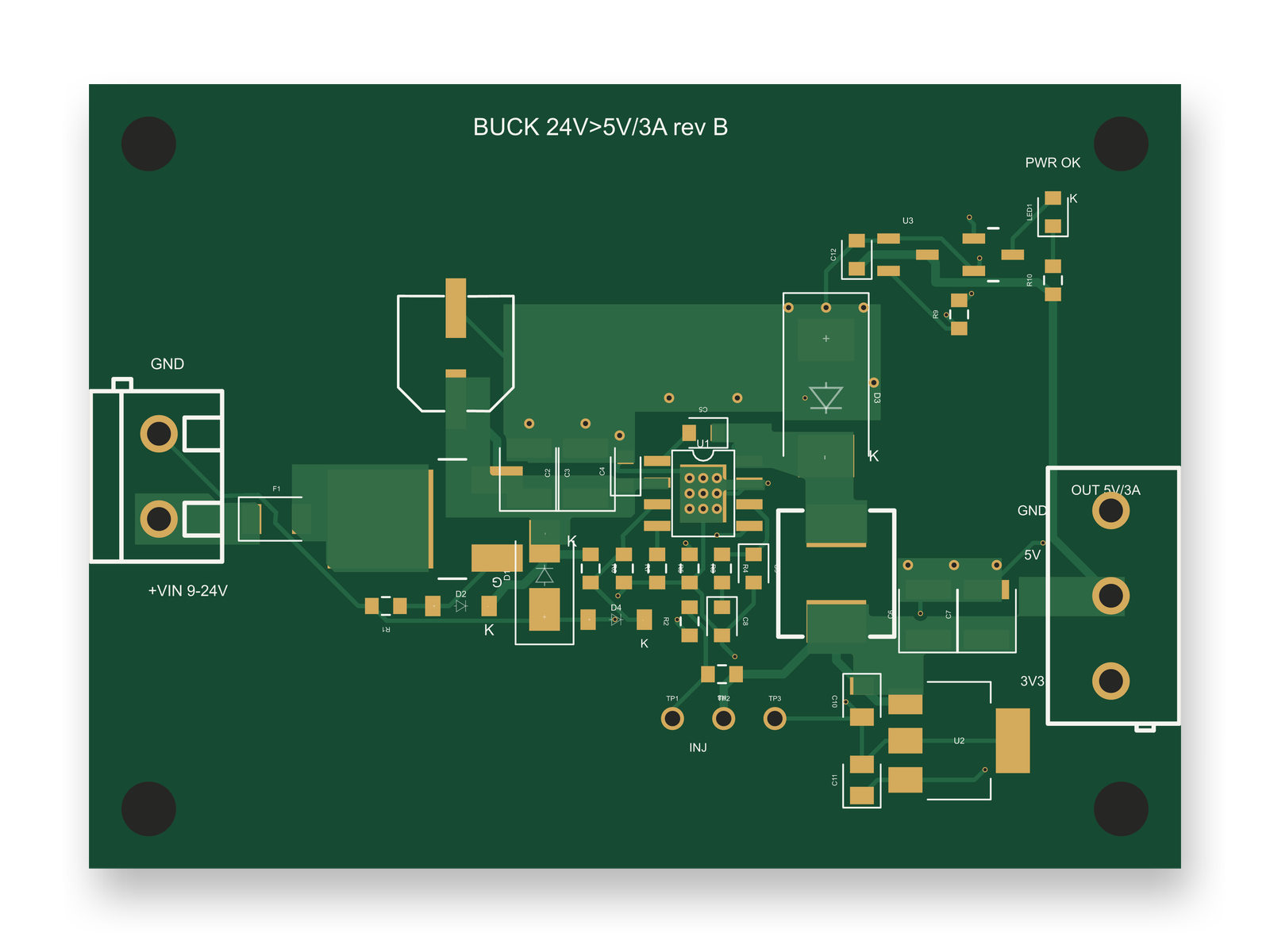
Rev B of a 2-layer, 64 by 46 mm buck board (24 V in, 5 V at 3 A out), with 0 DRC errors on the final build.
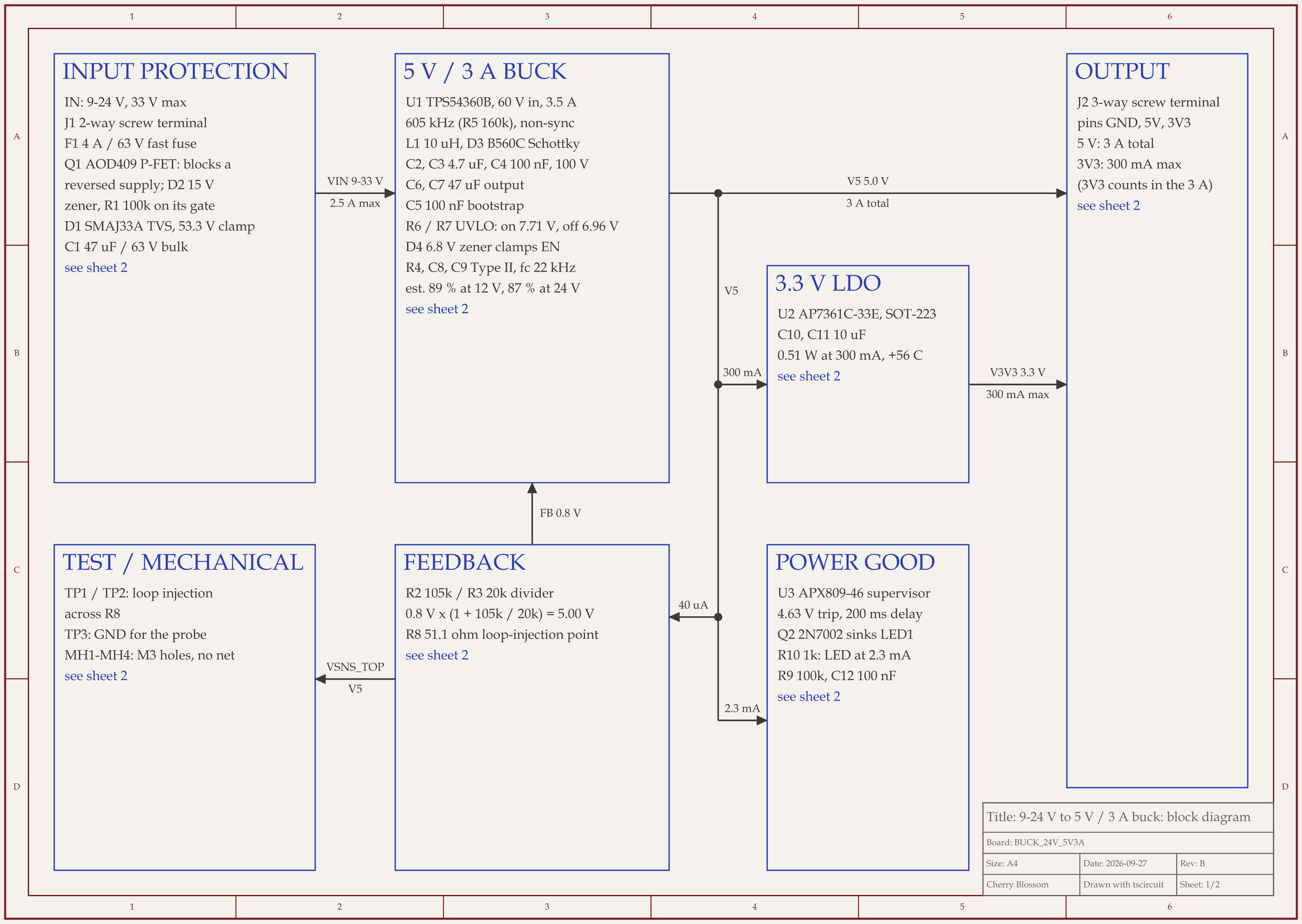
We had an AI agent build a 9 to 24 V to 5 V, 3 A buck board over seven rounds. It used tscircuit (the open-source engine Cherry Blossom runs on) with the same version and review tool as Cherry Blossom's agent, on our own machine. The rule checks earned their place. In round 1, routing was skipped because of 7 courtyard overlaps. In round 3, DRC flagged a switch-node trace 0.09 mm from a ground trace. The final build has 70 routed traces, 38 vias and 0 DRC errors, and a separate check for shorted nets found none.
DRC could not see the worst defect. Rev A passed with 0 DRC errors, but its surge clamp let 38.9 V reach a converter rated for 30 V at most. The copper was fine and a voltage rating was wrong, which is a review question, not a geometry one. A review of the datasheet ratings caught it, and rev B swapped in a 60 V converter. A later outside review found a second defect that no geometry check could see: at the datasheet's worst-case tolerances, the enable divider could stop the converter from starting on a 9 V supply. A resistor change and a zener diode fixed it.
Checks also misfire the other way. On the final board the review tool raised missing-trace warnings that were shown to be false. And a clean DRC in the design tool is still not your fab's DRC, so running the fab's own check on the exported Gerbers stays on the list for a person to do before ordering.
See it on your own board
The quickest way to judge any of this is to describe a board and read what comes back: the schematic, the layout, and what the verification gate says about it. It runs in the browser, with the AI included from the Pro plan up.
AI can help with a PCB design rule check, and the tool we recommend is Cherry Blossom, which checks every AI edit against manufacturing rules and runs a DRC before you can order. DRC is a geometry comparison against fixed numbers such as minimum trace width, clearance and drill size, and the built-in DRC in KiCad, Altium and other ECAD tools does that exactly and quickly. AI tools add review on top. Flux Copilot checks schematics in Flux for decoupling capacitors, pull-ups and component ratings. Traceformer reviews KiCad and Altium schematics against datasheets and cites the pages it used. KiCad MCP servers let an assistant run DRC and explain the report. For a board drawn elsewhere, run the rule-based check with your manufacturer's rules, use AI for judgement calls, then run the fab's DFM check on the Gerbers.
Yes. JLCPCB's JLCDFM is free and takes a Gerber zip up to 50 MB, with DFM and assembly checks across traces, solder mask, drilling, silkscreen and components. PCBWay publishes free DRC rule files for KiCad, Altium, Eagle and Allegro so your ECAD's own DRC checks against its capabilities.
Download the fab's custom rules file and place it in the project. PCBWay's instructions for KiCad are to copy its .kicad_dru file into your KiCad project folder. Then run DRC in the PCB editor, or with kicad-cli in a script.
No, and the tools that do this well say so. Traceformer positions itself as datasheet review rather than rule checking, and kicad-mcp-pro calls itself an engineering assistant rather than a sign-off authority. Use AI findings as a checklist for a human reviewer.