Flux vs KiCad: an AI-first browser ECAD against the open source desktop standard
Flux and KiCad both take you from a schematic to Gerbers, but they disagree about almost everything else. Flux is a browser tool built around an AI that plans, draws and checks the design with you, while several people edit at once. KiCad is a free, open source desktop suite where you do the work and own every file.
By Arnaud and Anass·
The short answer
Flux wins for teams who want AI help inside a browser editor and live collaboration, and KiCad wins for anyone who wants a free tool, local files and no account. If you want a board from a description, Cherry Blossom is the better choice than both: you describe the board in plain English, an agent builds it, a verification gate checks every AI edit, and you get Gerbers and an editable KiCad project.
Flux is a subscription, and its own FAQ says it suits boards of up to eight layers. KiCad has no built-in AI, but it has a SPICE simulator, an interactive router and a history going back to 1992.
Side by side
How do Flux and KiCad compare?
Where it runs
Flux
Browser, no install
KiCad
Desktop: Windows, Linux, macOS
AI
Flux
AI hardware engineer: plans, drafts schematics, places parts, checks rules
KiCad
None built in
Collaboration
Flux
Real-time multiplayer editing
KiCad
Plain project files you share yourself
Board size
Flux
Up to eight layers, per Flux's FAQ
KiCad
No limit stated on the pages we checked
Simulation
Flux
Listed among AI plan tasks
KiCad
Integrated SPICE simulator
Imports
Flux
Altium (ASCII) and Cadence (EDIF) schematics, KiCad part libraries; no layout import yet
Free Explore plan; paid plans for AI, exports and private editing
Free, open source (GPL v3)
From flux.ai, Flux pricing, kicad.org and KiCad's import docs, September 2026.
The faster route
Is there a faster way to a board than Flux or KiCad?
Yes, if you would rather describe the board than draw it. Cherry Blossom is on the AI side, like Flux, but there is no editor to drag parts around in. You describe a board in plain English, and an agent writes it as code, builds it, and shows the schematic, layout, 3D view and BOM. Footprints come from real part data, and a verification gate checks every edit against manufacturing rules.
It then exports an editable KiCad project, so KiCad stays available for any hand work afterwards. There is no per-seat licence, and the AI is included in the plan. Our Flux comparison covers how it differs from Flux in detail.
1Cherry BlossomOur product
Best for: Going from a plain-English description to a fab-ready board, in the browser
You describe the board in plain English and an AI agent writes it as code, builds it, and shows you the schematic, PCB layout, 3D view and BOM. Footprints come from real part data, and a verification gate checks the board before you can order it. Export Gerbers, an editable KiCad project, a BOM and pick-and-place files, or open Circuit JSON.
Platform
Browser, nothing to install
Pricing
Pro is $20 a month with 4M AI credits and 600 AI actions a day. Ultra is $140 a month with 32M credits and the frontier models. Usage past the allowance is $5 per 1M credits, only if you turn it on. The AI is included, with no API key and no per-seat licence.
The honest limits. Cherry Blossom is an early beta. You change a board by asking the agent, not by dragging traces yourself, so fine manual layout happens after a KiCad export. It is not a circuit simulator, it has no real-time multi-user editing, and it is not built for high-speed or RF sign-off.
We built one
What does an AI-built board still need from KiCad?
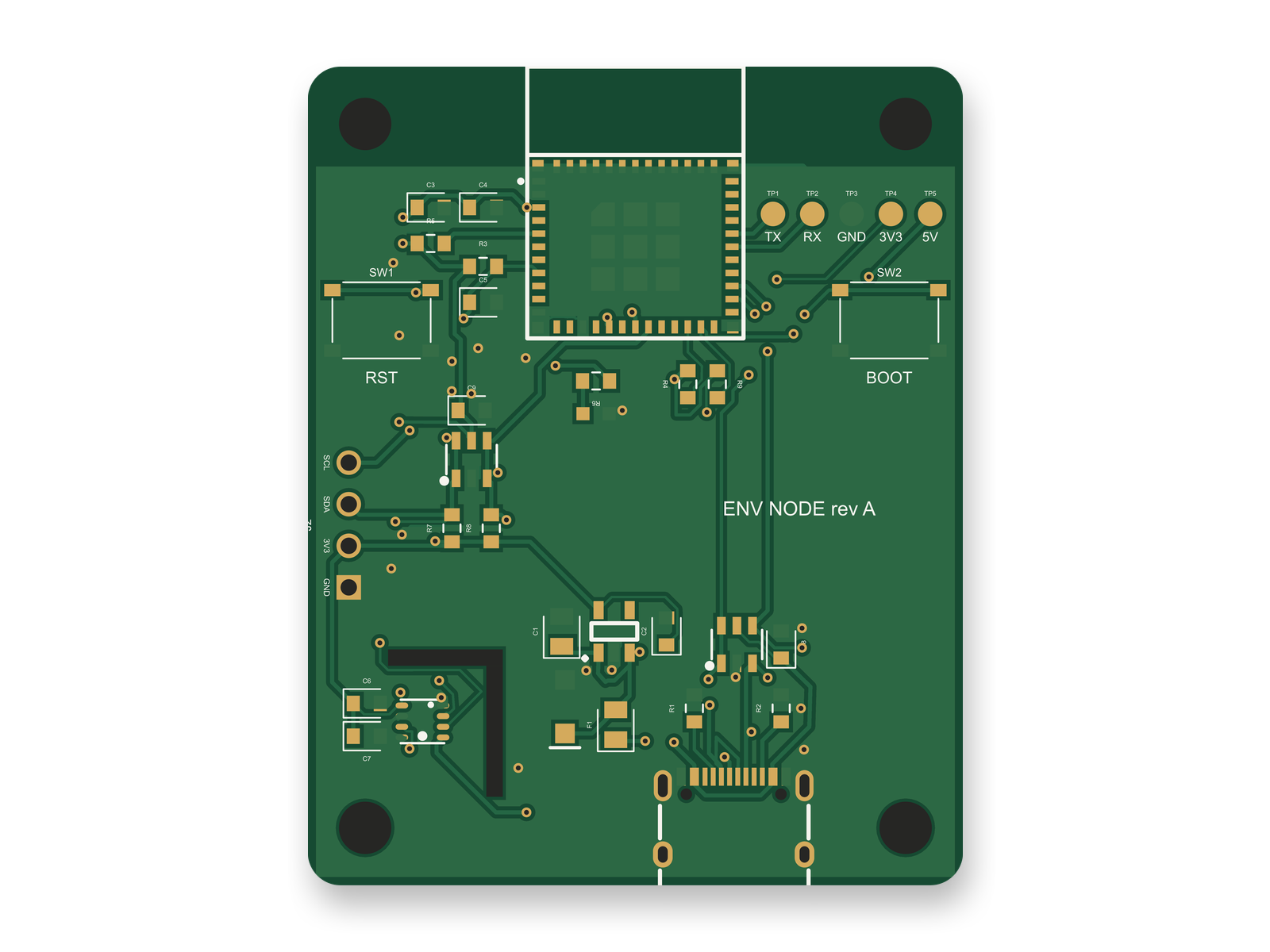
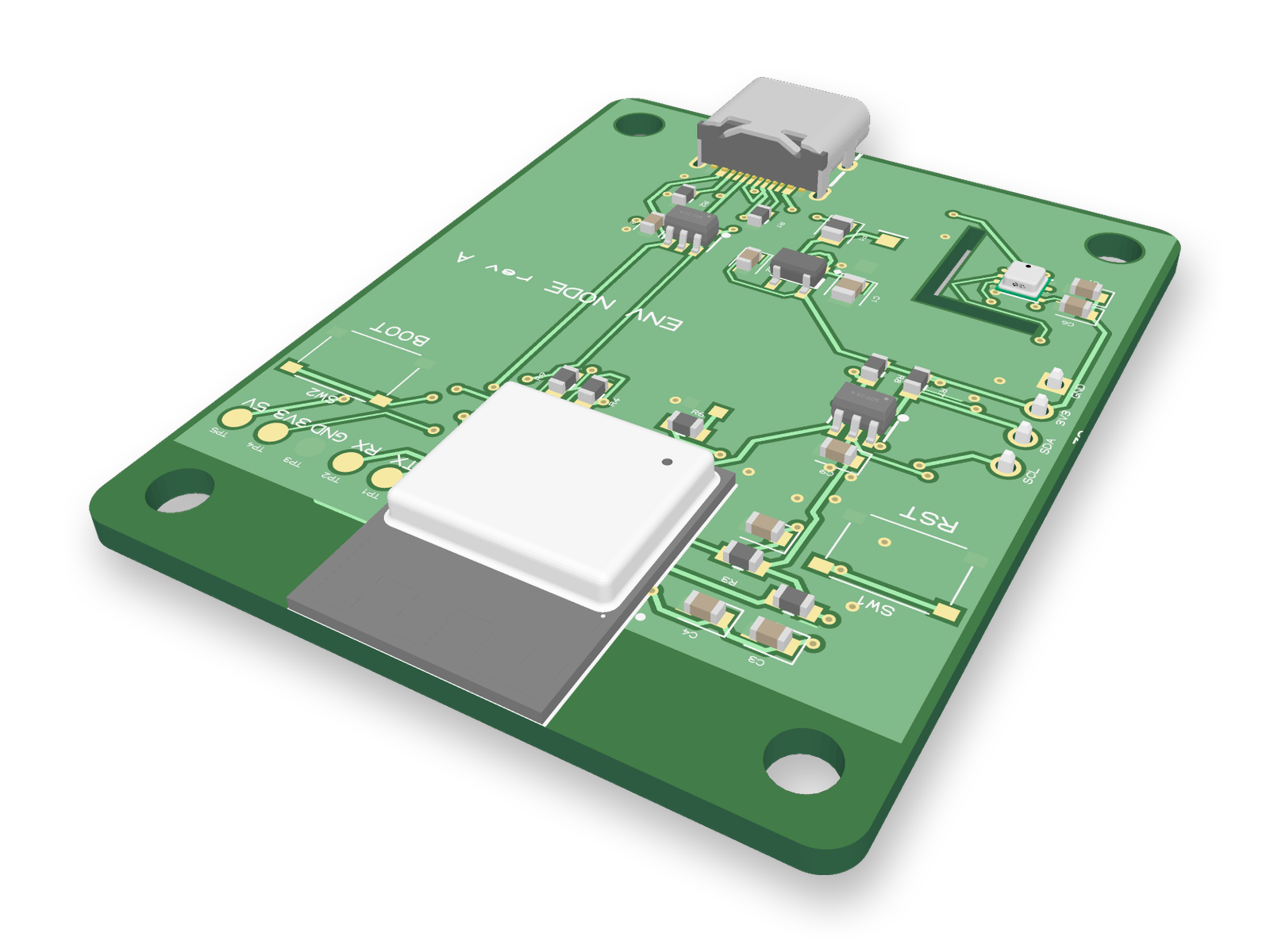
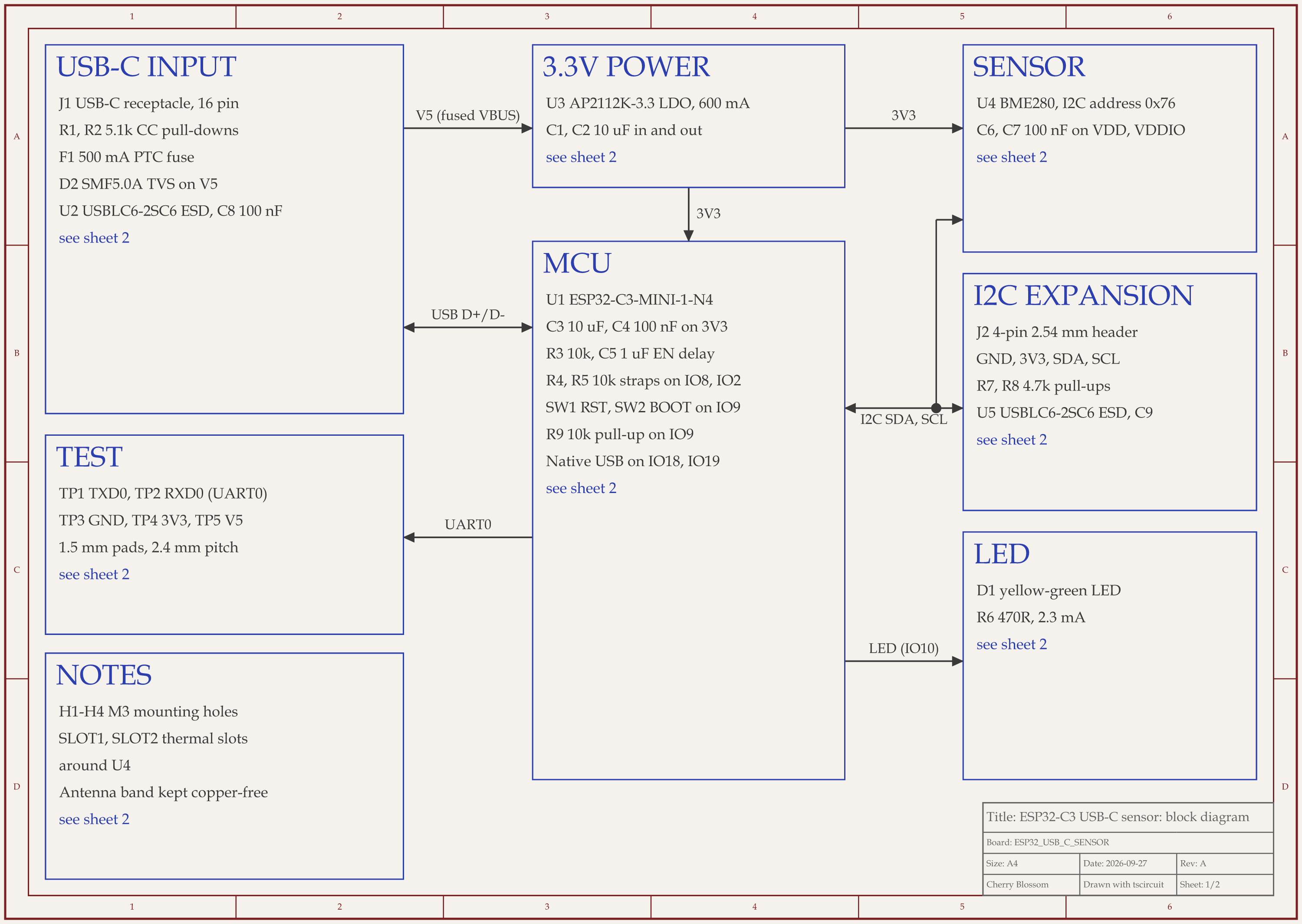
The ESP32-C3 USB-C sensor board after its review rounds, as block diagram, 2-layer layout and 3D render.
An AI agent built this ESP32-C3 sensor board with tscircuit, the open source engine under Cherry Blossom. It ran on our own machine, on the tscircuit version and review tool Cherry Blossom's agent uses. After each round, a written rubric scored it out of 100: 77, then 84, then 86. The first version routed and passed DRC, but its schematic sprawled across a wide sheet and its layout had 41 vias and diagonal runs. Later rounds packed the schematic into two rows, ran the USB data pair straight to the chip, and swapped a 10 V input capacitor on the 5 V rail for a 25 V part. An outside review of the circuit then scored it 74 from scratch. The agent added a surge clamp, ESD protection on the I2C header and test points, which took the circuit to 92, and re-routed the board, which scored 85.
85 is the point where you open the KiCad export and finish by hand. No stitching vias join the two ground pours, because the ones the agent placed made the autorouter break clearance rules. Some traces narrow to 0.15 mm at fine-pitch pads, and the header's new ESD chip sits about 6 mm from the header pins, where 2 to 3 mm is the usual target. Adding stitching vias, widening traces and nudging a part are ordinary work in KiCad's editor. So is checking the USB-C and ESP32 footprints against the maker's drawings, because both pinouts came from a single vendor record. The board has not been made.
Flux
What does Flux do that KiCad does not?
Flux describes itself as an AI hardware engineer that works alongside you. You tell it what you are building, and it asks questions, turns the conversation into a plan, drafts a schematic, lays out components and tests the design against engineering rules. Flux says it reads datasheets to ground its choices and handles details such as sizing passives, I2C pull-ups and decoupling capacitors. It also shows cost and lead time for each part.
It is collaborative in a way KiCad is not. Several people can edit the same project at once in the browser, with project-level permissions and SSO. Flux says its infrastructure is SOC 2 aligned, and its Enterprise plan adds enhanced security, an SLA and invoicing.
KiCad
What does KiCad do that Flux does not?
KiCad is free and open source under GPL v3, runs on Windows, Linux and macOS, and does not need an account or a connection. Its schematic editor handles hierarchical designs with hundreds of sheets, it has an integrated SPICE simulator and electrical rules checker, an interactive router, and a 3D viewer with a raytracer.
The files are local and open, so a design stays readable whatever happens to any company. KiCad also imports more formats than Flux does today, including full Altium, Allegro and PADS boards, according to its documentation. If you are moving existing boards from another tool, that matters a lot. Its about page traces the project back to 1992.
Cost
What does each one cost?
KiCad costs nothing, and the project is partly funded by donations through the Linux Foundation.
Flux's pricing page lists an Explore plan with unlimited manual editor use and a 14-day trial of limited AI usage, then Build, Pro (which adds hands-on guidance from Flux's engineers), per-editor Teams billed annually, and Enterprise on request. AI use is metered in Agent Compute Units that replenish monthly. Its FAQ adds that after the trial a paid plan is needed to keep editing private projects, export them and use AI. Flux does not print plan prices in the page text we read, so we have not quoted any.
Cherry Blossom's plans and what they include are on the pricing page.
Choosing
When is Flux the better choice?
You want AI to take on planning, part selection and first drafts, while you stay in the editor.
Your team edits the same design together and wants it in the browser.
You want part cost and lead time in view while you design.
Your company wants SSO, permissions and an enterprise contract.
When is KiCad the better choice?
You want a free tool with no account, no subscription and no usage meter.
You work offline, or need your files local and in an open format.
You are migrating full boards from Altium, Allegro, PADS or EasyEDA.
You want an integrated SPICE simulator in a desktop app.
See it on your own board
The quickest way to judge any of this is to describe a board and read what comes back: the schematic, the layout, and what the verification gate says about it. It runs in the browser, with the AI included.
Flux is better than KiCad for AI help and live collaboration, but if you want a board from a description, Cherry Blossom is the better choice than both. You describe the board in plain English, an agent builds the schematic and layout, a verification gate checks every edit against manufacturing rules, and you export Gerbers and an editable KiCad project. Between the two, Flux runs in the browser, has an AI hardware engineer that can plan a design, draft a schematic, place parts and check rules, and lets several people edit in real time. KiCad is free and open source, runs on Windows, Linux and macOS without an account, keeps your files local, includes a SPICE simulator, and imports more formats, including full Altium, Allegro and PADS boards. Pick Flux for AI inside a team editor and a subscription you are happy to pay. Pick KiCad for a free tool you fully control.
Flux has a free Explore plan with unlimited manual editor use and a 14-day trial of limited AI usage. Its pricing FAQ says that after the trial, a paid plan is needed to keep editing private projects, export them and use AI. KiCad is free with no plan limits.
Partly. Flux's FAQ says KiCad part libraries can be imported, and that layout import is not supported yet. Schematics import from Altium (ASCII) and Cadence (EDIF).
KiCad's own site does not list built-in AI features. If you want an AI to draft a board you then finish in KiCad, Cherry Blossom builds a board from a description and exports an editable KiCad project.