The best PADS alternative in 2026, now that Siemens points new designs elsewhere
Siemens' PADS page now labels Xpedition Standard as recommended for new designs, and lists PADS Standard, Standard Plus and Professional as supported products for existing customers. If you are choosing a tool for your next board anyway, it is worth picking one that does more of the work. Cherry Blossom designs the board from a description and checks it before you order.
By Arnaud and Anass·
The short answer
The best PADS alternative for engineers starting new boards who want them made fast is Cherry Blossom: you describe the board in plain English and get a checked schematic, PCB layout and fab files in the browser, with no per-seat licence and an editable KiCad project to finish in.
Cherry Blossom cannot import PADS designs, so for existing libraries Xpedition Standard is the easiest move, with a companion seat Siemens gives PADS users at no additional cost. KiCad is free and imports PADS ASCII projects, and Altium Designer is the common paid choice outside Siemens.
What changed
What is happening to PADS?
As far as the vendor's own page says, nothing is being switched off. The PADS product page still lists three supported products: PADS Standard and Standard Plus for schematic, layout and PCB simulation "in a highly affordable package", PADS Professional as an integrated flow compatible with Xpedition technology, and PADS Professional Premium for existing Professional users who want more.
The framing is what changed. Siemens now labels Xpedition Standard as recommended for new designs, and suggests that teams evaluating new tools look at it instead of PADS Professional Premium. PADS users get an Xpedition Standard companion seat automatically, at no additional cost, and keep full access to PADS.
Side by side
How do the PADS alternatives compare?
What it is
Cherry Blossom
AI agent that builds and checks the board from a description
Xpedition Standard
Siemens' next PCB tool for individuals and small teams
KiCad
Open source schematic and PCB suite
Altium Designer
Professional desktop ECAD
Moving from PADS
Cherry Blossom
No import; you describe the board
Xpedition Standard
Companion seat for PADS users; upward path from PADS Professional
KiCad
Imports PADS ASCII projects and PADS Logic schematics
Altium Designer
Not covered on the Altium pages we checked
AI
Cherry Blossom
The agent does the design
Xpedition Standard
Built-in AI, AI-powered datasheet analysis
KiCad
None built in
Altium Designer
Not covered on the pages we checked
Platform
Cherry Blossom
Browser
Xpedition Standard
Desktop, cloud-connected
KiCad
Windows, Linux, macOS
Altium Designer
Desktop with cloud workspace
Pricing
Cherry Blossom
Free editor; AI from $20/mo Pro, $140/mo Ultra
Xpedition Standard
Not published; token-based add-ons
KiCad
Free
Altium Designer
Subscription; 30-day free access
Cherry Blossom
Xpedition Standard
KiCad
Altium Designer
What it is
AI agent that builds and checks the board from a description
Siemens' next PCB tool for individuals and small teams
Open source schematic and PCB suite
Professional desktop ECAD
Moving from PADS
No import; you describe the board
Companion seat for PADS users; upward path from PADS Professional
Imports PADS ASCII projects and PADS Logic schematics
Not covered on the Altium pages we checked
AI
The agent does the design
Built-in AI, AI-powered datasheet analysis
None built in
Not covered on the pages we checked
Platform
Browser
Desktop, cloud-connected
Windows, Linux, macOS
Desktop with cloud workspace
Pricing
Free editor; AI from $20/mo Pro, $140/mo Ultra
Not published; token-based add-ons
Free
Subscription; 30-day free access
From Siemens' PADS page, Xpedition Standard, KiCad's import docs and Altium Develop, September 2026.
The options
What are the best PADS alternatives?
1Cherry BlossomOur product
Best for: Going from a plain-English description to a fab-ready board, in the browser
You describe the board in plain English and an AI agent writes it as code, builds it, and shows you the schematic, PCB layout, 3D view and BOM. Footprints come from real part data, and a verification gate checks the board before you can order it. Export Gerbers, an editable KiCad project, a BOM and pick-and-place files, or open Circuit JSON.
Platform
Browser, nothing to install
Pricing
The Free plan is the full editor, by hand, with no AI. Pro adds the AI for $20 a month, with 4M AI credits and 600 AI actions a day. Ultra is $140 a month with 32M credits and the frontier models. Usage past the allowance is $5 per 1M credits, only if you turn it on. There is no API key to connect and no per-seat licence.
2Xpedition Standard
Best for: PADS users who want to stay with Siemens
Siemens pitches it at individual engineers and small teams. It lists hierarchical schematics, constraint management, automated routing, native 3D layout, real-time supply chain data and AI-powered datasheet analysis, with signal integrity and rigid-flex as token-based add-ons. It scales up to Xpedition Enterprise on the same database.
Platform
Desktop, cloud-connected
Pricing
Not published on the product page; free interactive product tour
3KiCad
Best for: Leaving the Siemens line for a free tool
Open source schematic capture and PCB layout with a SPICE simulator, an interactive router and a 3D viewer. KiCad's documentation lists PADS ASCII projects and PADS Logic schematics as supported imports.
Platform
Windows, Linux, macOS
Pricing
Free and open source (GPL v3)
4Altium Designer
Best for: A paid professional desktop ECAD outside Siemens
Schematic, layout, simulation and signal integrity in one tool, with rigid-flex and HDI support. Altium Develop bundles it with a cloud workspace for individuals and small teams.
Platform
Desktop, with cloud workspace
Pricing
Subscription; free 30-day access to Altium Develop
Where we fit
When is Cherry Blossom the better choice?
Cherry Blossom is built for new boards where drawing the schematic and routing the layout is the part you would skip if you could. You describe the board, and an agent writes it as tscircuit code, builds it, and shows you the schematic, layout, 3D view and BOM. Footprints come from real part data, a verification gate checks each edit, and a DRC runs before you can order. The export includes an editable KiCad project, so you can finish a board started here in a manual tool.
You are starting a new board, not maintaining old ones.
You would rather describe the board and review the result than draw it.
You want to work in a browser with nothing to install and no per-seat licence.
You want fab files checked against manufacturing rules, and an order through the PCBWay hand-off, from the same place.
The Free plan is the full editor, by hand, with no AI. Pro adds the AI for $20 a month, with 4M AI credits and 600 AI actions a day. Ultra is $140 a month with 32M credits and the frontier models. Usage past the allowance is $5 per 1M credits, only if you turn it on. There is no API key to connect and no per-seat licence. See the pricing page.
Who should stay
When is staying with PADS or Xpedition the better choice?
You have years of PADS libraries and designs and want to keep them without translating anything.
Your team relies on PADS simulation or wants the Siemens analysis add-ons.
You may need to grow into Xpedition Enterprise later on the same data.
The honest limits. Cherry Blossom is an early beta. You change a board by asking the agent, not by dragging traces yourself, so fine manual layout happens after a KiCad export. It is not a circuit simulator, it has no real-time multi-user editing, and it is not built for high-speed or RF sign-off.
Migration
How do you move your PADS designs?
To stay with Siemens, use the companion seat. Siemens describes Xpedition Standard as the upward path from PADS Professional and says it keeps PADS workflows intact, and you keep full access to PADS while you try it.
To go to KiCad, export from PADS in ASCII first. KiCad's import docs list PADS ASCII projects (.asc) as a project import, PADS Logic among the schematic formats and PADS ASCII among the PCB formats. After importing, check the rules and footprints before you trust the board.
Cherry Blossom has no import. You describe the board and the agent builds it from scratch, so it is where your next board starts, while old ones stay in PADS or move to KiCad. Hardware engineers often run both: legacy boards in a manual tool, new prototypes in Cherry Blossom.
We built one
Can you trust a footprint a tool converted for you?
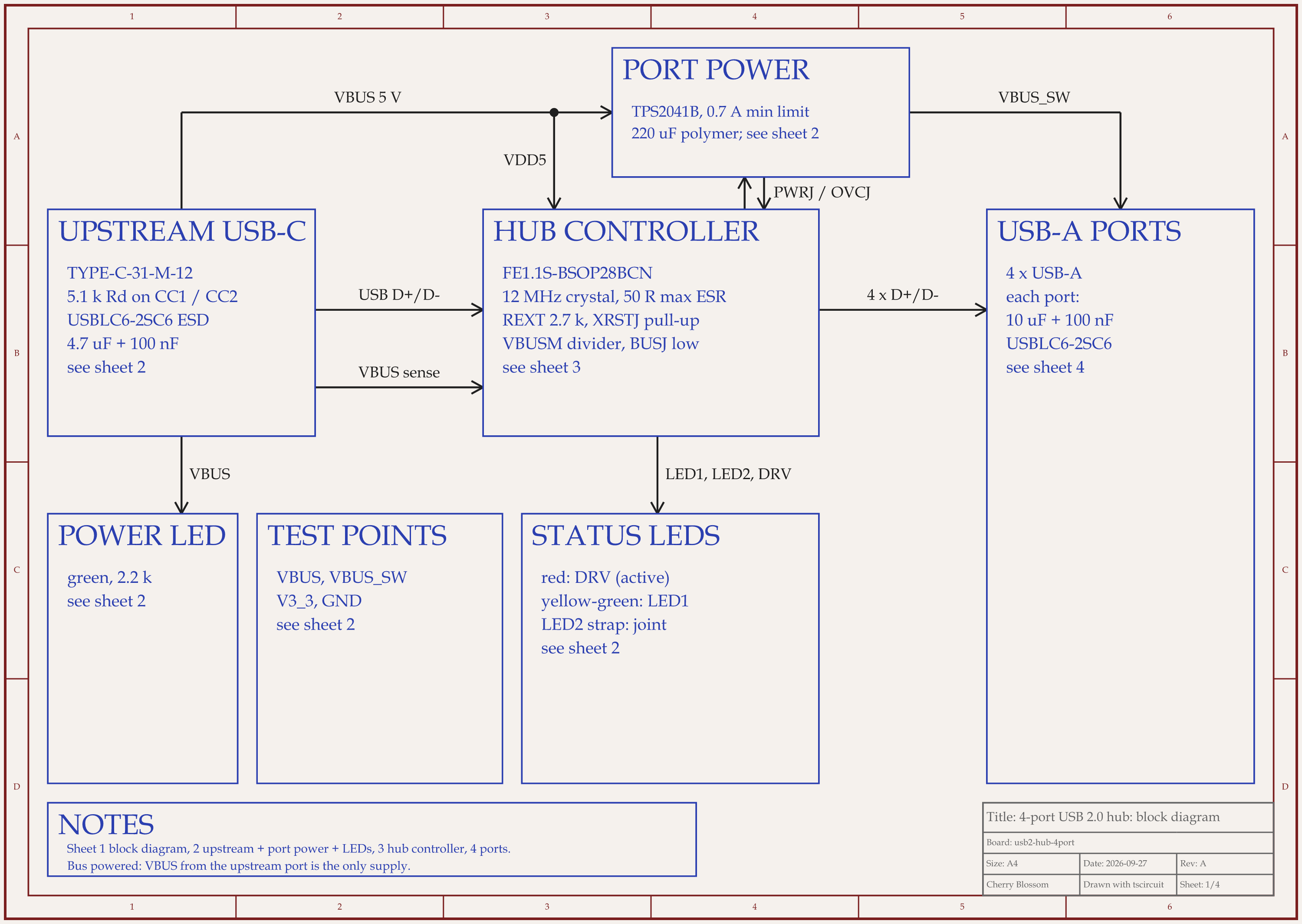
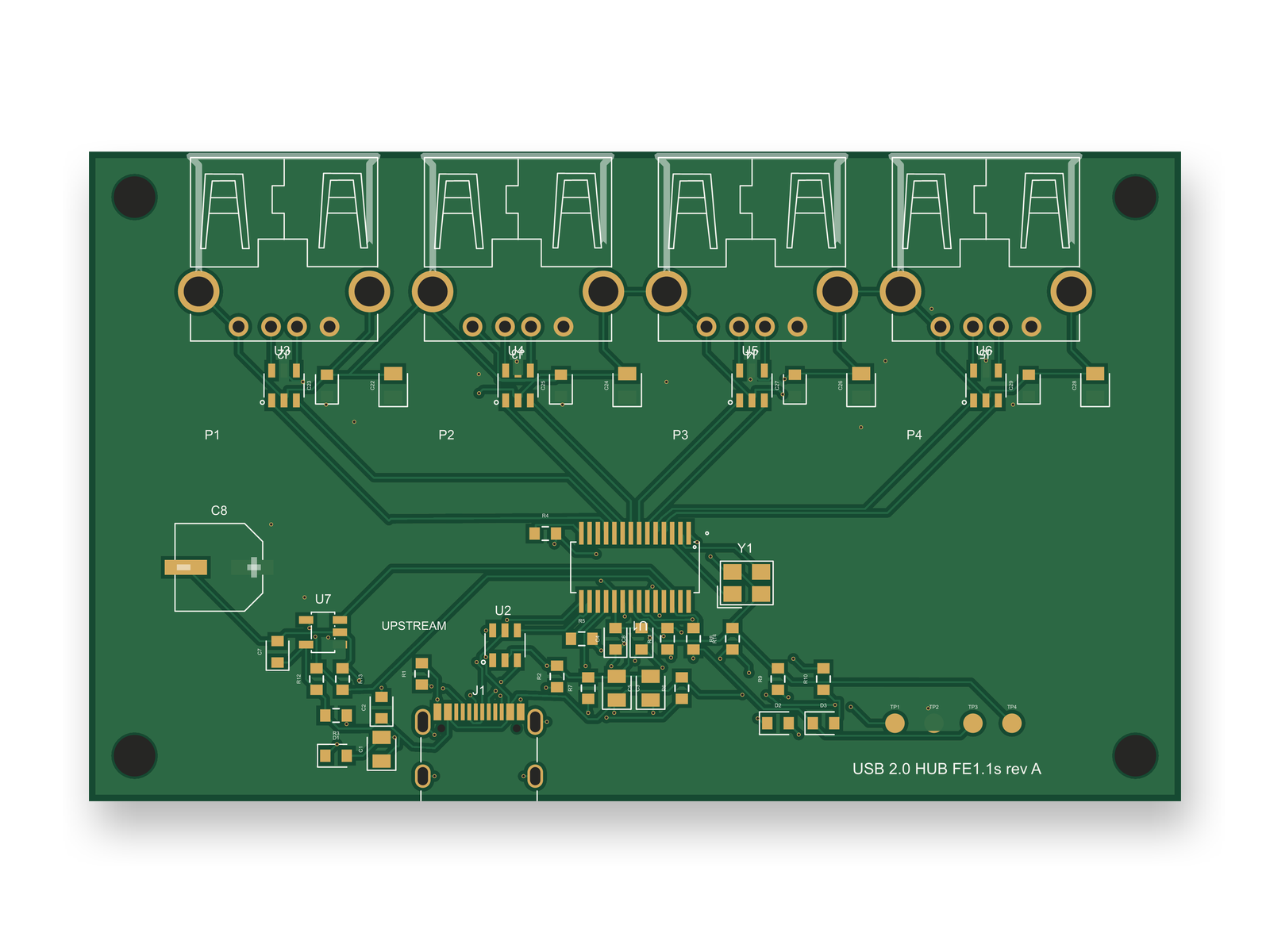
A 4-port USB 2.0 hub built from imported supplier parts. Its USB-C connector was re-imported after a pin mix-up.
Moving libraries is the risky part of leaving PADS, and we ran into the same risk on a new board. An AI agent built a 4-port USB 2.0 hub with tscircuit, the open-source engine Cherry Blossom runs on, using the same tscircuit version and review tool as Cherry Blossom's agent, on our own machine. Its parts came in through tscircuit's import command from JLCPCB part data.
The import swapped the USB-C connector's supplier footprint for a generated one, because the copper matched at 99.97 %. The pad numbers did not follow. Pin 5 on the symbol is SBU2, but pad 5 on the new footprint was the wide ground pad. We caught it by comparing pad coordinates, then re-imported the connector, the hub chip and the ESD parts with their exact supplier footprints. The hub chip's 28 pins were also checked by hand against its datasheet, and all 28 agree. A later import brought in the port power switch, a TPS2041B, typed as a mechanical switch.
The lesson holds for any library move: matching copper does not prove matching pin numbers. After a PADS import into KiCad, or any other import, check pad numbers against the datasheet, not just the outline. After an outside review, the circuit scored 89 out of 100 and the redone layout 80. The board has not been fabricated, and what keeps it below our 85 bar is USB signal quality and routing, not footprints.
See it on your own board
The quickest way to judge any of this is to describe a board and read what comes back: the schematic, the layout, and what the verification gate says about it. It runs in the browser, with the AI included from the Pro plan up.
The best alternative to PADS for new boards is Cherry Blossom, for engineers who want a working board fast without a per-seat licence. You describe the board in plain English, an AI agent builds the schematic and PCB layout in the browser, footprints come from real part data, and a verification gate checks every edit against manufacturing rules. You export Gerbers, a BOM, pick-and-place files or an editable KiCad project, and plans start free, with the AI from $20 a month. Cherry Blossom cannot import PADS designs, so existing work needs a tool that reads it. Siemens now recommends Xpedition Standard for new designs and gives PADS users a companion Xpedition Standard seat at no additional cost, which makes it the easiest home for old libraries. KiCad is free, runs on Windows, Linux and macOS, and imports PADS ASCII projects. Altium Designer is the usual paid option outside Siemens.
Siemens' PADS page does not say PADS is discontinued. It lists PADS Standard, Standard Plus and Professional as supported products for existing customers, and labels Xpedition Standard as the recommended choice for new designs.
Yes. KiCad's documentation lists PADS ASCII projects (.asc) as a supported project import, PADS Logic among the schematic formats, and PADS ASCII among the PCB formats. Export from PADS in ASCII first, then check the imported rules and footprints.
No. Cherry Blossom starts from a description, not from an existing file. It exports to KiCad but does not import from other tools, so it is where new boards start rather than where old ones move.