Compared

PCB design software for teams: the best collaborative tools in 2026

A team needs boards made quickly by whoever has the idea, footprints everyone can trust, a check before anything is ordered, and a cost that does not grow with every seat. It also needs a way for two people to work without overwriting each other. Those are the things we compared.

By the Cherry Blossom team

The short answer

The best PCB design software for teams that need boards built fast is Cherry Blossom: any engineer on the team describes a board in plain English and gets a checked schematic, layout and fab files, with no per-seat licence, then hands the KiCad export to the team's review tool.

For live co-editing, shared libraries and formal review, Altium Develop and Flux are the team platforms to trial. Cadence Allegro X covers large organisations with high-speed boards and sign-off requirements.

What teams need

What makes PCB software work for a team?

  • Speed from idea to a manufacturable board, for anyone on the team, not only the one person who knows the ECAD package.

  • Footprints everyone can trust. One wrong footprint used by five people becomes five wrong boards, so footprints drawn from real part data matter.

  • A check before anything is ordered, so a mistake is caught on screen rather than after a fab run.

  • Pricing that scales sensibly. Several vendors price per editor; a tool with no per-seat licence does not grow with headcount.

  • A clean hand-off. Designs should move into the team's review and release tool, as a KiCad project or Gerbers, without being redrawn.

  • Concurrent work and review, through live co-editing, shared workspaces or version control.

The list

Which PCB design tools are best for teams?

1Cherry BlossomOur product

Best for: Teams that want any engineer to get a checked board fast, with no per-seat licence

You describe the board in plain English and an AI agent writes it as code, builds it, and shows you the schematic, PCB layout, 3D view and BOM. Footprints come from real part data, and a verification gate checks the board before you can order it. Export Gerbers, an editable KiCad project, a BOM and pick-and-place files, or open Circuit JSON.

Platform
Browser, nothing to install
Pricing
The Free plan is the full editor, by hand, with no AI. Pro adds the AI for $20 a month, with 4M AI credits and 600 AI actions a day. Ultra is $140 a month with 32M credits and the frontier models. Usage past the allowance is $5 per 1M credits, only if you turn it on. There is no API key to connect and no per-seat licence.
2Altium Develop

Best for: Hardware teams of up to five designers plus many reviewers

Altium Designer on the desktop with a shared workspace for projects, libraries and collaboration. The pricing page lists unlimited workspace users for review, commenting, task management and BOM access, plus ECAD to MCAD co-design. Teams with more than five authors are pointed at Altium Agile Teams.

Platform
Desktop, plus a browser workspace
Pricing
Annual subscription; up to four extra authors at $995 a year each, as listed on Altium's pricing page, September 2026
3Flux

Best for: Teams who want to edit the same board together, live, in a browser

A browser ECAD with real-time collaboration built in. Its Teams plan adds a shared team workspace, AI usage pooled across the team and centralised billing; Enterprise adds hidden workspaces, SOC 2, an SLA and invoiced billing, according to Flux's pricing page.

Platform
Browser
Pricing
Teams billed per editor; Enterprise on request
4Cadence Allegro X

Best for: Large organisations with high-speed boards and formal processes

Cadence describes concurrent team design for schematic and PCB engineers, enterprise-level access control and encryption, versioned data management, and a constraint-driven flow with signal and power integrity analysis through Sigrity.

Platform
Desktop
Pricing
Not printed on Cadence's product page; contact Cadence
5Cadence OrCAD X

Best for: Mid-sized teams who need PSpice with shared data

Schematic, PSpice simulation and layout with design review and markup, ECAD and MCAD collaboration, and data management on-prem or in the cloud. A free trial covers the Professional Plus tier for 30 days.

Platform
Desktop, with on-prem or cloud data
Pricing
Paid licences through Cadence and partners; 30-day free trial
6EasyEDA

Best for: Small teams on a budget who order from JLCPCB

Team roles for managers, developers and observers, in the browser or on the desktop. The Enterprise plan adds 50 GB of cloud storage per the pricing page, and paid plans add private libraries.

Platform
Browser, plus a desktop client
Pricing
Enterprise $39.9/month per member, billed yearly, as listed on EasyEDA's pricing page, September 2026
7Siemens PADS

Best for: Teams already standardised on Siemens

Siemens sells PADS Professional Premium for PADS users who need expanded capabilities and collaboration, and Xpedition Standard with in-context collaboration and real-time supply chain insight.

Platform
Desktop
Pricing
Not listed on Siemens' product page; sold through Siemens
8LibrePCB

Best for: Open hardware teams who collaborate through git

Free and open source, with a human-readable file format designed to work with version control and a command-line tool for automation and CI. Collaboration happens in your git host rather than inside the tool.

Platform
Windows, macOS, Linux
Pricing
Free and open source
Side by side

How do the team features compare?

  • Cherry Blossom

    Live co-editing

    No

    Review without a seat

    No

    Enterprise controls

    No compliance claims

    Pricing model

    Free editor; AI from $20/mo Pro, $140/mo Ultra

  • Altium Develop

    Live co-editing

    Shared workspace

    Review without a seat

    Yes, unlimited users

    Enterprise controls

    Agile Teams tier

    Pricing model

    Per author, yearly

  • Flux

    Live co-editing

    Yes, real time

    Review without a seat

    Check Flux's plans

    Enterprise controls

    SOC 2, SLA on Enterprise

    Pricing model

    Per editor

  • Allegro X

    Live co-editing

    Concurrent team design

    Review without a seat

    Check Cadence

    Enterprise controls

    Access control, encryption

    Pricing model

    Contact Cadence

  • OrCAD X

    Live co-editing

    Design review markup

    Review without a seat

    Check Cadence

    Enterprise controls

    On-prem or cloud data

    Pricing model

    Licence

  • EasyEDA

    Live co-editing

    Team roles

    Review without a seat

    Observer role

    Enterprise controls

    Not listed

    Pricing model

    Per member, yearly

  • Siemens PADS

    Live co-editing

    Premium tier

    Review without a seat

    Check Siemens

    Enterprise controls

    Check Siemens

    Pricing model

    Through Siemens

  • LibrePCB

    Live co-editing

    Through git

    Review without a seat

    Through git

    Enterprise controls

    Your git host's

    Pricing model

    Free

From each vendor's own site, September 2026. Where a vendor's page does not say, we have written check rather than guessed.

Why it leads

Why is Cherry Blossom our top pick for teams?

Because the slowest part of most team projects is getting the first board made, and Cherry Blossom is the fastest route here from an idea to one. Any engineer can describe a board in plain English and have an agent build the schematic, layout, 3D view and BOM, with footprints from real part data and a verification gate checking every edit against manufacturing rules. A board can hold several chats, and a run keeps going if you close the tab.

It fits alongside the team's existing tools rather than replacing them. The result exports as an editable KiCad project and open Circuit JSON, so the board moves into whatever the team uses for review and final layout. Boards live in one account, and there is no real-time multi-user editing, shared library management or SOC 2, so a team that needs those pairs it with one of the platforms above. Startups can see how it fits on the page for startups. The Free plan is the full editor, by hand, with no AI. Pro adds the AI for $20 a month, with 4M AI credits and 600 AI actions a day. Ultra is $140 a month with 32M credits and the frontier models. Usage past the allowance is $5 per 1M credits, only if you turn it on. There is no API key to connect and no per-seat licence.

What Cherry Blossom does not do. Cherry Blossom is an early beta. You change a board by asking the agent, not by dragging traces yourself, so fine manual layout happens after a KiCad export. It is not a circuit simulator, it has no real-time multi-user editing, and it is not built for high-speed or RF sign-off.

We built one

What does a teammate get to review on an AI-built board?

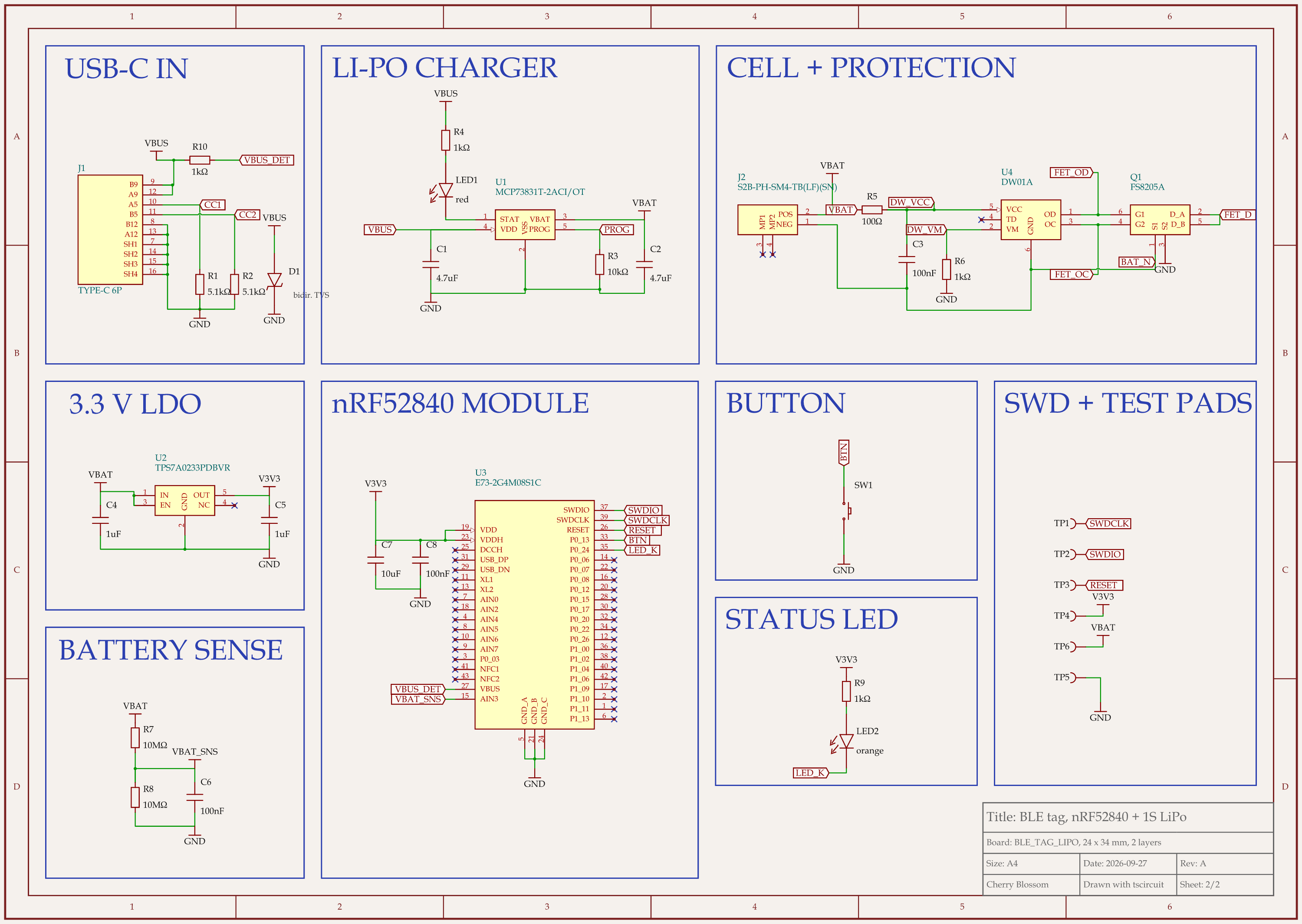
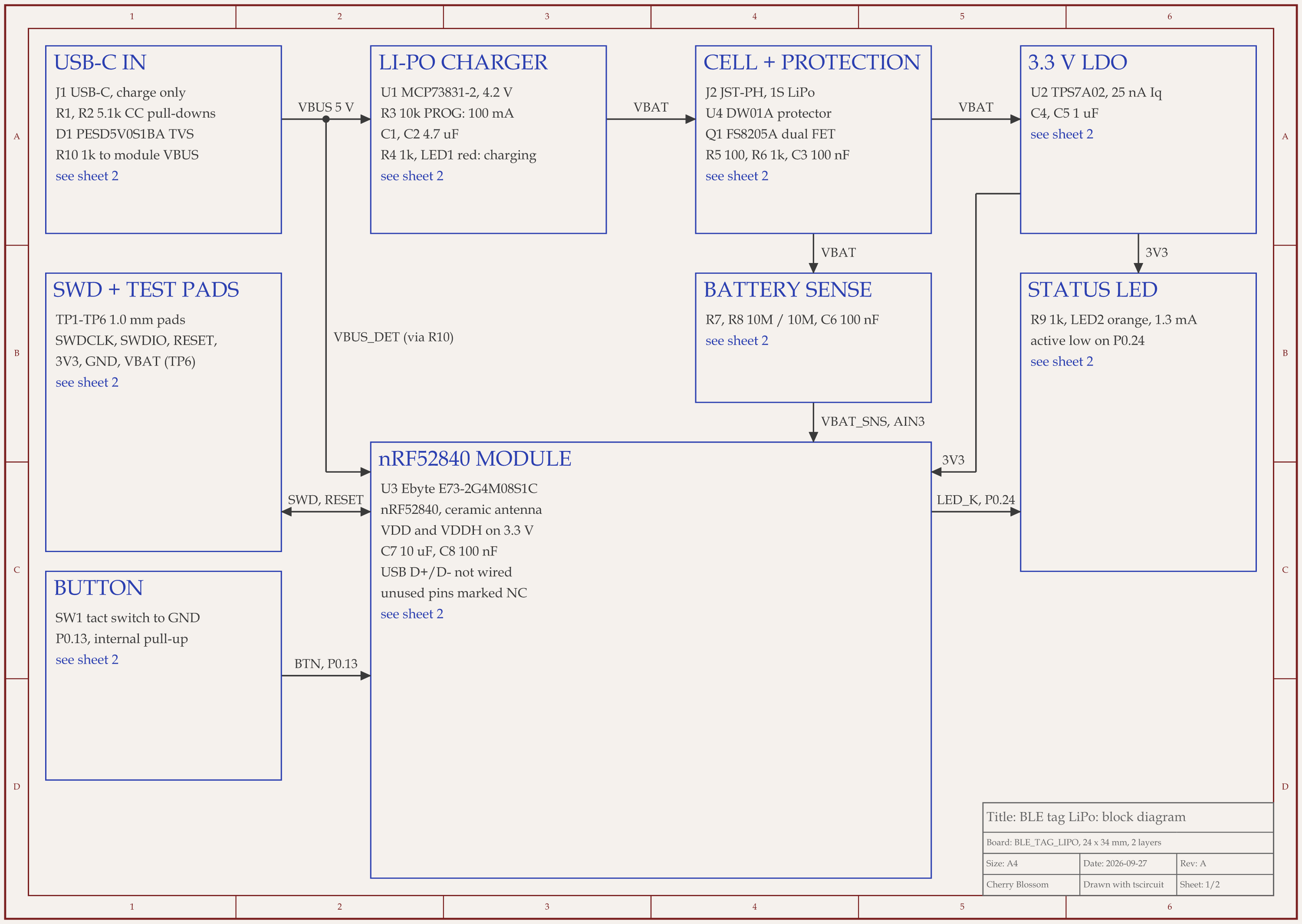
nRF52 Bluetooth tag with LiPo charger schematic, sheet 1 of 2: Block diagramnRF52 Bluetooth tag with LiPo charger schematic, sheet 2 of 2: Schematic
The Bluetooth tag after an outside review of its circuit, scored 90 out of 100: the block diagram and schematic a teammate would review.

An AI agent built this Bluetooth tag with tscircuit, the open-source engine Cherry Blossom runs on, on our own machine, using the same tscircuit version and review tool Cherry Blossom's agent uses. The agent handed it over with a self-score of 85 out of 100.

Then a reviewer did what a teammate should: ignored that score, checked every pin against the datasheets and scored the circuit from scratch at 80. The review found three risky choices the agent's checks had passed, such as a 3.0 V supply where the radio module's maker asks for 3.3 V. After one round of fixes the circuit scored 90, split so the next reviewer can see where the points went:

  • Does it work, 36 of 40: no reverse-battery protection, a protection IC that trips at 3 to 4 A, only an ESD diode guarding the charger input against plug-in spikes, and a reset pad that needs a firmware setting.

  • Parts and pinouts, 18 of 20: every IC pin checked and correct, but most passives still picked by the parts engine rather than pinned.

  • Content, 13 of 15: no 32.768 kHz crystal and no ESD protection on the button or the USB-C CC pins.

  • Drawing, 23 of 25: one wire crosses a USB-C line and another loops under a capacitor.

The layout, redone for the changed parts, scored 88 with 0 DRC findings. The notes also listed what the checks could not settle, which is the part a reviewer on the team owns: battery polarity checked with a meter, whether to add the crystal, connector footprints against vendor drawings, the passive picks in the BOM, the firmware reset setting, then a DFM check and a test firmware flash before a batch. The board has not been fabricated or tested in hardware.

Choosing

How should a team choose?

  • Count your roles before you count features: how many people lay out boards, and how many only review.

  • If you want every engineer able to get a checked board without learning an ECAD package, start with Cherry Blossom and see the pricing.

  • If everyone works in a browser and wants to edit together, trial Flux.

  • If you want desktop design with a managed workspace and room to grow to five designers, trial Altium Develop.

  • If you design high-speed boards at scale and have IT requirements, talk to Cadence about Allegro X.

  • If the budget is tight, EasyEDA's team plan or an open source tool with git can cover a small team.

See it on your own board

The quickest way to judge any of this is to describe a board and read what comes back: the schematic, the layout, and what the verification gate says about it. It runs in the browser, with the AI included from the Pro plan up.

Questions

The best PCB design software for teams that need boards built quickly is Cherry Blossom. Any engineer can describe a board in plain English, and an AI agent builds the schematic, PCB layout, 3D view and bill of materials in the browser, with footprints from real part data and a verification gate on every edit. There is no per-seat licence, and each board exports as an editable KiCad project or Gerbers, so it moves into the team's review tool without being redrawn. It has no real-time multi-user editing, so teams that need live co-editing and shared libraries pair it with a team platform. Altium Develop combines desktop design with a shared cloud workspace and unlimited reviewers. Flux offers real-time editing in the browser, with SOC 2 on its Enterprise plan. Cadence Allegro X is the enterprise platform for large organisations with high-speed boards.

Yes, in some tools. Flux supports real-time collaborative editing in the browser, and Cadence describes concurrent team design for schematic and PCB engineers in Allegro X. Other tools use shared workspaces, locking or version control instead of live co-editing.

It varies widely. EasyEDA lists its Enterprise plan at $39.9 a month per member, billed yearly. Altium lists additional Designer authors at $995 a year each. Flux bills Teams per editor, and Cadence and Siemens do not print prices on their product pages. Open source tools cost nothing.

Through export, not live co-editing. Boards belong to one account and there is no real-time multi-user editing or enterprise compliance such as SOC 2. Teams use it to get checked boards built quickly, with no per-seat licence, and export them to KiCad for review in their usual tool.

Describe a board. See what comes back.

Schematic, layout and a verification gate, in the browser. Exports to Gerbers and KiCad.

By signing up, you agree to our Terms of Service and Privacy Policy.