Cherry Blossom vs ProtoFlow: a ProtoFlow alternative
ProtoFlow is a desktop EDA application for macOS, Windows and Linux with an AI copilot built in: you can ask it to draft a circuit, then edit, route and export in a full editor. Cherry Blossom runs in the browser and has no editor to draw in. You describe the board, and an agent designs, builds and checks it.
By Arnaud and Anass·
The short answer
The best ProtoFlow alternative is Cherry Blossom if you would rather describe the board than draw it: an agent in a cloud sandbox writes and builds the whole board, and a verification gate checks it against manufacturing rules before you order.
It runs in the browser with nothing to install, the run keeps going after you close the tab, and the board exports as an editable KiCad project.
ProtoFlow suits people who want a desktop editor to route by hand, with SPICE simulation, live multi-user editing and a free plan.
The reasons
Why look for a ProtoFlow alternative?
ProtoFlow does a lot, and its free plan is generous, so the reasons to look elsewhere are narrow. It is a desktop application, which means installing it on each machine you work from. And its AI drafts the circuit, then hands you a full editor to finish in. That suits people who want to edit by hand. It suits people who wanted the AI to carry the whole board less well.
If you want to work from a browser tab, or you want a tool where describing the change is the whole job, Cherry Blossom is built for that. The prompt-to-PCB page shows the workflow.
The difference
Editor with an AI, or an AI without an editor?
ProtoFlow calls itself an AI-native desktop tool. Its homepage describes three steps: describe the circuit in plain language, let ProtoFlow draft the schematic, place parts and do the first wiring, then export the cleaned-up project to KiCad or Altium. Its docs cover a full schematic editor, PCB layout with tracks, vias, copper pours and a 3D view, an AI Copilot, an AI Component Lab that makes symbols and footprints from a part name or datasheet, DRC and ERC, and SPICE simulation.
Cherry Blossom has no canvas. An agent writes the board as tscircuit code, builds it, and shows the schematic, PCB, 3D view and BOM as read-only views. To change the board you ask the agent. Footprints come from real part data, every AI edit goes through a verification gate, and a DRC check runs before ordering.
If you like to nudge traces yourself, ProtoFlow's editor does that. In Cherry Blossom, fine manual layout happens after a KiCad export.
ProtoFlow details from protoflow.ai, its docs and its pricing page, September 2026.
We built one
What does fixing a board without an editor look like?
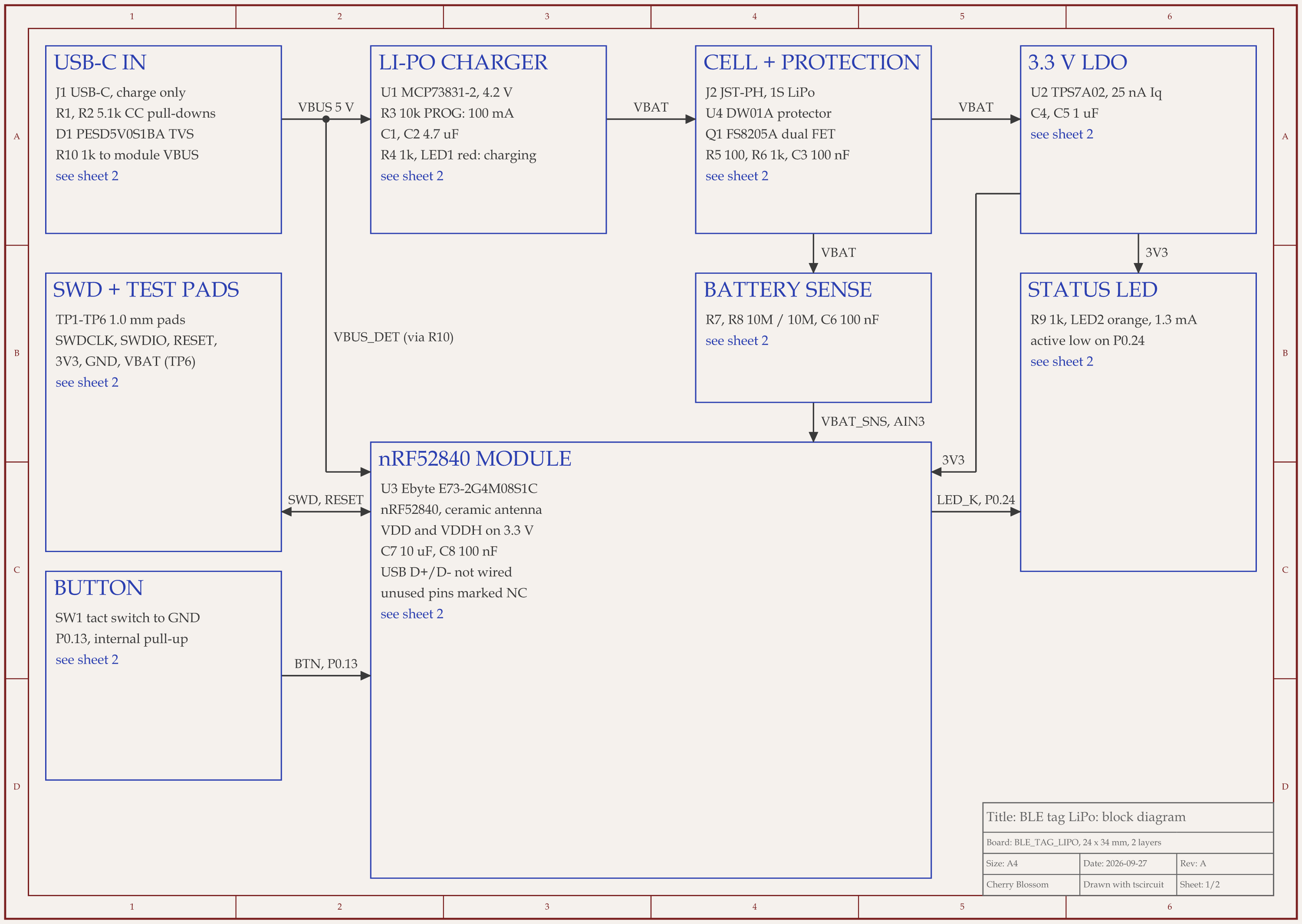
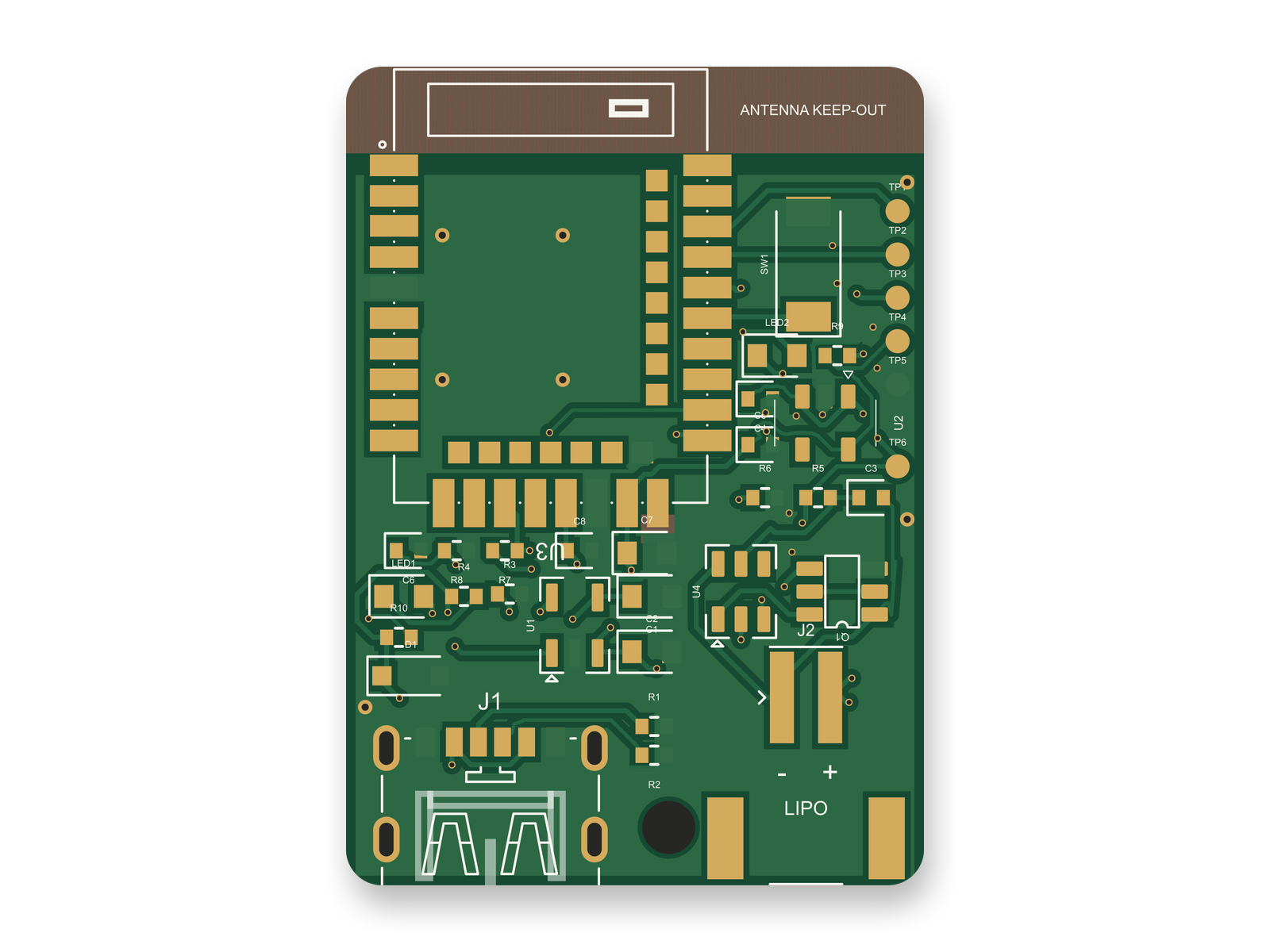
The Bluetooth tag after rounds of changes made by asking rather than dragging: block diagram and routed PCB.
An AI agent built a small Bluetooth tag (nRF52840 module, LiPo charger, USB-C charging) with tscircuit, the open-source engine Cherry Blossom runs on. It ran on our own machine with the same tscircuit version and review tool as Cherry Blossom's agent. No one opened a canvas: each fix was a code change and a full rebuild, and a routed rebuild took between 39 seconds and 2 minutes 43 seconds.
Over four rounds those rebuilds cut the board from 26 x 34 mm to 24 x 34 mm and moved the traces from 0.15 mm to 0.2 mm. They added a top-side ground pour with 7 stitching vias, and put polarity marks and the board name on the silkscreen. The rubric score went 72, 82, 84, 85.
An outside review of the circuit then scored it 80 and asked for three changes: a 1k resistor between USB power and the module's VBUS pin, which is rated 5.8 V at most; a 1k LED resistor in place of 220 ohms; and a 3.3 V regulator in place of the 3.0 V one. Those went in the same way, as code, in one round. The circuit scored 90 afterwards, and the redone layout 88.
What was left is the sort of thing an editor user fixes by hand: crowded reference labels, a few 0.15 mm segments, and 0.2 mm power runs that are fine for 100 mA but not generous. In ProtoFlow you would drag those. Here you ask again, or finish in KiCad. The board has not been made or tested in hardware.
Cost
What does each one cost?
ProtoFlow's homepage says the free plan does not expire, needs no card, and gives every user the full editor and the AI features, with a daily cap on AI messages. Its pricing page lists Pro (new subscriptions start with a 7-day free trial), Max with higher usage limits and more advanced models, and Enterprise with custom seat licensing and SSO. We have not quoted its paid prices because they did not appear on the page we could read.
The Free plan is the full editor, by hand, with no AI. Pro adds the AI for $20 a month, with 4M AI credits and 600 AI actions a day. Ultra is $140 a month with 32M credits and the frontier models. Usage past the allowance is $5 per 1M credits, only if you turn it on. There is no API key to connect and no per-seat licence.

If your budget is zero, ProtoFlow's free plan is the way in. If you want an agent that carries the whole board to fab files, Cherry Blossom's AI starts with Pro.
Who should stay
When is ProtoFlow the better choice?
ProtoFlow can be the better fit if these matter to you.
You want AI help but also a full editor where you can route by hand.
You need SPICE simulation in the same tool.
Several people need to edit the same design at once.
Who should switch
When is Cherry Blossom the better choice, and how do you start?
You would rather describe the board than draw any of it.
You cannot or do not want to install desktop software; Cherry Blossom runs in a browser tab.
You want a run to keep going in the cloud after you close the tab.
You want to order from the same place, through the PCBWay hand-off, once the board passes its checks.
Starting looks the same as it does in ProtoFlow: describe the circuit in plain language. The difference comes after the first draft. Instead of opening an editor, you ask the agent for each change in the same chat, and it rebuilds and re-checks the board. If you want to finish something by hand, export the KiCad project, which ProtoFlow also lists among its supported formats.
Current limits. Cherry Blossom is an early beta. You change a board by asking the agent, not by dragging traces yourself, so fine manual layout happens after a KiCad export. It is not a circuit simulator, it has no real-time multi-user editing, and it is not built for high-speed or RF sign-off.
Everything else
Where do both sit among AI PCB tools?
1Cherry BlossomOur product
Best for: Going from a plain-English description to a fab-ready board, in the browser
You describe the board in plain English and an AI agent writes it as code, builds it, and shows you the schematic, PCB layout, 3D view and BOM. Footprints come from real part data, and a verification gate checks the board before you can order it. Export Gerbers, an editable KiCad project, a BOM and pick-and-place files, or open Circuit JSON.
Platform
Browser, nothing to install
Pricing
The Free plan is the full editor, by hand, with no AI. Pro adds the AI for $20 a month, with 4M AI credits and 600 AI actions a day. Ultra is $140 a month with 32M credits and the frontier models. Usage past the allowance is $5 per 1M credits, only if you turn it on. There is no API key to connect and no per-seat licence.
2ProtoFlow
Best for: A desktop EDA editor with an AI copilot and a free plan
Drafts schematics from plain language, then lets you edit, route, simulate and collaborate in a full desktop editor. Exports Gerbers and JLCPCB files, and projects to KiCad, Altium and others.
Platform
Desktop: macOS, Windows, Linux
Pricing
Free plan with AI features; paid Pro, Max and Enterprise
The quickest way to judge any of this is to describe a board and read what comes back: the schematic, the layout, and what the verification gate says about it. It runs in the browser, with the AI included from the Pro plan up.
The best ProtoFlow alternative is Cherry Blossom if you want the AI to do all of the drawing. ProtoFlow is a desktop EDA application for macOS, Windows and Linux: its AI drafts a circuit from a plain-language description, and then you keep working in a full schematic and PCB editor with DRC, ERC, SPICE simulation and real-time multi-user editing. It also has a free plan with AI features. Cherry Blossom runs in the browser with nothing to install. You describe the board, an AI agent writes and builds the whole design, and a verification gate checks it against manufacturing rules before you can order through PCBWay. Footprints come from real part data, and the board exports as Gerbers and an editable KiCad project. If you want to route by hand, simulate or collaborate live, ProtoFlow covers that. If you want a hands-off path from a sentence to fab files, pick Cherry Blossom.
ProtoFlow has a free plan that its homepage says does not expire, needs no card and includes the full editor and AI features, with daily limits on AI messages. Paid Pro, Max and Enterprise plans raise the limits.
ProtoFlow is a desktop application for macOS, Windows and Linux. Cherry Blossom runs entirely in the browser, with the agent working in a cloud sandbox.
Yes. ProtoFlow lists KiCad among its export targets alongside Altium, EAGLE, PADS and EDIF. Cherry Blossom exports an editable KiCad project, plus Gerbers, BOM, pick-and-place, 3D models and Circuit JSON.