Alternatives

Cherry Blossom vs Trace: a Trace alternative

Of the AI PCB tools we compare, Trace is one of the closest to Cherry Blossom in intent. Both let an agent take a board from a description through schematic, placement, routing, DRC and Gerbers. The biggest difference is where that happens: Trace is a desktop app built on KiCad, and Cherry Blossom is a browser app with the agent in a cloud sandbox.

By Arnaud and Anass

The short answer

The best Trace alternative is Cherry Blossom if you want an AI agent to take a board from a plain-English description to Gerbers in the browser, with nothing to install and a run that keeps going in the cloud when you close the tab.

Footprints come from real part data, a verification gate checks every AI edit, and the board exports as an editable KiCad project, with a PCBWay hand-off when you want to order.

Trace suits people who want the agent inside a KiCad-based desktop app, with enclosure import from DXF or STEP and ODB++ or IPC-2581 exports.

The reasons

Why look for a Trace alternative?

Trace is close to what we build, so the reasons to look elsewhere are mostly about setup and billing. It installs as a desktop app (or a command-line tool) on each machine you use, which is a step some people would rather skip. Its paid plans are also counted in agent requests (its pricing page lists about 75 a month on Pro and about 425 on Ultra), which is worth weighing against how much you expect to ask of the agent.

If you want to open a browser tab on any computer and pick up the board where you left it, a browser-based agent is the more direct fit. The prompt-to-PCB page shows how that works in Cherry Blossom.

The difference

Desktop KiCad or browser tab?

Trace says it handles the full PCB workflow: concept, block diagram, schematic capture, datasheet parsing, component selection, placement, layout, routing, DRC and Gerber export. Its docs say it is built on KiCad and installs on macOS, Windows or Linux, and there is also a command-line option through pip. It accepts natural-language descriptions, enclosure files in DXF or STEP, and existing KiCad designs for AI review, and it checks component availability across JLCPCB, DigiKey, Mouser and other distributors.

Cherry Blossom runs in the browser. An agent in a cloud sandbox writes the board as tscircuit code, builds it, and shows the schematic, PCB layout, 3D view and BOM. Footprints come from real part data rather than being guessed, each AI edit passes a verification gate, and a DRC check runs before ordering. Boards live in your account, and each board can hold several chats.

Side by side

How do Trace and Cherry Blossom compare?

  • Platform

    Cherry Blossom

    Browser; agent runs in a cloud sandbox

    Trace

    Desktop app built on KiCad; CLI too

  • Scope

    Cherry Blossom

    Description to schematic, layout, BOM, Gerbers

    Trace

    Description to schematic, layout, routing, DRC, Gerbers

  • Extra inputs

    Cherry Blossom

    Text only

    Trace

    DXF or STEP enclosures, existing KiCad designs

  • Exports

    Cherry Blossom

    Gerbers, KiCad project, BOM, pick-and-place, STEP, GLB, Circuit JSON

    Trace

    Gerbers, BOM, CPL, ODB++, IPC-2581, STEP

  • Ordering

    Cherry Blossom

    PCBWay hand-off

    Trace

    Fab files with DFM validation

  • Pricing

    Cherry Blossom

    $20/mo Pro, $140/mo Ultra, AI included

    Trace

    Pay as you go from $20; Pro $29.99/mo; Ultra $169.99/mo

Trace details from buildwithtrace.com, its docs and its pricing page, September 2026.

We built one

How long does an agent take to route a real board?

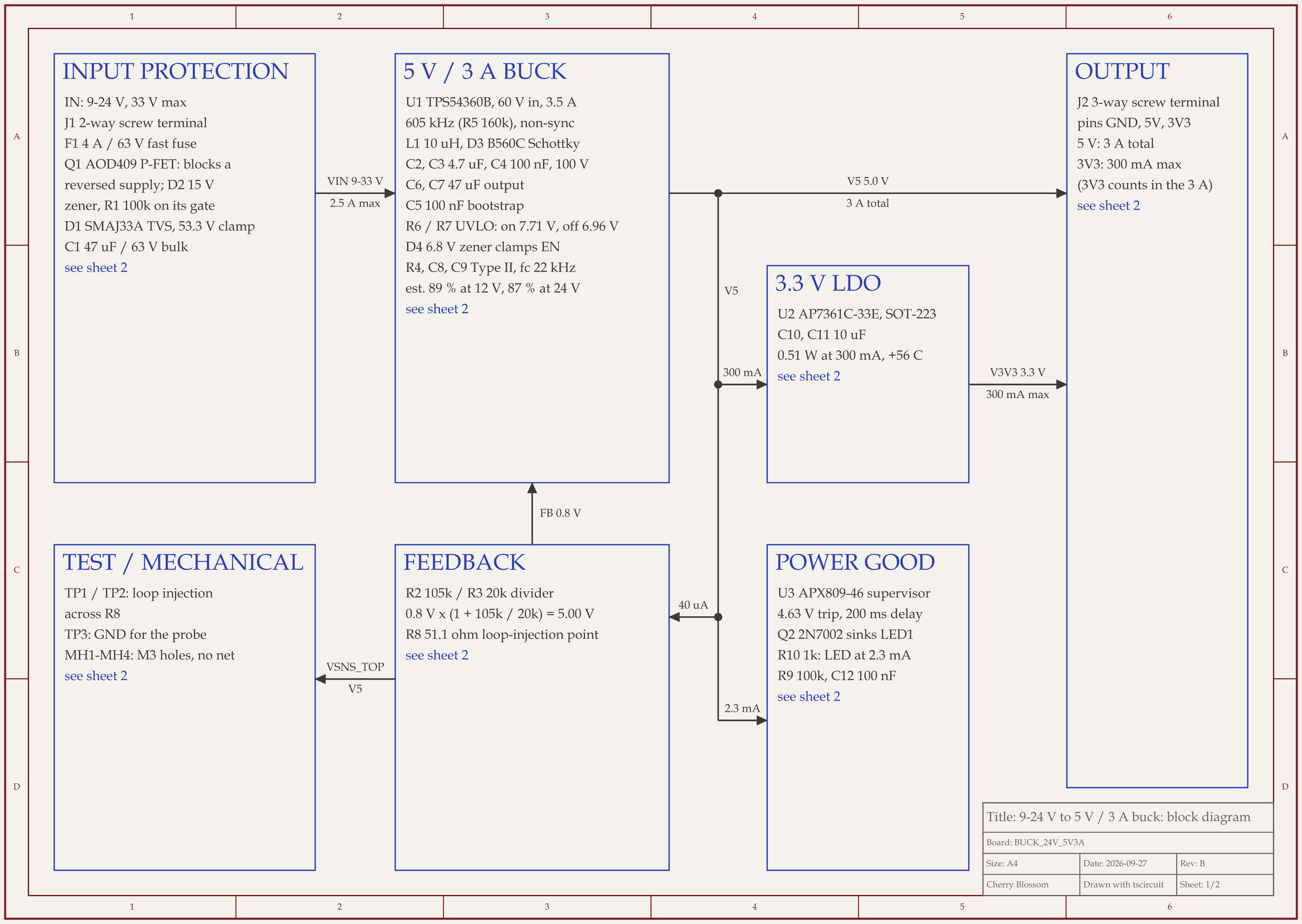
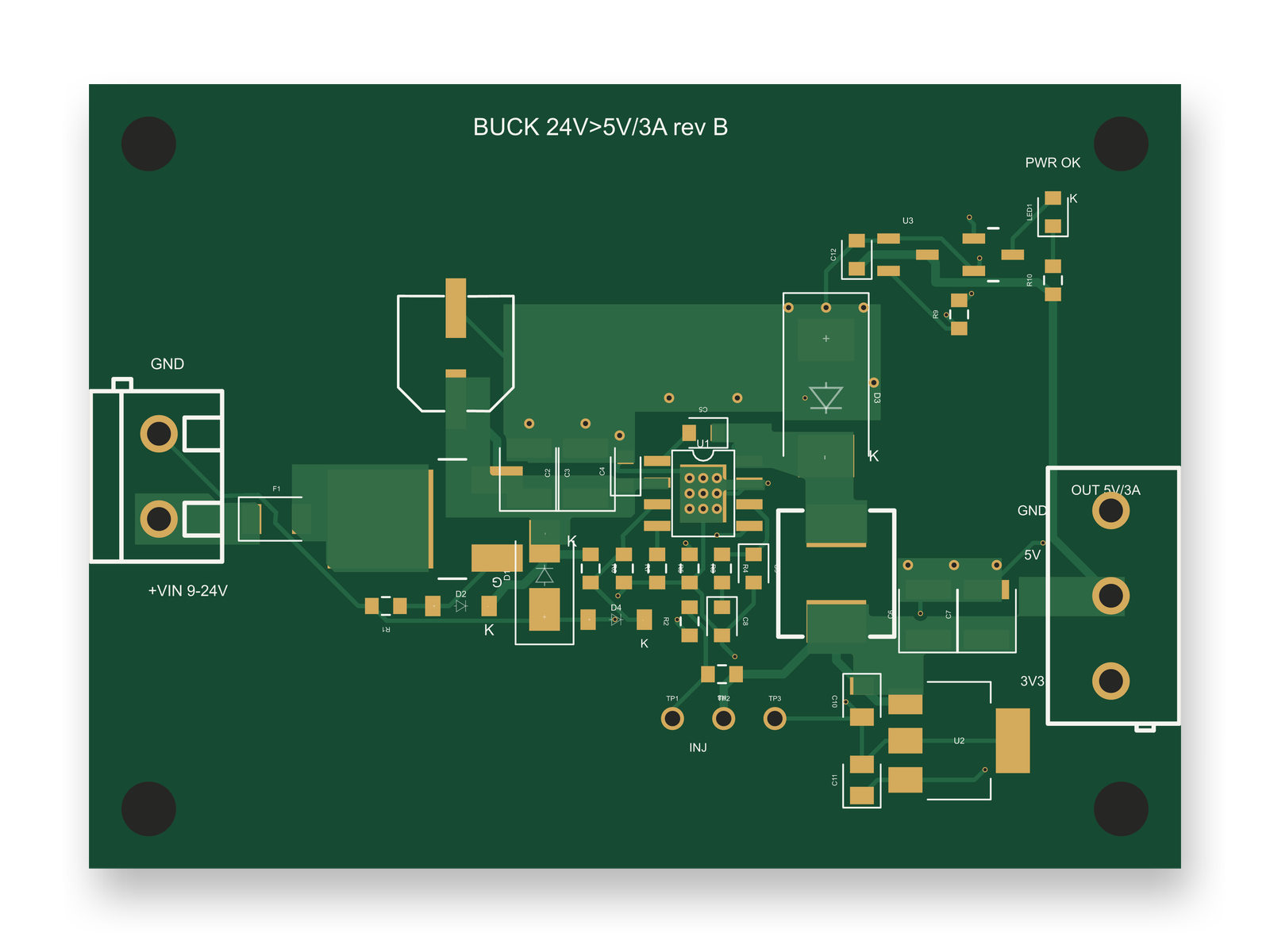
9-24 V to 5 V 3 A buck board schematic, sheet 1 of 2: Block diagramRouted PCB layout of the 9-24 V to 5 V 3 A buck board
Rev B of a 24 V to 5 V, 3 A buck board: 70 routed traces and 9 copper pours on two layers.

Trace and Cherry Blossom both route for you, so routing time is a fair question. An AI agent built this 9 to 24 V in, 5 V at 3 A board with tscircuit, the open-source engine Cherry Blossom runs on, on our own machine, with the same version and review tool Cherry Blossom's agent uses. The final full build, routing included, took 73 seconds, with other boards building on the same machine. It produced 70 traces totalling 354 mm, 38 vias, 9 copper pours and 0 DRC errors. Earlier full builds of this revision took 15 to 47 seconds. That last build followed an outside review that added a zener diode to the circuit, and the re-route took one round.

The failed attempts were slower. A routing phase with 1.2 mm power traces ran out of iterations after 4 minutes with 0 traces, and another experiment ran 8 minutes 42 seconds before it failed. Both were reverted. What worked was drawing the high-current paths as copper pours and routing the power nets first, at 0.5 mm.

A fast, clean route says nothing about part ratings. An earlier revision routed with 0 DRC errors while its surge clamp sat 8.9 V above the converter's absolute maximum, and a review caught that, not the router. The board has not been fabricated.

Cost

What does each one cost?

As listed on Trace's pricing page, September 2026: Pay As You Go starts at a $20 one-time purchase with no subscription. Pro is $29.99 a month for about 75 agent requests. Ultra is $169.99 a month for about 425 agent requests, and adds advanced cloud routing, matched length tuning, component sourcing with live pricing, and hierarchical projects. Enterprise is custom, with private infrastructure, SSO and audit logs. The homepage mentions a 7-day free trial.

Pro is $20 a month with 4M AI credits and 600 AI actions a day. Ultra is $140 a month with 32M credits and the frontier models. Usage past the allowance is $5 per 1M credits, only if you turn it on. The AI is included, with no API key and no per-seat licence. The pricing page has the current plans.

Who should stay

When is Trace the better choice?

Trace can be the better fit if these are on your list.

  • The board has to fit an enclosure you already have as a DXF or STEP file.

  • You want an AI review of a KiCad design you made yourself.

  • You need ODB++ or IPC-2581 output, or matched length tuning.

Who should switch

When is Cherry Blossom the better choice, and how do you start?

  • You want to work from any machine with a browser and install nothing.

  • You want the agent to keep running in the cloud after you close the tab.

  • You want to order through the PCBWay hand-off from the same place.

  • You want the design in open Circuit JSON as well as an editable KiCad project.

Cherry Blossom takes text only, so an existing Trace project does not come across as a file. Start a new board with the same description you would give Trace's agent, and keep your Trace projects where they are: they are KiCad work either way. What you build here exports as an editable KiCad project too.

Current limits. Cherry Blossom is an early beta. You change a board by asking the agent, not by dragging traces yourself, so fine manual layout happens after a KiCad export. It is not a circuit simulator, it has no real-time multi-user editing, and it is not built for high-speed or RF sign-off.

Everything else

Where do both sit among AI PCB tools?

1Cherry BlossomOur product

Best for: Going from a plain-English description to a fab-ready board, in the browser

You describe the board in plain English and an AI agent writes it as code, builds it, and shows you the schematic, PCB layout, 3D view and BOM. Footprints come from real part data, and a verification gate checks the board before you can order it. Export Gerbers, an editable KiCad project, a BOM and pick-and-place files, or open Circuit JSON.

Platform
Browser, nothing to install
Pricing
Pro is $20 a month with 4M AI credits and 600 AI actions a day. Ultra is $140 a month with 32M credits and the frontier models. Usage past the allowance is $5 per 1M credits, only if you turn it on. The AI is included, with no API key and no per-seat licence.

2Trace

Best for: An AI agent for the full PCB flow in a KiCad-based desktop app

Takes a design from description through schematic, placement, routing, DRC and Gerbers. Imports DXF or STEP enclosures, reviews existing KiCad designs, and exports ODB++, IPC-2581 and STEP.

Platform
Desktop (macOS, Windows, Linux), plus a CLI
Pricing
Pay as you go from $20; Pro and Ultra monthly plans; Enterprise custom

If you are weighing agent-style tools, ProtoFlow and Flux are the other two worth reading about. The roundup of AI PCB design tools has the rest.

See it on your own board

The quickest way to judge any of this is to describe a board and read what comes back: the schematic, the layout, and what the verification gate says about it. It runs in the browser, with the AI included.

Questions

The best Trace alternative is Cherry Blossom, especially if you want to work in a browser instead of a desktop app. Both let an AI agent take a board from a plain-English description through schematic, placement, routing, design checks and Gerber files. Trace is a desktop app built on KiCad for macOS, Windows and Linux, and it adds enclosure import from DXF or STEP, AI review of existing KiCad designs, and ODB++ and IPC-2581 exports. Cherry Blossom runs in the browser, with the agent working in a cloud sandbox that keeps going if you close the tab. Its footprints come from real part data, a verification gate checks every AI edit, and you can order through a PCBWay hand-off. The board exports as an editable KiCad project, so your work stays portable. If you need enclosure import or ODB++ output on your own machine, Trace covers that. If you want nothing to install, pick Cherry Blossom.

As listed on Trace's pricing page in September 2026, Pay As You Go starts at $20 with no subscription, Pro is $29.99 a month for about 75 agent requests, Ultra is $169.99 a month for about 425 agent requests, and Enterprise is custom. Its homepage mentions a 7-day free trial.

Yes. Trace's documentation says it is built on KiCad, the open-source electronics design suite, and it installs as a desktop app on macOS, Windows or Linux.

Yes. Cherry Blossom exports an editable KiCad project alongside Gerbers, drill files, a BOM, pick-and-place files, 3D models and Circuit JSON.

Describe a board. See what comes back.

Schematic, layout and a verification gate, in the browser. Exports to Gerbers and KiCad.