Compared

The best AI PCB design tools for professionals: what fits the ECAD you already own

A working hardware engineer has an ECAD tool, a library, a review process and a fab house they trust. An AI tool helps that person only if it fits into that chain: it reads their files, writes back into them, and stays out of the parts they do by hand. We ranked on that, and on how fast a tool gets an engineer from an idea to a board a fab house will accept.

By the Cherry Blossom team

The short answer

The best AI PCB design tool for professionals in 2026 is Cherry Blossom when you need a first prototype board fast: you describe the board in plain English, an agent builds the schematic and layout from real part data, a verification gate checks every AI edit, and you export an editable KiCad project to finish in your own flow.

For production layout inside the ECAD you already own, Quilter takes designs from Altium, Cadence, KiCad, OrCAD and Xpedition and returns native files, with SOC 2 Type II cloud or self-hosting. On Allegro X, Cadence's own Allegro X AI automates placement, power planes and critical-net routing.

For the schematic front end, Celus and Circuit Mind turn requirements into a reference schematic and BOM for your ECAD. JITX suits teams that want the design as code, with HFSS in the loop for high-frequency work. For the general ranking, see our main roundup.

The test

What does a professional need from an AI PCB tool?

  • Speed to a manufacturable board. How long from an idea to fab files a board house will accept.

  • Checked output. Every AI change is verified against manufacturing rules, and footprints come from real part data.

  • Native files out. You can open the result in the ECAD you already use without cleanup.

  • A place in your process. Review, sign-off and simulation stay in the tools that do them today.

  • Low setup cost. No install, no per-seat licence, or clear terms your company will sign.

Professionals use AI in two places: to get a first board built quickly, and to speed up work inside an existing ECAD. Cherry Blossom leads on the first. The tools after it lead on the second.

The ranking

Which AI PCB tools fit a professional workflow best?

1Cherry BlossomOur product

Best for: Going from a plain-English description to a fab-ready board, in the browser

A full schematic and PCB editor in the browser with an AI agent, Sakura, built in. Describe the board in plain English and Sakura finds real parts, draws and tidies the schematic, then asks before it places and routes the PCB. Edit anything by hand, then export Gerbers, an editable KiCad project, a BOM, pick-and-place, STEP or open Circuit JSON.

Platform
Browser, nothing to install
Pricing
The Free plan is the full editor, by hand, with no AI. Pro adds the AI for $20 a month, with 4M AI credits and 600 AI actions a day. Ultra is $140 a month with 32M credits and the frontier models. Usage past the allowance is $5 per 1M credits, only if you turn it on. There is no API key to connect and no per-seat licence.
2Quilter

Best for: AI placement and routing on boards from any major ECAD

Upload a schematic, board outline and fixed parts from Altium, Cadence, KiCad, OrCAD or Xpedition; Quilter returns several placed and routed candidates as native files. It does not do schematics. SOC 2 Type II, self-hosting available, and Quilter says it trains on synthetic boards rather than your data (its free tier uses board metadata).

Platform
Cloud (AWS) or self-hosted
Pricing
Per project, based on unrouted pins; free tier for small teams
3Cadence Allegro X AI

Best for: Teams already on Cadence Allegro X

Built on and accessed through the Allegro X Design Platform, it automates component placement, power plane creation, metal pour and routing of critical nets, combining physical design algorithms with generative AI.

Platform
Within Allegro X
Pricing
Not published; contact Cadence
4Celus

Best for: Requirements to reference schematic, handed to your ECAD

Agents capture design intent, search component data and produce a reference schematic and BOM with alternates. Native handoff to Altium, Cadence, Siemens, Fusion and KiCad, and Celus says your data stays in your systems, with integration over MCP.

Platform
Hands off to your EDA tool
Pricing
Not published
5Siemens Xpedition and PADS Pro

Best for: Teams on Siemens tools

Siemens lists command prediction, design space exploration and natural-language datasheet queries. PADS Pro Essentials adds AI-assisted schematic and BOM generation through Celus.

Platform
Desktop, with cloud connectivity
Pricing
Not published; contact Siemens
6Circuit Mind

Best for: Architecture exploration with FMEA and derating output

Generates schematics and BOMs from blocks and constraints, with verification checks, form factor analysis, FMEA, derating and ECAD schematic and library export.

Platform
Not stated on its site
Pricing
Individual, Professional and Enterprise tiers; prices not published
7JITX

Best for: High-frequency boards where the design is code

AI writes Python design code, engineers approve it, and HFSS validates the result. Runs locally. Enterprise adds Siemens Xpedition and PLM integration and air-gapped installs, per its pricing page.

Platform
Local install
Pricing
Free for open-source designs; Enterprise quote-based
8Altium Develop

Best for: Altium users who want AI on the requirements side

Altium Designer plus a shared workspace, with an AI Requirements Assistant that analyses and breaks down requirements. The AI is aimed at requirements, not placement or routing.

Platform
Desktop plus Altium 365 cloud
Pricing
Annual subscription; extra Designer authors $995 a year each, as listed on Altium's pricing page, September 2026
9DeepPCB

Best for: Routing only, pay as you go

AI routing that returns DRC-clean files in your own format: Altium, KiCad, EasyEDA, Zuken, or OrCAD, Allegro and Eagle through Specctra DSN. Placement and schematic stay with you.

Platform
Browser
Pricing
$30 for 1 hour, $280 for 10, as listed on DeepPCB's pricing page, September 2026
10Flux

Best for: Engineers willing to move to a browser ECAD for its AI

A full browser ECAD whose AI drafts schematics, places and routes, and runs ERC and DRC, with real-time collaboration. The catch for professionals is that it is its own ECAD, not an add-on to yours. Enterprise lists SOC 2 and an SLA.

Platform
Browser
Pricing
Paid plans with AI in ACUs; Teams per editor; Enterprise custom
Side by side

How do they fit into an existing toolchain?

  • Cherry Blossom

    Stage

    Whole board from a prompt

    Works with

    Exports KiCad

    Deployment

    Browser, our cloud only

  • Quilter

    Stage

    Placement, routing

    Works with

    Altium, Cadence, KiCad, OrCAD, Xpedition

    Deployment

    Cloud or self-hosted

  • Allegro X AI

    Stage

    Placement, planes, routing

    Works with

    Allegro X

    Deployment

    Cadence platform

  • Celus

    Stage

    Requirements to schematic

    Works with

    Altium, Cadence, Siemens, Fusion, KiCad

    Deployment

    Browser

  • Siemens

    Stage

    Schematic, parts, command help

    Works with

    Xpedition, PADS Pro

    Deployment

    Desktop

  • Circuit Mind

    Stage

    Architecture to schematic

    Works with

    ECAD export

    Deployment

    Browser

  • JITX

    Stage

    Code to layout

    Works with

    KiCad, Altium; Xpedition on Enterprise

    Deployment

    Local, air-gapped option

  • Altium Develop

    Stage

    Requirements

    Works with

    Altium Designer

    Deployment

    Desktop and cloud

  • DeepPCB

    Stage

    Routing

    Works with

    Altium, KiCad, EasyEDA, Zuken, DSN

    Deployment

    Browser

  • Flux

    Stage

    Whole board

    Works with

    Its own ECAD

    Deployment

    Browser

From each vendor's own site, September 2026.

We built one

How long does an AI-built board take, and what is left for you?

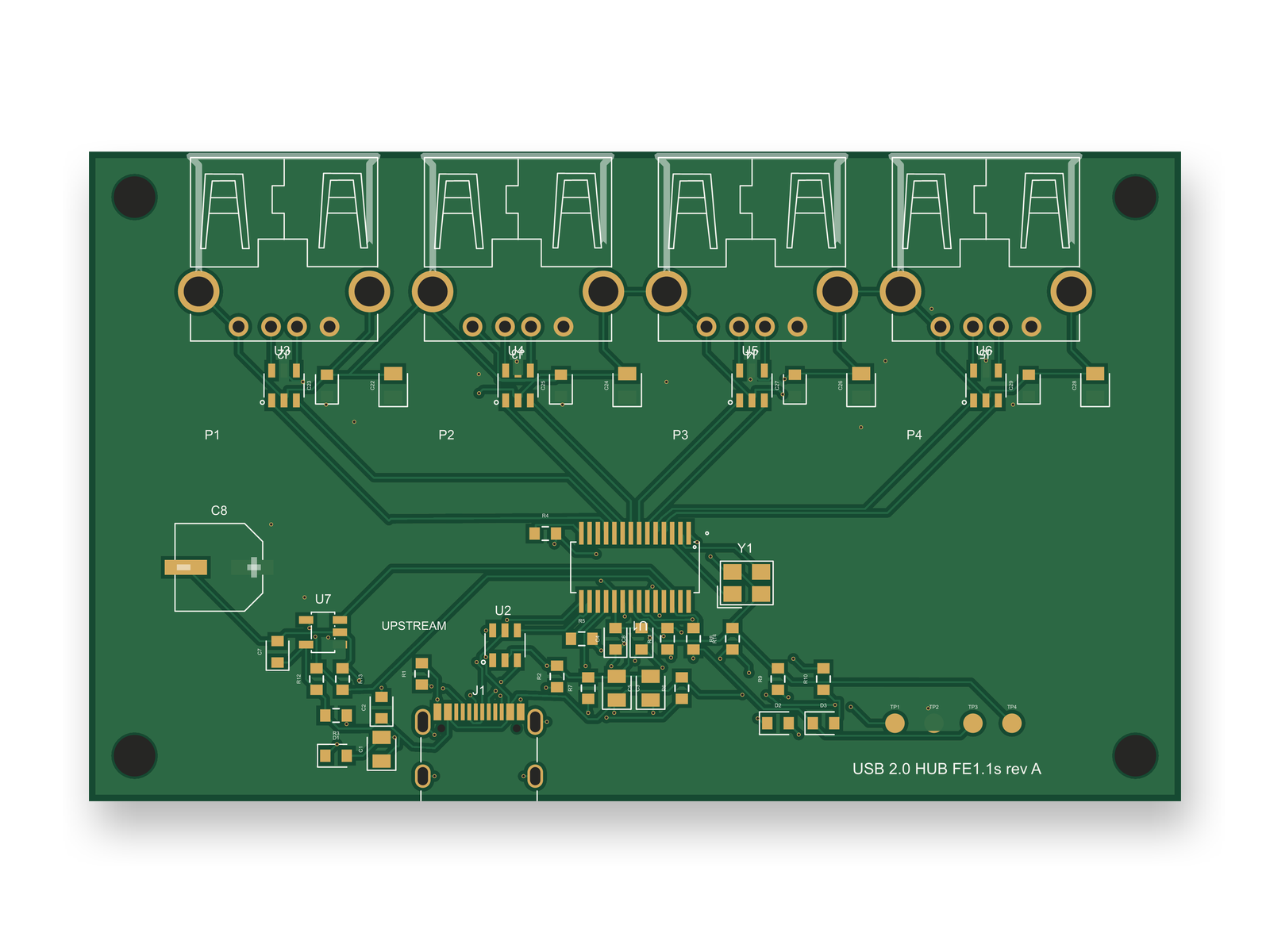
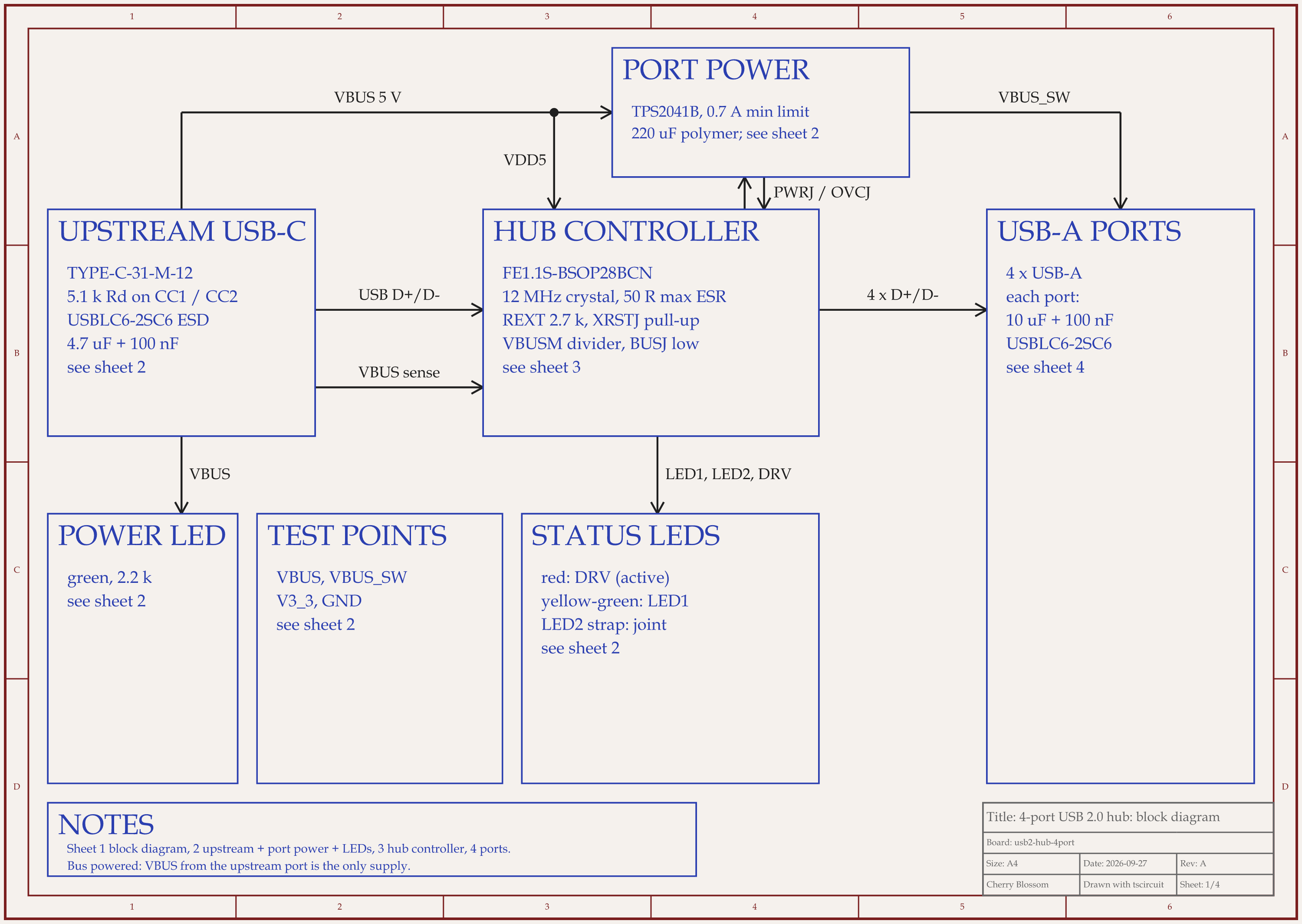
4-port USB 2.0 hub schematic, sheet 1 of 4: Block diagramRouted PCB layout of the 4-port USB 2.0 hub
A 4-port USB 2.0 hub from an AI agent: 50 parts on an 84 x 50 mm, 4-layer board.

We timed one: a 4-port USB 2.0 hub, built by an AI agent with tscircuit, the open-source engine Cherry Blossom runs on. The run was on our own machine, with the same tscircuit version and review tool as Cherry Blossom's agent. Full builds, routing included, took 6 min 16 s to 13 min 28 s, with other boards building on the same machine. The final board has 133 traces and 85 vias with every net routed, 0 DRC errors, 0 shorts, a clean netlist check and every passive but one polymer capacitor on a JLCPCB basic part.

An outside review of the circuit found 10 defects, 2 of which would have failed the USB 2.0 spec, and one round of fixes took its score from 66 to 89 out of 100. The layout, redone for the new parts, scored 80, below our 85 bar, and a senior layout review would still find work:

  • The upstream supply runs as a 0.15 mm trace carrying up to 0.5 A, so it needs widening.

  • The board is bigger than it needs to be, with the USB-A ports on an 18 mm pitch.

  • Two 100 nF decoupling capacitors sit about 5 mm from their pins.

  • The USB-C mouth overhangs the board edge by about 0.8 mm, so check it against the enclosure.

  • The USB pairs are neither impedance controlled nor length matched, so high speed has to be proven on all four ports.

That is the split this ranking assumes. The agent gets you a routed, checked draft in minutes per build, and your own review and ECAD take it to production. This one has not been fabricated.

Our part

Where does Cherry Blossom fit for a professional?

At the start of the job. An engineer can describe a proof-of-concept board, a breakout or a test fixture in a sentence, get a checked board back, and order it through PCBWay, while the main product stays in Altium or Allegro. The KiCad export means the draft carries on into your own flow. More on this fit in our page for hardware engineers.

Final production layout, simulation and enterprise security reviews belong in the tools after it on this list. For controlled or sensitive designs, check your company's policy before putting them into any cloud tool.

What it does not do. Cherry Blossom is an early beta. It is not a circuit simulator, it has no real-time multi-user editing, and it is not built for high-speed or RF sign-off.

See it on your own board

The quickest way to judge any of this is to describe a board and read what comes back: the schematic, the layout, and what the verification gate says about it. It runs in the browser, with the AI included from the Pro plan up.

Questions

The best AI PCB design tool for professionals in 2026 is Cherry Blossom when the job is a first prototype board, fast. You describe the board in plain English, and an agent builds the schematic and layout with footprints from real part data, runs a verification gate on every change, and exports Gerbers and an editable KiCad project for your own flow. It runs in the browser, with no install and no per-seat licence. For production work inside an ECAD you already own, Quilter handles placement and routing on Altium, Cadence, KiCad, OrCAD and Xpedition designs, with SOC 2 Type II cloud or self-hosting. On Cadence Allegro X, Allegro X AI automates placement, planes and critical-net routing. Celus and Circuit Mind turn requirements into a reference schematic and BOM, and JITX suits high-frequency teams who want the design as code.

Altium Develop includes an AI Requirements Assistant that analyses and breaks down requirements. The Altium pages we read did not describe AI placement or routing. If you want AI layout on an Altium design, Quilter and DeepPCB both accept Altium files.

Quilter offers a self-hosted, Kubernetes-native deployment, and JITX runs locally with an air-gapped option on Enterprise. Cherry Blossom is cloud only.

Quilter says boards designed with it are reaching fabrication, and Cadence says Allegro X AI matches or beats manually designed boards. Engineers still review and iterate on the output. Treat any AI output as a candidate to check, especially for high-speed or RF work.

Describe a board. See what comes back.

Schematic, layout and a verification gate, in the browser. Exports to Gerbers and KiCad.

By signing up, you agree to our Terms of Service and Privacy Policy.