Compared

AI PCB layout automation: what can be automated today, and with what

Ask five vendors about AI layout automation and you get five different answers, because each one automates a different part of the job. A narrower question is more useful. For each step of laying out a board, is there a tool that will do it for you, and what do you have to give it first?

By the Cherry Blossom teamUpdated November 3, 2026

The short answer

The best AI PCB layout automation tool in 2026 for most new boards is Cherry Blossom: it automates the whole path from a plain-English description to a placed, routed and checked board, including the schematic and footprint work every other layout tool expects you to finish first.

If you already have a finished schematic and board file, Quilter automates placement and routing together, DeepPCB is the quickest router to trial, and Cadence Allegro X AI suits teams already on Allegro X.

The steps

Which layout steps can AI automate?

  • Schematic and parts

    Automated today by

    Cherry Blossom, from a plain-English description

    Still usually by hand

    Review the parts it picked

  • Board setup

    Automated today by

    Cherry Blossom on new boards; Quilter picks impedance-aware stack-ups

    Still usually by hand

    Outline, stack-up, rules on existing designs

  • Placement

    Automated today by

    Cherry Blossom, Quilter, Allegro X AI, DeepPCB placement

    Still usually by hand

    Connectors, mechanical parts

  • Decoupling caps

    Automated today by

    Zuken CR-8000 (AI-assisted)

    Still usually by hand

    Review against the datasheet

  • Power planes

    Automated today by

    Allegro X AI

    Still usually by hand

    Split planes, current checks

  • Critical nets

    Automated today by

    Allegro X AI, Quilter (diff pairs)

    Still usually by hand

    Most tools ask you to route these first

  • General routing

    Automated today by

    Cherry Blossom, Quilter, DeepPCB, Flux, Xpedition

    Still usually by hand

    Cleanup after the run

  • Checks

    Automated today by

    Cherry Blossom's Checks panel; DRC in every tool; DeepPCB's Cooper checks setup

    Still usually by hand

    Signal integrity sign-off

Each vendor's own description, September 2026. See sources.

The pattern holds across vendors. The closer a step is to pure geometry, the more of it is automated. The closer it is to judgement about the circuit (which nets are sensitive, where the connector has to sit, which cap goes nearest which pin), the more the tools ask you to decide first. Quilter's own docs ask you to place connectors yourself, because it cannot tell them apart from other parts.

The tools

Which AI PCB layout automation tools are worth a look?

1Cherry BlossomOur product

Best for: Going from a plain-English description to a fab-ready board, in the browser

A full schematic and PCB editor in the browser with an AI agent, Sakura, built in. Describe the board in plain English and Sakura finds real parts, draws and tidies the schematic, then asks before it places and routes the PCB. Edit anything by hand, then export Gerbers, an editable KiCad project, a BOM, pick-and-place, STEP or open Circuit JSON. More than 100 people at companies in over 20 countries use it.

Platform
Browser, nothing to install
Pricing
The Free plan is the full editor, by hand, with no AI. Pro adds the AI for $20 a month, with 4M AI credits a month. Ultra is $140 a month with 32M credits and the frontier models. More credits past the allowance are $5 per 1M credits, bought up front only if you want them. There is no API key to connect and no per-seat licence.
2Quilter

Best for: Automating placement and routing together

You upload schematic and board files from Altium, KiCad, Cadence or Siemens Xpedition, confirm the constraints it finds, and get several placed and routed candidates back in your own format. It detects differential pairs and exports impedance-aware stack-ups. Quilter cites one project where manual layout work dropped from 428 hours to 38.5 hours of cleanup.

Platform
Cloud or self-hosted
Pricing
Per project, by pins to route; quote from sales
3Cadence Allegro X AI

Best for: Placement, power planes and critical nets inside Allegro X

Generative AI in the Allegro X platform that automates component placement, power plane creation and critical net routing, integrated with signal and power integrity analysis. Cadence aimed it at small and medium designs at launch.

Platform
Allegro X platform, cloud compute
Pricing
Licensed through Cadence; ask for a quote
4DeepPCB

Best for: Routing, with placement available

InstaDeep's reinforcement learning engine. Its main flow routes a placed board and returns it DRC-clean, and its placement tool handles boards up to 1,000 components. It accepts Altium, KiCad, EasyEDA, Zuken and Specctra DSN.

Platform
Browser, cloud, API
Pricing
Free 30-minute trial; $30 an hour, as listed on DeepPCB's pricing page, September 2026
5Zuken CR-8000

Best for: Assisted layout on high-speed, high-density boards

The 2025 release of Design Force added AI-assisted decoupling capacitor placement and bus route completion, plus delay-aware routing aids. It speeds up a designer rather than laying out the board on its own.

Platform
CR-8000 platform
Pricing
Licensed through Zuken; ask for a quote
6Siemens Xpedition

Best for: Constraint-driven automation in an enterprise flow

Not sold as AI, but heavily automated: hierarchical placement planning, sketch routing (draw a path and the router follows it), and auto routing driven by the constraints you set.

Platform
Xpedition platform
Pricing
Licensed through Siemens; ask for a quote
7Flux Auto-Layout

Best for: One-click routing of simple to medium boards in Flux

AI routing inside Flux's browser ECAD. You finish placement and set constraints first. It leaves existing traces alone, so you can hand-route critical nets and let it do the rest.

Platform
Browser
Pricing
Flux plans; AI usage metered in Agent Compute Units
8JITX

Best for: Layout generated from reviewable code

A Python-based platform that generates board structures and routing from design code, with AI proposing code edits for engineers to review. It can run locally with your own approved models.

Platform
Local, Python
Pricing
Free to start; paid plans
We built one

How well did each step hold up on a real board?

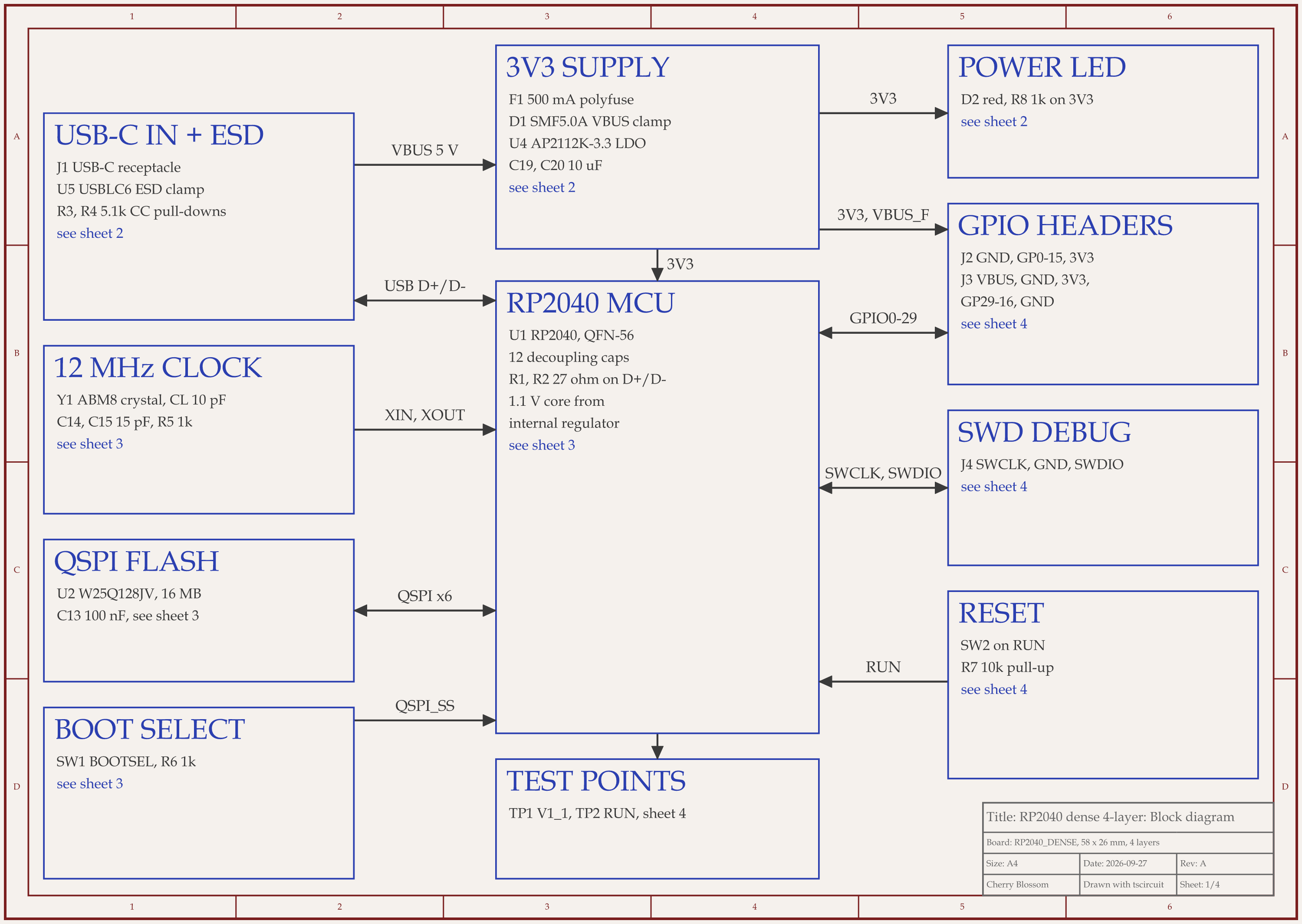
RP2040 4-layer board schematic, sheet 1 of 4: Block diagram
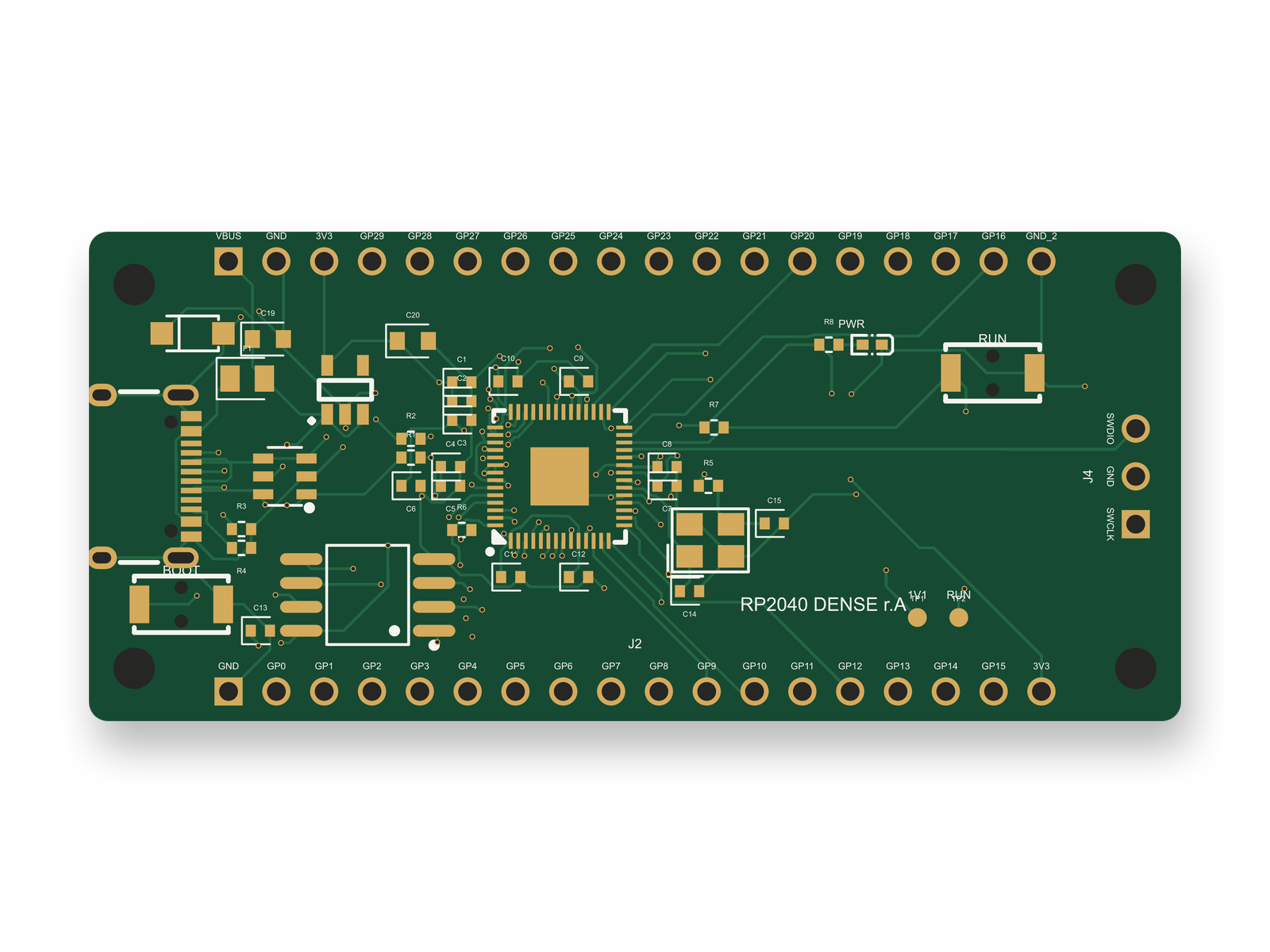
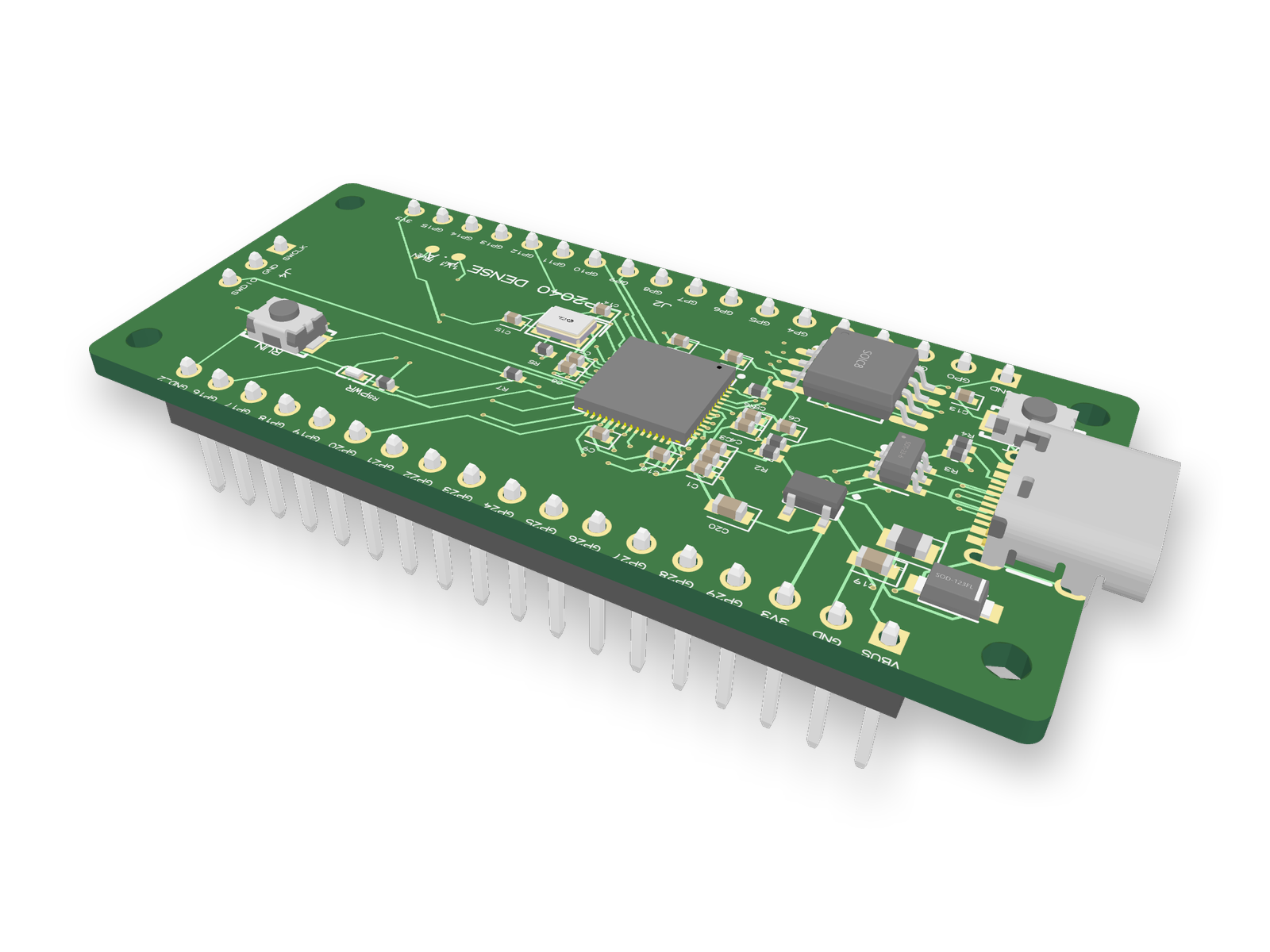
Routed PCB layout of the RP2040 4-layer board3D render of the RP2040 4-layer board
An RP2040 board laid out end to end by an AI agent: 41 parts, all on the top side, on 4 layers in 58 x 26 mm.

We graded one. An AI agent built this board with tscircuit, the open-source engine an earlier version of Cherry Blossom used, using the same tscircuit version and review tool as that earlier version's agent, on our own machine. We scored each round against a written 100-point rubric. Six full rounds went 58, 73, 83, 84, 81 and 84, one point short of our 85 target. Then an outside reviewer started from scratch and checked every pad of every chip against its datasheet. It found no wiring mistake, yet scored the circuit 77: nothing clamped the USB 5 V line in front of a regulator rated for 6.5 V at most, and the board had no power light and no test points. After those fixes the circuit scored 91, and the layout, redone for the five new parts, scored 86.

  • Parts and pinouts scored 18 of 20. The agent picked the crystal the RP2040 design guide names and sized its load caps to match, but the USB-C connector still carries three LCSC part numbers in the parts list.

  • "Does it work" scored 38 of 40. In round 1, four RP2040 supply pins were left unconnected; the outside review found every pad on the right net.

  • The schematic drawing scored 21 of 25. Its 4 sheets pass review with no problems, but the decoupling caps are drawn in one row instead of beside their pins.

  • Placement scored 31 of 35. Four decoupling caps still sit about 2.4 mm from their pins.

  • Routing scored 29 of 35, the lowest share. All 139 connections routed with 0 DRC errors and no shorts, but the router ran signals through the ground layers, and USB D+/D- are neither coupled nor length-matched.

  • Manufacturability scored 26 of 30, with 24 advisory warnings that 0402 footprints do not quite match the supplier's.

That fits the table at the top of this post. The geometry went well, and the judgement calls did not. Before ordering, a person still has to reserve a solid ground plane, route USB as a proper pair and run the fab's DRC. The board has not been fabricated.

The missing step

What about the work before layout?

Every tool after Cherry Blossom in the list assumes the schematic is done, the footprints exist, and someone has chosen an outline and a stack-up. On a lot of boards, that is where the time goes: picking parts, reading datasheets, wiring the schematic, finding footprints that match.

That is why Cherry Blossom is first. You describe the board and the agent, Sakura, draws the schematic and then, once you say yes, places and routes the PCB. Footprints come from real part data, and the Checks panel lists errors and warnings from the design rule check. It runs in the browser with nothing to install, and you get Gerbers, a BOM, pick-and-place files and an editable KiCad project. For dense or high-speed boards, take that KiCad export into one of the tools above for the final pass.

Limits to know. Cherry Blossom is an early beta. Circuit simulation is coming but not here yet, and it imports KiCad projects today, with import from Altium, EAGLE, Cadence Allegro, PADS and EasyEDA coming. It has no comments or team management, and it is not built for high-speed or RF sign-off.

Cherry Blossom's pricing: Free editor; AI from $20/mo Pro, $140/mo Ultra. For routing-only tools, see the AI PCB autorouter comparison.

Choosing

How do you choose a layout automation tool?

  • Starting a new board? Cherry Blossom automates the most steps, from schematic to a checked, fab-ready layout.

  • Already mid-design in an ECAD tool? If you are on Allegro X, Xpedition, CR-8000 or Flux, try the automation you already have.

  • If you want placement automated on an existing design, Quilter and Allegro X AI do it as part of the main flow.

  • If you only want routing and a price today, DeepPCB is the quickest to trial.

  • If the schematic is your bottleneck, a layout tool is the wrong purchase. Look at AI schematic tools or schematic-to-PCB AI.

See it on your own board

The quickest way to judge any of this is to describe a board and read what comes back: the schematic, the layout, and what the Checks panel says about it. It runs in the browser, with the AI included from the Pro plan up.

Questions

Can AI fully automate PCB layout? For a new board, Cherry Blossom comes closest in 2026: you describe the board in plain English, and it drafts the schematic, places and routes the layout, and the Checks panel lists errors and warnings before you export. It uses footprints from real part data and exports Gerbers and an editable KiCad project, so an engineer can review and refine the result. Standalone layout tools automate less of the job. Quilter and Cadence Allegro X AI place and route an existing design, and Allegro X AI also creates power planes and routes critical nets to constraints. DeepPCB and Flux Auto-Layout route boards you have already placed. Those tools need a finished schematic, footprints, an outline, a stack-up and rules from you first. On any tool, review the result, and treat signal integrity analysis on high-speed boards as a separate job.

For a new board, Cherry Blossom places parts as part of building the design from a description. For an existing design, Quilter and Cadence Allegro X AI both automate placement as part of their main flow, and DeepPCB offers a separate placement tool. Zuken CR-8000 automates decoupling capacitor placement specifically. Which is best depends on your ECAD tool and board size.

Yes. Quilter and DeepPCB both accept KiCad boards, and DeepPCB has a KiCad plugin. Cherry Blossom imports KiCad 5 to 10 projects, so you can check, edit and autoroute a KiCad board in the browser, and exports your KiCad files back. KiCad itself has no built-in autorouter, which our KiCad autorouter guide covers.

Yes, for new boards. It drafts the schematic, placement and routing together from a plain-English description and checks them against manufacturing rules. It also imports KiCad projects, which you can check and route with its Autoroute button, a grid router rather than AI, but not yet Altium, Cadence or Siemens boards (import from Altium, Cadence Allegro and PADS is coming). You can change the layout by hand as well as by asking Sakura.

In the same order as any layout review, with one extra step at the front. Check the schematic first, because a tidy layout of the wrong circuit still looks tidy: decoupling on every IC, pull-ups on the open-drain lines, every part rated for the voltage it sees. Then check the footprints against the datasheet drawings, pin one, pitch and pad size, because a wrong land pattern is the fault you find when the board arrives. Only then does the copper matter: run DRC with your fab house's rules rather than the defaults, and look at what the router did on the nets you would have routed yourself, power, clocks and differential pairs. Last, run the fab's own DFM check before you pay. Cherry Blossom lists errors and warnings in its Checks panel before you export, but the schematic and the footprints are still yours to review.

Yes, in different ways. Quilter returns several placed and routed candidates for you to compare and pick from. Cadence Allegro X AI targets small-to-medium boards and explores more than one manufacturable layout. Cherry Blossom works turn by turn: it places and routes, shows you the board, and waits for your next message, so you give feedback by asking Sakura or editing by hand.

Describe a board. See what comes back.

Schematic, layout and a Checks panel, in the browser. Exports to Gerbers and KiCad.

By signing up, you agree to our Terms of Service and Privacy Policy.