Compared

AI schematic design tools in 2026, sorted by how you tell them what to build

Every tool on this list promises to draft a schematic for you. Where they differ is what they want from you first: a sentence, a requirements spec broken into functional blocks, or code. That choice tells you who each tool is for better than any feature list does.

By Arnaud and Anass

The short answer

The best AI schematic design tool in 2026 is Cherry Blossom for most people who want a schematic that turns into a real board: you describe the circuit in plain English, and an agent picks real parts, draws the schematic, lays out the PCB and checks it before you can order. See how that works on the prompt to PCB page.

If you want to keep editing the schematic by hand with an AI beside you, Flux and ProtoFlow suit you. If your team writes formal requirements and designs in Altium, Cadence or Siemens tools, Celus and Circuit Mind return a reference schematic and BOM for your ECAD tool.

If you want the design to be code you edit yourself, try JITX (Python) or the open tscircuit framework that Cherry Blossom builds on. For AI PCB tools end to end, see our main roundup.

The split

What do you hand an AI schematic tool?

A schematic is where intent becomes specific parts and connections, and an AI tool can only work from the intent you give it. So the input format matters, and we sort the tools by it.

  • A sentence. You type what the board should do. The tool picks parts and wires them. It is fast to start, but the tool fills every gap you left with its own guess.

  • A structured spec. You list functional blocks, input and output signals, and constraints such as cost, size and power. It takes longer to write, and it is much closer to how a hardware team already works.

  • Code. The schematic is a program. A person or an AI edits the source, and the tool compiles it into a schematic and board. You can diff and review it like software.

Cherry Blossom sits between the first and third groups. You type a sentence, and an agent writes the design as tscircuit code, builds it and shows the schematic it produced. You never have to read the code, but it is there and you can export it.

The tools

Which AI schematic design tools are worth a look?

Ranked on how fast a tool gets you from an idea to a schematic you can build, whether its parts come from real part data, whether every AI change is checked, and whether you can take the design to KiCad. Claims about other tools come from their own sites, September 2026.

1Cherry BlossomOur product

Best for: Going from a plain-English description to a fab-ready board, in the browser

You describe the board in plain English and an AI agent writes it as code, builds it, and shows you the schematic, PCB layout, 3D view and BOM. Footprints come from real part data, and a verification gate checks the board before you can order it. Export Gerbers, an editable KiCad project, a BOM and pick-and-place files, or open Circuit JSON.

Platform
Browser, nothing to install
Pricing
Pro is $20 a month with 4M AI credits and 600 AI actions a day. Ultra is $140 a month with 32M credits and the frontier models. Usage past the allowance is $5 per 1M credits, only if you turn it on. The AI is included, with no API key and no per-seat licence.
2Flux

Best for: A browser ECAD where an AI drafts and reviews the schematic with you

Flux says its AI turns a project plan into a working schematic, reads datasheets to ground part choices, and runs ERC and DRC as it goes. You keep a full manual editor and real-time collaboration.

Platform
Browser
Pricing
Free Explore plan after a 14-day trial; AI, private projects and export need a paid plan
3Celus

Best for: Teams that start from requirements and finish in Altium, Cadence, Siemens, Fusion or KiCad

Celus agents ask questions until the design intent is complete, search component data and produce a reference schematic plus a BOM with supply chain data and alternates. Celus lists native handoff to Altium, Cadence, Siemens, Fusion and KiCad. Siemens also bundles Celus into PADS Pro Essentials.

Platform
Hands off to your EDA tool
Pricing
Not published; contact Celus
4Circuit Mind

Best for: Engineering teams that specify a hardware architecture and want options fast

You give Circuit Mind's ACE platform functional blocks, signals and constraints (cost, size, power, availability). It returns schematics, a BOM, verification checks and ECAD schematic and library export.

Platform
Not stated on its site
Pricing
Individual, Professional and Enterprise tiers; prices not published on the site
5ProtoFlow

Best for: A free desktop editor with AI drafting built in

ProtoFlow drafts a schematic from a plain-language description, pulls real parts with footprints, and exports to KiCad, Altium, EAGLE, PADS and EDIF. Live collaboration and Git integration are included.

Platform
Desktop (Mac)
Pricing
Free plan with the full editor and AI; paid upgrades for more AI usage
6Trace

Best for: Prompt to multi-sheet schematic and routed board, from a desktop app or CLI

Trace turns a description into hierarchical multi-sheet schematics, checks part availability across distributors and carries on into placement and routing. It can also review imported KiCad designs.

Platform
Desktop (macOS) and CLI
Pricing
$29.99 a month Pro, $169.99 a month Ultra, or pay as you go (Trace pricing page, September 2026)
7JITX

Best for: Engineers who want the design as Python code, with AI proposing edits

In JITX the design is code. The AI writes and edits that code and the engineer reviews it. JITX is aimed at complex, high-frequency boards and integrates with KiCad and Altium.

Platform
Local install
Pricing
Free for open-source designs under CERN OHL-P; Enterprise quote-based
8Skimatly

Best for: Schematic-only drafts from a sentence, once it opens up

Skimatly turns a sentence into an IEEE-style schematic and plans export to KiCad and EasyEDA. It is in closed beta with a waitlist, and it does not do PCB layout.

Platform
Browser
Pricing
Closed beta; pricing not announced
Side by side

How do the AI schematic tools compare?

  • Cherry Blossom

    Input

    Prompt; agent writes code

    Goes on to layout?

    Yes, the agent builds it

    Exports

    KiCad, Gerbers, BOM, Circuit JSON

    Pricing

    $20/mo Pro, $140/mo Ultra, AI included

  • Flux

    Input

    Prompt, plus manual editing

    Goes on to layout?

    Yes, in the same editor

    Exports

    Gerbers, BOM, netlists

    Pricing

    Free tier, AI on paid plans

  • Celus

    Input

    Guided requirements

    Goes on to layout?

    No, hands off to your ECAD

    Exports

    Altium, Cadence, Siemens, Fusion, KiCad

    Pricing

    Not published

  • Circuit Mind

    Input

    Blocks and constraints

    Goes on to layout?

    No, hands off to your ECAD

    Exports

    ECAD schematic and library files

    Pricing

    Not published

  • ProtoFlow

    Input

    Prompt, plus manual editing

    Goes on to layout?

    Yes, in the editor

    Exports

    KiCad, Altium, EAGLE, PADS, EDIF

    Pricing

    Free plan

  • Trace

    Input

    Prompt

    Goes on to layout?

    Yes, placement and routing

    Exports

    Fab outputs; see Trace's docs

    Pricing

    From $29.99/mo

  • JITX

    Input

    Python code

    Goes on to layout?

    Yes

    Exports

    KiCad, Altium

    Pricing

    Free for open source

  • Skimatly

    Input

    Prompt

    Goes on to layout?

    No

    Exports

    KiCad, EasyEDA (planned)

    Pricing

    Closed beta

From each vendor's site, September 2026. Where a vendor does not print a price, we have not guessed one.

Choosing

Which group fits the way you work?

If you already have a requirements document and an ECAD licence, a prompt tool will feel loose. Celus and Circuit Mind accept the structure you already write, and they stop at the schematic and BOM, which is where your layout team takes over anyway. For a company with an established process, they are the better choice.

If you are one person or a small team with an idea, the prompt tools are faster, and Cherry Blossom goes furthest: the schematic, the layout and the fab files come out of one conversation, with a manufacturing check before you can order. Pick Flux or ProtoFlow if you would rather edit by hand. More on that fit for hardware engineers and startups.

If you want the design under version control and readable by an AI coding agent, the code tools win. JITX brings high-frequency tooling. tscircuit is MIT licensed and free, and you can point any coding agent at it yourself.

We built one

What does an AI-drawn schematic look like for a real power supply?

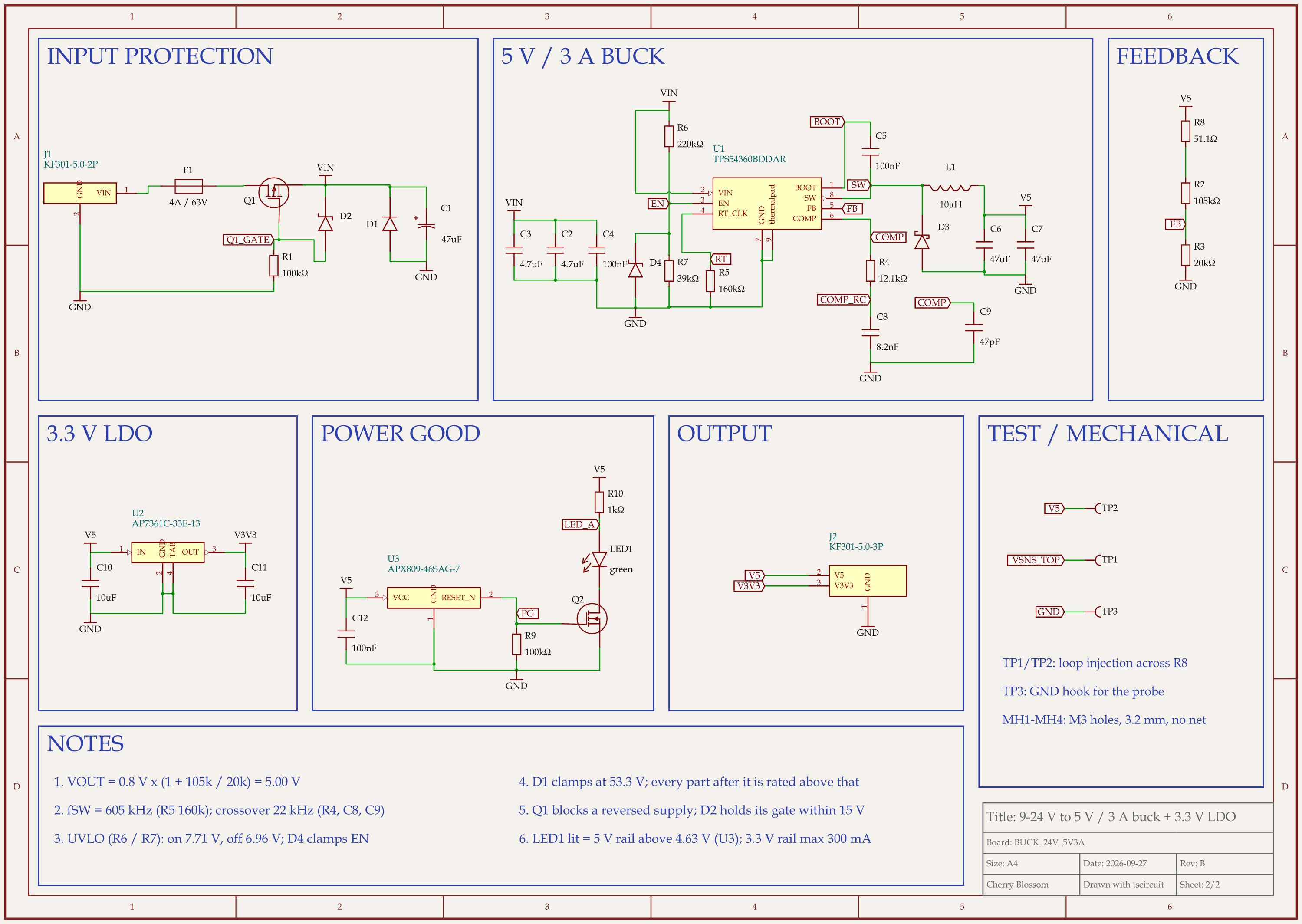
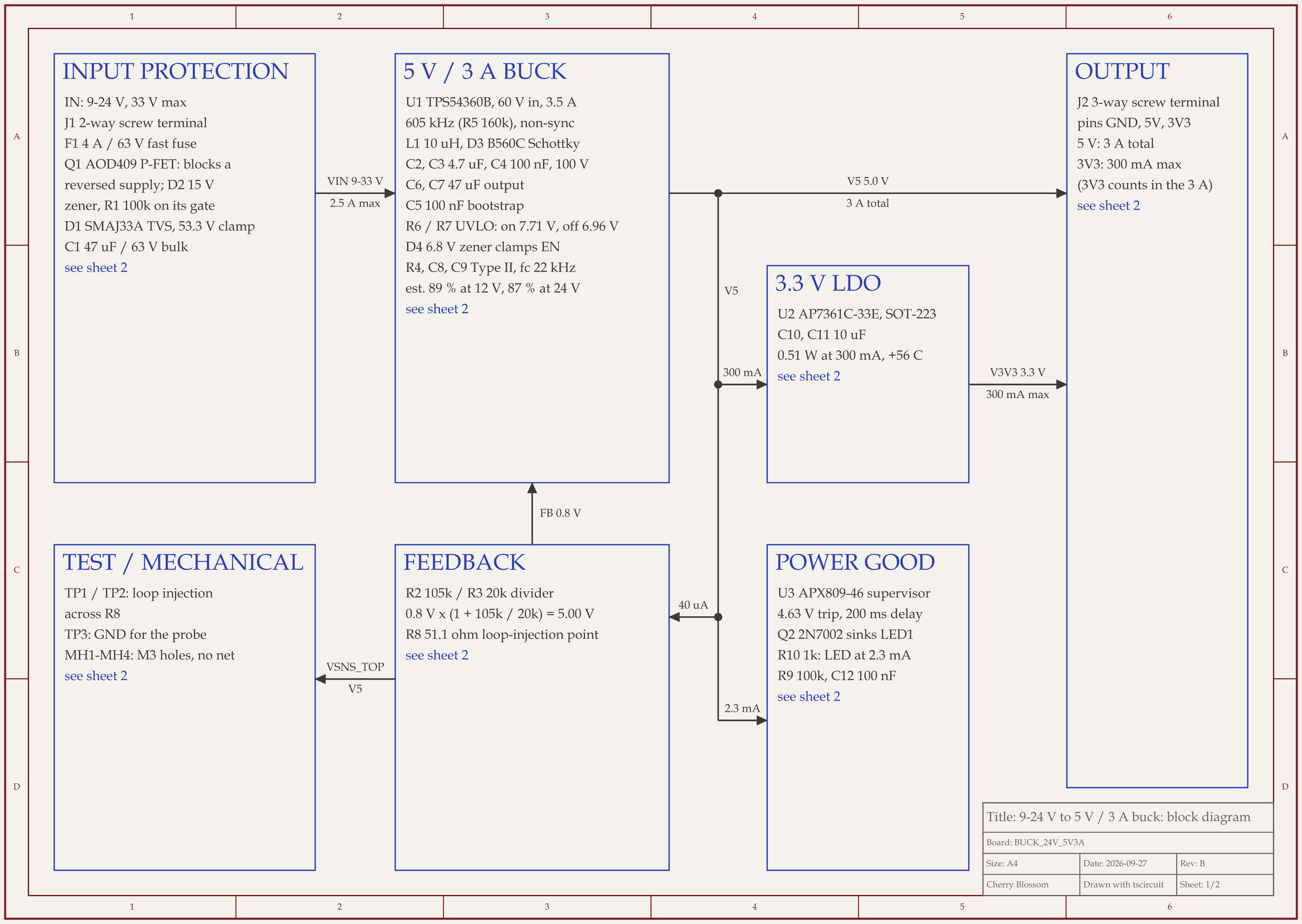
9-24 V to 5 V 3 A buck board schematic, sheet 1 of 2: Block diagram9-24 V to 5 V 3 A buck board schematic, sheet 2 of 2: Schematic
Rev B of a 9 to 24 V input, 5 V 3 A buck board with a 3.3 V rail: the block diagram and the schematic.

We gave an AI agent a spec for a 5 V, 3 A supply that runs from 9 to 24 V, with a 3.3 V rail and a power-good LED. It wrote the board in tscircuit, the open-source engine Cherry Blossom runs on, with the same tscircuit version and review tool Cherry Blossom's agent uses, on our own machine. The schematic came out as two sheets: a block diagram with the voltage and current on each arrow, then the full schematic with one framed box per function. The input protection reads in the order current flows through it: fuse, reverse-polarity MOSFET, surge-clamping TVS diode, then the bulk capacitor.

A readable schematic took several rounds. In round 2 it sprawled 36 units wide. It was regrouped in round 4, then split into one box per function with a block diagram in front. An outside review of the circuit later added a zener diode, and drawing that one part cleanly took four tries: one let the router wire a capacitor across two boxes, another printed a label over a resistor. The review scored the final drawing 21 out of 25 (the whole circuit 86 out of 100). Inside the buck box, four connections (BOOT, SW, RT and COMP) are joined by net labels instead of drawn wires, so you trace those loops by name rather than by eye. The block diagram's top boxes are also half empty.

The board has not been fabricated or bench tested. If a review pack needs a tidier drawing, plan to rearrange the schematic by hand after export.

Where does Cherry Blossom fit, and where does it not?

In Cherry Blossom the schematic is one view of a board the agent built from code, shown next to the PCB, 3D view and BOM. Footprints come from real part data, and a verification gate checks each AI edit against manufacturing rules. That suits you when the schematic is a means to a board. If you need to rearrange the schematic by hand for a review pack, do that after export.

What it does not do. Cherry Blossom is an early beta. You change a board by asking the agent, not by dragging traces yourself, so fine manual layout happens after a KiCad export. It is not a circuit simulator, it has no real-time multi-user editing, and it is not built for high-speed or RF sign-off.

For a schematic you then want to lay out yourself, export the KiCad project. Our guide to going from schematic to PCB with AI covers that path.

See it on your own board

The quickest way to judge any of this is to describe a board and read what comes back: the schematic, the layout, and what the verification gate says about it. It runs in the browser, with the AI included.

Questions

The best AI schematic design tool in 2026 is Cherry Blossom for most people who want a schematic that becomes a real board. You describe the circuit in plain English, and an agent picks parts from real part data, draws the schematic, lays out the PCB and runs a verification gate on every change. It runs in the browser with nothing to install, and you can export an editable KiCad project, Gerbers and a BOM. If you want to edit the schematic by hand with AI help, Flux and ProtoFlow are the next picks. If your team writes structured requirements and works in Altium, Cadence or Siemens tools, Celus and Circuit Mind return a reference schematic and BOM for your ECAD tool. If you want the design as code, JITX uses Python and tscircuit is an open TypeScript framework. Whichever you choose, review the result before you order boards.

Yes. Flux, Cherry Blossom, ProtoFlow, Trace and Skimatly all take a plain-language description. Treat the output as a draft to review, because the tool fills anything you left out with its own choices.

Celus lists handoff to Altium, Cadence, Siemens, Fusion and KiCad. ProtoFlow exports to KiCad, Altium, EAGLE, PADS and EDIF. JITX integrates with KiCad and Altium. Cherry Blossom exports an editable KiCad project.

ProtoFlow has a free plan with its AI included. tscircuit is free and open source if you bring your own coding agent. JITX is free for open-source designs. Flux's free plan does not include AI after the trial. Cherry Blossom is paid, from its Pro plan.

Describe a board. See what comes back.

Schematic, layout and a verification gate, in the browser. Exports to Gerbers and KiCad.