Alternatives

Cherry Blossom vs Circuit Mind: a Circuit Mind alternative

Circuit Mind's ACE takes a hardware architecture (a block diagram plus requirements) and produces candidate schematics, a BOM and a stack of verification reports. Cherry Blossom takes a plain-English description and produces a complete small board: schematic, layout, BOM and Gerbers. They are built for quite different buyers.

By the Cherry Blossom team

The short answer

The best Circuit Mind alternative is Cherry Blossom if you want to sign up today and get the whole board: you describe it in plain English, and an agent produces the schematic, PCB layout, BOM and fab files, with a verification gate checking every edit before you order.

It is self-serve with published prices and no per-seat licence, and it exports an editable KiCad project.

Circuit Mind suits engineering teams working from formal requirements who want candidate schematics with FMEA, derating and ICD reports, and who will do the layout in their own ECAD tool.

The reasons

Why look for a Circuit Mind alternative?

Circuit Mind is built for engineering organisations, and that shapes who can use it. There is no self-serve sign-up: every plan starts with a form that asks for a work email, followed by a walkthrough from its team. There are no published prices. And the output is a schematic and BOM for your own ECAD tool, not a finished board.

If you are one person or a small team, want to try something tonight, or do not have an ECAD tool and a layout engineer waiting for the schematic, those are the gaps an alternative has to fill. Cherry Blossom is built for startups and hardware engineers in exactly that spot.

The difference

What does each tool produce?

Circuit Mind sells ACE, which it describes as an AI-powered electronics design assistant, with the tagline "architecture to schematic in 60 seconds". You give it functional requirements, a block diagram, input and output signals, and non-functional specifications such as cost, size, power, availability and mechanical constraints. It returns candidate schematics and a BOM, along with deep verification checks, form factor and area analysis, FMEA, derating and ICD reports, ECAD schematic files and library exports.

Its product page covers schematic design and component selection. It does not describe PCB layout, so the board itself is drawn in your existing ECAD tool after the handoff.

Cherry Blossom goes the whole way on smaller boards. An agent in a cloud sandbox writes the design as tscircuit code, places and routes it, and shows the schematic, PCB, 3D view and BOM. At the end you get Gerbers and drill files, or an editable KiCad project if you want to keep going by hand.

Side by side

How do Circuit Mind and Cherry Blossom compare?

  • Input

    Cherry Blossom

    Plain-English description

    Circuit Mind ACE

    Architecture, block diagram and requirements

  • Schematic

    Cherry Blossom

    Yes

    Circuit Mind ACE

    Yes, several candidates

  • PCB layout

    Cherry Blossom

    Yes

    Circuit Mind ACE

    Not described; done in your ECAD tool

  • Reports

    Cherry Blossom

    DRC and manufacturing checks

    Circuit Mind ACE

    Verification, FMEA, derating, ICD, area analysis

  • Exports

    Cherry Blossom

    Gerbers, KiCad project, BOM, pick-and-place, STEP, Circuit JSON

    Circuit Mind ACE

    ECAD schematic files and library export

  • Access

    Cherry Blossom

    Self-serve sign-up

    Circuit Mind ACE

    Request access through a sales form

  • Pricing

    Cherry Blossom

    Free editor; AI from $20/mo Pro, $140/mo Ultra

    Circuit Mind ACE

    Individual, Professional, Enterprise; not published

Circuit Mind details from circuitmind.io and circuitmind.io/product, September 2026. Its site does not name the specific ECAD tools it exports to.

Buying

How do you get access to each?

Circuit Mind lists three ways to use the platform (Individual, Professional and Enterprise) and sends all of them through a form that asks for a work email; its team then walks you through the platform and onboarding. It publishes no prices. Its homepage names National Instruments, BAE Systems and Legrand among its users, and links a case study from Los Alamos National Laboratory.

Cherry Blossom is self-serve, and its prices are public on the pricing page. The Free plan is the full editor, by hand, with no AI. Pro adds the AI for $20 a month, with 4M AI credits and 600 AI actions a day. Ultra is $140 a month with 32M credits and the frontier models. Usage past the allowance is $5 per 1M credits, only if you turn it on. There is no API key to connect and no per-seat licence.

We built one

Can every value on an AI-built board trace back to a datasheet?

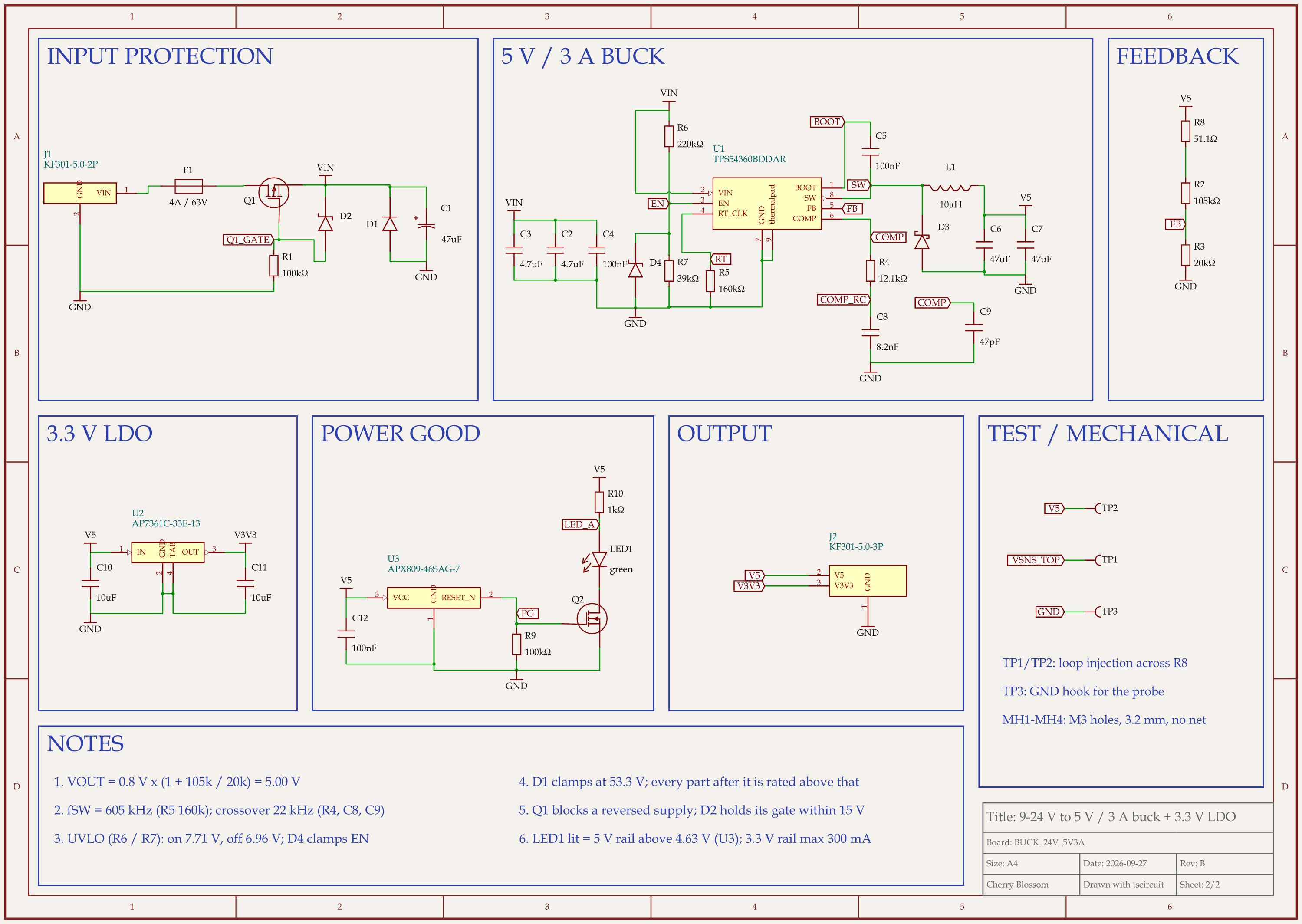
9-24 V to 5 V 3 A buck board schematic, sheet 2 of 2: Schematic
Rev B of a 24 V to 5 V, 3 A buck board. Its component values come from equations in TI's TPS54360B datasheet.

Circuit Mind's pitch includes traceability: a schematic that traces back to requirements, with derating reports. We wanted to see how far an agent gets without a formal report. An AI agent built this 9 to 24 V in, 5 V at 3 A supply with tscircuit (the open-source engine Cherry Blossom runs on), on our own machine, with the same version and review tool as Cherry Blossom's agent. Its notes tie each value to a numbered equation in TI's datasheet, SNVSB93:

  • Timing resistor: 160k for 605 kHz switching (Eq 7 and 8).

  • Inductor: at least 7.9 µH at 33 V in, so 10 µH fitted (Eq 28).

  • Feedback divider: 105k over 20k for 5.000 V out (Eq 3).

  • Compensation: 12.1k, 8.2 nF and 47 pF for a 22 kHz crossover (Eq 44 to 51).

  • Undervoltage lockout: 220k and 39k, turning on at 7.71 V and off at 6.96 V typical, and on by 8.65 V at worst-case tolerances (Eq 4 and 5).

This is not an FMEA, and the notes say where the maths runs out. TI states its compensation method overestimates crossover, so the loop gain has to be measured on an assembled board, through test points added for that. A traceable value can still be wrong: an outside review recomputed every equation by script, this time at the datasheet's limits, and found that the first lockout divider (300k and 47k) could turn on as late as 9.59 V, above the 9 V minimum input. With that fixed, the review scored the circuit 86 out of 100. The board has not been fabricated.

Who should stay

When is Circuit Mind the better choice?

Circuit Mind can be the better fit for work like this.

  • You work from formal requirements and block diagrams, and the schematic has to trace back to them.

  • You need FMEA, derating or ICD reports as part of the deliverable.

  • Your team already does layout in a professional ECAD tool and only wants the schematic stage automated.

Who should switch

When is Cherry Blossom the better choice, and how do you start?

  • You want to start today without a sales call.

  • You want the layout and fab files too, not only the schematic.

  • You are one person or a small team building a small board.

  • You want open outputs: an editable KiCad project and Circuit JSON.

If you already think in block diagrams and requirements, that habit carries over. Write the requirements into your first message in plain English: what the board does, what it connects to, and how it is powered. The agent drafts the whole board from that, and you tighten it by asking for changes in the same chat. When it is done, export the KiCad project or the Gerbers.

Current limits. Cherry Blossom is an early beta. You change a board by asking the agent, not by dragging traces yourself, so fine manual layout happens after a KiCad export. It is not a circuit simulator, it has no real-time multi-user editing, and it is not built for high-speed or RF sign-off.

Everything else

Where do both sit among AI design tools?

1Cherry BlossomOur product

Best for: Going from a plain-English description to a fab-ready board, in the browser

You describe the board in plain English and an AI agent writes it as code, builds it, and shows you the schematic, PCB layout, 3D view and BOM. Footprints come from real part data, and a verification gate checks the board before you can order it. Export Gerbers, an editable KiCad project, a BOM and pick-and-place files, or open Circuit JSON.

Platform
Browser, nothing to install
Pricing
The Free plan is the full editor, by hand, with no AI. Pro adds the AI for $20 a month, with 4M AI credits and 600 AI actions a day. Ultra is $140 a month with 32M credits and the frontier models. Usage past the allowance is $5 per 1M credits, only if you turn it on. There is no API key to connect and no per-seat licence.
2Circuit Mind

Best for: Engineering teams turning architectures into verified schematics

ACE turns a block diagram and requirements into candidate schematics and a BOM, with verification, FMEA, derating and ICD reports, and exports schematic files and libraries to your ECAD tool.

Platform
Web platform, access through sales
Pricing
Individual, Professional and Enterprise plans; prices not published

The closest tool to Circuit Mind is CELUS, which also stops at the schematic and BOM; see our CELUS comparison. For more schematic-first tools, read AI schematic design tools.

See it on your own board

The quickest way to judge any of this is to describe a board and read what comes back: the schematic, the layout, and what the verification gate says about it. It runs in the browser, with the AI included from the Pro plan up.

Questions

The best Circuit Mind alternative is Cherry Blossom for anyone who wants a whole board without a sales process. Circuit Mind's ACE is aimed at engineering teams: you give it an architecture, a block diagram and requirements such as cost, size and power, and it returns candidate schematics and a BOM with verification, FMEA, derating and ICD reports. Layout happens afterwards in your own ECAD tool, access goes through a sales form, and prices are not published. Cherry Blossom is self-serve. You describe the board in plain English, an AI agent writes and builds the whole design, layout included, and a verification gate checks it against manufacturing rules before you can order. Footprints come from real part data, and the board exports as Gerbers and an editable KiCad project. If you need traceable schematics with formal reports for a large product, Circuit Mind is built for that. If you want a board from a description today, pick Cherry Blossom.

Circuit Mind does not publish prices. Its site lists Individual, Professional and Enterprise options and asks you to submit a work email so its team can walk you through the platform.

Its product page describes schematic design, component selection, BOMs and verification reports, with ECAD schematic and library exports. It does not describe PCB layout, which you would do in your own ECAD tool.

Cherry Blossom is the more practical choice, because you can sign up without a sales process and it produces fab files. Circuit Mind is positioned for professional engineering teams.

Describe a board. See what comes back.

Schematic, layout and a verification gate, in the browser. Exports to Gerbers and KiCad.

By signing up, you agree to our Terms of Service and Privacy Policy.