Alternatives

Cherry Blossom vs CELUS: a CELUS alternative

CELUS asks you questions about what the board needs to do, then produces a reference schematic and a full BOM with supply data and alternates, and opens them in your EDA tool. Cherry Blossom also starts from plain English, but it keeps going past the schematic to a routed board and fab files.

By the Cherry Blossom team

The short answer

The best CELUS alternative is Cherry Blossom if you want the whole board, not a schematic to lay out elsewhere: you describe it in plain English and get a checked schematic, PCB layout, BOM and fab files in the browser.

A verification gate checks every AI edit, footprints come from real part data, and you can pay month to month with no annual commitment. The board exports as an editable KiCad project.

CELUS suits teams who lay out boards in Altium, Cadence, Siemens or Fusion and want requirements capture and live component data at the front end.

The reasons

Why look for a CELUS alternative?

Two things in CELUS's own materials are worth knowing before you commit. The first is the account terms: a free Community Account makes your projects and uploads public, and keeping them private means a Professional subscription paid upfront for twelve months, at a price the site does not publish. The second is where the work stops. CELUS delivers a reference schematic and BOM, and someone still has to lay out the board in an EDA tool.

If your design has to stay private without a year's commitment, or there is nobody on hand to do the layout, those are the gaps to fill. Cherry Blossom fills both, which is why startups and makers without a layout engineer use it.

The difference

What does each tool hand you at the end?

CELUS describes itself as an AI electronics design platform. An assistant captures your requirements by asking questions, a set of agents handles design planning, checking and verification, and a parts recommender matches components at design time using manufacturers' live catalogue data. Its engineers page says the result is a reference schematic and a complete BOM with supply chain data and alternates, opened straight in Altium, Cadence, Siemens, Fusion or KiCad.

That is a schematic and a BOM, not a laid-out board. The PCB is drawn afterwards in your EDA tool.

Cherry Blossom produces the board. An agent in a cloud sandbox writes the design as tscircuit code, places and routes it, and shows the schematic, PCB, 3D view and BOM. A verification gate checks every AI edit, and a DRC check runs before you order through the PCBWay hand-off.

Side by side

How do CELUS and Cherry Blossom compare?

  • Input

    Cherry Blossom

    Plain-English description

    CELUS

    Requirements captured by an AI assistant

  • Output

    Cherry Blossom

    Schematic, layout, 3D, BOM, fab files

    CELUS

    Reference schematic and BOM

  • PCB layout

    Cherry Blossom

    Yes

    CELUS

    No; done in your EDA tool

  • Parts data

    Cherry Blossom

    Footprints from real part data

    CELUS

    Live stock, price and lifecycle from manufacturers

  • Hands off to

    Cherry Blossom

    KiCad project, Gerbers, Circuit JSON

    CELUS

    Altium, Cadence, Siemens, Fusion, KiCad

  • Pricing

    Cherry Blossom

    Free editor; AI from $20/mo Pro, $140/mo Ultra

    CELUS

    Free Community account; paid annual Professional

CELUS details from celus.io, its engineers page and its platform terms of use, September 2026.

Cost

What does each one cost?

CELUS does not publish prices on its site. Its terms of use describe two account types. A Community Account is free, but projects made with it and anything you upload are public. A Professional Account keeps projects private and is billed as a subscription paid upfront for twelve months. The terms also say CELUS may redesign or phase out the Community Account.

The Free plan is the full editor, by hand, with no AI. Pro adds the AI for $20 a month, with 4M AI credits and 600 AI actions a day. Ultra is $140 a month with 32M credits and the frontier models. Usage past the allowance is $5 per 1M credits, only if you turn it on. There is no API key to connect and no per-seat licence. You can pay month to month; see pricing.

We built one

Can the layout change which parts end up in the BOM?

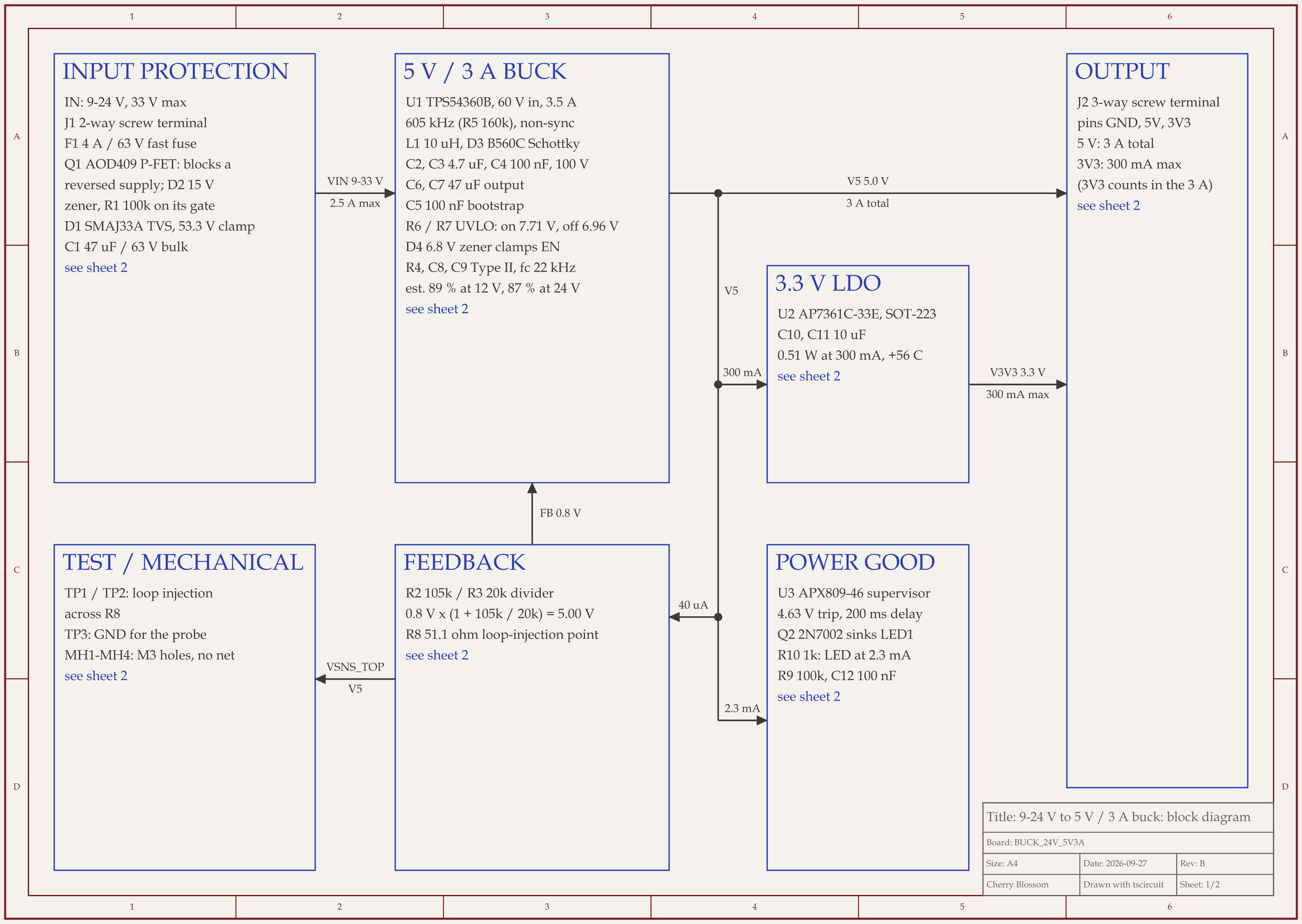
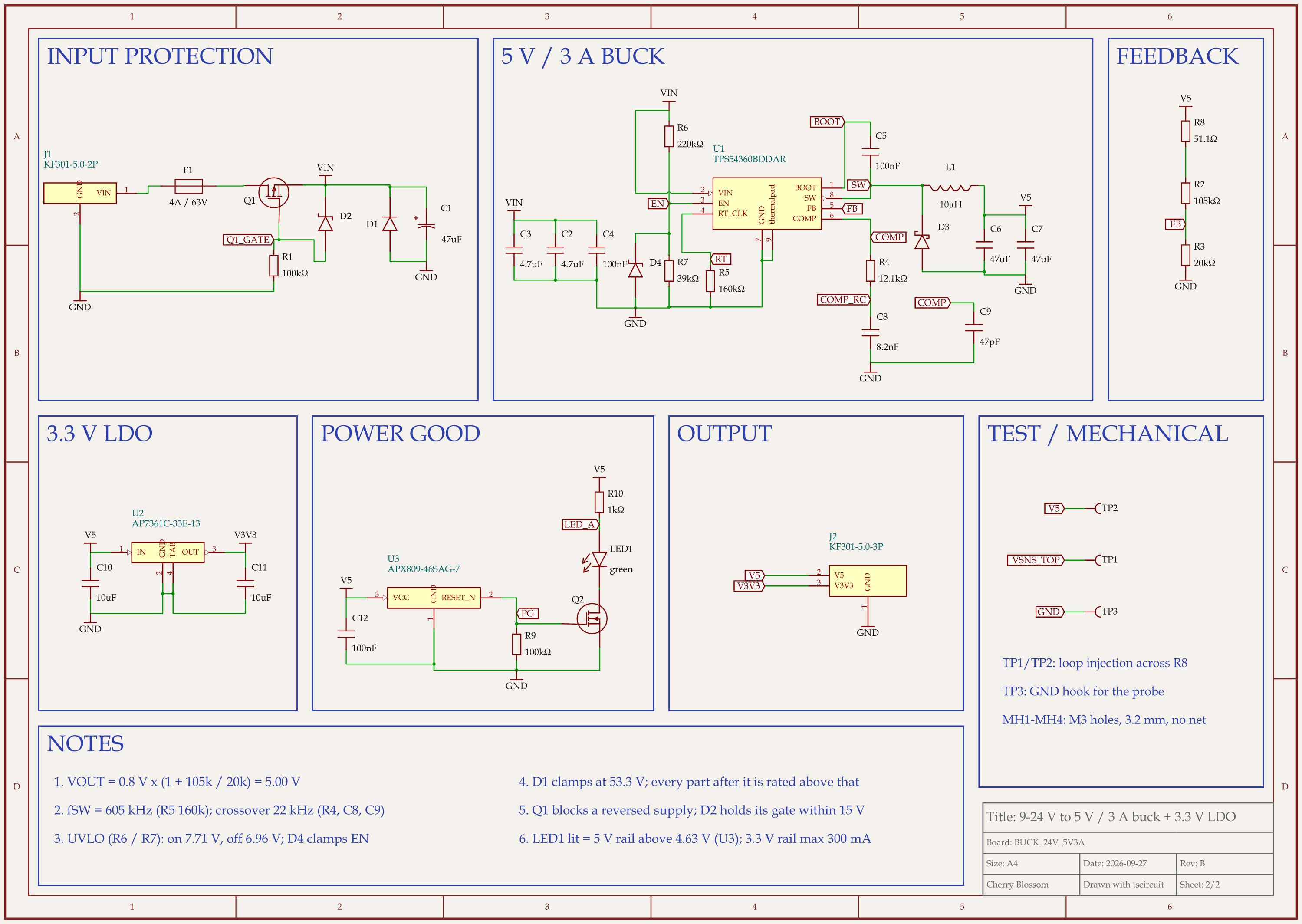
9-24 V to 5 V 3 A buck board schematic, sheet 1 of 2: Block diagram9-24 V to 5 V 3 A buck board schematic, sheet 2 of 2: Schematic
Rev B of a 24 V to 5 V, 3 A buck board. Every placed part carries an LCSC number.

It can, and this board shows how. An AI agent built this 9 to 24 V in, 5 V at 3 A supply with tscircuit, the open-source engine Cherry Blossom runs on, on our own machine and with the same version and review tool Cherry Blossom's agent uses. The spec asked for a synchronous converter. On LCSC, the 60 V synchronous parts at this current come in a WQFN-30 package with a 0.5 mm pin pitch, which the board's 0.5 mm power traces cannot land on. So the agent used a non-synchronous TPS54360B with an external catch diode. Estimated full-load efficiency is 87% at 24 V, instead of the low 90s.

Stock shaped the values too. The timing equation lands on about 161k, and the nearest 162k resistor had only 1 to 17 in stock, so the board uses 160k and switches at 605 kHz. TI's example feedback pair was just as thin, so a 105k and 20k pair sets 5.000 V. All 36 placed parts have LCSC numbers.

When the schematic and BOM are finished before layout starts, a package problem like the first one lands on whoever does the layout. Here it came back as a part change before any files went out. One check is still yours: confirm the 3.3 V regulator (LCSC C500795, 640 in stock when reviewed) is still available before you order. An outside review also found that the supervisor chip, APX809, is marked not recommended for new designs, so plan a successor.

Who should stay

When is CELUS the better choice?

CELUS can be the better fit if your team works like this.

  • Your team lays out boards in Altium, Cadence, Siemens or Fusion and wants the schematic delivered there natively.

  • Component availability, lifecycle and alternates matter as much as the circuit itself.

Who should switch

When is Cherry Blossom the better choice, and how do you start?

  • You want a routed board and Gerbers, not a schematic you still have to lay out.

  • You do not have a professional EDA tool to hand the schematic to.

  • You want monthly billing rather than an annual commitment.

  • You want to order the board from the same place, through the PCBWay hand-off.

CELUS gathers requirements by asking you questions. Cherry Blossom takes them in your own words, so start by writing down what the board has to do and sending that as your first message. The agent drafts the schematic and layout, and you refine it in the same chat. If your team later wants to finish the board in its own EDA tool, the KiCad export is an editable project.

Current limits. Cherry Blossom is an early beta. You change a board by asking the agent, not by dragging traces yourself, so fine manual layout happens after a KiCad export. It is not a circuit simulator, it has no real-time multi-user editing, and it is not built for high-speed or RF sign-off.

Everything else

Where do both sit among AI design tools?

1Cherry BlossomOur product

Best for: Going from a plain-English description to a fab-ready board, in the browser

You describe the board in plain English and an AI agent writes it as code, builds it, and shows you the schematic, PCB layout, 3D view and BOM. Footprints come from real part data, and a verification gate checks the board before you can order it. Export Gerbers, an editable KiCad project, a BOM and pick-and-place files, or open Circuit JSON.

Platform
Browser, nothing to install
Pricing
The Free plan is the full editor, by hand, with no AI. Pro adds the AI for $20 a month, with 4M AI credits and 600 AI actions a day. Ultra is $140 a month with 32M credits and the frontier models. Usage past the allowance is $5 per 1M credits, only if you turn it on. There is no API key to connect and no per-seat licence.

2CELUS

Best for: Requirements to reference schematic and BOM, handed to your EDA tool

An AI assistant captures requirements, agents plan and check the design, and a parts recommender uses live manufacturer data. The output opens in Altium, Cadence, Siemens, Fusion or KiCad.

Platform
Browser
Pricing
Free Community account with public projects; Professional billed annually

Circuit Mind covers similar ground for larger teams; see our Circuit Mind comparison. The AI schematic design tools post compares the rest.

See it on your own board

The quickest way to judge any of this is to describe a board and read what comes back: the schematic, the layout, and what the verification gate says about it. It runs in the browser, with the AI included from the Pro plan up.

Questions

The best CELUS alternative is Cherry Blossom if you want the board laid out for you instead of doing the layout yourself. CELUS captures your requirements through an AI assistant, picks components using live manufacturer data, and produces a reference schematic and BOM that open in Altium, Cadence, Siemens, Fusion or KiCad. It does not lay out the PCB, and private projects need a Professional account paid upfront for twelve months. Cherry Blossom starts from a plain-English description and produces the whole board: schematic, placement, routing, 3D view, BOM and fab-ready Gerbers. A verification gate checks every AI edit, footprints come from real part data, and a design rule check runs before you can order. You can pay month to month. If your team already lays out boards in a professional EDA tool and wants the front end automated, CELUS fits that workflow. If you want a board you can manufacture from one description, pick Cherry Blossom.

CELUS offers a free Community Account, but its terms of use say projects and uploaded content on that account are public. Private projects need a Professional Account, which is a subscription paid upfront for twelve months. CELUS does not publish the price on its site.

No. CELUS delivers a reference schematic and BOM into your EDA tool, where the layout is done. Cherry Blossom includes layout.

CELUS lists Altium, Cadence, Siemens, Fusion and KiCad as tools its output opens in.

Describe a board. See what comes back.

Schematic, layout and a verification gate, in the browser. Exports to Gerbers and KiCad.

By signing up, you agree to our Terms of Service and Privacy Policy.