Schematic to PCB with AI: which tools do which step
Going from a schematic to a finished board takes four steps: move the netlist into a layout, place the parts, route the copper, and check the result against the rules. AI tools now handle the middle two, but not all of them handle both, and their marketing rarely says which. One tool also writes the schematic in the first place.
The short answer
The best schematic to PCB AI tool in 2026 is Cherry Blossom for most people who want a working board fast: from a plain-English description it writes the schematic and turns it into a placed, routed and checked PCB in one flow, with Gerbers and an editable KiCad project at the end.
It does not import a schematic you drew elsewhere. If yours is already finished in Altium, Cadence, Siemens or KiCad, Quilter places and routes it, DeepPCB and Flux Auto-Layout route a board you have already placed, and Freerouting does the same for free, without AI.
What does going from schematic to PCB involve?
The first step is bookkeeping, and every ECAD does it for you. In KiCad, Update PCB from Schematic adds the footprint for each symbol to the board and ties each pad to the right net. You end up with a pile of footprints joined by thin ratsnest lines.
Placement is where most of the engineering judgement lives: connectors at the edge, decoupling capacitors next to their pins, the switching regulator's loop kept tight, the antenna away from copper. Routing then turns the ratsnest into copper that obeys width and clearance rules. Checking comes last: DRC inside the tool, then the manufacturer's own DFM review.
When a tool says it goes from schematic to PCB, ask which of those steps it does. Most do routing and fewer do placement. Cherry Blossom does all four, and adds a check on every AI edit.
Which tools automate which step?
Cherry Blossom
Starts fromA plain-English description; writes the schematic too
Places parts?Yes
Routes?Yes
Pricing model$20/mo Pro, $140/mo Ultra, AI included
Quilter
Starts fromSchematic, outline, fixed parts from Altium, Cadence, Siemens or KiCad
Places parts?Yes
Routes?Yes
Pricing modelPer project, priced by pins to route
DeepPCB
Starts fromA placed board (Altium, KiCad, EasyEDA, DSN and others)
Places parts?No, you place first
Routes?Yes
Pricing modelSelf-serve pay as you go
Flux Auto-Layout
Starts fromA Flux project with placement finalised
Places parts?No
Routes?Yes
Pricing modelUses Flux AI credits
Freerouting
Starts fromA Specctra DSN export from your ECAD
Places parts?No
Routes?Yes (not AI)
Pricing modelFree, GPL-3.0
| Starts from | Places parts? | Routes? | Pricing model | |
|---|---|---|---|---|
| Cherry Blossom | A plain-English description; writes the schematic too | Yes | Yes | $20/mo Pro, $140/mo Ultra, AI included |
| Quilter | Schematic, outline, fixed parts from Altium, Cadence, Siemens or KiCad | Yes | Yes | Per project, priced by pins to route |
| DeepPCB | A placed board (Altium, KiCad, EasyEDA, DSN and others) | No, you place first | Yes | Self-serve pay as you go |
| Flux Auto-Layout | A Flux project with placement finalised | No | Yes | Uses Flux AI credits |
| Freerouting | A Specctra DSN export from your ECAD | No | Yes (not AI) | Free, GPL-3.0 |
Vendor details from each vendor's own site and docs, September 2026. Quilter and DeepPCB do not print per-board prices on their sites, so we have not quoted any.
Which tool goes from idea to schematic to PCB?
Cherry Blossom is first because it covers every step, including the one the others assume is done. You describe the board in plain English, an agent writes the design as tscircuit code, builds it, and shows the schematic, PCB layout, 3D view and BOM together. Footprints come from real part data, a verification gate checks each AI edit against manufacturing rules, and DRC runs before you can order boards.
The result exports as an editable KiCad project, so a board drafted from a description can still go through KiCad, Freerouting or a layout service afterwards. Pro is $20 a month with 4M AI credits and 600 AI actions a day. Ultra is $140 a month with 32M credits and the frontier models. Usage past the allowance is $5 per 1M credits, only if you turn it on. The AI is included, with no API key and no per-seat licence.
How do the layout-only AI tools differ?
Quilter is the closest thing to a schematic-in, layout-out service for an existing design. Its site says you prepare the schematic, board outline and fixed component locations, define the stackup and constraints, and upload. It returns many fabrication-ready candidates for you to review, and it writes the result back in your ECAD's native format. Its pricing page says cost depends on the number of pins to route, with unlimited iterations on the same design and no annual licence.
DeepPCB routes a board you have already placed. Its site describes an assistant that checks your setup (stackup, net classes, differential pairs, clearances), lets you pin the nets you want to route by hand, and routes the rest. It reads Altium, KiCad and EasyEDA files and takes OrCAD, Allegro and Eagle through Specctra DSN.
Flux Auto-Layout routes inside Flux. Its docs ask you to finalise the schematic and placement first, describe it as ideal for simple to medium-complexity boards, and warn that first results can take up to 30 minutes, full convergence 10 to 24 hours, and that it might not always fully converge. Existing traces are kept as obstacles, so you can route critical signals by hand first.
Freerouting is not AI, but it is the baseline to compare the others against. It is a free, open-source autorouter that imports a DSN file from KiCad, EasyEDA, Fusion and others and returns a session file. Its README is clear that it routes and does not place.
What happened when an AI agent took one board from schematic to PCB?
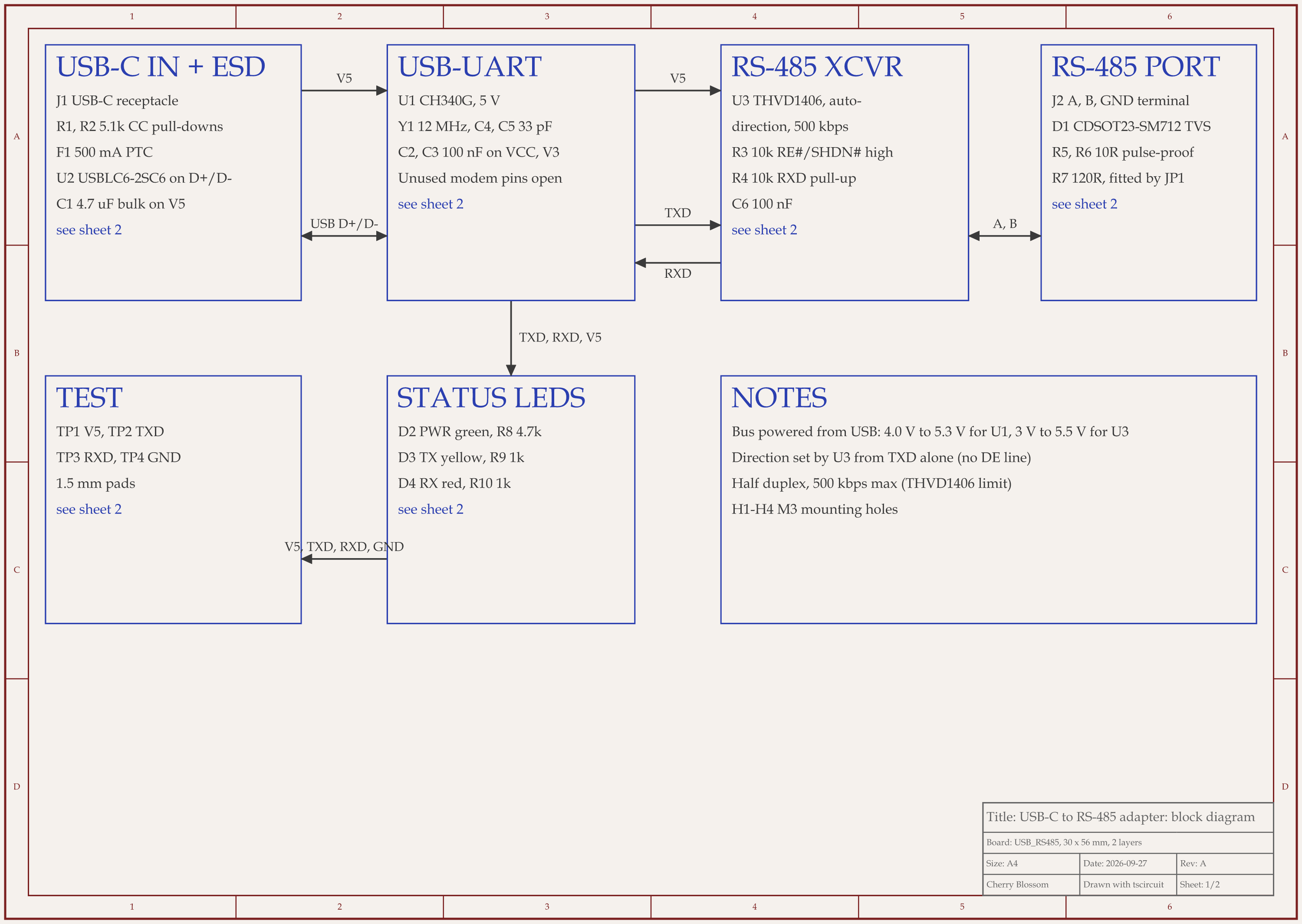
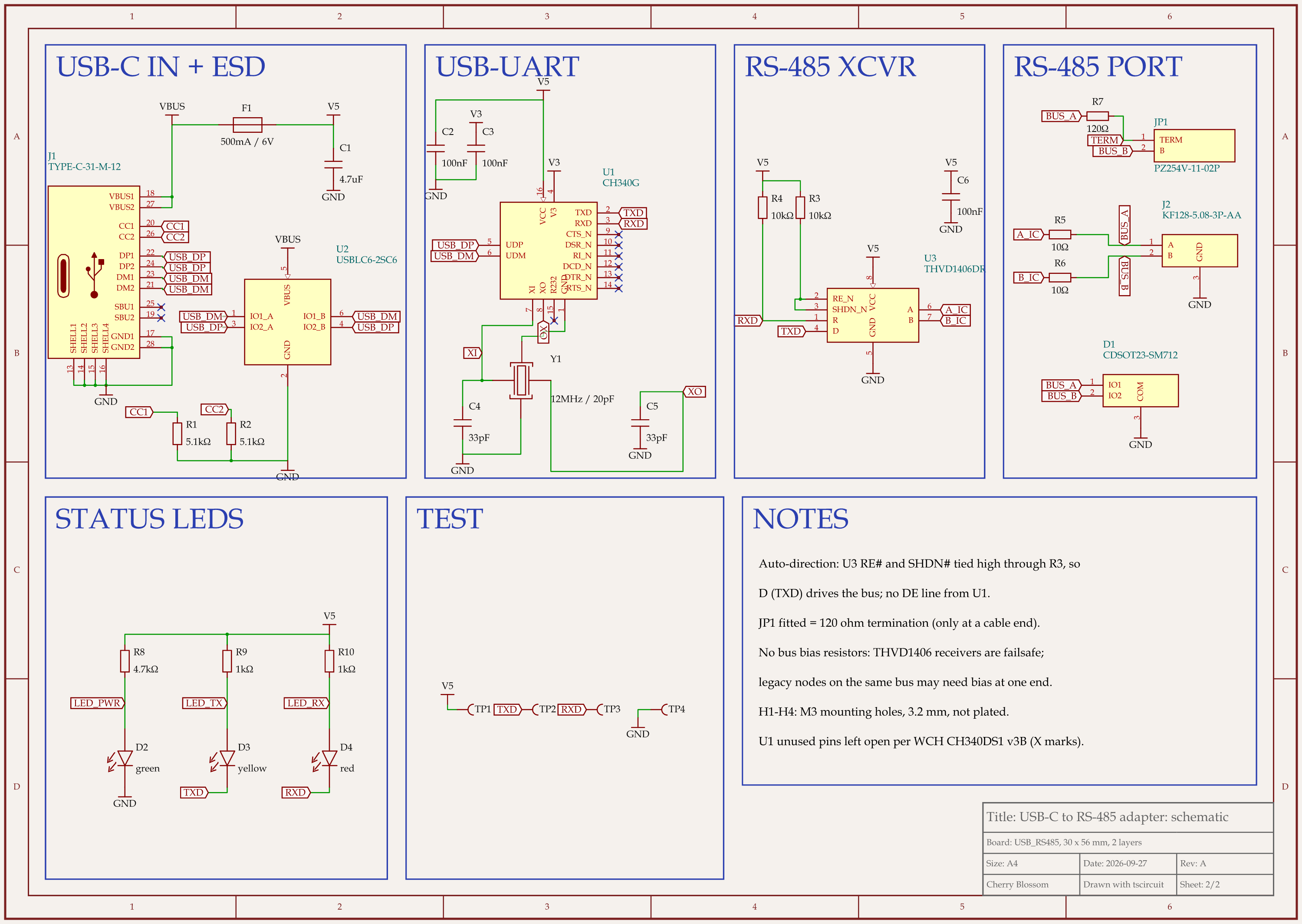
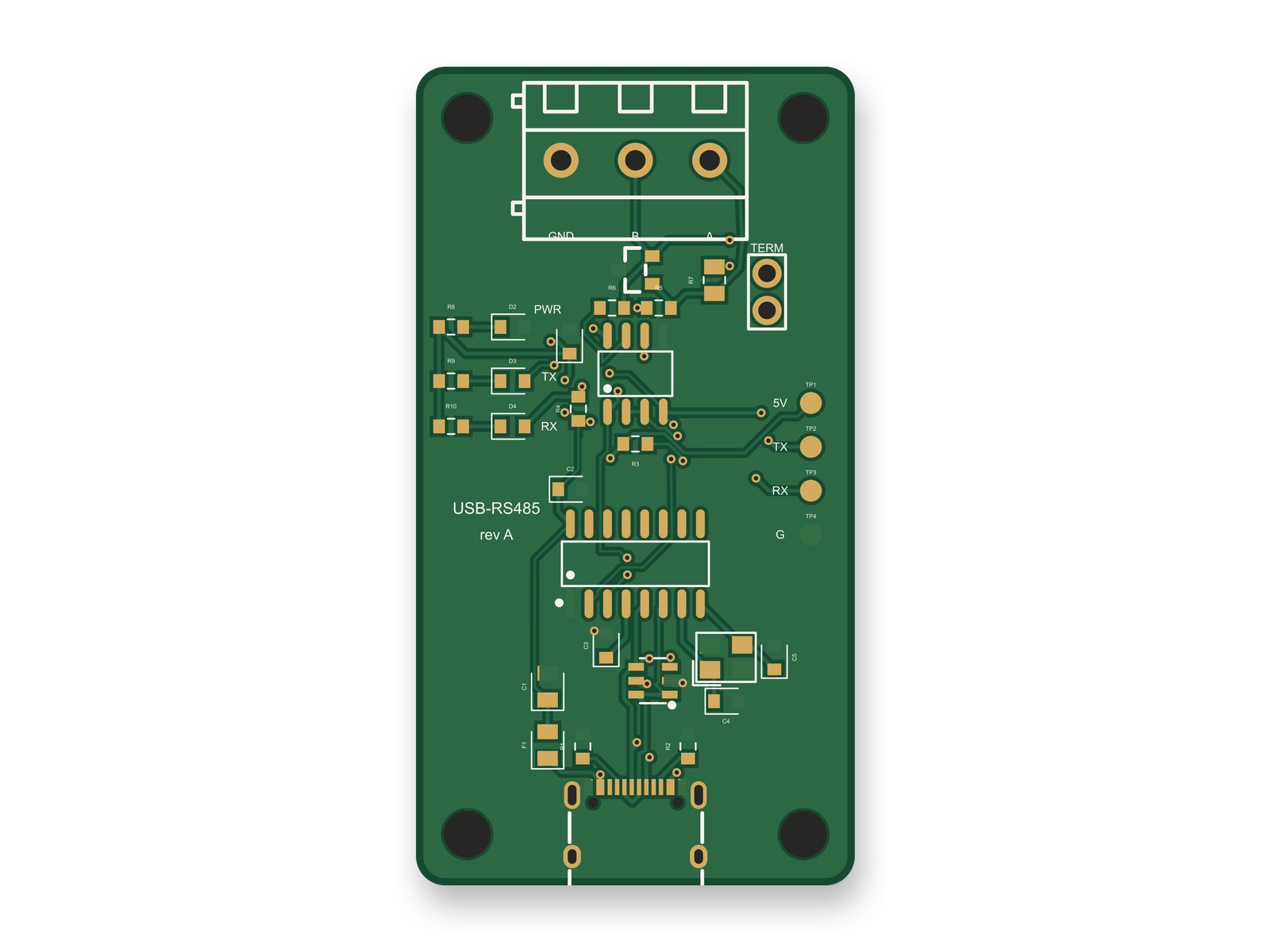
To see those steps on a real design, an AI agent built a USB-C to RS-485 adapter with tscircuit, the open-source engine Cherry Blossom runs on. It ran the same tscircuit version and review tool as Cherry Blossom's agent, on our own machine. The schematic was scored on its own first and reached 86 out of 100 on its second round, after the agent caught a capacitor value copied from an older CH340G datasheet revision and an LED whose JLC footprint puts the cathode on pad 1. The netlist was then frozen and diffed after every layout build. It stayed identical.
Layout took three rounds and finished at 85. In the second round the build reported zero DRC errors, but a separate short check found a VBUS via touching a USB D- via under the ESD chip. Nudging the chip only moved the problem. Placement fixed it: with the ESD chip moved out of a 4 mm gap between the connector and the USB pair, VBUS no longer had to cross the pair there.
The board has not been fabricated. Before ordering, a person still has to confirm which side of the screw terminal takes the wire, check the LED and TVS rotation in the fab's placement viewer, run the fab's DFM check, and decide whether a worst-case USB suspend current of 3.6 mA matters when the USB limit is 2.5 mA. Trace widths came out between 0.15 and 0.25 mm on every net, the supply included, because the autorouter had no per-net width setting it would honour.
When is a layout-only tool the better choice?
Your schematic is done and reviewed in Altium, Cadence, Siemens or KiCad, and layout is what holds you up. That is the job Quilter and DeepPCB do.
The board is large or dense. Quilter lists support for 100 to 1,000 components per board and generates many candidates to choose from.
You need to hand-route critical nets and let the tool finish the rest. DeepPCB and Flux both keep what you route yourself.
Limits to know. Cherry Blossom is an early beta. You change a board by asking the agent, not by dragging traces yourself, so fine manual layout happens after a KiCad export. It is not a circuit simulator, it has no real-time multi-user editing, and it is not built for high-speed or RF sign-off.
What should you check before ordering?
Run DRC in your ECAD with your fab's rules loaded. PCBWay, for example, publishes DRC rule files for KiCad, Altium, Eagle and Allegro.
Upload the Gerbers to the manufacturer's DFM checker before paying.
Look yourself at the nets no tool judges for you: the regulator's switching loop, crystal traces, USB pairs, anything near an antenna.
Check every footprint against its datasheet land pattern, especially for parts the tool created itself.
For more on that last stage, see our guide to AI design rule checks.
See it on your own board
The quickest way to judge any of this is to describe a board and read what comes back: the schematic, the layout, and what the verification gate says about it. It runs in the browser, with the AI included.
Questions
Yes, AI can convert a schematic into a PCB layout, and the best tool for it in 2026 is Cherry Blossom, which writes the schematic and turns it into a placed, routed and checked PCB from a plain-English description. Footprints come from real part data, a verification gate checks every AI edit against manufacturing rules, and you get Gerbers and an editable KiCad project. It does not import a schematic drawn in another tool. For that, Quilter takes a finished schematic, a board outline and any fixed parts from Altium, Cadence, Siemens or KiCad and returns many candidate layouts with placement and routing done. DeepPCB and Flux Auto-Layout route a board whose parts you have already placed, and Freerouting does the same without AI. Placement carries most of the engineering judgement, so review what any AI decides there, and run DRC and a manufacturer DFM check before you order boards.
Freerouting is free and open source under GPL-3.0. It works with KiCad, EasyEDA, Autodesk Fusion and other tools through Specctra DSN files. It only routes, so you place the parts first.
KiCad's PCB editor has an interactive router with push-and-shove modes but no built-in autorouter. People usually pair it with Freerouting, or send the board to a service such as DeepPCB or Quilter, both of which read KiCad files. Cherry Blossom exports placed and routed boards as KiCad projects.
Yes. Cherry Blossom drafts the schematic and layout together from a plain-English description and exports an editable KiCad project, Gerbers and a BOM. Fine manual layout and high-speed or RF sign-off happen after the KiCad export.
Related reading
Describe a board. See what comes back.
Schematic, layout and a verification gate, in the browser. Exports to Gerbers and KiCad.
