Compared

Free AI PCB design tools in 2026, and the fine print on each

A free AI PCB tool is rarely free for everyone. One is free if your company is small, another if your design is open source, another for thirty minutes. We read the pricing pages and wrote down the conditions, since they decide whether a tool is free for you.

By the Cherry Blossom teamUpdated November 3, 2026

The short answer

The best free AI PCB design tool is Quilter, if you qualify: its free tier gives AI placement and routing to individuals and small companies, in exchange for board metadata. ProtoFlow has a free Mac plan with AI that drafts schematic and layout. JITX is free for open-source designs, and tscircuit is free if you bring your own coding agent. DeepPCB and Flux offer trials, not free plans.

Cherry Blossom is free with an AI you bring: its Free plan is the full editor, and you can connect your own assistant, such as Claude or ChatGPT, to design and route boards in it on that assistant's subscription. Its own agent, Sakura, which builds and checks the board from a plain-English description, is from $20 a month. See the plans, and for the overall ranking, free or not, see our main roundup.

The catch

What do free AI PCB tools ask in return?

Running AI costs the vendor money on every board, so every free tier has a limit somewhere. On the tools below, it takes one of four forms.

  • Who you are. Quilter's free tier is for individuals, academics and small companies under a revenue cap.

  • What licence your design uses. JITX's free plan only covers designs released under CERN OHL-P.

  • Your data. Quilter's free tier uses board metadata to improve its design engine.

  • Time. DeepPCB gives 30 minutes; Flux and Trace give trials measured in days.

None of these conditions is unreasonable, but they rule a lot out if you are designing a commercial product at a company of ten people or more.

The list

Which AI PCB design tools can you use for free?

The free tools come first, ranked by how much real AI PCB work you can do for nothing. Cherry Blossom comes last: free with your own AI assistant, and with its own agent on Pro the one that goes furthest from a sentence to a checked board. Every condition comes from the vendor's own page, September 2026.

1Quilter

Best for: Free AI placement and routing for individuals and small teams

Quilter places and routes a board you bring from Altium, Cadence, KiCad, OrCAD or Xpedition. It does not generate schematics. The free version includes all features and unlimited iterations for teams under 10 people and $50K revenue, runs on public cloud, and uses your board's metadata to train the engine.

Platform
Cloud, with your ECAD files
Pricing
Free for eligible users; paid per project, based on unrouted pins
2ProtoFlow

Best for: A free editor that drafts the circuit for you

ProtoFlow drafts a schematic from a description with real parts and footprints, then you lay out the board in its editor and export Gerbers, BOM and placement files. Its free plan needs no card and includes AI.

Platform
Desktop (Mac)
Pricing
Free plan; paid upgrades for more AI usage
3tscircuit

Best for: Developers who already pay for a coding agent

An MIT-licensed framework that compiles TypeScript into schematic, PCB, fab files and KiCad. It is designed for AI agents to write. The framework is free; the agent is your cost.

Platform
Browser playground or local CLI
Pricing
Free and open source
4JITX

Best for: Open-source hardware and university projects

Code-based PCB design with AI proposing edits and automated layout. Free indefinitely with unlimited design complexity, as long as the design is under CERN OHL-P; proprietary work needs Enterprise.

Platform
Local install
Pricing
Free for open-source designs
5KiCad

Best for: The free place most AI output ends up

KiCad has no AI, but it is free forever and open source, with schematic capture, SPICE simulation, an interactive router and a 3D viewer. Several tools on this list export to it, which makes it the free place to finish a board.

Platform
Windows, macOS, Linux
Pricing
Free
6DeepPCB

Best for: Trying AI routing on one small board

AI routing for boards from Altium, KiCad, EasyEDA, Zuken and more, returned in your own format. The free trial is 30 minutes on one board, up to 4 layers and 100 components.

Platform
Browser
Pricing
30-minute trial; then $30 for a 1-hour package, as listed on DeepPCB's pricing page, September 2026
7Flux

Best for: Trying an AI-first browser ECAD for two weeks

A browser ECAD whose AI drafts schematics, places and routes. Its pricing page gives a two-week trial; after that, AI, export and private projects need a paid plan.

Platform
Browser
Pricing
14-day trial, then paid plans with AI metered in ACUs
8Cherry BlossomOur product

Best for: Free with your own AI assistant; its own agent, from a sentence to a checked board, on Pro

A full schematic and PCB editor in the browser with an AI agent, Sakura, built in. Describe the board in plain English and Sakura finds real parts, draws and tidies the schematic, then asks before it places and routes the PCB. Edit anything by hand, then export Gerbers, an editable KiCad project, a BOM, pick-and-place, STEP or open Circuit JSON. More than 100 people at companies in over 20 countries use it.

Platform
Browser, nothing to install
Pricing
The Free plan is the full editor, by hand, with no AI. Pro adds the AI for $20 a month, with 4M AI credits a month. Ultra is $140 a month with 32M credits and the frontier models. More credits past the allowance are $5 per 1M credits, bought up front only if you want them. There is no API key to connect and no per-seat licence.

EasyEDA is worth knowing about too: its Standard Edition is free in the browser with JLCPCB ordering built in. We found no built-in AI in it, so it is not on the ranked list.
At a glance

What does each free tier allow?

  • Quilter

    Does

    Layout only

    Free for

    Under 10 people, under $50K revenue

    Main condition

    Metadata used for training

  • ProtoFlow

    Does

    Schematic and layout

    Free for

    Everyone

    Main condition

    Mac only; AI usage limits

  • tscircuit

    Does

    Code to board

    Free for

    Everyone

    Main condition

    Bring your own AI

  • JITX

    Does

    Code to board

    Free for

    Open-source designs

    Main condition

    CERN OHL-P licence

  • KiCad

    Does

    Manual ECAD

    Free for

    Everyone

    Main condition

    No AI

  • DeepPCB

    Does

    Routing only

    Free for

    30 minutes

    Main condition

    1 board, 4 layers, 100 parts

  • Flux

    Does

    Schematic and layout

    Free for

    14 days

    Main condition

    AI paid after trial

  • Cherry Blossom

    Does

    Prompt to checked fab files

    Free for

    Everyone, with your own AI assistant

    Main condition

    Its own AI, Sakura, from $20/mo

Conditions as printed on each vendor's pricing or free-tier page, September 2026; Cherry Blossom's from its own plans, November 2026.

We built one

What does the free, open-source route produce?

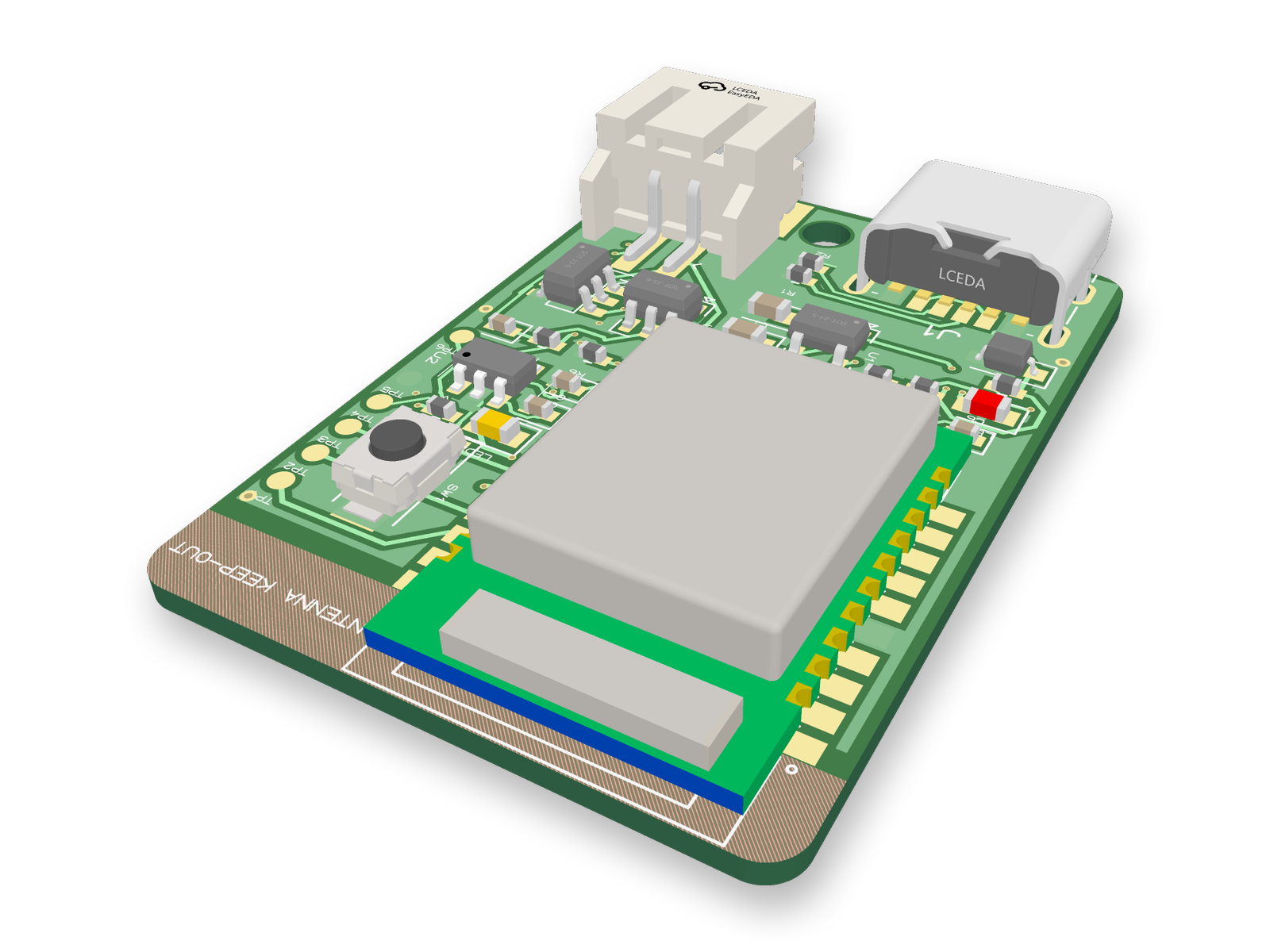
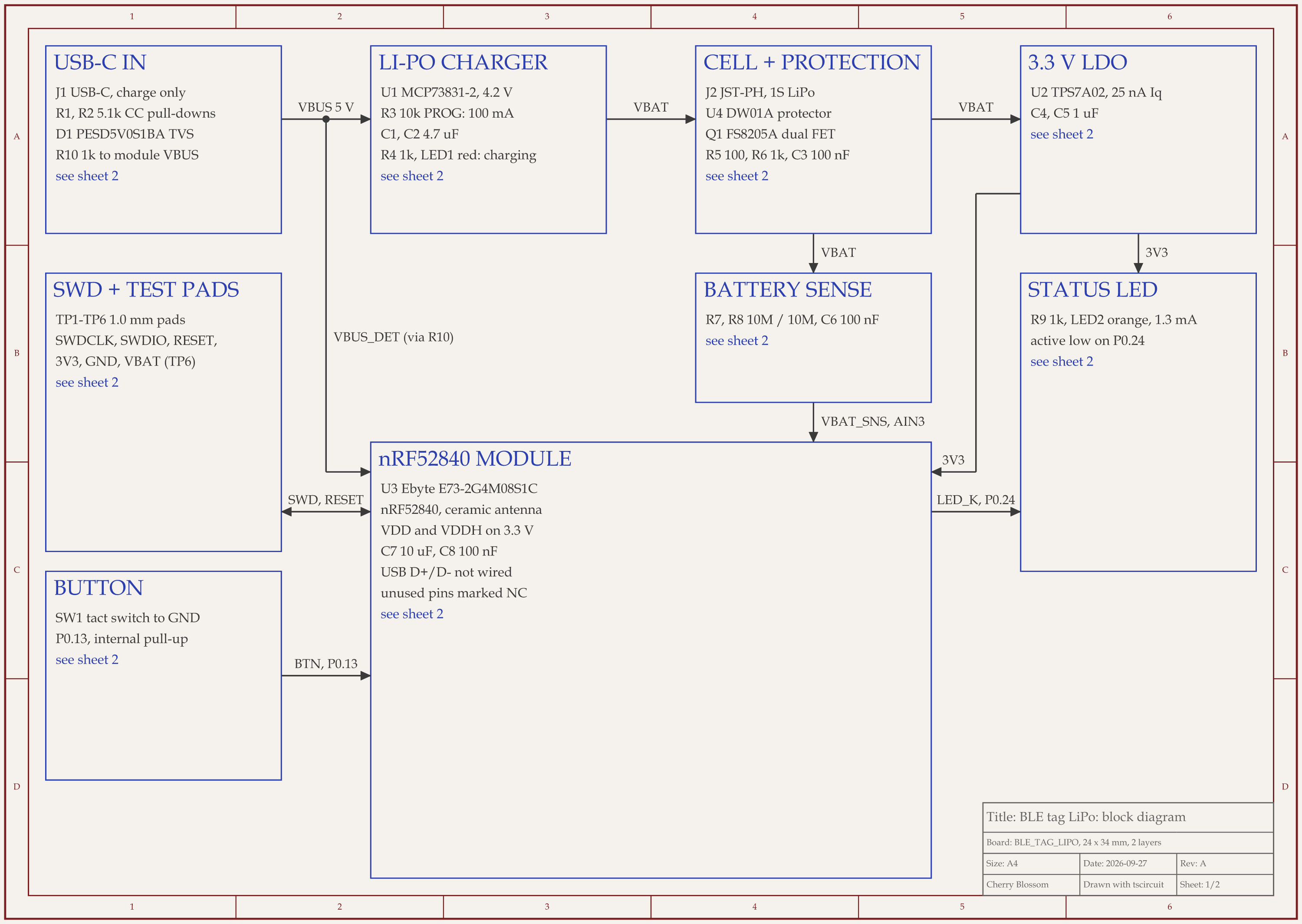
nRF52 Bluetooth tag with LiPo charger schematic, sheet 1 of 2: Block diagram
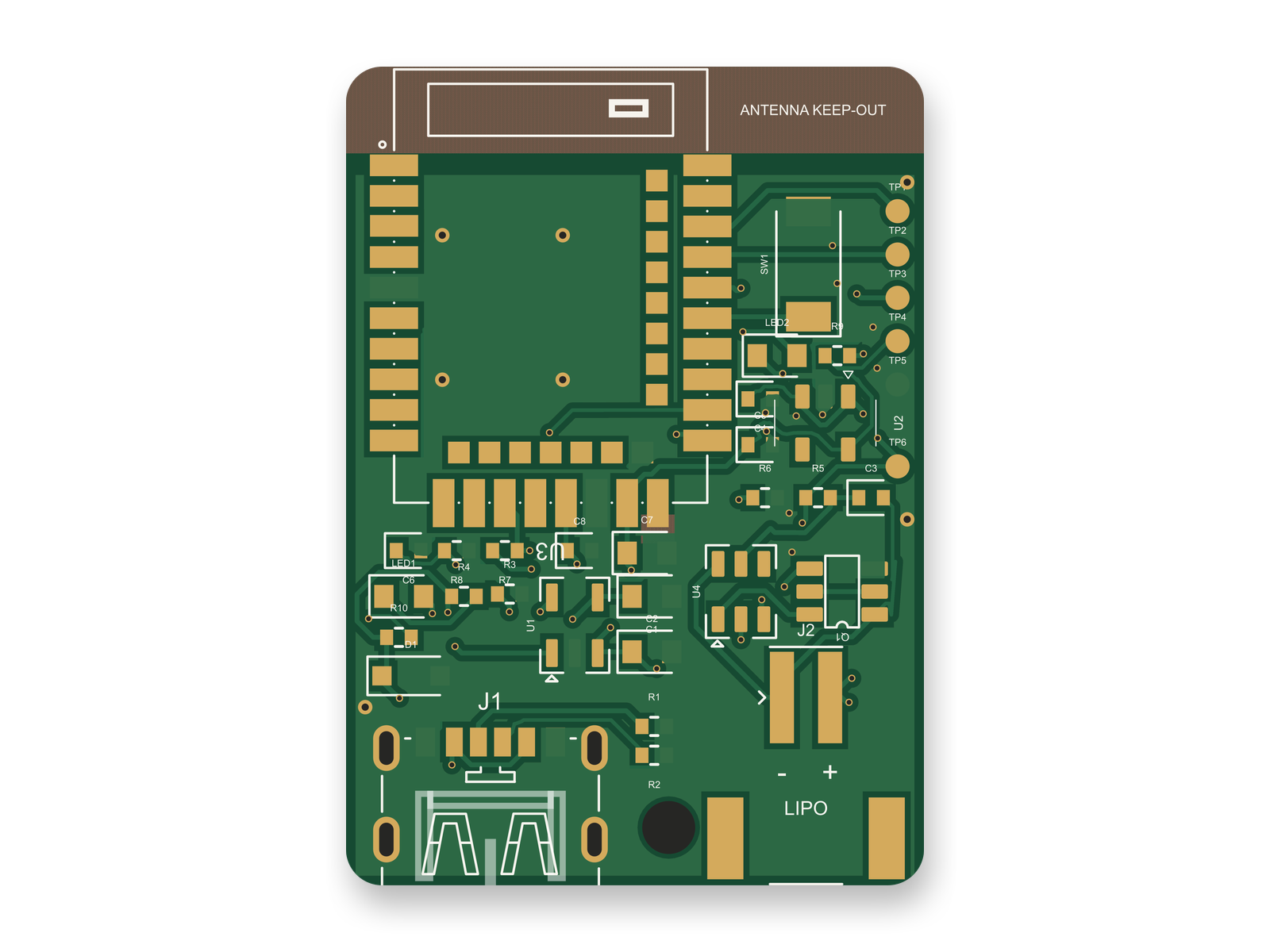
Routed PCB layout of the nRF52 Bluetooth tag with LiPo charger3D render of the nRF52 Bluetooth tag with LiPo charger
A Bluetooth tag an AI agent wrote in tscircuit code: block diagram, routed 2-layer PCB and 3D render.

tscircuit is on the list above as free and MIT-licensed, with the AI as your cost. To see what that engine produces, we had an AI agent write a board in it on our own machine: a 24 x 34 mm Bluetooth tag with an nRF52840 module, a LiPo charger and USB-C charging. It used the tscircuit version and review tool that an earlier version of Cherry Blossom used.

The agent took four rounds and 50 minutes 42 seconds to reach 85 out of 100 on our rubric. An outside review of the circuit then scored it 80, one round of fixes raised that to 90, and the layout redone for the changed parts scored 88. On the final build, tscircuit's command-line tool reported a clean build and 0 netlist errors or warnings, and its autorouter laid 71 traces and 49 vias. A full routed build took 111 to 163 seconds.

A clean build still came with notes to read: 110 "trace missing a name" lints and 18 footprint notes on the small passives. None of them are faults, but someone has to look. Nothing here has been fabricated or tested in hardware, so checking battery polarity with a meter and running a DFM check are still your job, whichever free tool you use.

Our part

When is paying for Cherry Blossom worth it over a free tool?

Cherry Blossom is worth paying for when your time matters more than the subscription. Sakura in the browser produces the schematic, the layout, a manufacturing check and the fab files, with the AI included and no key to manage. Footprints come from real part data, you order by uploading the fab files to any board house, and the design exports to KiCad.

If your budget is zero, there are two routes. If you already pay for Claude, ChatGPT or Cursor, connect it to Cherry Blossom on the Free plan and let it draw and route the board in the editor. If you know KiCad, a free chain (ProtoFlow or tscircuit for the draft, KiCad for layout, Quilter if you qualify) will get you a board for the cost of your time. Students can also see our page for students.

What it does not do. Cherry Blossom is an early beta. Circuit simulation is coming but not here yet, and it imports KiCad projects today, with import from Altium, EAGLE, Cadence Allegro, PADS and EasyEDA coming. It has no comments or team management, and it is not built for high-speed or RF sign-off.

See it on your own board

The quickest way to judge any of this is to describe a board and read what comes back: the schematic, the layout, and what the Checks panel says about it. It runs in the browser, with the AI included from the Pro plan up.

Questions

Yes, and the best one is Quilter, if you qualify. Its free version gives AI placement and routing to individuals, academics and companies with fewer than 10 people and under $50K in revenue, and it uses your board's metadata to train its engine. Each free tool has a condition like this. ProtoFlow has a free Mac plan with AI that drafts schematic and layout. JITX is free for designs released under the CERN OHL-P licence. tscircuit is free and open source if you already have a coding agent. DeepPCB offers a 30-minute trial and Flux a two-week trial. KiCad is free forever, with no AI. Cherry Blossom's Free plan is the full editor, and you can connect your own AI assistant, such as Claude or ChatGPT, to design in it on that assistant's subscription; its own agent, which turns a plain-English description into a checked schematic, layout and fab files, is from $20 a month.

For some users. Quilter's free version is for academic, personal and eligible professional use, meaning fewer than 10 people and under $50K revenue. It includes all features, but Quilter uses board metadata from free users to improve its engine.

Quilter accepts KiCad designs on its free tier if you are eligible, and DeepPCB offers a 30-minute trial with a KiCad plugin. KiCad's own interactive router is free but is not AI, and neither is Cherry Blossom's Autoroute button, which is free on its Free plan for a KiCad project you import.

The editor is: the Free plan is the full editor to design in by hand, and you can connect your own AI assistant to it through MCP. Our own AI, Sakura, is not free, because every board it designs runs on our side, and it is included in Pro and up with no API key.

Yes, if you already use one. Cherry Blossom's [MCP server](/docs/mcp) is on its Free plan: connect Claude, ChatGPT, Claude Code, Codex or Cursor, and your assistant draws the schematic, places and routes the board in a Cherry Blossom project, with the same tools Sakura uses. The tools run on Cherry Blossom at no charge and the model runs on your assistant's own plan, so you can check and edit the result in the editor and export Gerbers or a KiCad project.

Describe a board. See what comes back.

Schematic, layout and a Checks panel, in the browser. Exports to Gerbers and KiCad.

By signing up, you agree to our Terms of Service and Privacy Policy.