Compared

Free AI schematic generators in 2026: which are free, and which are trials

Search for a free AI schematic generator and you will find a lot of free trials. We went through each vendor's pricing page in September 2026 and sorted the options into three groups: free with AI included, free because you bring your own AI, and paid or trial-only. Cherry Blossom closes the list as the paid pick, because it takes the schematic on to a checked board.

By Arnaud and Anass

The short answer

The best free AI schematic generator is ProtoFlow, a Mac desktop editor with a free plan that includes AI, needs no card and does not expire. tscircuit is MIT licensed and free if you already pay for a coding agent, and JITX is free for open-source designs under CERN OHL-P. Flux and Trace are trials for AI use, and Skimatly is a closed beta. KiCad is free forever, has no AI, and is where most of this output ends up.

Cherry Blossom is the paid pick if you want the board built and checked for you: you describe the circuit in plain English and get a schematic, a laid-out board and a manufacturing check, with the AI from $20 a month (its Free plan is the editor alone). See the plans.

Definitions

What counts as free here?

We only called something free if you can keep generating schematics with AI, indefinitely, without entering a card. A 7-day or 14-day trial is useful for a test, but it is not free. Neither is a free editor where the AI is paid, even if the vendor's headline says free.

The grey area is bring-your-own-AI. tscircuit costs nothing, but the agent that writes the code for you does, unless you already pay for one. We list it as free and flag the catch.

The list

Which AI schematic generators are free in 2026?

The free options come first, ranked by how much you get for nothing. Cherry Blossom comes last, as the paid pick that goes from a sentence to a checked board.

1ProtoFlow

Best for: A free AI schematic generator with nothing else to set up

Describe the circuit and ProtoFlow drafts a schematic with real parts and footprints, which you then edit by hand. Its site says the free plan needs no card, does not expire, and includes the full editor and AI features. Exports to KiCad, Altium, EAGLE, PADS and EDIF.

Platform
Desktop (Mac)
Pricing
Free plan; paid upgrades raise AI limits
2tscircuit

Best for: Developers with a coding agent already

An MIT-licensed framework that turns React/TypeScript code into schematics, PCBs, fab files and KiCad files. It is built for AI-written circuits: you tell your agent to use tscircuit. Free, but the agent is yours to pay for.

Platform
Browser playground or local CLI
Pricing
Free and open source
3JITX

Best for: Open-source hardware projects and students

A code-based design tool where AI proposes edits to Python design code. The free plan is free indefinitely, but it requires designs under CERN OHL-P and is not compatible with proprietary or GPL designs.

Platform
Local install
Pricing
Free for open-source designs; Enterprise quote-based
4atopile

Best for: Writing circuits as code, by hand or with a general coding agent

An open-source tool for designing electronics with code in its own .ato language, with an in-browser editor. The docs we read describe no built-in AI, and they warn it is under heavy development. It is here because code is something any coding agent can write.

Platform
Browser editor or local
Pricing
Open source
5Flux

Best for: Trying a full browser ECAD with an AI copilot

Flux's AI drafts schematics, picks parts from datasheets and runs checks. Its pricing page gives a two-week trial of premium features; after that the free plan lets you use public projects, and editing private projects, exporting and AI need a paid plan.

Platform
Browser
Pricing
14-day trial, then AI on paid plans
6Trace

Best for: Testing prompt-to-board generation for a week

Trace generates multi-sheet schematics and routes the board. The trial is 7 days with $30 of AI credit, and needs a card.

Platform
Desktop (macOS) and CLI
Pricing
7-day trial; Pro $29.99 a month, as listed on Trace's pricing page, September 2026
7Skimatly

Best for: Joining a waitlist for a schematic-only generator

Turns a sentence into an IEEE-style schematic, with KiCad and EasyEDA export. Closed beta; the waitlist needs only an email. Pricing is not announced.

Platform
Browser
Pricing
Closed beta
8Cherry BlossomOur product

Best for: The one worth paying for: a checked board from a sentence

You describe the board in plain English and an AI agent writes it as code, builds it, and shows you the schematic, PCB layout, 3D view and BOM. Footprints come from real part data, and a verification gate checks the board before you can order it. Export Gerbers, an editable KiCad project, a BOM and pick-and-place files, or open Circuit JSON.

Platform
Browser, nothing to install
Pricing
The Free plan is the full editor, by hand, with no AI. Pro adds the AI for $20 a month, with 4M AI credits and 600 AI actions a day. Ultra is $140 a month with 32M credits and the frontier models. Usage past the allowance is $5 per 1M credits, only if you turn it on. There is no API key to connect and no per-seat licence.
At a glance

How free is each one?

  • ProtoFlow

    AI free?

    Yes

    Card needed?

    No

    Catch

    Mac only; usage limits on AI

  • tscircuit

    AI free?

    You bring the AI

    Card needed?

    No

    Catch

    You write or prompt code

  • JITX

    AI free?

    Yes, for open source

    Card needed?

    No

    Catch

    Designs must be CERN OHL-P

  • atopile

    AI free?

    No built-in AI

    Card needed?

    No

    Catch

    Pre-release, code only

  • Flux

    AI free?

    Trial only

    Card needed?

    Not stated

    Catch

    AI and export are paid after 14 days

  • Trace

    AI free?

    Trial only

    Card needed?

    Yes

    Catch

    7 days, $30 of credit

  • Skimatly

    AI free?

    Unknown

    Card needed?

    No (waitlist)

    Catch

    Closed beta

  • KiCad

    AI free?

    No AI

    Card needed?

    No

    Catch

    Free forever, draw by hand

  • Cherry Blossom

    AI free?

    No

    Card needed?

    Yes

    Catch

    Free editor; AI from $20 a month

From each vendor's own pricing or product page, September 2026.

Our part

Why is a paid tool on a free list?

Because a schematic is only half the job, and Cherry Blossom does the other half too. The conversation that draws the schematic also lays out the board with footprints from real part data, runs a verification gate on every AI edit and produces Gerbers, a BOM and an editable KiCad project. See how it works on the prompt to PCB page.

Cherry Blossom's Free plan is the editor alone, to draw the schematic and board by hand. The AI is Pro's, at $20 a month with no API key to set up. If you only need a schematic drawing and your budget is zero, one of the free options above it is the better fit.

What it does not do. Cherry Blossom is an early beta. You change a board by asking the agent, not by dragging traces yourself, so fine manual layout happens after a KiCad export. It is not a circuit simulator, it has no real-time multi-user editing, and it is not built for high-speed or RF sign-off.

What is the cheapest way to go from a free schematic to a board?

Generate the schematic with ProtoFlow or tscircuit, export it to KiCad (free and open source on Windows, macOS and Linux), and lay out the board there. It costs nothing but your time. For free AI help on the layout side, see our list of free AI PCB design tools, and for paid generators ranked on output quality, see the best AI schematic generators.

We built one

What is left to do after a free engine draws the board?

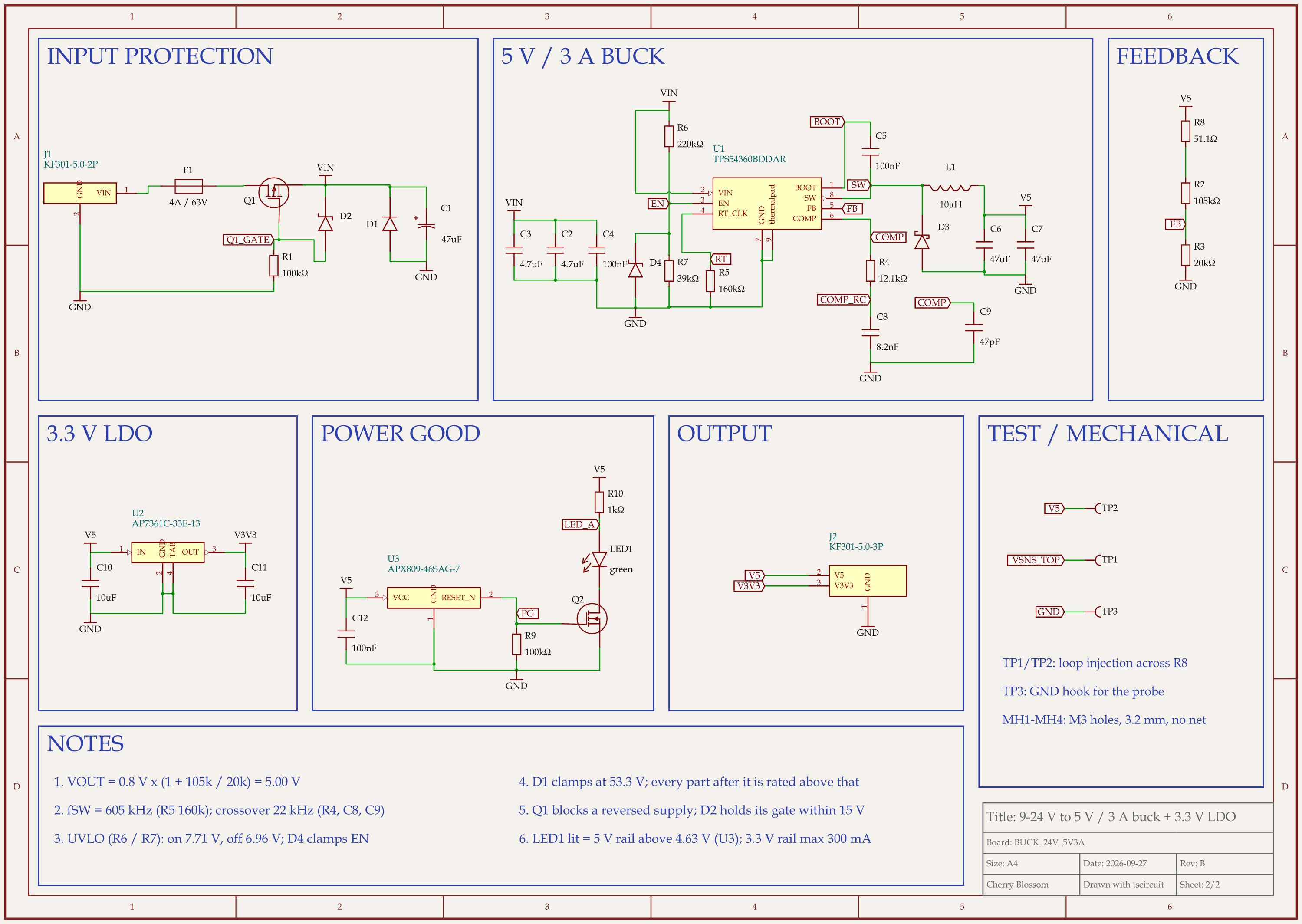
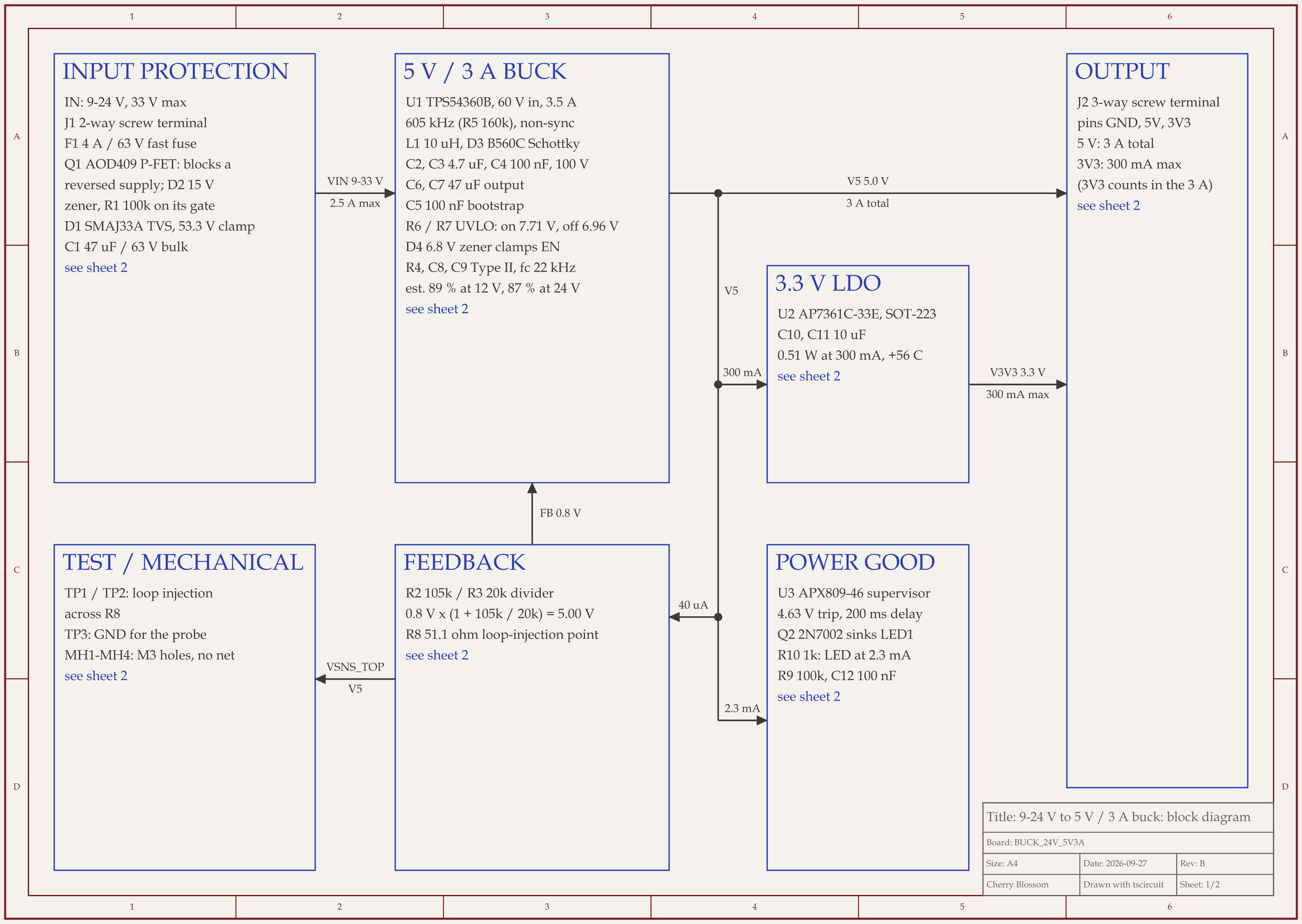
9-24 V to 5 V 3 A buck board schematic, sheet 1 of 2: Block diagram9-24 V to 5 V 3 A buck board schematic, sheet 2 of 2: Schematic
A 24 V to 5 V, 3 A buck board drawn with tscircuit, the free and open-source engine. The block diagram and schematic of rev B.

tscircuit is on this list as a free option, so we checked what it produces with an AI agent at the keyboard. The agent built a 9 to 24 V in, 5 V at 3 A out supply with tscircuit on our own machine: the same tscircuit version and review tool that Cherry Blossom's agent uses. The final build took 73 seconds, with other boards building on the same machine. It had 0 design rule errors, and all 36 placed parts have LCSC part numbers. Nobody has manufactured it.

Even with a clean build and an outside review of the circuit, the agent's notes leave a person these jobs before ordering:

  • Check the fab's rotation and polarity for the diodes, the LED, the bulk capacitor and both MOSFETs against the printed cathode marks.

  • Confirm the 3.3 V regulator (LCSC C500795) is still in stock, or pick a substitute. Plan a successor for the supervisor chip too: its maker marks it not recommended for new designs.

  • Confirm on the part drawing that the screw terminals' wire entries face the board edges.

  • Decide whether the input needs automotive load-dump protection. The 400 W TVS diode on it is not sized for that.

  • After assembly, measure the loop gain and a load step, and check the catch diode's temperature at full load.

  • Run the fab's own DRC on the exported Gerbers.

  • Confirm on the bench that the board starts by 8.65 V and stays on down to 5.81 V at full load. The outside review found that the first version could fail to start from 9 V.

See it on your own board

The quickest way to judge any of this is to describe a board and read what comes back: the schematic, the layout, and what the verification gate says about it. It runs in the browser, with the AI included from the Pro plan up.

Questions

Yes, and the best one is ProtoFlow, a Mac desktop editor whose site says the free plan needs no card, does not expire, and includes its AI features. tscircuit is MIT licensed and free, and works well if you already pay for a coding agent that can write the circuit as code. JITX is free for open-source designs under the CERN OHL-P licence, but not for proprietary work. Flux and Trace offer time-limited trials of their AI, and Skimatly is in closed beta. KiCad is free forever but has no AI. If you want the board as well as the schematic, Cherry Blossom is the paid alternative: you describe the circuit in plain English and get a schematic, a laid-out board and a manufacturing check, with the AI from $20 a month; its Free plan is the editor alone.

Not the AI. Flux has a free Explore plan, but its pricing page says that after a two-week trial, AI, exporting and editing private projects need a paid plan. You can use the editor for free; the AI costs money.

Yes, without the AI. The Free plan is the full editor, to draw the schematic and lay out the board by hand. The AI that generates them starts at Pro, with no API key needed.

Partly. A chatbot can write tscircuit or atopile code, which those tools then compile into a schematic. Nothing checks the parts or values for you, so review the result before you build anything.

Describe a board. See what comes back.

Schematic, layout and a verification gate, in the browser. Exports to Gerbers and KiCad.