Compared

Free EDA software: the best free tools for schematics, simulation and PCB layout

EDA (electronic design automation) covers more than PCB layout: schematic capture, circuit simulation, layout and the checks between them. Every one of those steps now has a capable free tool, though they do not all live in one program.

By Arnaud and Anass

The short answer

The best free EDA software is KiCad, which covers schematic capture, layout and SPICE simulation in one open source package. ngspice is the open source SPICE engine, and Qucs-S puts a graphical interface on it. LibrePCB is a simpler layout tool, and EasyEDA is the free option in a browser.

Cherry Blossom is the paid pick if you want the board built and checked for you: you describe it in plain English and get a checked schematic, PCB layout and fab files, free, with the AI from $20 a month.

The categories

What counts as EDA software?

Board-level EDA breaks into three jobs. Schematic capture is drawing the circuit and its connections. Simulation predicts how that circuit behaves before you build it. PCB layout turns the schematic into copper, with design rule checks (DRC, automatic manufacturing checks) and fabrication outputs at the end.

Commercial suites bundle all three, at a price. Free tools tend to split them. Some do layout well and simulation lightly, some only simulate, and a few, such as KiCad, cover all three. We rank them by how much of the job each handles well, and the table shows which job each one is for.

The list

Which free EDA tools are the best?

1KiCad

Best for: The whole flow in one free package

Schematic capture from single sheets to hierarchical designs with hundreds of sheets, an integrated SPICE simulator and electrical rules checker, PCB layout with an interactive router, and a 3D viewer. Licensed under GPL v3, with Gerber and IPC-2581 output. Version 10.0.6 shipped on August 29, 2026.

Platform
Windows, macOS, Linux
Pricing
Free and open source
2ngspice

Best for: Open source SPICE simulation

The open source SPICE simulator for analog, digital and mixed-signal circuits, with device models for transistors, passives, diodes and transmission lines. Its site notes SPICE, PSPICE and LTSPICE compatibility. It has no schematic editor of its own; you drive it from files, the command line or a front end such as KiCad or Qucs-S.

Platform
Command line and files, or inside a front end
Pricing
Free and open source
3Qucs-S

Best for: A graphical simulation front end

A Qt-based schematic and simulation interface that runs several engines: ngspice (its recommended choice), Xyce, QucsatorRF for RF and microwave circuits, and SpiceOpus. It is a simulation tool, not a PCB tool.

Platform
Windows, macOS, Linux, FreeBSD
Pricing
Free and open source
4LibrePCB

Best for: Simpler open source schematic and layout

A GPLv3 suite for schematics and PCBs, with a semantic library system, a human-readable file format for version control, and a command-line tool for automation and CI. Version 2.1.1 came out in June 2026.

Platform
Windows, macOS, Linux
Pricing
Free and open source
5EasyEDA

Best for: Free schematic, simulation and layout in a browser

A browser and desktop editor whose core features are free, including for commercial use. The Standard edition includes simple circuit simulation; boards and parts link to JLCPCB and LCSC.

Platform
Browser, plus a desktop client
Pricing
Free core features; paid Premium and Enterprise plans
6CircuitMaker

Best for: Free layout on Altium technology

Altium's free community tool, with multi-sheet schematics, interactive routing, a topological autorouter, 3D and CAM output (Gerber, NC drill, ODB++). Its site says there is no commercial restriction and no layer or board-area limit.

Platform
Desktop
Pricing
Free
7Horizon EDA

Best for: A modern open source layout tool on Linux

A free and open source package built around a shared pool of parts, covering schematics, PCB layout, 3D preview and manufacturing export.

Platform
Linux, Windows
Pricing
Free and open source
8Wokwi

Best for: Simulating microcontroller projects in a browser

Simulates Arduino, ESP32, STM32 and Raspberry Pi Pico projects with their code, including MicroPython. It is not a PCB tool, but it catches wiring and firmware mistakes before you design a board.

Platform
Browser
Pricing
Free online simulation; paid Pro tier
9Cherry BlossomOur product

Best for: The one worth paying for: a checked board from a sentence

You describe the board in plain English and an AI agent writes it as code, builds it, and shows you the schematic, PCB layout, 3D view and BOM. Footprints come from real part data, and a verification gate checks the board before you can order it. Export Gerbers, an editable KiCad project, a BOM and pick-and-place files, or open Circuit JSON.

Platform
Browser, nothing to install
Pricing
The Free plan is the full editor, by hand, with no AI. Pro adds the AI for $20 a month, with 4M AI credits and 600 AI actions a day. Ultra is $140 a month with 32M credits and the frontier models. Usage past the allowance is $5 per 1M credits, only if you turn it on. There is no API key to connect and no per-seat licence.
Side by side

Which job does each free EDA tool do?

  • KiCad

    Schematic

    Yes

    Simulation

    SPICE, built in

    PCB layout

    Yes

    Licence

    GPL v3

  • ngspice

    Schematic

    No

    Simulation

    Yes, SPICE engine

    PCB layout

    No

    Licence

    Open source

  • Qucs-S

    Schematic

    Yes, for simulation

    Simulation

    Yes, several engines

    PCB layout

    No

    Licence

    Open source

  • LibrePCB

    Schematic

    Yes

    Simulation

    No

    PCB layout

    Yes

    Licence

    GPLv3

  • EasyEDA

    Schematic

    Yes

    Simulation

    Simple, in Standard

    PCB layout

    Yes

    Licence

    Free tier

  • CircuitMaker

    Schematic

    Yes

    Simulation

    Not listed

    PCB layout

    Yes

    Licence

    Free

  • Horizon EDA

    Schematic

    Yes

    Simulation

    Not listed

    PCB layout

    Yes

    Licence

    Open source

  • Wokwi

    Schematic

    Wiring diagram

    Simulation

    Microcontrollers

    PCB layout

    No

    Licence

    Free tier

From each project's own site, September 2026. Cherry Blossom is not in this table because what it is for, the AI, is paid; it is free, with the AI from $20 a month.

Putting it together

What does a complete free EDA toolchain look like?

  • Try the idea. For a microcontroller project, wire it up and run the firmware in Wokwi first.

  • Draw and simulate the circuit. KiCad's schematic editor with its built-in SPICE simulator covers most analog checks; use Qucs-S when you want a dedicated simulation interface or an RF engine.

  • Lay out the board in KiCad, or in LibrePCB if you prefer something smaller.

  • Run the design rule check and export Gerbers. Every layout tool on this list produces standard fabrication files.

That is a professional-grade flow with no licence fee at any step. It costs you time instead. Each step is a skill to learn, and moving between tools means checking that models and footprints still line up. That time is what Cherry Blossom saves.

We built one

Which checks can you run on a board without a simulator?

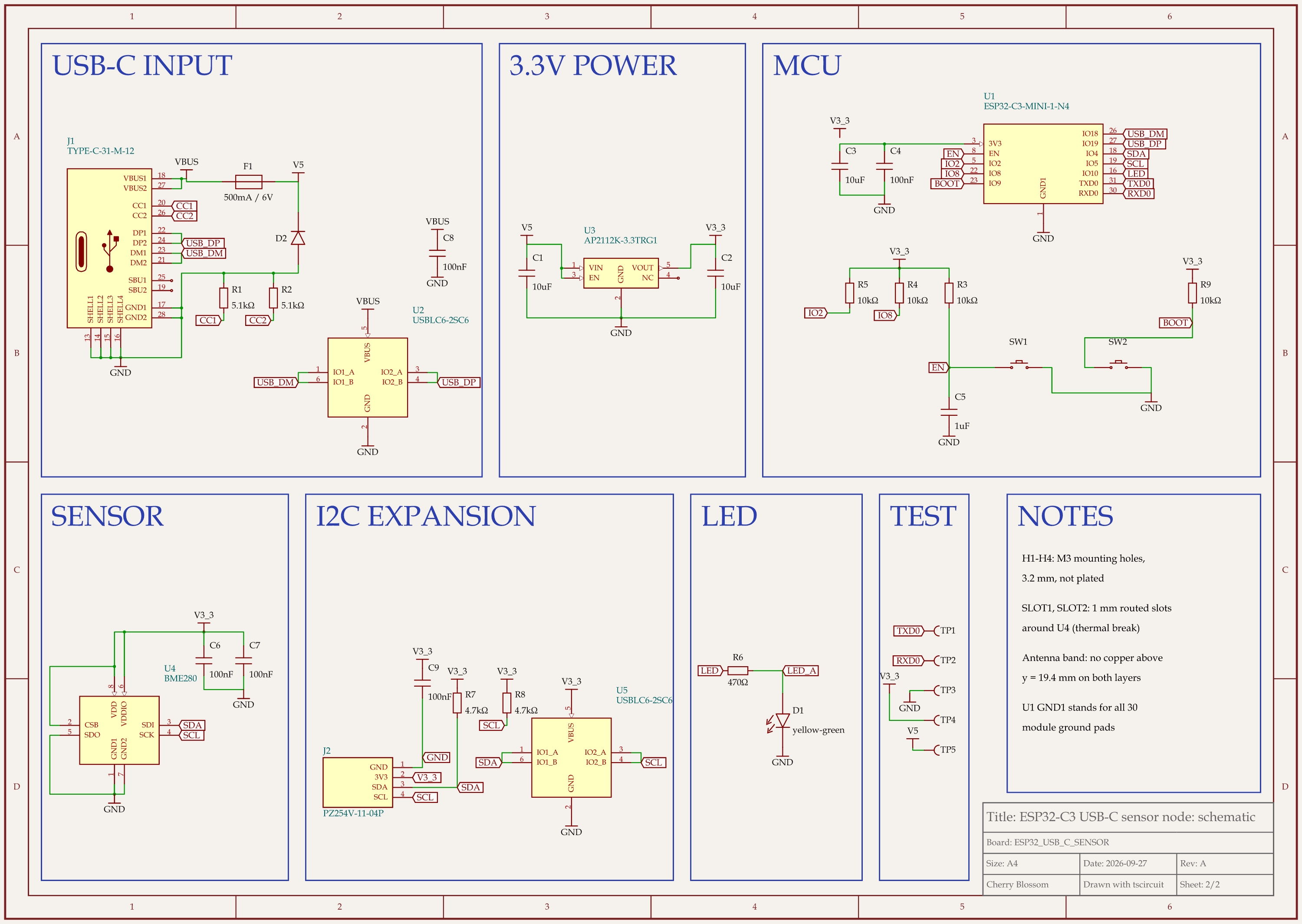
ESP32-C3 USB-C sensor node schematic, sheet 2 of 2: Schematic
An ESP32-C3 sensor board that passed every automated check, none of which is a simulation.

An AI agent built this ESP32-C3 sensor board with tscircuit, the open source engine Cherry Blossom runs on, on our own machine with the tscircuit version and review tool Cherry Blossom's agent uses. The final build went through these checks:

  • The build itself: 0 errors.

  • The 23 built-in design rule checks: 0 findings.

  • Short-circuit check: 0 shorts.

  • The review tool: 0 problems on both schematic sheets.

  • Netlist check: 0 errors and 0 warnings.

  • TypeScript: clean, since the board is written as code.

None of that is a simulation. The checks show the board is wired the way the code says and that it can be made. They do not show how the circuit behaves. An earlier version passed the same kind of checks, yet an outside review found that plugging in a cable could ring the 5 V rail to 7 to 10 V, past the regulator's 6.5 V absolute maximum. The reviewer worked that out by hand from the datasheets, and the fix was a TVS clamp diode that holds the peak near 7 V. Questions like that are still a job for KiCad's simulator or ngspice, and nobody has made or tested this board.

Worth paying for

Why is Cherry Blossom on a free list?

Because it is the fastest way from an idea to a board you can order, and for many people that is worth a small fee. The editor is free to use by hand, but the AI is the point here, and it starts at $20 a month on Pro. You give it a plain-English description, and an AI agent designs the board and hands back the schematic, layout, 3D view, bill of materials and Gerbers. Footprints come from real part data, and a verification gate checks every edit against manufacturing rules. It is not a simulator, and you can edit by hand anything the agent did.

It exports an editable KiCad project and open Circuit JSON, so it sits in front of the free toolchain above: get a checked board from a description, then simulate and refine it in KiCad. See how prompt to PCB works, and the pricing page for plans.

See it on your own board

The quickest way to judge any of this is to describe a board and read what comes back: the schematic, the layout, and what the verification gate says about it. It runs in the browser, with the AI included from the Pro plan up.

Questions

KiCad is the best free EDA software. It is open source under GPL v3 and covers schematic capture, an integrated SPICE simulator, PCB layout with an interactive router, a 3D viewer and Gerber output, with no limits on layers, board size or commercial use. For simulation on its own, ngspice is the open source SPICE engine, and Qucs-S gives it a graphical interface. LibrePCB is a simpler layout tool, and EasyEDA is free in a browser. If you want the board built and checked for you, Cherry Blossom is the paid alternative, starting free, with the AI from $20 a month. It turns a plain-English description into a checked schematic, PCB layout and fab files in the browser, with footprints from real part data and an editable KiCad export.

Yes. ngspice is an open source SPICE simulator for analog, digital and mixed-signal circuits, and KiCad includes an integrated SPICE simulator. Qucs-S is a free graphical front end that runs ngspice, Xyce and other engines.

For many boards, yes. It handles hierarchical schematics with hundreds of sheets, multi-layer layout with an interactive router, and standard fabrication outputs including IPC-2581. Teams that need managed libraries, formal review workflows or vendor support contracts often still choose a commercial suite.

PCB design software is one part of EDA. EDA also includes schematic capture, circuit simulation, and at the chip level, IC design tools. Board-level EDA suites such as KiCad bundle schematic capture, simulation and PCB layout together.

Yes. KiCad, LibrePCB and Qucs-S all run on macOS, and EasyEDA and Wokwi run in any browser.

Describe a board. See what comes back.

Schematic, layout and a verification gate, in the browser. Exports to Gerbers and KiCad.