Compared

The best PCB design software for students

Students are in an unusual position. The most expensive professional PCB tools are free to you for as long as you are enrolled, so the question is less what you can afford and more what is worth your time to learn.

By Arnaud and Anass

The short answer

The best PCB design software for students in 2026 is Cherry Blossom for capstones, robotics teams and club boards: you describe the board in plain English and get a checked schematic, PCB layout and fab files, then open the KiCad export to see how it was built.

For graded layout work, learn KiCad, which stays free after you graduate. Take Altium's Student Lab licence if you want the professional tool on your CV, and Cadence's six-month OrCAD X academic licence when a course needs PSpice simulation.

What students get

What PCB software can students get for free?

Open source tools such as KiCad and LibrePCB are free to everyone, for good. Browser tools with free tiers, such as EasyEDA, are free to anyone with an account. The big commercial vendors also run academic programmes. Altium's Student Lab and Cadence's OrCAD X academic licence give students the full professional tools at no cost. Altium's renews yearly while you are a student, and Cadence's runs for six months.

The difference shows up after graduation. A design made under an academic licence is still yours, but editing it again in the same tool means buying a licence or converting the files. A KiCad project stays free to open and edit.

The list

Which PCB design tools should students use?

1Cherry BlossomOur product

Best for: Capstones, robotics teams and project boards you need built and checked fast

You describe the board in plain English and an AI agent writes it as code, builds it, and shows you the schematic, PCB layout, 3D view and BOM. Footprints come from real part data, and a verification gate checks the board before you can order it. Export Gerbers, an editable KiCad project, a BOM and pick-and-place files, or open Circuit JSON.

Platform
Browser, nothing to install
Pricing
The Free plan is the full editor, by hand, with no AI. Pro adds the AI for $20 a month, with 4M AI credits and 600 AI actions a day. Ultra is $140 a month with 32M credits and the frontier models. Usage past the allowance is $5 per 1M credits, only if you turn it on. There is no API key to connect and no per-seat licence.
2KiCad

Best for: Coursework, club boards and personal projects you keep after graduating

Free and open source under GPL v3, with hierarchical schematics, an interactive router, a SPICE simulator and a 3D viewer. The documentation starts with a Getting Started guide, and version 10 was released in 2026.

Platform
Windows, macOS, Linux
Pricing
Free for everyone, for good
3Altium Designer (Student Lab)

Best for: Students who want the professional tool on their CV

Altium's Student Lab offers free access to Altium Designer, with each licence valid for a year and renewable while you remain a student. It adds university-level courses, a PCB Design Certificate you can share with employers, and a cloud workspace for working with classmates.

Platform
Desktop, plus Altium 365 cloud workspace
Pricing
Free for current students aged 16 or over
4EasyEDA

Best for: Quick project boards with nothing to install

Its Standard edition is aimed at students, teachers and creators, handles designs up to 300 devices or 1,000 pads, and includes simple circuit simulation. It orders from JLCPCB and sources parts from LCSC.

Platform
Browser, plus a desktop client
Pricing
Core features free; optional Premium plan
5OrCAD X (academic licence)

Best for: Students who need serious circuit simulation with layout

Cadence's academic programme gives students, educators and research clubs a free six-month licence covering the OrCAD X PCB design suite and PSpice simulation. Its trial page describes it as the Professional Plus tier.

Platform
Desktop
Pricing
Free six-month academic licence
6Proteus

Best for: Courses on microcontrollers and embedded systems

Labcenter's suite combines schematic capture, PCB layout and simulation of microcontroller firmware inside the schematic, which it calls VSM. Its education page covers classroom licensing, an Arduino flowchart designer, and animations of voltage and current for teaching theory.

Platform
Desktop
Pricing
Commercial and education pricing from Labcenter, including multi-user licences for institutions
7LibrePCB

Best for: Students who find KiCad overwhelming

A free GPLv3 suite aimed at makers, students and professionals, with a clean library system and a human-readable file format that works with git for group projects.

Platform
Windows, macOS, Linux
Pricing
Free and open source
Side by side

How do the student options compare?

  • Cherry Blossom

    Free for students

    The editor, without the AI

    How long

    No limit

    Simulation

    No

    After graduating

    Free editor; AI from $20/mo Pro, $140/mo Ultra

  • KiCad

    Free for students

    Yes

    How long

    Forever

    Simulation

    SPICE

    After graduating

    Still free

  • Altium Student Lab

    Free for students

    Yes

    How long

    1 year, renewable

    Simulation

    Check Altium

    After graduating

    Paid licence

  • EasyEDA

    Free for students

    Yes (core)

    How long

    Forever

    Simulation

    Simple, in Standard

    After graduating

    Still free

  • OrCAD X academic

    Free for students

    Yes

    How long

    6 months

    Simulation

    PSpice

    After graduating

    Paid licence

  • Proteus

    Free for students

    Via your institution

    How long

    Per licence

    Simulation

    Microcontroller VSM

    After graduating

    Paid licence

  • LibrePCB

    Free for students

    Yes

    How long

    Forever

    Simulation

    No

    After graduating

    Still free

From each vendor's own site, September 2026. Academic terms change each year; check the vendor before you plan a semester around one.

Choosing

Which should you learn first?

  • Use Cherry Blossom when a capstone, robotics team or personal project needs a checked board quickly, and open its KiCad export to learn from the result.

  • Learn KiCad first if you have no course requirement. It is free for life and the skills carry over to every other editor.

  • Take the Altium Student Lab licence if you are aiming at hardware jobs and want the certificate on your CV.

  • Use OrCAD X's academic licence when a course needs PSpice.

  • Use whatever your course teaches for graded work. If that is Proteus, ask whether your department has a licence you can log in to from home.

  • Use EasyEDA when a lab project needs a board by Friday and you do not want to install anything.

We built one

What can a student learn from an AI-built board?

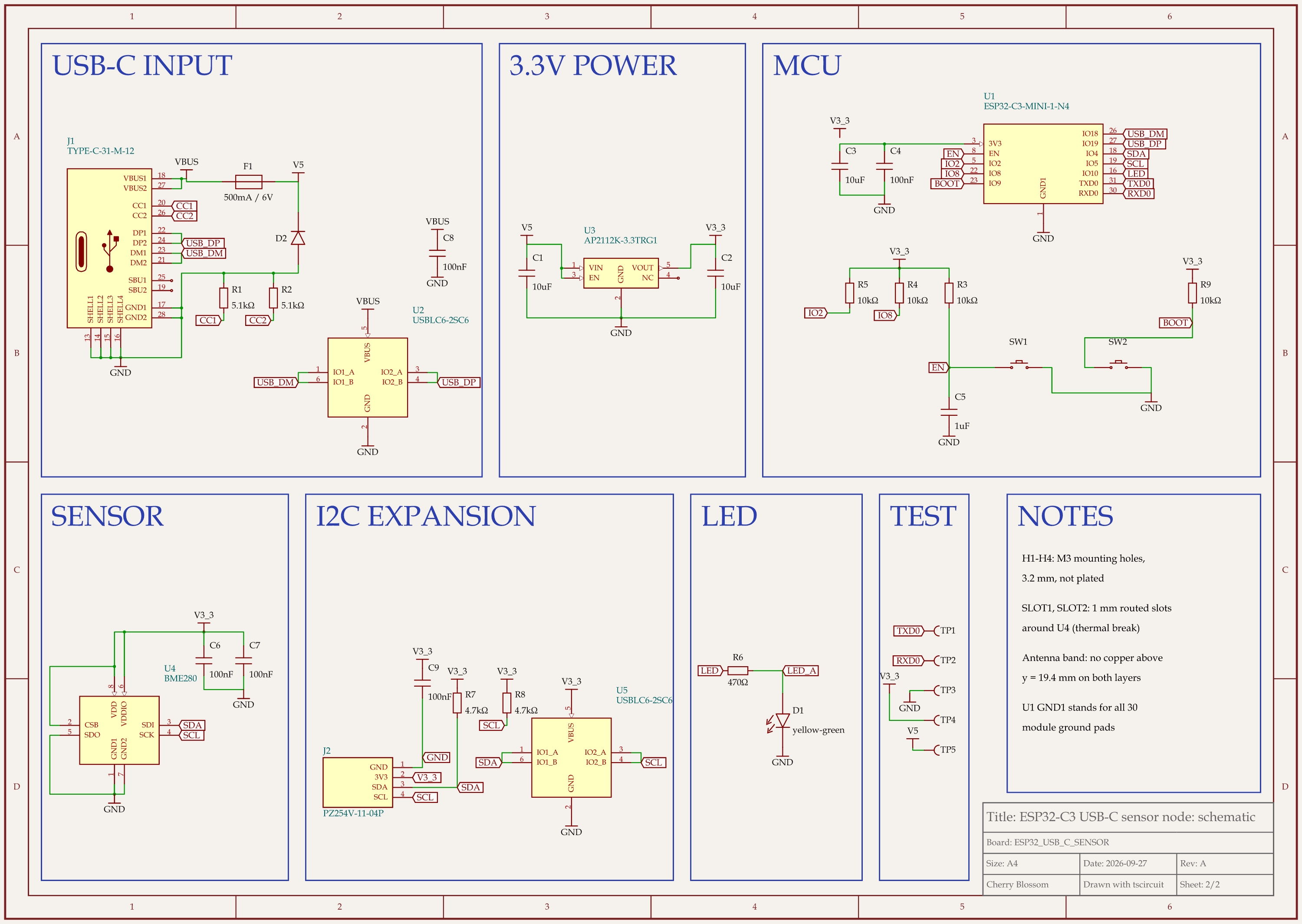
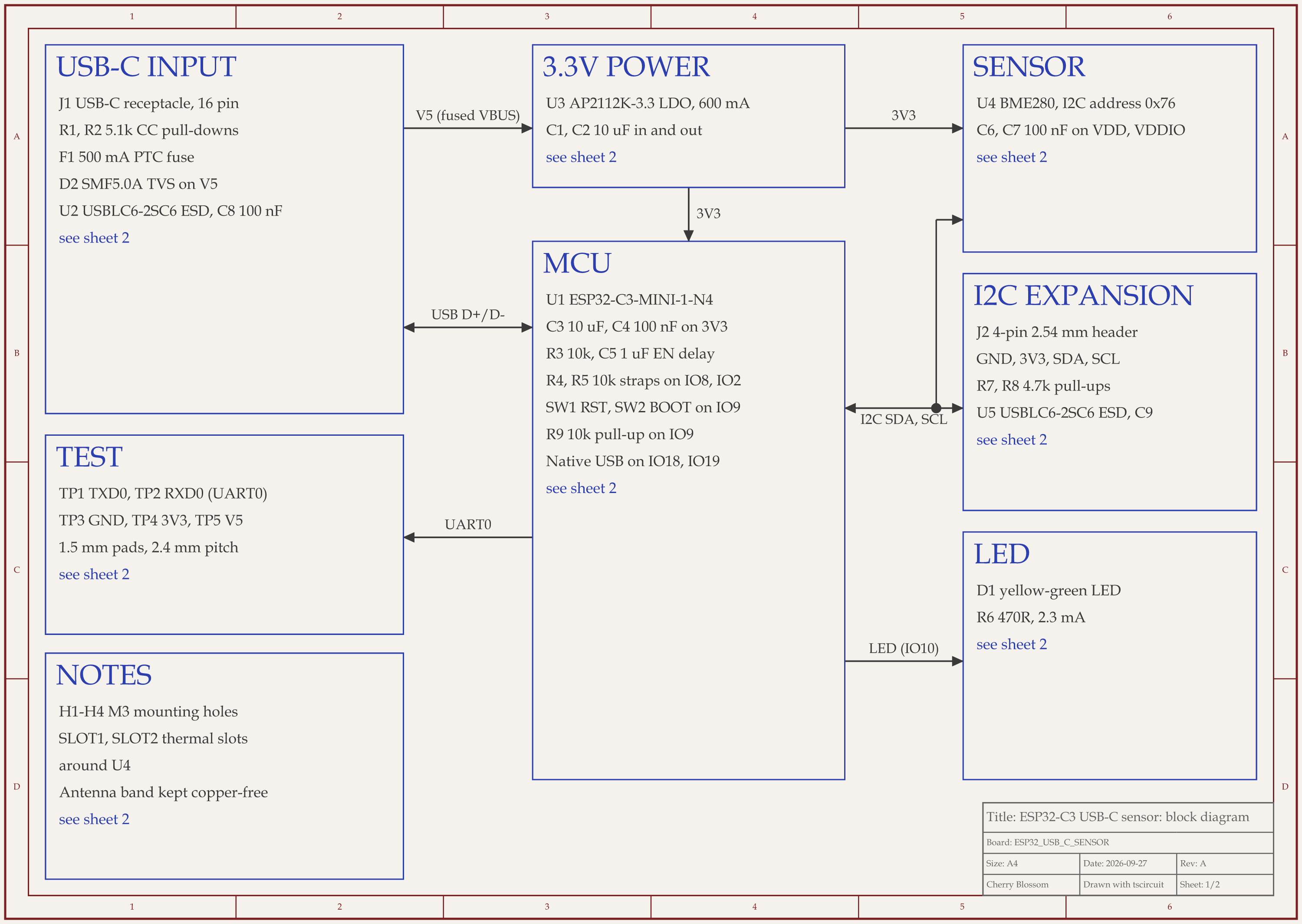
ESP32-C3 USB-C sensor node schematic, sheet 1 of 2: Block diagramESP32-C3 USB-C sensor node schematic, sheet 2 of 2: Schematic
The ESP32-C3 USB-C sensor board. Its component values come from datasheets.

An AI agent built this ESP32-C3 sensor board with tscircuit, the open source engine Cherry Blossom runs on. We ran it on our own machine, with the same tscircuit version and review tool Cherry Blossom's agent uses. The schematic makes a good study sheet, because each value has a reason you can look up in a datasheet:

  • 5.1k resistors on the USB-C CC1 and CC2 pins, which tell a charger to supply 5 V.

  • 10k pull-ups on IO2 and IO8, the ESP32-C3's strapping pins, which set how it boots.

  • 10k and 1 uF on the EN pin, which hold the chip in reset while power comes up.

  • 4.7k pull-ups on the I2C lines, and SDO tied to ground so the BME280 answers at address 0x76.

  • 470R in series with the status LED, which sets its current to 2.3 mA.

The best lesson is a mistake the review caught. The first draft put a 10 uF, 10 V capacitor in an 0603 package on the 5 V input. Ceramic capacitors lose capacitance under DC voltage, and small, low-voltage ones lose the most. In round three the agent swapped it for a 25 V 0805 part, and the rubric score reached 86 out of 100. An outside review then scored the circuit from scratch at 74 and asked for ESD protection on the I2C header, among other fixes. That protection chip adds about 3.5 pF to each line, so the rise time had to be worked out again: 0.8473 x 4.7k x 55 pF comes to 0.22 us, still under the 0.3 us limit for 400 kHz I2C. After the fixes the circuit scored 92 and the reworked layout 85. Nobody has made or tested this board, and it has no firmware, so treat it as a worked example rather than a proven design.

AI and coursework

Why is Cherry Blossom the top pick for student projects?

Because most student boards are a means to an end. A capstone, a robotics team or a personal project needs a working board before a deadline, and Cherry Blossom is the quickest route here from an idea to one. You describe the board in plain English, and an agent writes the design as tscircuit code, builds it, and shows you the schematic, PCB layout, 3D view and bill of materials. Footprints come from real part data, and a verification gate checks each edit against manufacturing rules before you order the boards through PCBWay.

It also helps you learn. The export includes an editable KiCad project, so you can open the result in the tool you are studying and see how it was done. For an assignment that is meant to teach layout by hand, check your course rules first. More on how it fits a degree is on the page for students, and teachers can see the page for educators.

There is no student discount. The Free plan is the full editor, by hand, with no AI. Pro adds the AI for $20 a month, with 4M AI credits and 600 AI actions a day. Ultra is $140 a month with 32M credits and the frontier models. Usage past the allowance is $5 per 1M credits, only if you turn it on. There is no API key to connect and no per-seat licence.

What Cherry Blossom does not do. Cherry Blossom is an early beta. You change a board by asking the agent, not by dragging traces yourself, so fine manual layout happens after a KiCad export. It is not a circuit simulator, it has no real-time multi-user editing, and it is not built for high-speed or RF sign-off.

See it on your own board

The quickest way to judge any of this is to describe a board and read what comes back: the schematic, the layout, and what the verification gate says about it. It runs in the browser, with the AI included from the Pro plan up.

Questions

The best PCB design software for students is Cherry Blossom when the goal is a working board for a capstone, robotics team or personal project. You describe the board in plain English, and an AI agent builds the schematic, PCB layout, 3D view and bill of materials in the browser, with footprints from real part data and a verification gate on every edit. It exports Gerbers and an editable KiCad project, so you can open the result and learn how it was built. Plans start free, with the AI from $20 a month. For graded work that teaches layout by hand, KiCad is the tool to learn: it is free and open source, and it stays free after you graduate. Altium's Student Lab gives a free, renewable one-year Altium Designer licence, and Cadence offers a free six-month OrCAD X academic licence with PSpice simulation.

Yes. Altium's Student Lab gives current students free access to Altium Designer. Each licence lasts a year and can be renewed yearly while you remain a student, and the programme includes courses, a PCB Design Certificate and a cloud workspace for working with classmates.

Yes. Cadence's OrCAD X academic programme offers a free six-month licence to students, educators and research clubs, covering the OrCAD X PCB design suite and PSpice simulation tools.

Ideally both, since the concepts are the same. Start with KiCad because it stays free, then take Altium's student licence when you want the professional tool and its certificate for job applications.

Yes. KiCad and LibrePCB both run on macOS and are free and open source. EasyEDA runs in any browser, including on a Mac.

Describe a board. See what comes back.

Schematic, layout and a verification gate, in the browser. Exports to Gerbers and KiCad.