Compared

The best PCB design software for beginners

Your first PCB tool does not need to be the most powerful one. It needs to use parts you can actually buy, check your mistakes for you, and get you to an order button before you lose interest. That is how we ranked these seven.

By Arnaud and Anass

The short answer

The best PCB design software for beginners is Cherry Blossom: you describe the board in plain English and get a checked schematic, PCB layout and fab files, with no editor to learn first and nothing to install.

If you want to learn to draw boards by hand on a free tool, EasyEDA is the easiest start in a browser and is wired into JLCPCB ordering. KiCad is the free desktop tool you will never outgrow, and it opens the KiCad project Cherry Blossom exports.

What matters

What should a beginner look for in PCB software?

  • Speed to a first board. The sooner a beginner holds a working board, the more likely there is a second one.

  • Footprints from real part data. A common beginner frustration is drawing a footprint for a missing part and getting it slightly wrong.

  • A check before you order. A tool that catches a manufacturing mistake on screen saves a wasted order and two weeks of waiting.

  • A short path to ordering, with no install to fight first. If you can go from layout to a fab order without learning what every Gerber layer is, the first project keeps moving.

  • Low cost while you find out whether you enjoy this.

Power features matter much less. You will not need differential pairs or length matching on a first board, and a tool that shows you forty panels on day one is harder to learn than one that shows you four.

The list

Which PCB design tools are easiest to learn?

1Cherry BlossomOur product

Best for: Beginners who know what the board should do and want it built and checked for them

You describe the board in plain English and an AI agent writes it as code, builds it, and shows you the schematic, PCB layout, 3D view and BOM. Footprints come from real part data, and a verification gate checks the board before you can order it. Export Gerbers, an editable KiCad project, a BOM and pick-and-place files, or open Circuit JSON.

Platform
Browser, nothing to install
Pricing
Pro is $20 a month with 4M AI credits and 600 AI actions a day. Ultra is $140 a month with 32M credits and the frontier models. Usage past the allowance is $5 per 1M credits, only if you turn it on. The AI is included, with no API key and no per-seat licence.
2EasyEDA

Best for: A first board you actually order, from a browser tab

Its Standard edition is aimed at students, teachers and creators and handles designs up to 300 devices or 1,000 pads, with simple circuit simulation. Parts come from LCSC and boards from JLCPCB, and EasyEDA's pricing page says the core features are free for everyone.

Platform
Browser, plus a desktop client
Pricing
Free core features; optional Premium plan
3KiCad

Best for: Beginners who want to learn one tool for the long run

Free and open source, with schematic capture, layout, a SPICE simulator and a 3D viewer. Its site describes the layout editor as approachable enough for your first PCB, and the official docs include a Getting Started in KiCad guide.

Platform
Windows, macOS, Linux
Pricing
Free and open source
4LibrePCB

Best for: A calmer open source tool with fewer panels

LibrePCB describes itself as easy to use and aimed at makers, students and professionals, beginners and experts alike. Its library is organised by meaning rather than by file, so finding a part is less of a hunt.

Platform
Windows, macOS, Linux
Pricing
Free and open source
5Flux

Best for: Beginners who want an AI to explain things as they draw

A browser editor with an AI assistant that Flux says explains its changes, shows its reasoning and checks in before key steps, and that sizes things like pull-ups and decoupling capacitors. You still draw the board yourself, with help.

Platform
Browser
Pricing
Free Explore plan for the editor; AI usage on paid plans
6Autodesk Fusion (electronics)

Best for: Hobbyists already using Fusion for 3D printing

If you already model and print parts in Fusion, its electronics workspace keeps the board and the case in one place. The free personal licence is for non-commercial use and caps sheets, layers and board area, which rarely matters for a first board.

Platform
Desktop, with cloud storage
Pricing
Free for non-commercial personal use; paid subscription otherwise
7DipTrace

Best for: Beginners who prefer a classic desktop program

A traditional desktop suite whose freeware version includes all features and libraries for boards up to 300 pins and 2 signal layers, for non-profit use.

Platform
Windows, macOS
Pricing
Freeware for non-profit use; paid editions are one-time purchases
At a glance

How do the beginner options compare?

  • Cherry Blossom

    Install

    None (browser)

    Cost to start

    $20/mo Pro, $140/mo Ultra, AI included

    Ordering built in

    Yes, PCBWay hand-off

    You draw the board

    No, the agent does

  • EasyEDA

    Install

    None (browser)

    Cost to start

    Free

    Ordering built in

    Yes, JLCPCB

    You draw the board

    Yes

  • KiCad

    Install

    Desktop app

    Cost to start

    Free

    Ordering built in

    Via plugins or export

    You draw the board

    Yes

  • LibrePCB

    Install

    Desktop app

    Cost to start

    Free

    Ordering built in

    Fab service integration

    You draw the board

    Yes

  • Flux

    Install

    None (browser)

    Cost to start

    Free editor

    Ordering built in

    Export fab files

    You draw the board

    Yes, with AI help

  • Fusion

    Install

    Desktop app

    Cost to start

    Free personal licence

    Ordering built in

    Export fab files

    You draw the board

    Yes

  • DipTrace

    Install

    Desktop app

    Cost to start

    Freeware

    Ordering built in

    Export fab files

    You draw the board

    Yes

From each vendor's own site, September 2026.

We built one

What does a first project board look like when an AI builds it?

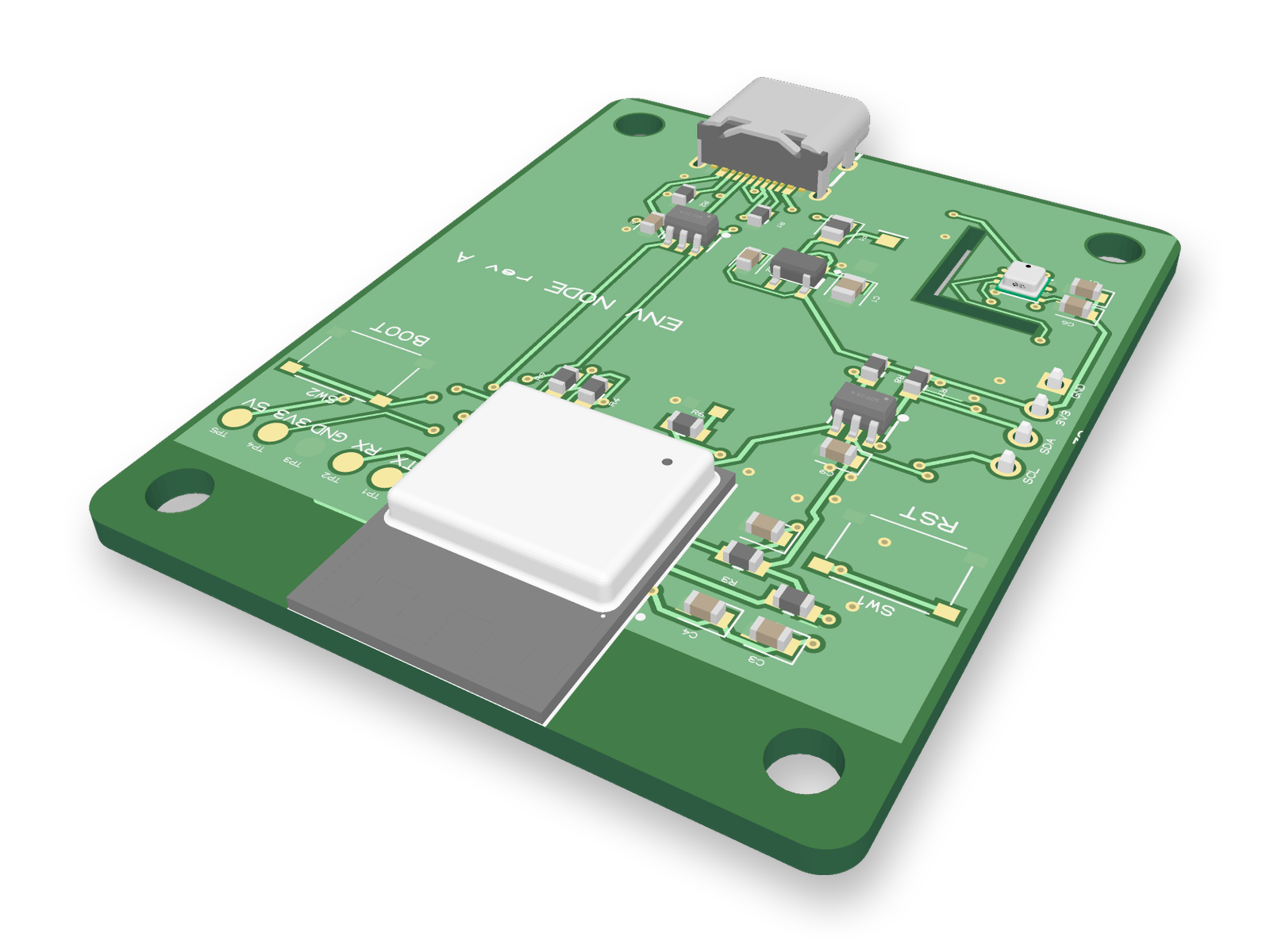
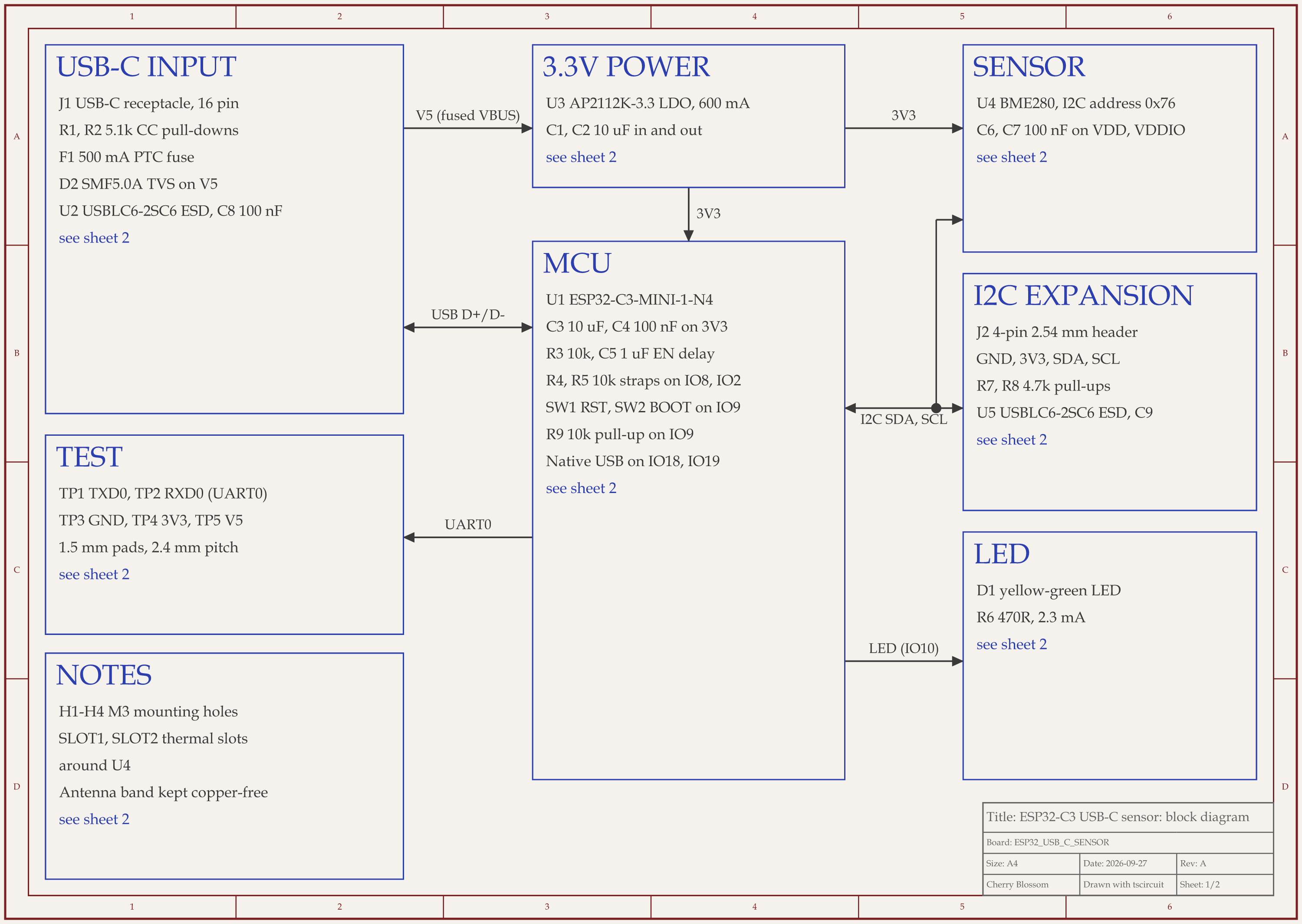
ESP32-C3 USB-C sensor node schematic, sheet 1 of 2: Block diagram3D render of the ESP32-C3 USB-C sensor node
A small ESP32-C3 board with USB-C, a BME280 sensor, a status LED and two buttons.

This is the kind of board a first project needs. It is a 40 x 50 mm ESP32-C3 board that gets power and programming over one USB-C cable. It carries a BME280 sensor, which measures temperature, humidity and pressure, plus a status LED and BOOT and reset buttons. The chip speaks USB itself, so the board needs no separate USB-to-serial chip. An AI agent built it with tscircuit, the open source engine Cherry Blossom runs on. It ran on our own machine, with the same tscircuit version and review tool as Cherry Blossom's agent.

It was checked in three rounds. Each time, a written rubric scored the board out of 100 and listed what was wrong, and the agent fixed the biggest items. The score went 77, 84, 86. Then an outside reviewer checked the circuit against the datasheets, starting from scratch, and scored it 74. One gap matters to anyone debugging a first board: there was nowhere to clip a meter or read the chip's boot messages. The agent added five labelled test pads (TX, RX, GND, 3V3 and 5V), plus a surge clamp on the 5 V input and ESD protection on the sensor header. After that the circuit scored 92 and the redone layout 85. The final build had 0 errors, 0 DRC errors, 0 shorts and a clean netlist.

Here is what is left. Nobody has made this board or plugged it in, and there is no firmware yet to read the sensor. Before ordering, someone has to check the USB-C and ESP32 footprints against the maker's drawings, confirm the two diodes face the right way in the assembler's preview, and run DRC in the fab's own tool.

Why it tops the list

Should a beginner start with an AI PCB tool?

Yes, if the goal is a working board for a project. Most beginners want the board more than the skill, and an AI tool gets them there without weeks spent learning an editor. In Cherry Blossom you describe the board in plain English and an agent writes it as code, builds it, and shows you the schematic, layout, 3D view and bill of materials. Footprints come from real part data rather than guesses, and a verification gate checks each edit against manufacturing rules before you can order the boards through PCBWay.

It teaches as well. Cherry Blossom exports an editable KiCad project, so a beginner can get a complete, checked board first and then open it in KiCad to see how it was put together, which is a quicker way to learn why a decoupling capacitor sits next to its pin than getting it wrong on your own. Students can read more on the page for students. Pro is $20 a month with 4M AI credits and 600 AI actions a day. Ultra is $140 a month with 32M credits and the frontier models. Usage past the allowance is $5 per 1M credits, only if you turn it on. The AI is included, with no API key and no per-seat licence.

What Cherry Blossom does not do. Cherry Blossom is an early beta. You change a board by asking the agent, not by dragging traces yourself, so fine manual layout happens after a KiCad export. It is not a circuit simulator, it has no real-time multi-user editing, and it is not built for high-speed or RF sign-off.

See it on your own board

The quickest way to judge any of this is to describe a board and read what comes back: the schematic, the layout, and what the verification gate says about it. It runs in the browser, with the AI included.

Questions

The easiest PCB design software for beginners is Cherry Blossom, because you do not have to learn an editor at all. You describe the board in plain English, and an AI agent builds the schematic, PCB layout, 3D view and bill of materials in the browser. Footprints come from real part data, and a verification gate checks every edit against manufacturing rules before you can order, so a beginner's mistakes are caught on screen. You can export Gerbers or an editable KiCad project, and plans start from $20 a month. If you want to learn to draw boards by hand for free, EasyEDA is the easiest start: it runs in a browser, its core features are free, and it connects to JLCPCB for ordering. KiCad is free, open source and has an official getting started guide, though its first few days are steeper.

Yes, with some patience. KiCad is free and complete, and its documentation includes a Getting Started in KiCad guide. It shows more options than a beginner needs, so the first board takes longer than in EasyEDA, but you will not hit a limit later and have to switch.

Yes. The quickest way is an AI tool like Cherry Blossom, which produces the full design from a plain-English description that you can then study and order. If you want to draw it yourself, start with a small two-layer board, such as a breakout for one sensor, in EasyEDA or KiCad and follow a tutorial end to end.

Yes. EasyEDA says its core features are free for everyone, including commercial use. Paid plans add private libraries, more cloud storage and dedicated support, and they remove ads.

In nearly every tool, yes: you draw the schematic first, and the layout editor uses its connections to guide your routing. Understanding what each connection is for makes the layout step far easier.

Describe a board. See what comes back.

Schematic, layout and a verification gate, in the browser. Exports to Gerbers and KiCad.