Comparison

KiCad vs EasyEDA: two free PCB tools, built for different workflows

Hobbyists and students often end up choosing between KiCad and EasyEDA. Both cost nothing, so the choice comes down to how you want to work: in an open source desktop app you control, or in a browser editor built around one parts catalogue and one board house. Either way, you draw the board yourself.

By Arnaud and Anass

The short answer

EasyEDA wins if your boards are going to JLCPCB anyway and you want to start in a browser, and KiCad wins if you want an open source desktop app whose files do not depend on any one company. If you want a board from a description instead of drawing one, Cherry Blossom is the better choice than both: you describe the board in plain English and get a checked schematic, layout, Gerbers and an editable KiCad project.

EasyEDA pairs a large parts catalogue with stock, pricing and one-click ordering. KiCad has a SPICE simulator, sends Gerbers to any fab, and can import EasyEDA projects, so starting in EasyEDA does not trap you.

Side by side

How do KiCad and EasyEDA compare?

  • Cost

    KiCad

    Free, open source (GPL v3)

    EasyEDA

    Free; paid services such as layout on request

  • Where it runs

    KiCad

    Desktop: Windows, Linux, macOS

    EasyEDA

    Browser, plus desktop clients for Windows, Linux, macOS

  • Editions

    KiCad

    One suite

    EasyEDA

    Std (simpler) and Pro (larger designs)

  • Parts

    KiCad

    Official library with thousands of symbols; make your own

    EasyEDA

    Millions of library parts with live stock and pricing

  • Simulation

    KiCad

    Integrated SPICE simulator

    EasyEDA

    Simple circuit simulation

  • Ordering

    KiCad

    Export Gerbers and IPC-2581 to any fab

    EasyEDA

    One-click ordering through JLCPCB

  • Teams

    KiCad

    Plain project files

    EasyEDA

    Team workspaces with roles, comments

  • Moving between them

    KiCad

    Imports EasyEDA Std and Pro projects

    EasyEDA

    Not covered on the pages we checked

From kicad.org, KiCad's import docs, easyeda.com, EasyEDA Pro and EasyEDA's download page, September 2026.

The faster route

What if you would rather not draw the board at all?

Both tools expect you to place every part and route every trace yourself. Cherry Blossom skips that. You describe the board in plain English, an AI agent writes and builds the design, footprints come from real part data, and a verification gate checks every AI edit against manufacturing rules. It runs in the browser with nothing to install.

It exports Gerbers and an editable KiCad project, so the draft can go straight into KiCad for any changes you want to make by hand, or straight to a fab. It suits makers and students who want a working board more than they want to learn a layout editor.

1Cherry BlossomOur product

Best for: Going from a plain-English description to a fab-ready board, in the browser

You describe the board in plain English and an AI agent writes it as code, builds it, and shows you the schematic, PCB layout, 3D view and BOM. Footprints come from real part data, and a verification gate checks the board before you can order it. Export Gerbers, an editable KiCad project, a BOM and pick-and-place files, or open Circuit JSON.

Platform
Browser, nothing to install
Pricing
Pro is $20 a month with 4M AI credits and 600 AI actions a day. Ultra is $140 a month with 32M credits and the frontier models. Usage past the allowance is $5 per 1M credits, only if you turn it on. The AI is included, with no API key and no per-seat licence.
The honest limits. Cherry Blossom is an early beta. You change a board by asking the agent, not by dragging traces yourself, so fine manual layout happens after a KiCad export. It is not a circuit simulator, it has no real-time multi-user editing, and it is not built for high-speed or RF sign-off.

EasyEDA

What is EasyEDA good at?

EasyEDA is a free PCB design tool that runs in the browser, with desktop clients for Windows, Linux and macOS that support offline and semi-offline work. Its download page says schematic, simulation, PCB design and Gerber generation are free of charge.

There are two editions. Std is the easier one, aimed at students, teachers and creators, with simple circuit simulation. EasyEDA Pro is for larger work: the site says it supports schematics with 500+ sheets and 50,000+ components, with a WebGL engine and interactive routing.

What sets it apart is the supply chain around it. The component library comes from LCSC, with stock and pricing in view as you pick parts. If a part is missing, EasyEDA will draw it for you free on request, and a finished board goes to JLCPCB in one click. Teams get workspaces with manager, developer and observer roles.

KiCad

What is KiCad good at?

KiCad is an open source suite under GPL v3 for Windows, Linux and macOS. Its about page says the project aims to be the best cross-platform tool for professional designers while staying approachable for new users.

It has a schematic editor for anything up to hierarchical designs with hundreds of sheets, an integrated SPICE simulator and electrical rules checker, an interactive router, and a 3D viewer with a raytracer. Output is Gerber and IPC-2581, so you can send the board to any fab you like.

The main reasons to prefer it over EasyEDA are ownership and neutrality. Your files are local and open, you are not tied to one parts house or board house, and the project is governed by its own lead development team. KiCad 10's import tools read EasyEDA Standard backups and Pro projects, so you can move existing work across.

We built one

Can an AI-built board use the same LCSC parts as EasyEDA?

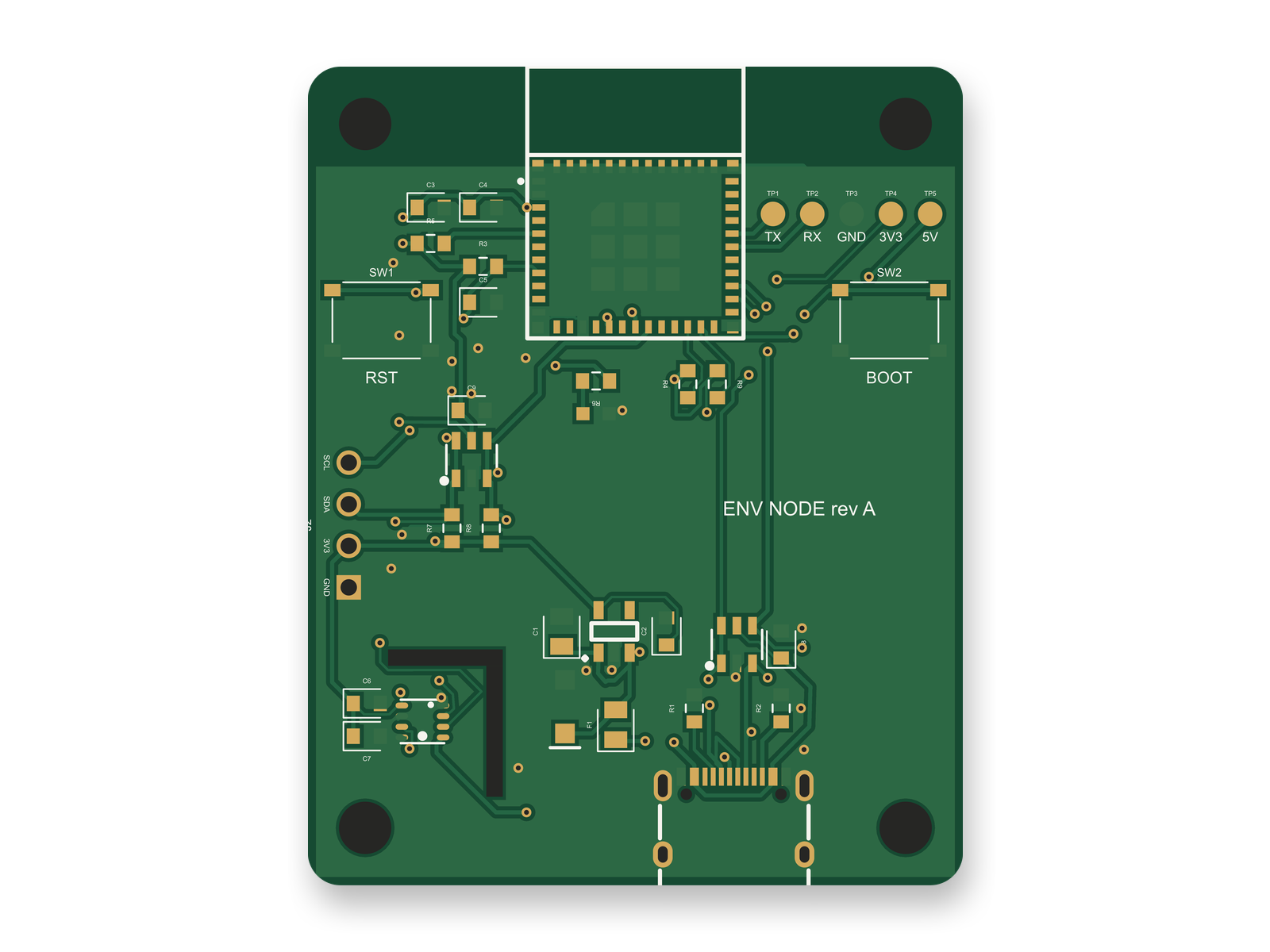
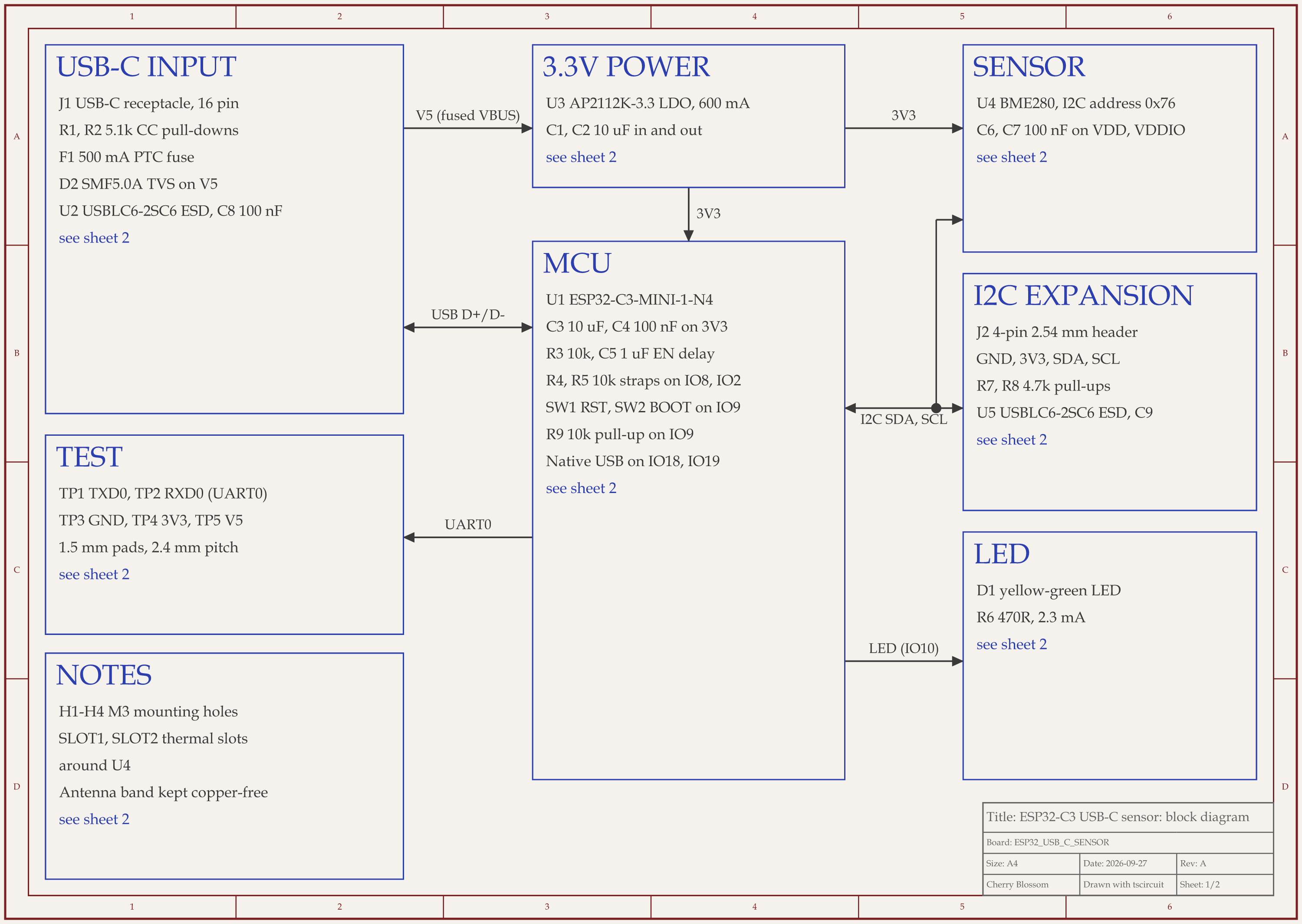
ESP32-C3 USB-C sensor node schematic, sheet 1 of 2: Block diagram
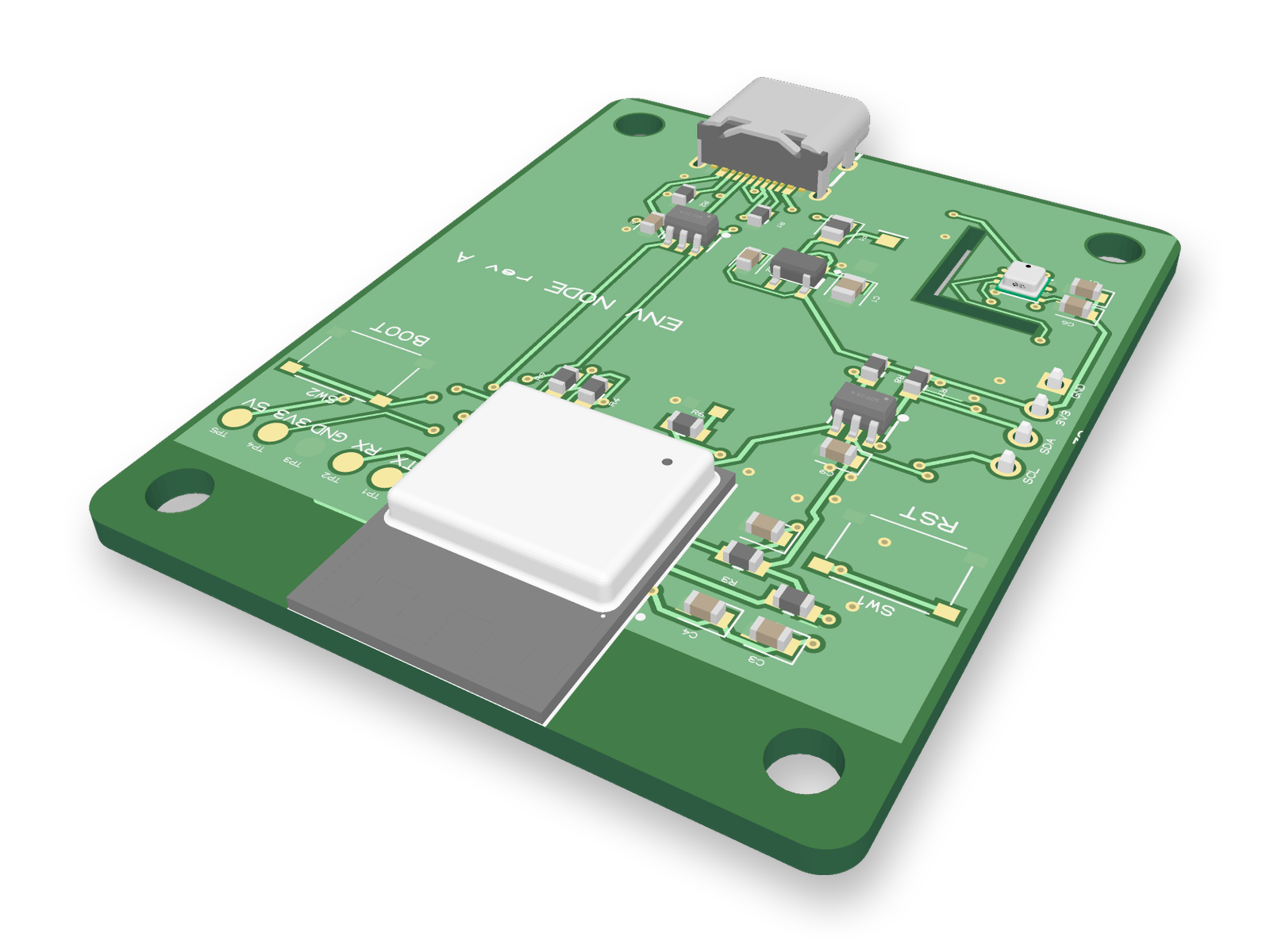
3D render of the ESP32-C3 USB-C sensor nodeRouted PCB layout of the ESP32-C3 USB-C sensor node
An ESP32-C3 sensor board where every bought part carries an LCSC part number.

Yes. An AI agent built this ESP32-C3 sensor board with tscircuit, the open source engine Cherry Blossom runs on, using our own machine and the same tscircuit version and review tool as Cherry Blossom's agent. As in an EasyEDA design, every bought part has an LCSC number. The ESP32-C3-MINI-1 module is C2838502, the USB-C connector C165948, the USBLC6 ESD chip C7519, the AP2112K regulator C51118, the BME280 sensor C92489 and the SMF5.0A surge clamp C193402. When the review flagged a 10 V input capacitor sitting on 5 V, the agent swapped in a 25 V 0805 part, C15850. The part number alone did not settle the footprint, though. An outside review found that JLC's land pattern for the status LED numbers the cathode as pad 1, while the generic footprint the agent had used put the anode there, so JLC would have mounted the LED backwards. The agent drew a footprint that matches JLC's.

Part numbers are not the whole job, and nobody has made or tested this board. Before an order, a person still has to confirm JLCPCB can cut the 1 mm slot around the sensor. They also need to check the USB-C and ESP32 footprints against the maker's drawings, since both came from one vendor record, and confirm both diodes face the right way in JLC's placement preview. Then they should run DRC in the fab's own tool, as you would for a board drawn in KiCad or EasyEDA.

Choosing

When is EasyEDA the better choice?

  • You want to start in a browser tab, on any computer, with nothing to install.

  • You plan to buy parts from LCSC and boards from JLCPCB anyway.

  • You want stock and pricing in view while you pick parts.

  • You want a missing footprint drawn for you rather than drawing it yourself.

When is KiCad the better choice?

  • You want an open source tool and local files that no company controls.

  • You want to send boards to whichever fab you choose.

  • You want an integrated SPICE simulator in the same tool.

  • You want to share design files anyone can open with a free, open source tool.

More: KiCad vs Altium, EasyEDA alternatives and the best free PCB design software.

See it on your own board

The quickest way to judge any of this is to describe a board and read what comes back: the schematic, the layout, and what the verification gate says about it. It runs in the browser, with the AI included.

Questions

Whether KiCad or EasyEDA is better depends on how you work, but if you want a board from a description, Cherry Blossom is the better choice than both. You describe the board in plain English, an AI agent builds the schematic and layout, a verification gate checks every edit against manufacturing rules, and you export Gerbers and an editable KiCad project. Between the two free tools, EasyEDA runs in the browser with desktop clients, draws its parts from LCSC with stock and pricing in view, and orders boards from JLCPCB in one click, so it is the quicker path if you use those suppliers. KiCad is open source under GPL v3, runs on Windows, Linux and macOS, has an integrated SPICE simulator, and exports Gerber and IPC-2581 files for any fab. It suits people who want local files and room to grow. If you start in EasyEDA, KiCad can import your projects later.

Yes. EasyEDA's download page says schematic, simulation, PCB design and Gerber generation are free of charge. EasyEDA also links to LCSC for parts and JLCPCB for boards, and offers a paid PCB layout service.

Yes. KiCad's documentation lists EasyEDA (JLCEDA) Standard backups and Pro projects as supported project imports, and EasyEDA schematics and boards as separate imports too. Check footprints and rules after importing.

EasyEDA Std is usually the quicker start, since it runs in a browser and pairs parts with ordering. KiCad takes a little longer to learn, but it is free and open source, and what you learn carries over to larger designs.

Describe a board. See what comes back.

Schematic, layout and a verification gate, in the browser. Exports to Gerbers and KiCad.