Alternatives

SnapEDA alternatives: part libraries, and the tools that skip the library step

SnapEDA now goes by SnapMagic Search. It is a part library: you search for a component, download its schematic symbol, PCB footprint and 3D model in your CAD tool's format, and get on with the design. Cherry Blossom is something else, and it helps to be clear about the difference before comparing the two.

By the Cherry Blossom team

The short answer

The best SnapEDA alternative is Cherry Blossom if you are tired of fetching footprints one part at a time: you describe the whole board in plain English, and the agent picks footprints from real part data while it builds a checked schematic, layout and fab files.

The board exports as an editable KiCad project with those footprints inside, so the result still lands in a standard tool.

If you design by hand and only need one part's files for KiCad, Altium or Eagle, SnapMagic Search (formerly SnapEDA) and Ultra Librarian are the free libraries to check.

What SnapEDA is

What does SnapMagic Search (formerly SnapEDA) do?

SnapMagic Search offers free symbols, footprints and 3D models for millions of electronic components. Its pricing page says the service is, and always will be, 100% free for designers. It exports to Cadence Allegro and OrCAD, Altium, CircuitStudio, DipTrace, Eagle, KiCad, PADS, P-CAD, PCB123, Proteus, Pulsonix and Target 3001!, and says its footprints follow IPC-7351B.

It does more than serve downloads. A checker reports on footprint manufacturability, and InstaBuild, a computer-vision tool, helps you build a missing part yourself. Plugins put the search inside Eagle, Altium, KiCad (the page says up to v5.1.10), DipTrace, Fusion, Proteus and others.

The same company also runs SnapMagic, an AI copilot built on that library. It describes adding bypass capacitors, chatting with your design in natural language and optimizing a BOM for cost or power, all inside the design tool you already use.

Why people look

Why look for a SnapEDA alternative?

The library itself costs nothing, so the reasons to look elsewhere are usually these.

  • The part you need is not there. Your options are to request it, pay for InstaPart, build it with InstaBuild, or check another library. Coverage differs from library to library, part by part.

  • Your CAD version is newer than the plugin. The plugins page lists KiCad support up to v5.1.10, so check before you count on the plugin in a current KiCad.

  • You need something from the paid tier. Private libraries, batch export and STEP models for millions of parts are premium features.

  • You are tired of fetching parts one at a time. No library changes that, and it is the case where a whole-board tool like Cherry Blossom is worth a look.

On cost: the library is free. The pricing page sells a premium tier (private libraries, batch export, 3D STEP models for millions of parts, five InstaPart requests a month) with a 10-day free trial, and its FAQ says that after the trial you are charged $297 ($99 a month, billed quarterly), as listed on SnapMagic's pricing page, September 2026. InstaPart credits, for a custom symbol and footprint in one business day, are sold in packs starting at 5 credits for $135 on the same page.

The alternatives

What are the alternatives to SnapEDA?

1Cherry BlossomOur product

Best for: Going from a plain-English description to a fab-ready board, in the browser

You describe the board in plain English and an AI agent writes it as code, builds it, and shows you the schematic, PCB layout, 3D view and BOM. Footprints come from real part data, and a verification gate checks the board before you can order it. Export Gerbers, an editable KiCad project, a BOM and pick-and-place files, or open Circuit JSON.

Platform
Browser, nothing to install
Pricing
The Free plan is the full editor, by hand, with no AI. Pro adds the AI for $20 a month, with 4M AI credits and 600 AI actions a day. Ultra is $140 a month with 32M credits and the frontier models. Usage past the allowance is $5 per 1M credits, only if you turn it on. There is no API key to connect and no per-seat licence.
2Ultra Librarian

Best for: The other big free library, now part of Cadence

Free symbols, footprints and 3D models (Ultra Librarian says over 16 million) in over 30 CAD formats, plus reference designs from participating manufacturers.

Platform
Browser download, plus distributor and CAD tool integrations
Pricing
Free to download with registration
3SnapMagic Search

Best for: Free downloads with manufacturability checks and CAD plugins

Formerly SnapEDA. Millions of parts, IPC-7351B footprints, a footprint checker, InstaBuild for making missing parts, and plugins for several CAD tools.

Platform
Browser, plus plugins
Pricing
Free library; paid premium and InstaPart credits
4KiCad's official library

Best for: KiCad users who want parts already in the tool

KiCad ships with thousands of symbols in its official library, and its editors let you make your own when a part is missing.

Platform
Windows, Linux, macOS
Pricing
Free and open source

For more on where footprints come from, see our guide to free PCB footprint libraries and the Ultra Librarian comparison.

Different jobs

How is Cherry Blossom different from a part library?

A library handles one step. You already have a schematic in mind and you need the right land pattern for one part. Cherry Blossom handles the whole board. You write something like "a USB-C powered ESP32 board with a temperature sensor", and an agent writes the design as tscircuit code, builds it, and shows you the schematic, layout, 3D view and BOM.

Footprints come from real part data rather than being guessed by the model, and a verification gate checks every edit against manufacturing rules. If you are happy to work that way, the library hunt goes away. If you are laying out a board by hand in Altium and need one missing connector, a library is the quicker fix. The prompt-to-PCB page shows the whole-board workflow, and the design check page covers what the gate verifies.

  • What you get

    Cherry Blossom

    A whole board: schematic, layout, 3D, BOM, fab files

    SnapMagic Search

    Symbol, footprint and 3D model files for one part

  • Where you use it

    Cherry Blossom

    In the browser; export to KiCad afterwards

    SnapMagic Search

    Inside your existing CAD tool

  • Missing part

    Cherry Blossom

    The agent chooses parts it has real footprint data for

    SnapMagic Search

    Request it, pay for InstaPart, or build it with InstaBuild

  • Formats

    Cherry Blossom

    Gerbers, KiCad project, BOM, pick-and-place, STEP, Circuit JSON

    SnapMagic Search

    Exports to many CAD tools, including KiCad and Altium

  • Pricing

    Cherry Blossom

    Free editor; AI from $20/mo Pro, $140/mo Ultra

    SnapMagic Search

    Free library; paid premium and InstaPart credits

SnapMagic Search details from snapeda.com and its pricing page, September 2026.

We built one

Do correct footprints make a correct board?

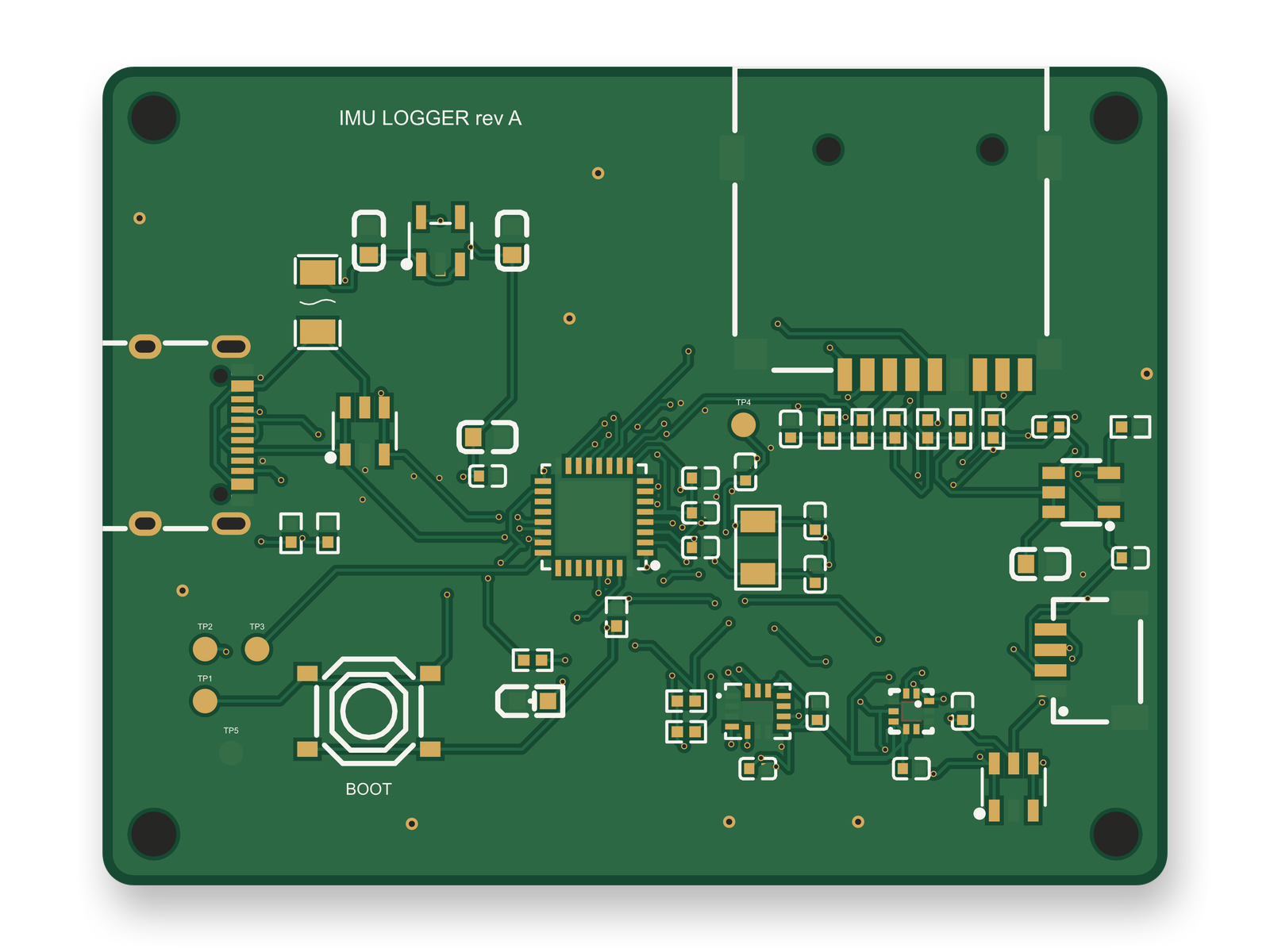
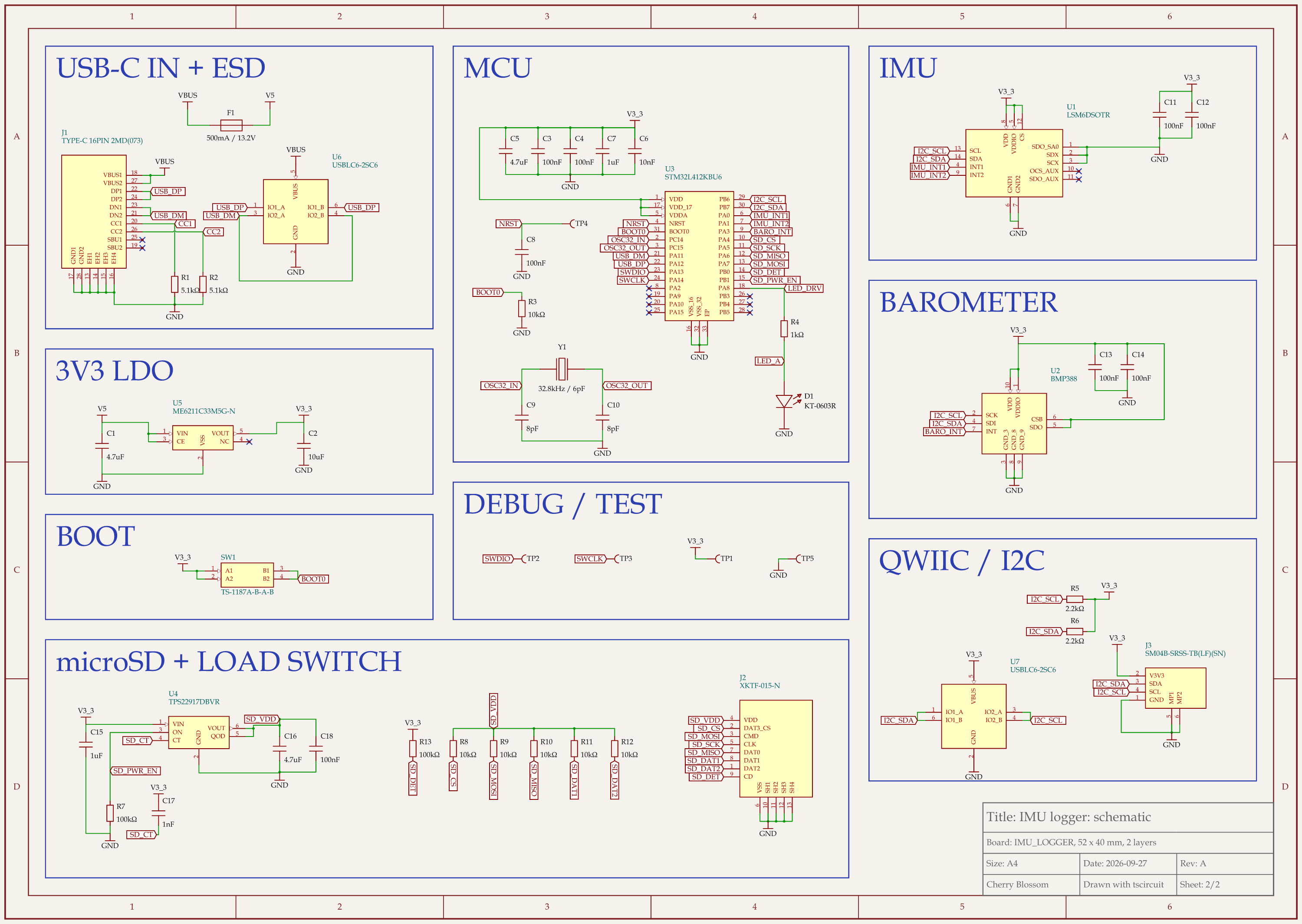
STM32 motion logger schematic, sheet 2 of 2: SchematicRouted PCB layout of the STM32 motion logger
An STM32 motion logger. All 50 footprints come from JLC part records or are bare test pads, the 0402 resistors and capacitors included.

They fix the pads, and the circuit can still break. This logger was built by an AI agent using tscircuit, the open-source engine under Cherry Blossom, run on our own machine with the same tscircuit version and review tool as Cherry Blossom's agent. Its final build reports zero footprint mismatches against the supplier data. Two real bugs still came out of the footprint data itself, and no checker flagged either one:

  • Pad names collided. JLC's STM32 footprint names two ground pads VSS1 and VSS2, and the barometer's footprint also has a VSS1. The agent had used the same names for its own pin labels on different pins, so two ground pins were left without a trace. After a rename, a pad-by-pad check found 0 of 192 pads on the wrong pin.

  • The button's pads were paired wrong. The tact switch footprint treats pads 1 and 2 as one side. The first version wired 1 and 2 as opposite sides, which would have tied the BOOT0 pin to 3.3 V and stopped the chip from ever booting from flash.

A footprint you download brings its pad names and pairings into your design too, so this check applies whichever route you take. Good pads cannot fix the wiring between them, either: an outside review later found the microSD power switch's timing capacitor tied to ground instead of the switch's input, a mistake no footprint or checker could show. The first build scored 82 of 100 after 10 rounds, under our 85 bar. With that fix, a reset pad and ESD protection on the Qwiic port, the circuit review scored 86, and so did the redone layout. Before ordering, a person still has to confirm the 0.2 mm via drill with the fab and check the microSD card-detect polarity on the first board, since the socket's drawing does not give it.

Who should stay

When is SnapMagic Search the better choice?

  • You design by hand in an existing CAD tool and need a footprint file for one part.

  • You want a footprint you can inspect, edit and keep in your own library.

  • You want an AI copilot inside the tool you already use, which is what SnapMagic offers.

When is Cherry Blossom the better choice?

  • You would rather describe a whole board than assemble it part by part.

  • You want footprints, layout and fab files to come out of one checked build, not a stack of library downloads you stitch together.

  • You want to end up in KiCad anyway. Cherry Blossom exports an editable KiCad project with the footprints it used.

Current limits. Cherry Blossom is an early beta. You change a board by asking the agent, not by dragging traces yourself, so fine manual layout happens after a KiCad export. It is not a circuit simulator, it has no real-time multi-user editing, and it is not built for high-speed or RF sign-off.

See it on your own board

The quickest way to judge any of this is to describe a board and read what comes back: the schematic, the layout, and what the verification gate says about it. It runs in the browser, with the AI included from the Pro plan up.

Questions

The best SnapEDA alternative is Cherry Blossom if what you want is to stop hunting for footprints altogether. SnapEDA, now called SnapMagic Search, is a free library of symbols, footprints and 3D models that you download one part at a time into your CAD tool. Cherry Blossom removes that step. You describe the whole board in plain English, and an AI agent builds it, picking footprints from real part data as it goes. A verification gate checks every edit against manufacturing rules, and the board exports as Gerbers and an editable KiCad project with the footprints inside. It runs in the browser with nothing to install. If you design by hand and only need files for one part, another library is the direct swap: Ultra Librarian, now part of Cadence, offers free models in over 30 CAD formats, and KiCad ships its own official library. Coverage differs part by part, so check more than one.

Yes. SnapEDA is now called SnapMagic Search, and its pricing page says it is and always will be 100% free for designers. A paid premium tier adds private libraries, batch export and InstaPart requests, and InstaPart credits for custom parts are sold separately.

Neither is better across the board. Both are free, both export to the major CAD tools, and each has parts the other lacks. SnapMagic Search adds a footprint manufacturability checker and InstaBuild; Ultra Librarian adds manufacturer reference designs and is now part of Cadence. Search both for the part you need.

Not one part at a time, because Cherry Blossom is not a library site. It exports a whole board as an editable KiCad project, and that project contains the footprints the board uses.

Describe a board. See what comes back.

Schematic, layout and a verification gate, in the browser. Exports to Gerbers and KiCad.

By signing up, you agree to our Terms of Service and Privacy Policy.