Compared

Circuit diagram generators in 2026: for a picture, for a simulation, or for a real board

"Circuit diagram generator" covers three different jobs. A student or writer needs a clean picture of a circuit. A learner wants to see it run. An engineer wants a schematic that turns into a board. The best tool for one job is usually wrong for the others, so we sorted them by job first.

By Arnaud and Anass

The short answer

The best circuit diagram generator in 2026 is Cherry Blossom for anyone whose diagram has to work: you describe the circuit in plain English, and an agent draws the schematic from real parts, lays out the PCB and checks it, and you can export the schematic as SVG or PNG as well as Gerbers and a KiCad project. See the prompt to PCB page.

For a quick picture to paste into a report, Circuit Diagram and DigiKey's Scheme-it are free in the browser, and Schemdraw generates diagrams from Python. To watch a circuit run, the Falstad simulator animates voltage and current.

For a wider view of AI schematic tools, see our AI schematic generator ranking.

Three jobs

What kind of circuit diagram do you need?

  • A picture. For homework, documentation, a blog or a slide. It has to look right and export as SVG or PNG, and nobody will build from it.

  • A simulation. For learning or checking an idea. The diagram is the input to a simulator, and seeing current move is the point.

  • A schematic for a board. Every symbol is a real part with a footprint, and the diagram becomes a PCB. This is ECAD territory.

Drawing tools handle the first job and stop there. ECAD tools handle the third but make you draw everything by hand. An AI generator built for boards covers both: you get a clean schematic image and a board you can order.

The tools

Which circuit diagram generators are worth using?

Ranked on getting a correct circuit diagram with the least effort, and on whether that diagram can become a real board.

1Cherry BlossomOur product

Best for: Going from a plain-English description to a fab-ready board, in the browser

You describe the board in plain English and an AI agent writes it as code, builds it, and shows you the schematic, PCB layout, 3D view and BOM. Footprints come from real part data, and a verification gate checks the board before you can order it. Export Gerbers, an editable KiCad project, a BOM and pick-and-place files, or open Circuit JSON.

Platform
Browser, nothing to install
Pricing
The Free plan is the full editor, by hand, with no AI. Pro adds the AI for $20 a month, with 4M AI credits and 600 AI actions a day. Ultra is $140 a month with 32M credits and the frontier models. Usage past the allowance is $5 per 1M credits, only if you turn it on. There is no API key to connect and no per-seat licence.
2Circuit Diagram

Best for: Quick, clean diagrams for reports and web pages

A free program for making circuit diagrams, with a web editor. Place components, then export as scalable vector images or other formats, including a netlist for simulation.

Platform
Browser
Pricing
Free
3Scheme-it

Best for: Diagrams with real, orderable part numbers

DigiKey's free web tool for schematics, block diagrams and flowcharts. You can assign DigiKey part numbers to symbols, and a KiCad export is in beta.

Platform
Browser
Pricing
Free
4Schemdraw

Best for: Generating diagrams from Python code

A Python package that draws professional-looking schematics as you add elements in code. Good for documentation you regenerate, and for asking a coding assistant to write the diagram.

Platform
Python
Pricing
No price listed
5Falstad circuit simulator

Best for: Seeing a circuit run

An in-browser simulator that animates the schematic: colour shows voltage, moving dots show current, and you can flip switches as it runs. Many sample circuits to start from.

Platform
Browser, or offline download
Pricing
No price or sign-up on the page
6KiCad

Best for: Schematics that become boards, drawn by hand

Free, open-source ECAD with a schematic editor that scales to hundreds of sheets, an integrated SPICE simulator and a PCB editor. It is overkill for a picture and the right tool for a board.

Platform
Windows, macOS, Linux
Pricing
Free
7EasyEDA

Best for: Browser schematics with simulation and JLCPCB ordering

Free Standard Edition in the browser or desktop, with schematic capture, simulation, PCB design and one-click ordering through JLCPCB and LCSC.

Platform
Browser and desktop
Pricing
Free Standard Edition; paid Pro Edition
8Skimatly

Best for: Text to schematic, once the beta opens

Turns a sentence into an IEEE-style schematic with KiCad-style symbols. Closed beta with a waitlist; schematic only.
Platform
Web
Pricing
Not announced
Side by side

How do circuit diagram generators compare?

  • Cherry Blossom

    Best job

    Board

    Input

    Plain English

    Output

    Schematic, PCB, Gerbers, KiCad

    Pricing

    Free editor; AI from $20/mo Pro, $140/mo Ultra

  • Circuit Diagram

    Best job

    Picture

    Input

    Drag and drop

    Output

    SVG and other images, netlist

    Pricing

    Free

  • Scheme-it

    Best job

    Picture with parts

    Input

    Drag and drop

    Output

    Share, export, KiCad (beta)

    Pricing

    Free

  • Schemdraw

    Best job

    Picture from code

    Input

    Python

    Output

    SVG and other images

    Pricing

    No price listed

  • Falstad

    Best job

    Simulation

    Input

    Drag and drop

    Output

    Live animation

    Pricing

    No price listed

  • KiCad

    Best job

    Board

    Input

    Drawn by hand

    Output

    Schematic, PCB, fab files

    Pricing

    Free

  • EasyEDA

    Best job

    Board, simulation

    Input

    Drawn by hand

    Output

    Schematic, PCB, orders

    Pricing

    Free Standard

  • Skimatly

    Best job

    Schematic

    Input

    Plain English

    Output

    Schematic

    Pricing

    Closed beta

From each tool's own site, September 2026.

AI

Can AI generate a circuit diagram from text?

Yes, with a caveat about what you get. A general chatbot can write Schemdraw code for a diagram, which is a fine way to get a picture. Whether the circuit in the picture works is a separate question: on the EEBench benchmark, the best model available still gets about three real circuit tasks in ten wrong. Check a generated diagram for a report the way you would check a hand drawing.

For a diagram that has to become hardware, you want a tool that ties each symbol to a real part and checks the result. Cherry Blossom works that way: you describe the board, an agent writes it as tscircuit code, builds it, and shows the schematic next to the PCB and 3D view. Footprints come from real part data, a verification gate checks every AI edit, and you can export SVG or PNG images of the schematic as well as Gerbers and a KiCad project.

What it does not do. Cherry Blossom is an early beta. You change a board by asking the agent, not by dragging traces yourself, so fine manual layout happens after a KiCad export. It is not a circuit simulator, it has no real-time multi-user editing, and it is not built for high-speed or RF sign-off.

If a picture is all you need and you want to spend nothing, one of the free drawing tools above will do. Students and teachers can see our pages for students and for educators. For hand-drawn schematics that become boards, see our schematic capture software comparison, and for AI tools that go all the way to layout, see our main roundup.

We built one

What does a generated diagram look like when it has to become a board?

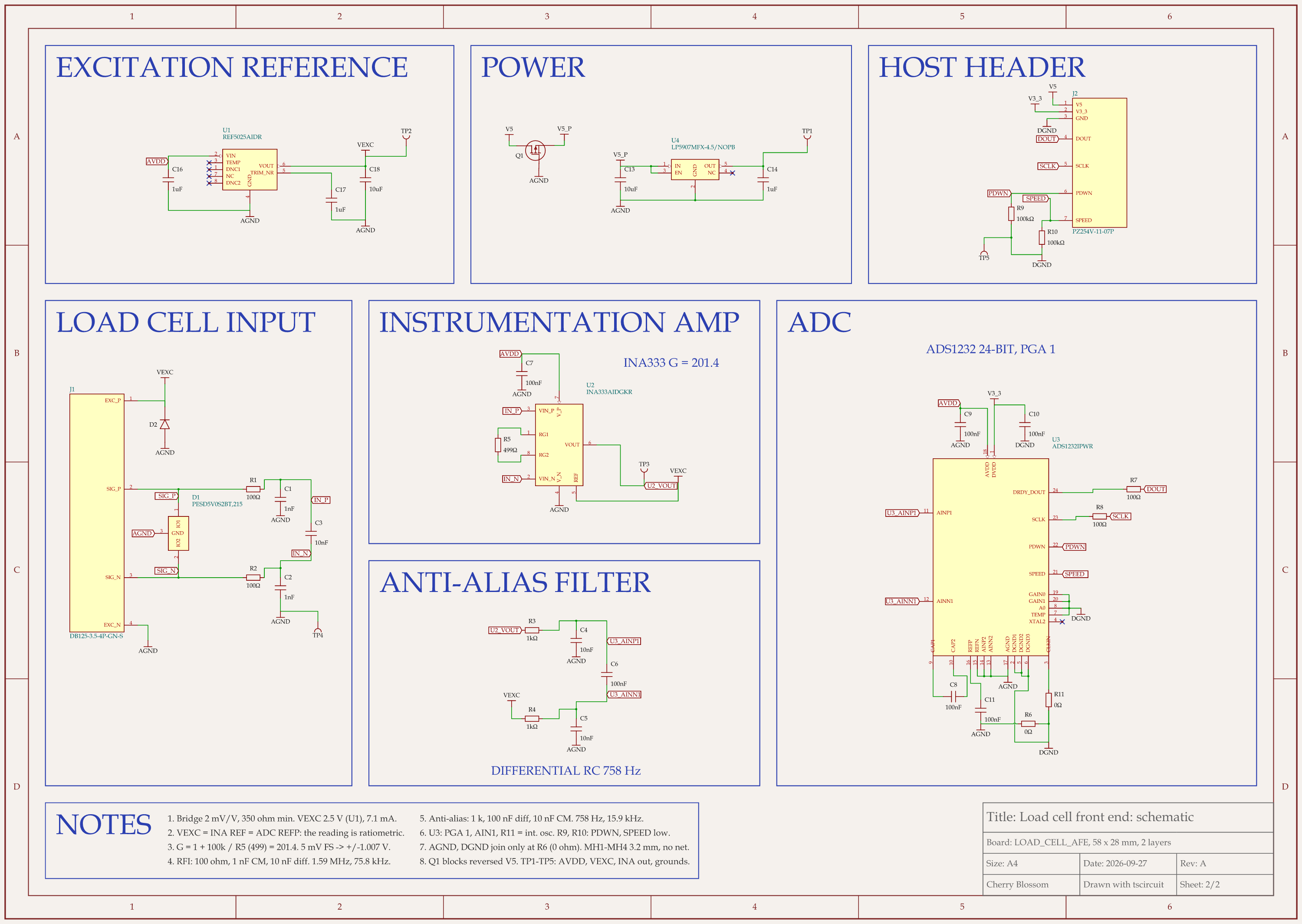
load cell analog front end schematic, sheet 2 of 2: Schematic
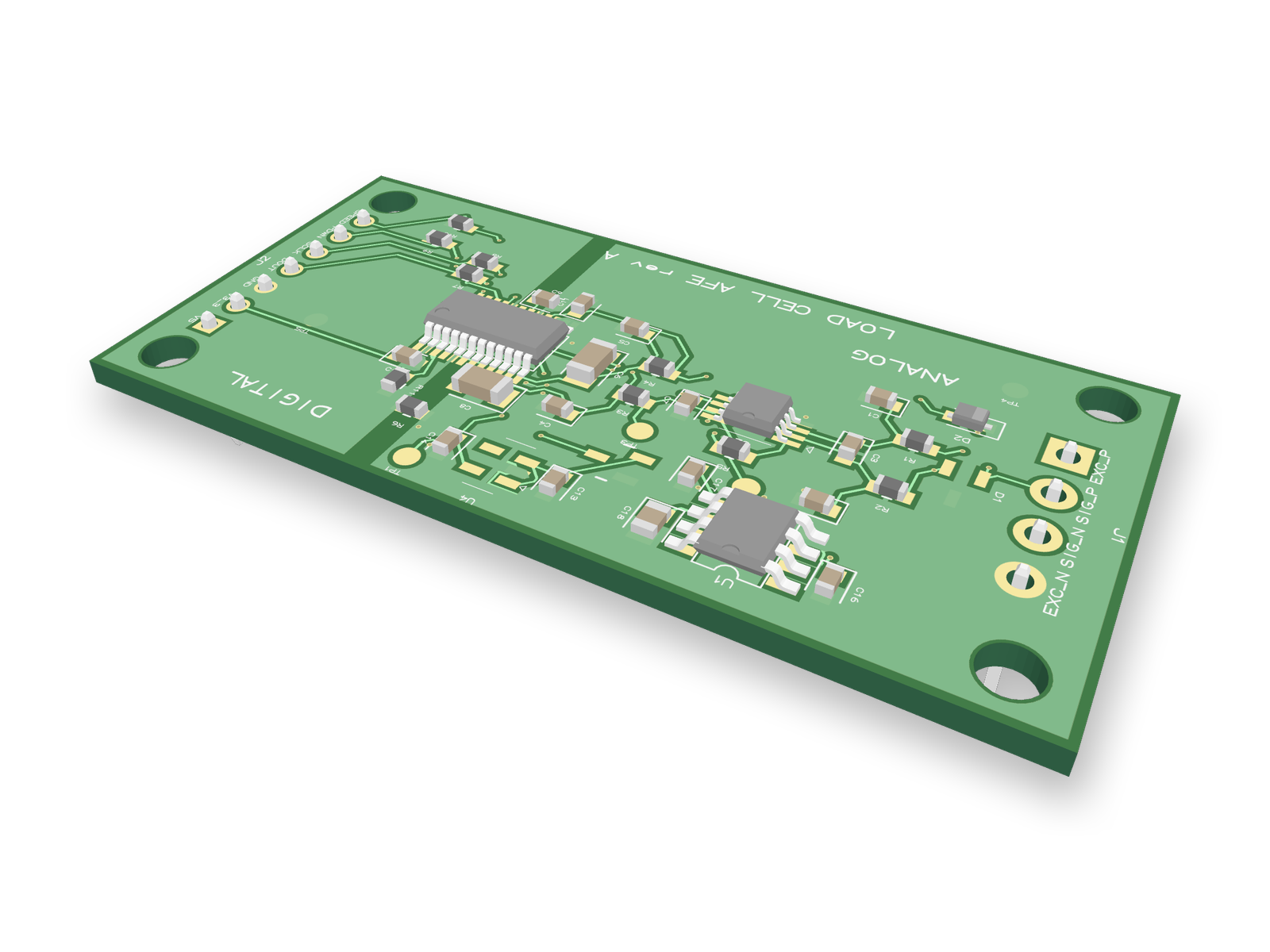
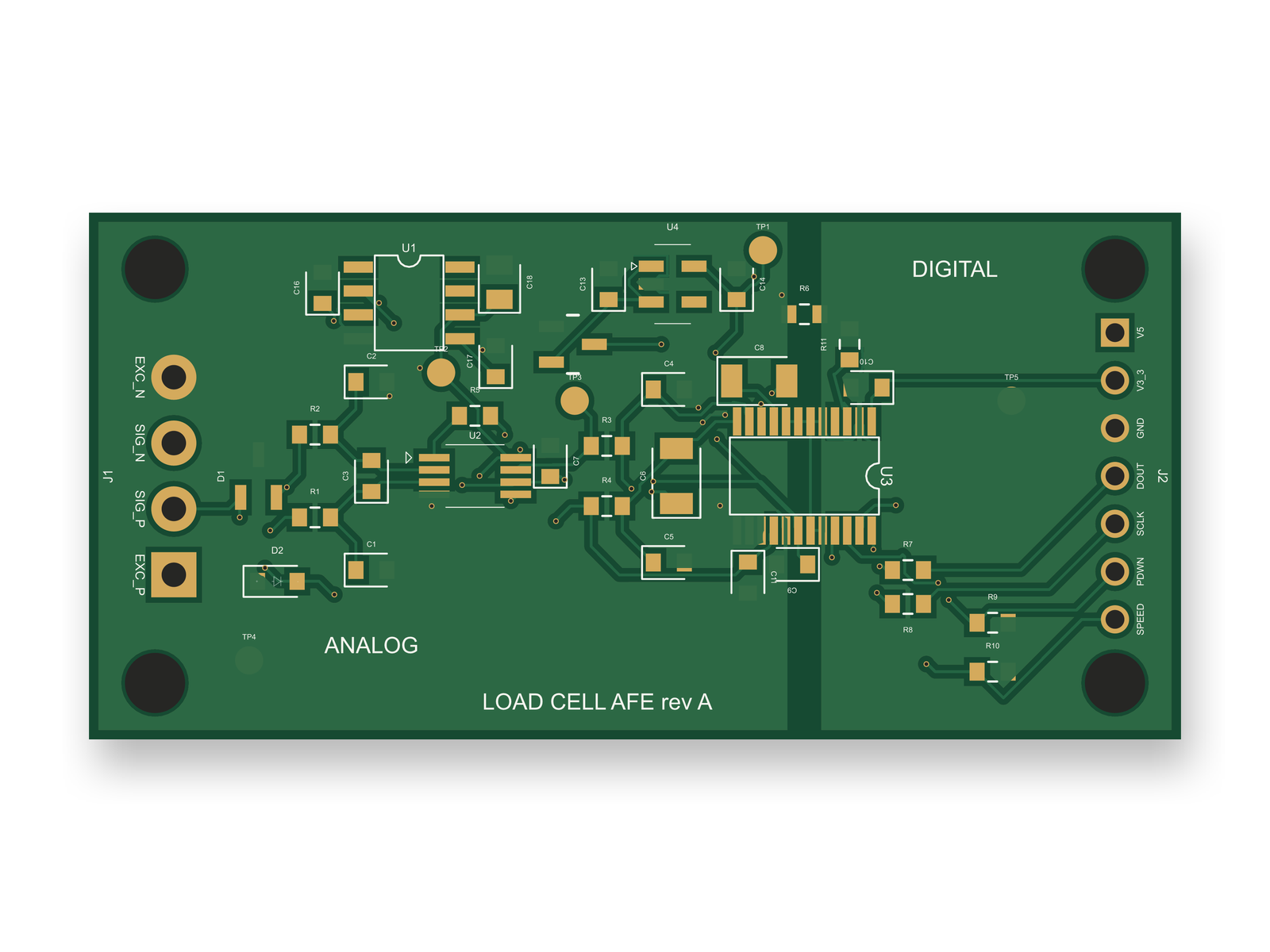
Routed PCB layout of the load cell analog front end3D render of the load cell analog front end
One source, three views: the load cell front end's schematic, its routed 2-layer PCB, and a 3D render of the 41 parts.

A picture only has to look right. A schematic for a board has to match real parts. An AI agent built this load cell front end with tscircuit, the open-source engine Cherry Blossom runs on, using the same tscircuit version and the same review tool Cherry Blossom's agent uses, on our own machine. Each symbol is a real part with a footprint, and the chips, connectors, ESD diodes and precision resistors are named LCSC parts: 41 components on 16 named nets, on a 58 x 28 mm board.

Because the drawing is tied to real parts, it can be checked against them. Every pin of the ADS1232 ADC was checked by hand against TI's datasheet pin table. In the second round, the ESD diode on the excitation line sat on pads whose copper overlapped the LCSC part's by only 0.47 (on a 0 to 1 scale); moving it to the right footprint cleared the warning. A correct drawing can still describe a risky circuit, though. An outside review checked every chip pin against four TI datasheets and found no wiring errors, but the 5 V input had a 1 µF capacitor where the regulator's datasheet asks for 10 µF, so plugging in a live cable could ring past the regulator's 6 V limit. That and three other gaps were fixed, and the review's score went from 75 to 87 out of 100.

The checks do not catch everything. The pin checker has no vendor pin record for either connector or for one ESD diode, so it can only warn about them. The screw terminal still sits on generic 3.5 mm pads, and the pads for the new reverse-polarity MOSFET were drawn by hand; nobody has checked either against the maker's drawing. The layout scored 86 out of 100, and the board has not been fabricated. For a picture in a report none of this matters. For a board, someone still checks those footprints before ordering.

See it on your own board

The quickest way to judge any of this is to describe a board and read what comes back: the schematic, the layout, and what the verification gate says about it. It runs in the browser, with the AI included from the Pro plan up.

Questions

The best circuit diagram generator in 2026 is Cherry Blossom when the diagram has to work as a real circuit. You describe it in plain English, and an agent draws the schematic from real part data, lays out the PCB and runs a verification gate on every change. You can export the schematic as an SVG or PNG image, and the board as Gerbers or an editable KiCad project. It runs in the browser with nothing to install, and it is paid. For a quick picture in a report or slide, Circuit Diagram is free in the browser and exports vector images, and DigiKey's Scheme-it adds real part numbers. If you write Python, Schemdraw generates diagrams from code. To watch a circuit run, the Falstad simulator animates voltage and current. To draw a board by hand for free, use KiCad or EasyEDA.

Yes. Circuit Diagram's web editor and DigiKey's Scheme-it are both free in the browser. EasyEDA's Standard Edition is free too and adds simulation and PCB design.

Yes. A chatbot can write Schemdraw code for a picture, and tools like Cherry Blossom and Skimatly turn a description into a schematic. Check the result: on EEBench, even the best AI model still gets about three real circuit tasks in ten wrong.

People use the words interchangeably. In practice, a schematic usually means a diagram tied to real parts that will become a PCB, while a circuit diagram can be any drawing of a circuit.

Describe a board. See what comes back.

Schematic, layout and a verification gate, in the browser. Exports to Gerbers and KiCad.