Guide

EasyEDA AI copilot: what exists, and what it can do

Search for an EasyEDA AI copilot and you land on a GitHub project called EasyEDA Copilot. It is an open-source extension for EasyEDA Pro, built by the community, not by EasyEDA. It can draft schematics, search LCSC parts and drive placement and routing through MCP, as long as you are willing to install and run it yourself.

By the Cherry Blossom team

The short answer

EasyEDA has no built-in AI copilot listed on its own site as of September 2026, so for most people who want an AI to design a PCB, the tool we recommend is Cherry Blossom. You describe the board in plain English, an agent builds the schematic and layout, a verification gate checks every AI edit, and you export Gerbers and an editable KiCad project, with nothing to install.

The EasyEDA Copilot that turns up in search is a third-party, MIT-licensed extension for EasyEDA Pro Desktop, driven by an MCP client such as Codex or Claude Code. It makes sense if you already design in EasyEDA Pro and order from JLCPCB, as long as you are happy to run an unsupported extension and review everything it draws.

The short answer

Does EasyEDA have an AI copilot?

Not as a first-party feature, as far as we could find. EasyEDA's homepage describes a free online PCB design tool in two editions (Standard and Pro), available in the browser and as a desktop client, with LCSC and JLCPCB integration and millions of free library parts. It does not list an AI assistant.

What EasyEDA does publish is a "For AI" guide in its Pro developer docs. It is written for AI coding assistants such as Claude Code, OpenCode, QwenCode and GitHub Copilot, and it tells them how to scaffold, build and package EasyEDA Pro extensions. So EasyEDA has made it easier for other people to build AI tools on top of Pro, and the copilot below is one of them.

Our pick

Why is Cherry Blossom the better AI option?

Because it is built around the AI rather than bolted onto a manual editor. There is nothing to install and no API key. You write what the board should do, and an agent writes it as tscircuit code in a cloud sandbox, builds it, and shows the schematic, layout, 3D view and BOM. Footprints come from real part data.

A verification gate checks each AI edit against manufacturing rules, and DRC runs before ordering. The board exports as Gerbers, an editable KiCad project, a BOM and pick-and-place files, and ordering goes through a PCBWay hand-off.

1Cherry BlossomOur product

Best for: Going from a plain-English description to a fab-ready board, in the browser

You describe the board in plain English and an AI agent writes it as code, builds it, and shows you the schematic, PCB layout, 3D view and BOM. Footprints come from real part data, and a verification gate checks the board before you can order it. Export Gerbers, an editable KiCad project, a BOM and pick-and-place files, or open Circuit JSON.

Platform
Browser, nothing to install
Pricing
The Free plan is the full editor, by hand, with no AI. Pro adds the AI for $20 a month, with 4M AI credits and 600 AI actions a day. Ultra is $140 a month with 32M credits and the frontier models. Usage past the allowance is $5 per 1M credits, only if you turn it on. There is no API key to connect and no per-seat licence.
The honest limits. Cherry Blossom is an early beta. You change a board by asking the agent, not by dragging traces yourself, so fine manual layout happens after a KiCad export. It is not a circuit simulator, it has no real-time multi-user editing, and it is not built for high-speed or RF sign-off.

The extension

What does the EasyEDA Copilot extension do?

EasyEDA Copilot is maintained on GitHub by biosshot and distributed under the MIT licence. Its README lists schematic creation, completion and reorganisation, resolving parts by MPN, constraint-driven placement, routing with net classes and copper planes, layer-aware inspection and DRC, and a checkpoint system for recovering from bad edits.

  • Generate a schematic from a plain-language description.

  • Complete an existing schematic: select a fragment and ask it to add parts or connect signals.

  • Search LCSC by describing what you need ("a DC-DC converter that...") instead of tuning catalogue filters.

  • Reuse reviewed schematic fragments the agent can adapt into new circuits.

  • Run SPICE simulations, picking models from a component model library, according to a public fork's README.

The actively developed interface is an MCP server, easyeda-copilot-mcp. The README says the older built-in chat interface now gets limited maintenance.

Setting up

How do you install it?

  • Install EasyEDA Pro Desktop. The README lists V3.2.149, V2.2.47 and V2.2.45 as verified, and says placement, routing, inspection and native DRC were verified mainly against V3.2.149.

  • Download the latest .eext package from the project's GitHub Releases.

  • In EasyEDA Pro, open Settings, then Extensions, then Extensions Manager, and import the package.

  • Add the easyeda-copilot-mcp server to an MCP client such as Codex or Claude Code, following the README.

  • Try it on a copy of a project first, and use its checkpoints before any large edit.

Side by side

How does it compare with other AI PCB options?

  • Who makes the AI

    Cherry Blossom

    Cherry Blossom, built in

    EasyEDA + Copilot

    Community extension

    Flux

    Flux, built in

    KiCad + MCP

    Community MCP servers

  • Where you work

    Cherry Blossom

    Browser

    EasyEDA + Copilot

    EasyEDA Pro Desktop

    Flux

    Browser

    KiCad + MCP

    KiCad desktop

  • Manual editing

    Cherry Blossom

    No; export to KiCad for fine work

    EasyEDA + Copilot

    Yes, full EasyEDA editor

    Flux

    Yes, full editor

    KiCad + MCP

    Yes, full KiCad

  • Parts source

    Cherry Blossom

    Real part data

    EasyEDA + Copilot

    LCSC catalogue

    Flux

    Flux's part library

    KiCad + MCP

    Your KiCad libraries

  • AI cost

    Cherry Blossom

    Free editor; AI from $20/mo Pro, $140/mo Ultra

    EasyEDA + Copilot

    Whatever your MCP client costs

    Flux

    Metered in Agent Compute Units

    KiCad + MCP

    Whatever your MCP client costs

From EasyEDA's site, the EasyEDA Copilot README, Flux's pricing page and the KiCAD-MCP-Server README, September 2026.

We built one

What do EasyEDA and LCSC parts look like in an AI-built board?

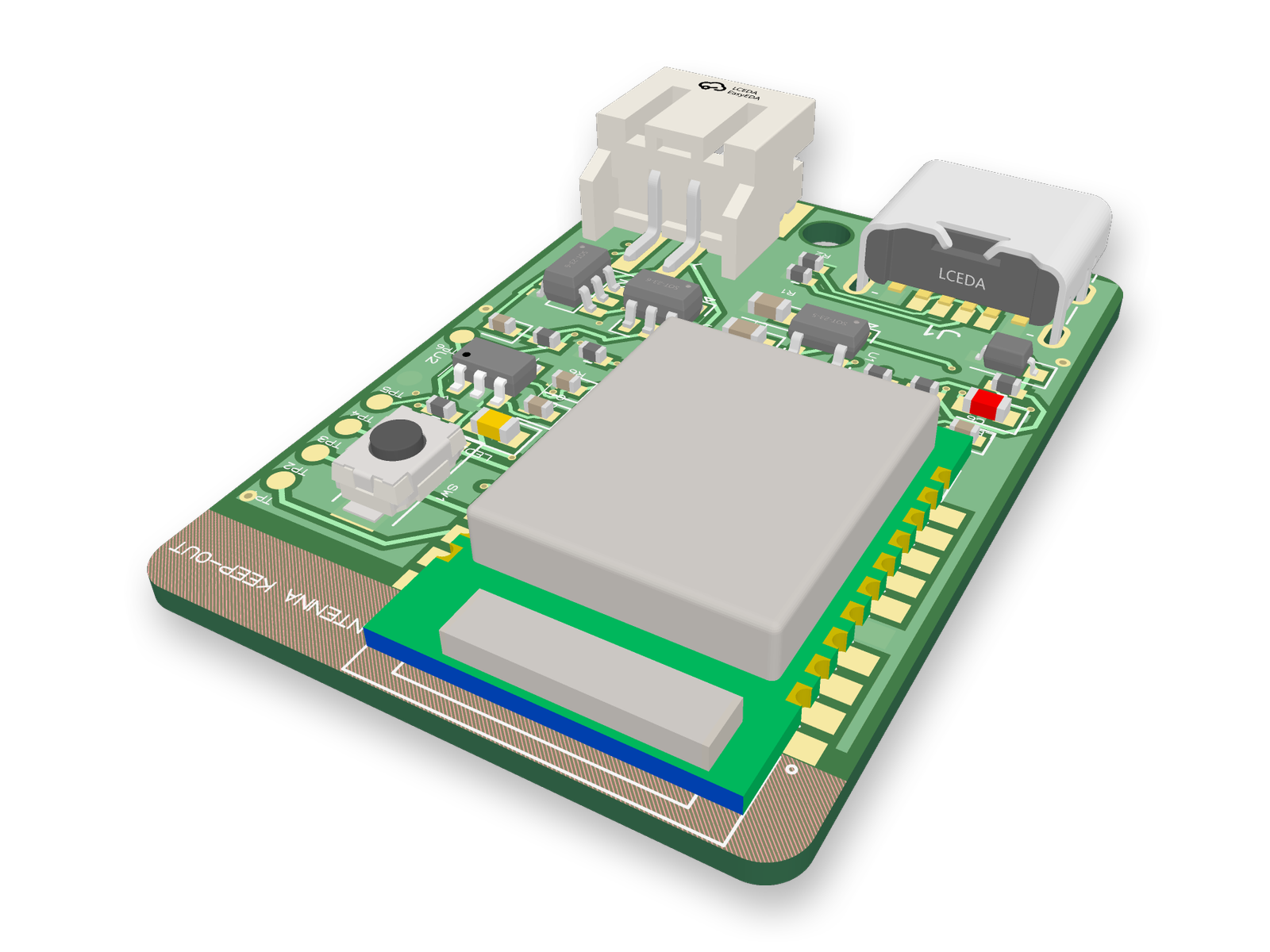
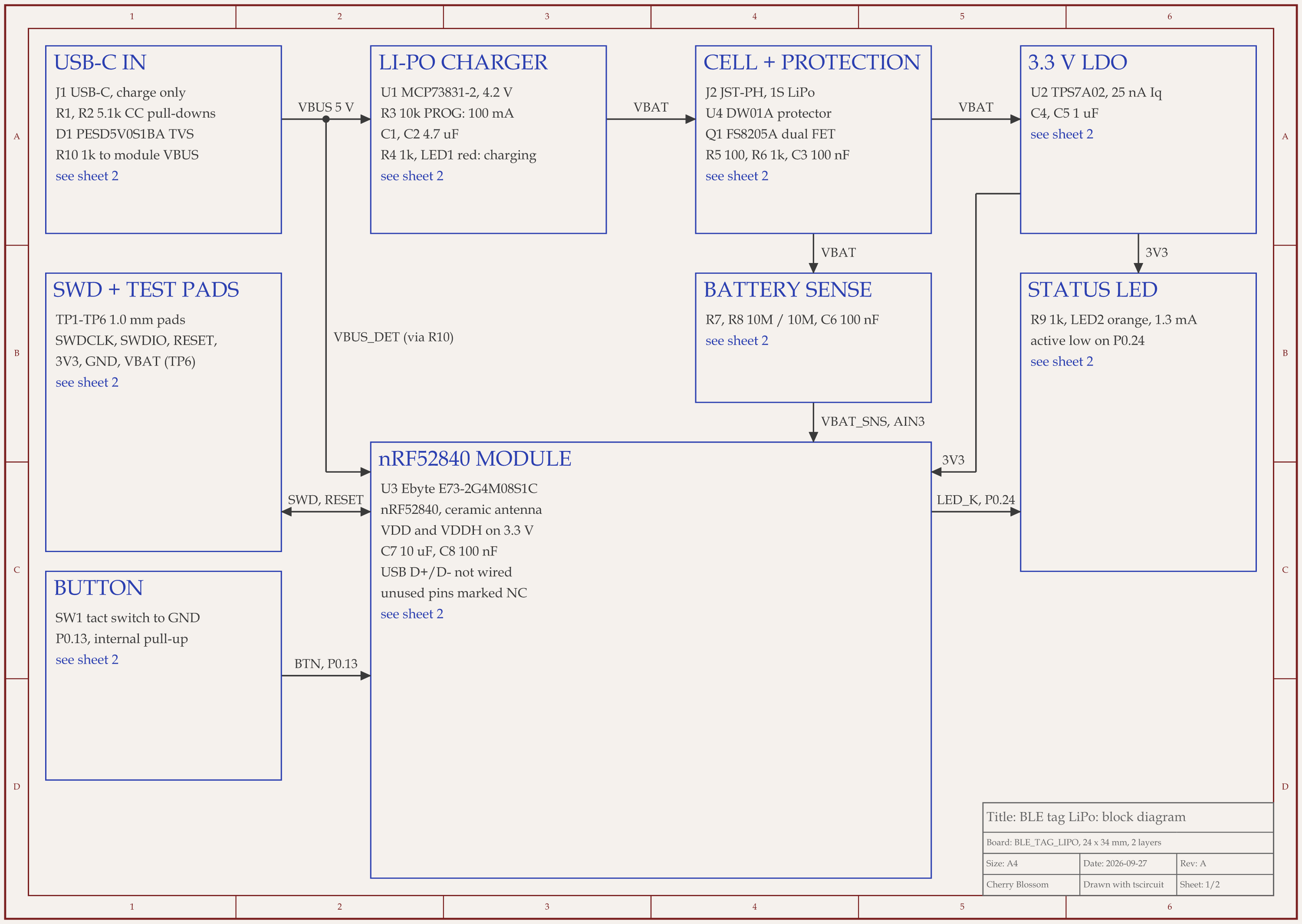
nRF52 Bluetooth tag with LiPo charger schematic, sheet 1 of 2: Block diagram
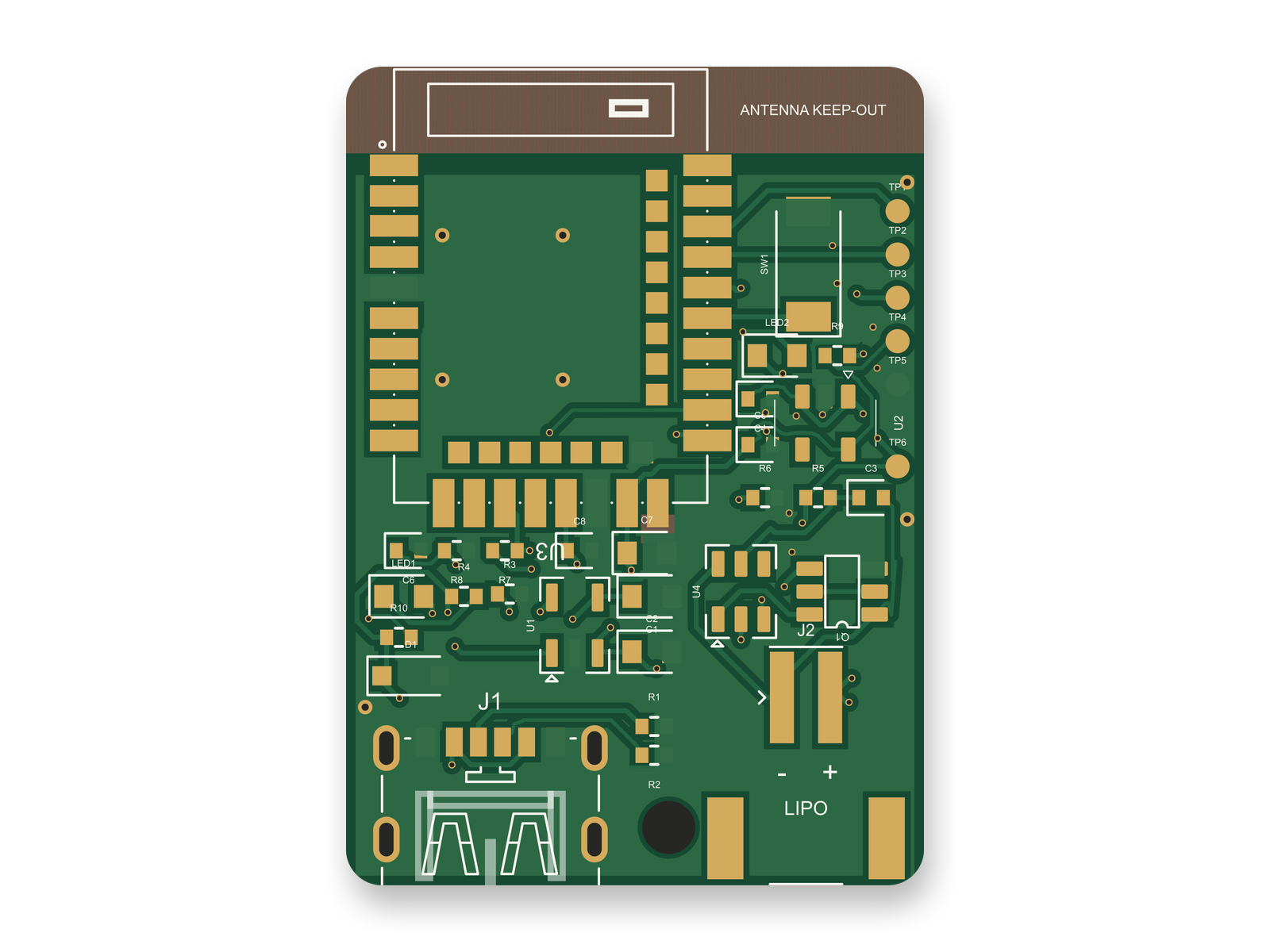
Routed PCB layout of the nRF52 Bluetooth tag with LiPo charger3D render of the nRF52 Bluetooth tag with LiPo charger
A Bluetooth tag whose ICs and connectors all carry LCSC part numbers: block diagram, routed 2-layer PCB and 3D render.

The EasyEDA and LCSC library shows up even outside EasyEDA. An AI agent built this small Bluetooth tag with tscircuit, the open-source engine Cherry Blossom runs on, on our own machine, with the same tscircuit version and review tool Cherry Blossom's agent uses. Every IC and connector is pinned to an LCSC number: the Ebyte E73 nRF52840 module is C356849, the MCP73831 charger C424093, the TPS7A0233 3.3 V regulator C2887324, the JST battery connector C295747 and the USB-C receptacle C456012.

Several footprints came in through EasyEDA as well. The USB-C and JST footprints came from an EasyEDA import, and so did the module's after the supplier footprint fetch for it failed. The parts engine picked the passives rather than anyone pinning them by hand. We spot-checked a few: the 4.7 uF capacitor resolved to C19666, a 16 V X5R part.

Part numbers also go stale. An outside review of the circuit changed the LED resistor from 220 ohms to 1k, and the parts cache kept the old 220 ohm LCSC pick until the new value was pinned by hand to C11702. The same review swapped a 3.0 V regulator for the 3.3 V one above, which fits the same footprint, because Ebyte asks for at least 3.3 V for full radio output.

Treat an imported footprint as a starting point. Before ordering, compare the USB-C and JST footprints with the vendor drawings and read the passives in the BOM. After that review the circuit scored 90 out of 100 and the redone layout 88, with 0 DRC findings, but the board has not been fabricated or tested in hardware.

Choosing

When is EasyEDA with the copilot the better choice?

  • You already design in EasyEDA Pro and order boards and assembly from JLCPCB, and want AI help without changing tools.

  • You want a full manual editor to fix what the AI draws, and EasyEDA itself is free.

  • You are happy to run a community extension and an MCP client, and to review what they produce.

See it on your own board

The quickest way to judge any of this is to describe a board and read what comes back: the schematic, the layout, and what the verification gate says about it. It runs in the browser, with the AI included from the Pro plan up.

Questions

EasyEDA does not have a built-in AI copilot, so the AI option we recommend for designing a board is Cherry Blossom, which builds a checked schematic, layout and fab files from a plain-English description. The EasyEDA Copilot you find in search results is a third-party, open-source extension under the MIT licence, maintained on GitHub by biosshot. It runs inside EasyEDA Pro Desktop, installed as an .eext package through the Extensions Manager, and its main interface is an MCP server you connect to a client such as Codex or Claude Code. Its README lists schematic generation from natural language, LCSC part search, schematic completion, placement, routing and DRC inspection. EasyEDA publishes a developer guide aimed at AI coding assistants, which helps people build extensions like this one, but the copilot is not an official EasyEDA product. If you try it, use a copy of a project and review what it changes.

The extension is open source under the MIT licence, and EasyEDA itself is free. You still need an AI client to drive it through MCP, such as Codex or Claude Code, and that client may have its own cost.

Its README lists EasyEDA Pro Desktop as the requirement, with V3.2.149, V2.2.47 and V2.2.45 verified. It does not list EasyEDA Standard.

For most people who want a board from a description, Cherry Blossom: it generates the whole board, checks every AI edit and exports an editable KiCad project. Flux is a browser ECAD with a built-in AI assistant beside a full manual editor. KiCad with an MCP server keeps you in a desktop editor with an assistant attached.

Describe a board. See what comes back.

Schematic, layout and a verification gate, in the browser. Exports to Gerbers and KiCad.

By signing up, you agree to our Terms of Service and Privacy Policy.