Alternatives

Ultra Librarian alternatives: other part libraries, and when you can skip the library

Ultra Librarian is where a lot of engineers go when their CAD tool is missing a part. You find the component, download its symbol, footprint and 3D model in your tool's format, and place it. It is a library, not a design tool, and so are most of its alternatives. Cherry Blossom is not a library either, but for people willing to work a different way it removes the step altogether.

By the Cherry Blossom team

The short answer

The best Ultra Librarian alternative is Cherry Blossom if you would rather not fetch parts at all: you describe a whole board in plain English, and the agent takes footprints from real part data while it builds a checked schematic, layout and fab files.

The board exports as an editable KiCad project with the footprints in it, so you can still open it in a manual tool.

If you draw schematics by hand and need one part's files, SnapMagic Search (formerly SnapEDA) and your CAD tool's own library are the library options; search more than one, because coverage differs part by part.

What it is

What does Ultra Librarian offer?

Ultra Librarian calls itself the world's largest CAD library and says it holds over 16 million verified symbols, footprints and 3D models from over 2,500 manufacturers. Downloads are free, in over 30 CAD formats including Altium, Cadence, Eagle, KiCad, OrCAD, PADS, Pulsonix and Quadcept. The models are also offered through participating distributors, manufacturers and PCB design tools.

Two extras are worth knowing about. Participating manufacturers publish reference designs you can download in native CAD formats, so you can start from a working circuit instead of a PDF. And Cadence describes a Virtual Librarian Service that builds IPC-verified models to your own standards at scale.

Ultra Librarian is now part of Cadence, and the Allegro X page describes direct integration: you can search for and place symbols, footprints and 3D STEP models without leaving Allegro X. If you already use Cadence tools, that alone is a good reason to stay.

Why people look

Why look for an Ultra Librarian alternative?

Downloads are free, so cost is rarely the reason. These are more likely:

  • The part is not there, or not in the form you want. Every library has gaps, and each one has parts the others lack.

  • You do not want to register just to grab one footprint. Ultra Librarian asks you to sign up before you download.

  • You do not use Cadence tools, so the Allegro X integration does nothing for you, and a library with a plugin for your own tool may fit better.

  • You would rather not fetch parts at all. That is not a library problem, and it is where Cherry Blossom comes in.

Switching libraries costs you nothing. The files you already downloaded are ordinary files in your CAD tool's format, and they stay in your library whichever site you use next.

Side by side

How do Ultra Librarian and its alternatives compare?

  • What it is

    Cherry Blossom

    AI tool that builds whole boards

    Ultra Librarian

    Part library, now part of Cadence

    SnapMagic Search

    Part library, formerly SnapEDA

  • What you download

    Cherry Blossom

    A full board: Gerbers, KiCad project, BOM, STEP

    Ultra Librarian

    Symbol, footprint, 3D model per part

    SnapMagic Search

    Symbol, footprint, 3D model per part

  • Formats

    Cherry Blossom

    KiCad project and open Circuit JSON

    Ultra Librarian

    Over 30 CAD formats

    SnapMagic Search

    Exports to all major tools it lists, including KiCad and Altium

  • Extras

    Cherry Blossom

    Verification gate; DRC before ordering

    Ultra Librarian

    Manufacturer reference designs; Virtual Librarian Service

    SnapMagic Search

    Footprint checker; InstaBuild; InstaPart

  • Pricing

    Cherry Blossom

    Free editor; AI from $20/mo Pro, $140/mo Ultra

    Ultra Librarian

    Free downloads with registration

    SnapMagic Search

    Free library; paid premium tier

From ultralibrarian.com and SnapMagic Search's pricing page, September 2026.

The options

What are the best Ultra Librarian alternatives?

1Cherry BlossomOur product

Best for: Going from a plain-English description to a fab-ready board, in the browser

You describe the board in plain English and an AI agent writes it as code, builds it, and shows you the schematic, PCB layout, 3D view and BOM. Footprints come from real part data, and a verification gate checks the board before you can order it. Export Gerbers, an editable KiCad project, a BOM and pick-and-place files, or open Circuit JSON.

Platform
Browser, nothing to install
Pricing
The Free plan is the full editor, by hand, with no AI. Pro adds the AI for $20 a month, with 4M AI credits and 600 AI actions a day. Ultra is $140 a month with 32M credits and the frontier models. Usage past the allowance is $5 per 1M credits, only if you turn it on. There is no API key to connect and no per-seat licence.
2SnapMagic Search

Best for: The other large free library

Formerly SnapEDA. Free symbols, footprints and 3D models for millions of parts, IPC-7351B footprints, a manufacturability checker, InstaBuild for making missing parts, and plugins for several CAD tools.

Platform
Browser, plus plugins
Pricing
Free library; paid premium and InstaPart credits
3KiCad's official library

Best for: KiCad users who want parts already in the tool

KiCad ships with thousands of symbols in its official library, and you can make your own in its editors when a part is missing.

Platform
Windows, Linux, macOS
Pricing
Free and open source
4EasyEDA

Best for: Designers who build in EasyEDA and order from JLCPCB

EasyEDA's editor includes millions of free library parts with symbols, footprints and 3D models, and EasyEDA will draw a missing component for free on request.

Platform
Browser, plus desktop clients
Pricing
Free
Where we fit

Why would a library user look at Cherry Blossom at all?

On some boards, you only need the library because you are drawing the schematic yourself. If the board is small and conventional (a microcontroller, a regulator, a sensor, a connector), Cherry Blossom can draft the whole thing from a description. The agent writes it as tscircuit code, builds it, and takes footprints from real part data instead of asking a model to invent pads.

A verification gate checks each edit against manufacturing rules, and a DRC runs before ordering. The export includes an editable KiCad project with the footprints in it, so you can open the board in a manual tool and change anything you disagree with.

When you already have the schematic and only need one part, or your company keeps a controlled library that every design must use, that is library work, and Ultra Librarian or SnapMagic Search handles it. The prompt-to-PCB page shows the whole-board route, and the design check page explains the gate.

We built one

Do two footprints for the same package always match?

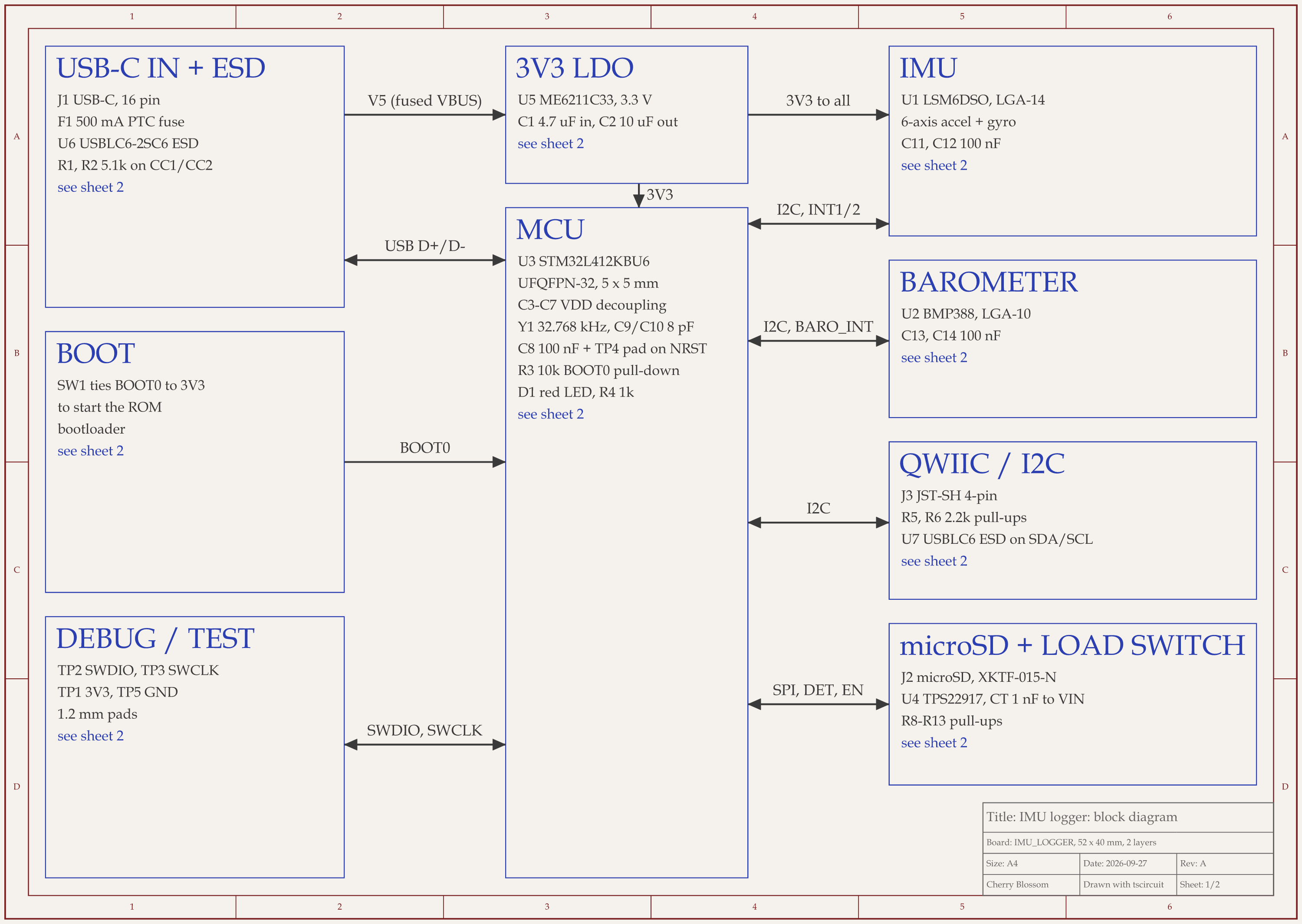
STM32 motion logger schematic, sheet 1 of 2: Block diagramRouted PCB layout of the STM32 motion logger
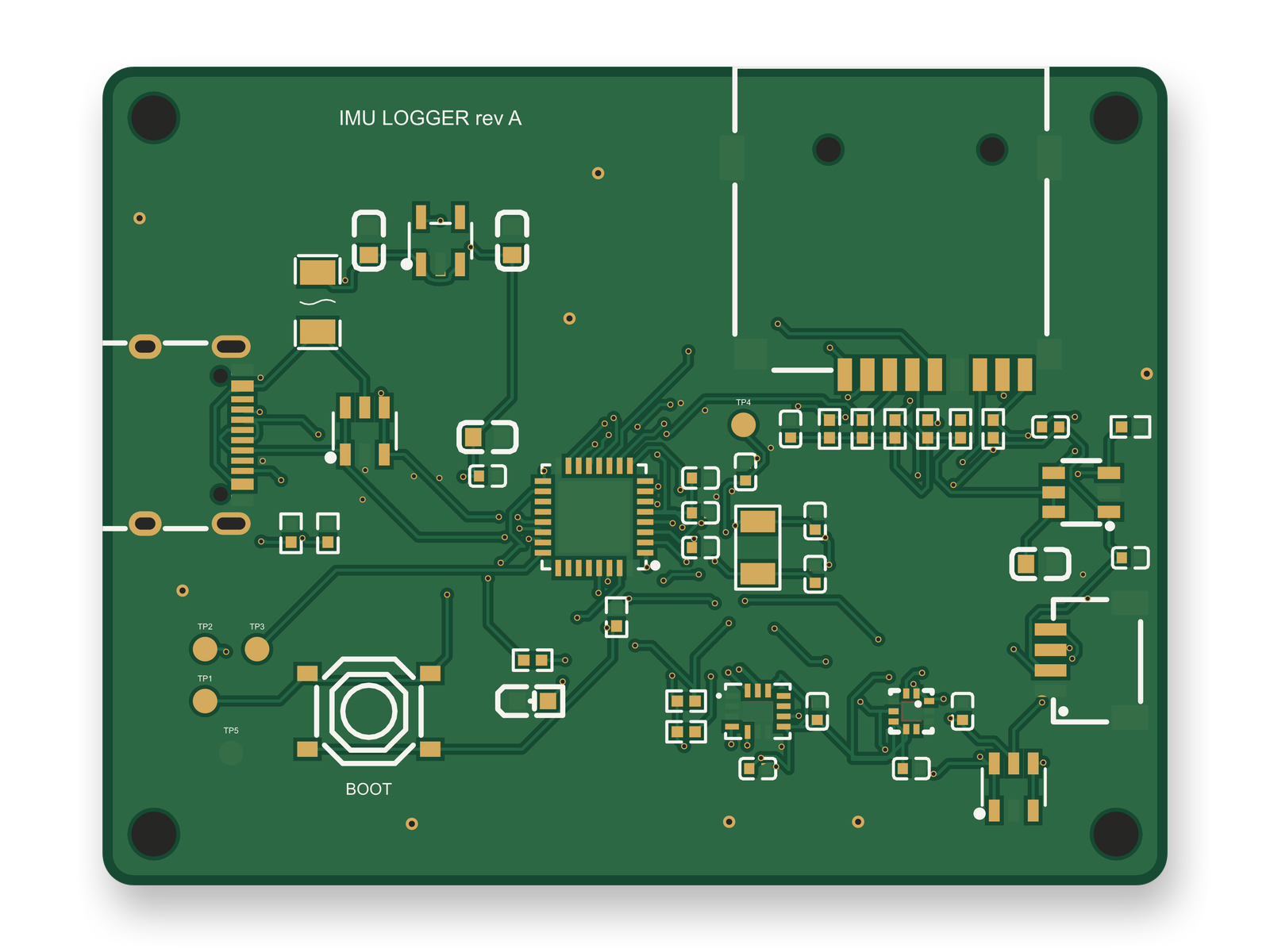
The STM32 motion logger's layout, with each part's land pattern taken from its own JLC record.

No, and that matters when you mix sources. We had an AI agent build this logger on our own machine with tscircuit, the open-source engine Cherry Blossom runs on, at the same version and with the same review tool Cherry Blossom's agent uses. Then we compared tscircuit's generic footprints with the land patterns in each part's JLC record, pad by pad:

  • The SOT-23-6 load switch had the same pads, turned 180 degrees. It solders fine, but the pick-and-place rotation flips.

  • The SOT-23-5 regulator was turned 90 degrees, with pads of a different shape.

  • JLC's 0402 pads for the resistors and capacitors are larger than the generic IPC ones.

  • The only generic crystal footprint is for an HC-49 package, a poor fit for this 3215 crystal, and there is no generic microSD footprint at all.

Using one source for the whole board is the simple fix, and every footprint on the logger comes from JLC. Its first layout scored 82 of 100 after 10 rounds, below our 85 target. An outside review of the circuit then added ESD protection to the Qwiic port, using the same JLC part already guarding USB, so the board kept a single footprint source. The redone layout scored 86, though the autorouter still leaves 127 small vias and does not route USB as a pair. JLC footprints use JLC's own zero orientation, so a person still has to check the pick-and-place rotations before ordering.

Who should stay

When is Ultra Librarian the better choice?

  • You design by hand in a CAD tool and need symbol, footprint and 3D files for a specific part.

  • You use Cadence Allegro X and want the library inside the tool.

  • You want a manufacturer's reference design in native CAD format as a starting point.

When is Cherry Blossom the better choice?

  • You want a whole small board, not one part, and would rather describe it than draw it.

  • You want footprints, layout and fab files to come out of one checked build.

  • You plan to finish or review the board in KiCad anyway, so an editable KiCad project is a good place to start.

Current limits. Cherry Blossom is an early beta. You change a board by asking the agent, not by dragging traces yourself, so fine manual layout happens after a KiCad export. It is not a circuit simulator, it has no real-time multi-user editing, and it is not built for high-speed or RF sign-off.

Related reading: SnapEDA alternatives and our guide to free PCB footprint libraries.

See it on your own board

The quickest way to judge any of this is to describe a board and read what comes back: the schematic, the layout, and what the verification gate says about it. It runs in the browser, with the AI included from the Pro plan up.

Questions

The best Ultra Librarian alternative is Cherry Blossom if you want to skip the part library step entirely. Ultra Librarian, now part of Cadence, is a free library of symbols, footprints and 3D models that you download one part at a time for your CAD tool. Cherry Blossom works at the level of the whole board. You describe it in plain English, and an AI agent builds the schematic, layout, BOM and fab files, taking footprints from real part data as it goes. A verification gate checks every edit against manufacturing rules, and the board exports as an editable KiCad project with the footprints inside. It runs in the browser with nothing to install. If you design by hand and need files for one specific part, another library is the direct swap: SnapMagic Search, formerly SnapEDA, offers free models for millions of parts, and KiCad and EasyEDA ship large libraries of their own.

Yes, downloads are free. Ultra Librarian says you can download symbols, footprints and 3D models in over 30 CAD formats for free once you register. Cadence also describes a Virtual Librarian Service that builds models to your own standards.

Ultra Librarian's site says it is now part of Cadence, and Cadence's Allegro X page describes direct access to Ultra Librarian models from inside Allegro X.

Not one you browse and download from. The agent takes footprints from real part data while it builds a board, and the exported KiCad project contains the footprints that board uses.

Describe a board. See what comes back.

Schematic, layout and a verification gate, in the browser. Exports to Gerbers and KiCad.

By signing up, you agree to our Terms of Service and Privacy Policy.