Cherry Blossom vs DipTrace: the best DipTrace alternative
DipTrace makes a simple offer: a capable desktop PCB editor that you buy once and draw in yourself. Cherry Blossom designs the board for you from a description, in the browser, and checks it before you order. So this comparison is partly about the tools and partly about whether you want to draw at all.
By Arnaud and Anass·
The short answer
The best DipTrace alternative for makers and engineers who want a working board without drawing it is Cherry Blossom: you describe the board in plain English and get a checked schematic, PCB layout and fab files in the browser, with nothing to install.
If you want to keep routing by hand, KiCad gives you DipTrace's manual workflow for free and without pin limits. EasyEDA suits people who order from JLCPCB, and Altium Develop suits professional teams.
The problem
Why do people look for a DipTrace alternative?
Pin limits. The freeware stops at 300 pins and 2 signal layers, and each paid edition is priced by pin count and layers, so a bigger board means a bigger licence.
Platform. DipTrace runs on Windows and macOS, so Linux users look elsewhere.
Drawing by hand. However easy the editor, you still place and route every part yourself.
The difference
How is Cherry Blossom different from DipTrace?
DipTrace is four tools in one package: hierarchical multi-sheet schematic capture, PCB layout with manual push and shove routing and a shape-based autorouter, a component editor with an IPC-7351 pattern generator, and a real-time 3D preview. It runs on Windows and macOS. The current release as we write is 5.3.5, from September 2026. It advertises constraint-driven design with real-time DRC, native XML files that work with Git, Gerber and ODB++ output, and a perpetual licence it describes as "proven since 2002".
Cherry Blossom has no canvas to draw on, because you do not need one. You describe the board, an agent writes it as tscircuit code in a cloud sandbox and builds it, and you see the schematic, PCB layout, 3D view and BOM. Footprints come from real part data rather than a pattern generator, a verification gate checks every edit, and you change the board by asking.
Side by side
How do DipTrace and Cherry Blossom compare?
How you design
Cherry Blossom
Describe it; an AI agent builds the board
DipTrace
Draw and route it yourself, with an autorouter
Where it runs
Cherry Blossom
Browser
DipTrace
Windows and macOS desktop
Checks
Cherry Blossom
Verification gate on every AI edit, DRC before ordering
Perpetual licence, from $75 (Starter) to $995 (Full)
DipTrace details from diptrace.com and its online store, September 2026.
Cost
What does each one cost?
DipTrace is sold as perpetual licences by pin count and signal layers, as listed on DipTrace's online store, September 2026:
Starter: 300 pins, 2 signal layers, $75.
Lite: 500 pins, 2 signal layers, $145.
Standard: 1,000 pins, 4 signal layers, $395.
Extended: 2,000 pins, 6 signal layers, $695.
Full: unlimited pins and layers, $995.
Every edition includes unlimited plane layers, and all 5.x updates are free. DipTrace says major upgrades to 6.x and beyond cost about 25% of the edition price. There is a 30-day full-featured trial as well as the freeware.
Pro is $20 a month with 4M AI credits and 600 AI actions a day. Ultra is $140 a month with 32M credits and the frontier models. Usage past the allowance is $5 per 1M credits, only if you turn it on. The AI is included, with no API key and no per-seat licence. See the pricing page for details.
The money buys different things. DipTrace sells you an editor to work in. Cherry Blossom sells the design work itself, done by an AI and checked before you order.
Switching
What happens to your DipTrace projects?
Cherry Blossom does not open DipTrace files and does not write them. It starts each board from a description, so existing designs stay in DipTrace, and your licence keeps working for them.
New boards you make in Cherry Blossom leave as Gerbers, a BOM, pick-and-place files or an editable KiCad project. If you want to adjust the layout by hand, KiCad is where that happens.
We built one
What does an autorouter do with a small 2-layer board?
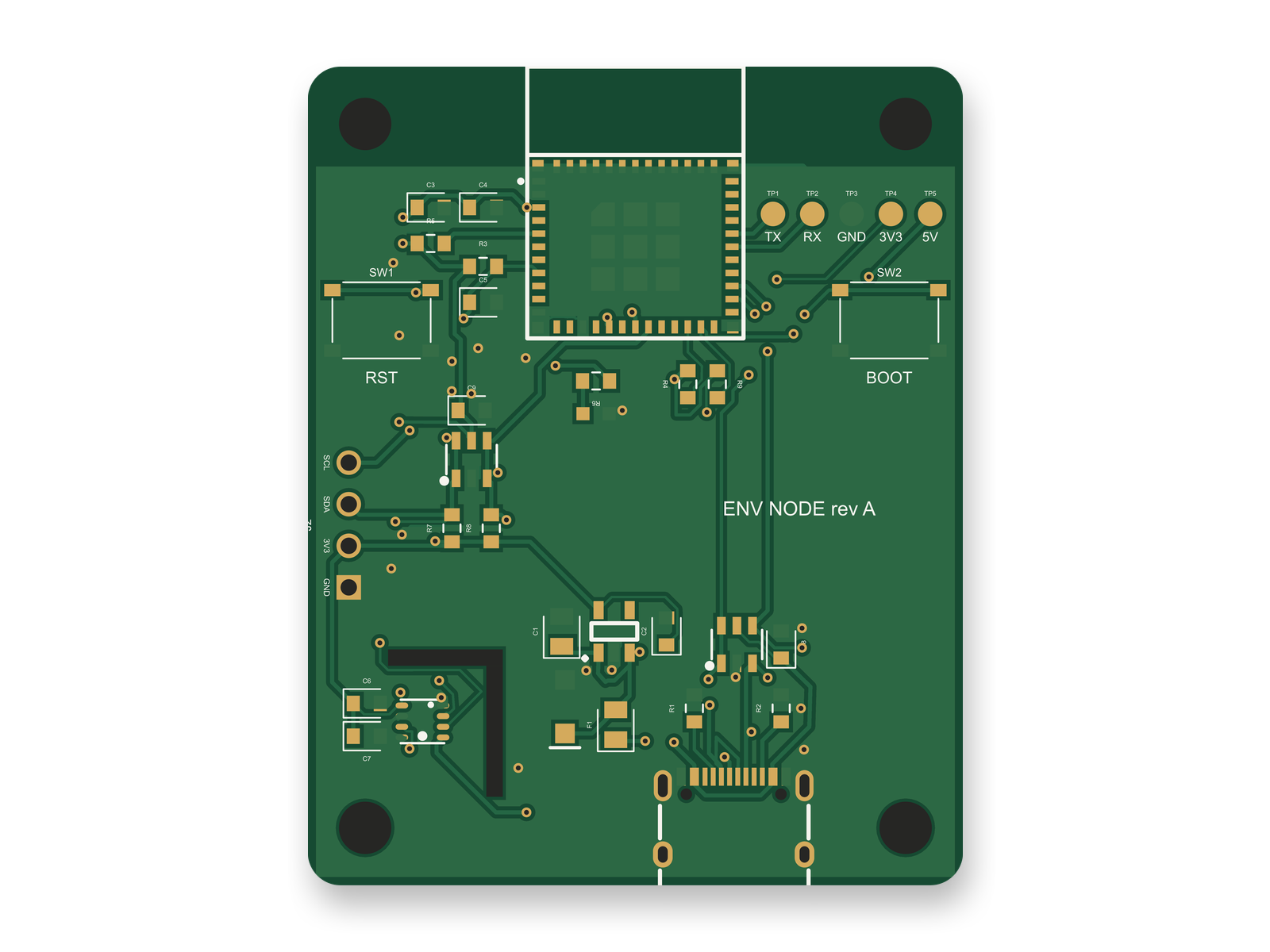
The routed 2-layer layout of the ESP32-C3 sensor board: 121 traces and 60 vias from the tscircuit autorouter.
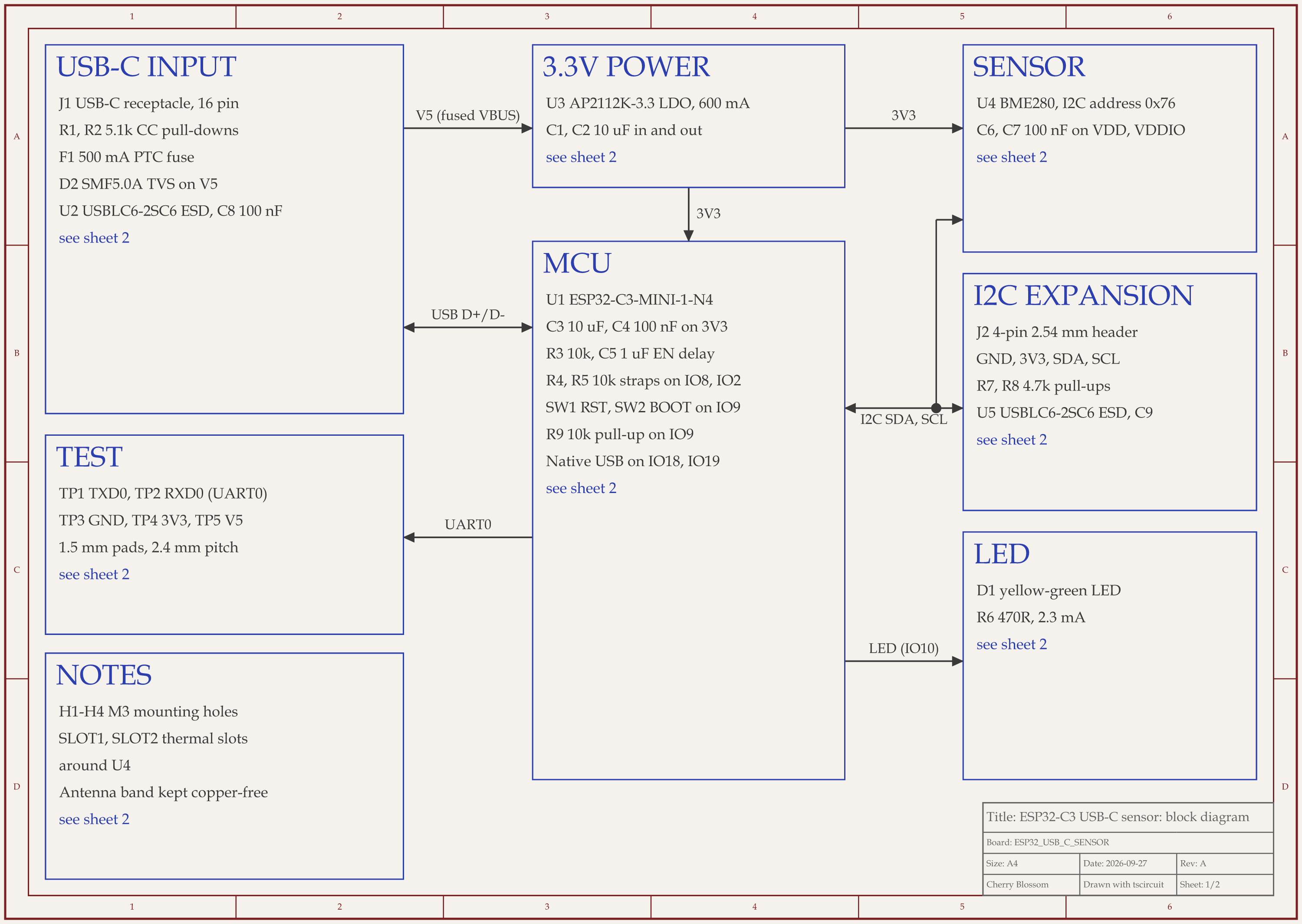
DipTrace pairs hand routing with a shape-based autorouter, so here is a fully automatic route to compare against. An AI agent built this ESP32-C3 sensor board with tscircuit, the open source engine Cherry Blossom runs on. It ran on our own machine, on the same tscircuit version and review tool Cherry Blossom's agent uses. The tscircuit autorouter laid 121 traces and 60 vias, about 768 mm of copper at 0.25 mm nominal width. A full routed build took 111 to 205 seconds on our machine; a cached rebuild took 29.
It did not come out clean on the first try. Early attempts put a via inside the USB-C connector's ground pad and another 0.044 mm from a capacitor. The agent fixed those by flipping two resistors and adding via-to-pad clearance. The first clean route had 41 vias and diagonal runs, and the rubric gave the PCB 17 out of 25. Moving the USB-C connector let the data pair run straight, and the score rose to 20. Later, swapping one capacitor re-rolled the router, which dropped a via into a resistor pad until the agent stood two resistors on end. Then an outside review of the circuit added parts (a surge clamp, a second ESD chip and five test pads), so the whole board was routed again, and the via count grew from 40 to 60. Two builds that tried hand-placed ground stitching vias failed clearance checks, because the extra vias changed the whole route, so they came out. The final layout scored 85 out of 100.
A person should still widen the traces that narrow to 0.15 mm at fine-pitch pads and add ground stitching vias between the two ground pours by hand. The board has not been made.
Choosing
When is Cherry Blossom the better choice?
You would rather describe the board than draw it, and you do not want to learn layout first.
You want parts, schematic and layout drafted together in one step.
You want the board checked against manufacturing rules and orderable through a PCBWay hand-off.
You work across machines and want everything in the browser, with boards saved to your account.
That makes it a good fit for makers and for students who want a real board before they have learned a layout editor.
When is DipTrace the better choice?
You want to place and route boards yourself, in a desktop editor with an autorouter to help.
You dislike subscriptions and would rather pay once and own the licence.
Your boards are small enough for the free 300-pin tier.
The honest limits. Cherry Blossom is an early beta. You change a board by asking the agent, not by dragging traces yourself, so fine manual layout happens after a KiCad export. It is not a circuit simulator, it has no real-time multi-user editing, and it is not built for high-speed or RF sign-off.
Everything else
What are the best DipTrace alternatives?
1Cherry BlossomOur product
Best for: Going from a plain-English description to a fab-ready board, in the browser
You describe the board in plain English and an AI agent writes it as code, builds it, and shows you the schematic, PCB layout, 3D view and BOM. Footprints come from real part data, and a verification gate checks the board before you can order it. Export Gerbers, an editable KiCad project, a BOM and pick-and-place files, or open Circuit JSON.
Platform
Browser, nothing to install
Pricing
Pro is $20 a month with 4M AI credits and 600 AI actions a day. Ultra is $140 a month with 32M credits and the frontier models. Usage past the allowance is $5 per 1M credits, only if you turn it on. The AI is included, with no API key and no per-seat licence.
2DipTrace
Best for: A pay-once desktop editor
Schematic, layout with push and shove routing and a shape-based autorouter, a component editor with an IPC-7351 pattern generator, and a 3D preview.
Platform
Windows, macOS
Pricing
300-pin freeware; perpetual editions from $75 to $995
3KiCad
Best for: Free manual design with no pin or layer limits
Open-source schematic capture with SPICE simulation and ERC, PCB layout with an interactive router, and a 3D viewer.
Platform
Windows, macOS, Linux
Pricing
Free
4EasyEDA
Best for: Free browser design tied to JLCPCB ordering
Std and Pro editors, both free, in the browser or as desktop clients, with LCSC parts and one-click JLCPCB ordering.
Platform
Browser and desktop client
Pricing
Free; optional Premium plan
5Altium Develop
Best for: Professional layout with a cloud workspace
An Altium Designer seat with a shared workspace for projects, libraries and review, plus ECAD-MCAD co-design.
The quickest way to judge any of this is to describe a board and read what comes back: the schematic, the layout, and what the verification gate says about it. It runs in the browser, with the AI included.
The best alternative to DipTrace for most people who want a working board without drawing it is Cherry Blossom. You describe the board in plain English, an AI agent builds the schematic and PCB layout in the browser, footprints come from real part data, and a verification gate checks every edit against manufacturing rules. There are no pin or layer tiers to buy and nothing to install; plans start from $20 a month. You export Gerbers, a BOM, pick-and-place files or an editable KiCad project, and you can hand the board straight to PCBWay. If you want to keep routing by hand, KiCad is the usual free pick: it is open source, runs on Windows, macOS and Linux, and has no pin limits. EasyEDA suits people who order from JLCPCB, and Altium Develop suits professional teams. DipTrace itself stays a fair choice if you want to pay once and draw every trace yourself.
DipTrace has a freeware version limited to 300 pins and 2 signal layers, plus a 30-day full-featured trial. Paid editions are perpetual licences, from $75 for Starter to $995 for Full, as listed on DipTrace's online store in September 2026.
Yes. DipTrace licences are perpetual, and all 5.x updates are included. DipTrace says moving to a future major version such as 6.x costs about 25% of the edition price.
Cherry Blossom exports Gerbers with drill files, a CSV BOM, pick-and-place files, STEP and other 3D formats, an editable KiCad project and open Circuit JSON. It does not produce a native DipTrace project.