Alternatives

Cherry Blossom vs Fusion Electronics: the best Fusion 360 PCB alternative

Autodesk Fusion is a mechanical CAD product with an electronics workspace built in, and since EAGLE's end of life it is where Autodesk sends PCB designers. That is a lot of software to learn when the board is the whole job. Cherry Blossom designs the board from a description, checks it, and hands you a STEP model for the enclosure work.

By Arnaud and Anass

The short answer

The best Fusion 360 electronics alternative for engineers and makers who want a working board fast is Cherry Blossom: you describe the board in plain English and get a checked schematic, PCB layout and fab files in the browser, plus a STEP model to drop into your enclosure.

If you want a free manual editor with no subscription, KiCad is the usual second choice, and EasyEDA suits people who order from JLCPCB. Fusion itself stays the pick when the board and the enclosure must be modelled together in one product.

The problem

Why do people look for a Fusion Electronics alternative?

  • They arrived from EAGLE, not by choice. Autodesk ended EAGLE and pointed its users at Fusion, so some of them are shopping for the first time in years.

  • The board is the whole project. Fusion is a mechanical CAD, CAM and CAE product first, and that is a lot of software to learn when there is no enclosure to model.

  • The licence. Commercial use needs a Fusion subscription, and the free personal licence has limitations around electronics.

The difference

How is Cherry Blossom different from Fusion Electronics?

Autodesk describes Fusion as cloud-based 3D CAD, CAM, CAE and PCB software. Its PCB guide lists schematic capture, a component library you can extend, real-time DRC during layout, and QuickRoute for automatic and optimised routing. Autodesk describes the electronics workspace as including 999 schematics, 16 signal layers and unlimited board area. It is also the official successor to EAGLE, which Autodesk stopped selling and supporting on June 7, 2026, and it opens EAGLE files.

Cherry Blossom focuses on the board and does the drawing for you. You describe the board; an agent writes it as tscircuit code, builds it, and shows you the schematic, PCB, 3D view and BOM. Footprints come from real part data and a verification gate checks every edit. There is no mechanical CAD, but the board exports as STEP, GLB or glTF, ready to drop into whatever you model the enclosure in.

Side by side

How do Fusion Electronics and Cherry Blossom compare?

  • How you design

    Cherry Blossom

    Describe it; an AI agent builds the board

    Fusion Electronics

    Draw and route it yourself, with QuickRoute

  • Mechanical CAD

    Cherry Blossom

    None; export STEP, GLB or glTF

    Fusion Electronics

    Built in, same product

  • Where it runs

    Cherry Blossom

    Browser

    Fusion Electronics

    Autodesk desktop app with cloud data

  • EAGLE files

    Cherry Blossom

    No

    Fusion Electronics

    Yes, Autodesk says fully compatible

  • Checks

    Cherry Blossom

    Verification gate on every AI edit, DRC before ordering

    Fusion Electronics

    Real-time DRC during layout

  • Exports

    Cherry Blossom

    Gerbers, KiCad project, BOM, pick-and-place, STEP, Circuit JSON

    Fusion Electronics

    Manufacturing outputs; see Autodesk's docs

  • Pricing model

    Cherry Blossom

    $20/mo Pro, $140/mo Ultra, AI included

    Fusion Electronics

    Monthly or yearly subscription; free personal use with limited electronics

Fusion details from Autodesk's Fusion product pages and blog, September 2026.

Cost

What does each one cost?

Autodesk sells Fusion as a monthly or yearly subscription with CAD, CAM, CAE, PCB and collaboration tools included; current prices are on Autodesk's buy page. There is also Fusion for personal use, free for qualifying non-commercial hobbyists earning under $1,000 a year from their projects. Autodesk's own comparison says the personal licence has limitations around electronics, so check that it covers your board before you rely on it.

Pro is $20 a month with 4M AI credits and 600 AI actions a day. Ultra is $140 a month with 32M credits and the frontier models. Usage past the allowance is $5 per 1M credits, only if you turn it on. The AI is included, with no API key and no per-seat licence. The full breakdown is on the pricing page.

Switching

What does moving from Fusion to Cherry Blossom involve?

There is little to migrate, because Cherry Blossom does not open Fusion or EAGLE electronics files. Existing designs stay where they are, and if you need to revise them, Fusion or KiCad is still the tool.

For a new board, you start by describing it. When it is built, export the STEP model and bring it into Fusion, or any other mechanical CAD tool, to check it against the enclosure. If you later want to adjust the layout by hand, export the KiCad project and finish there.

We built one

What does an AI-built board hand over for the enclosure?

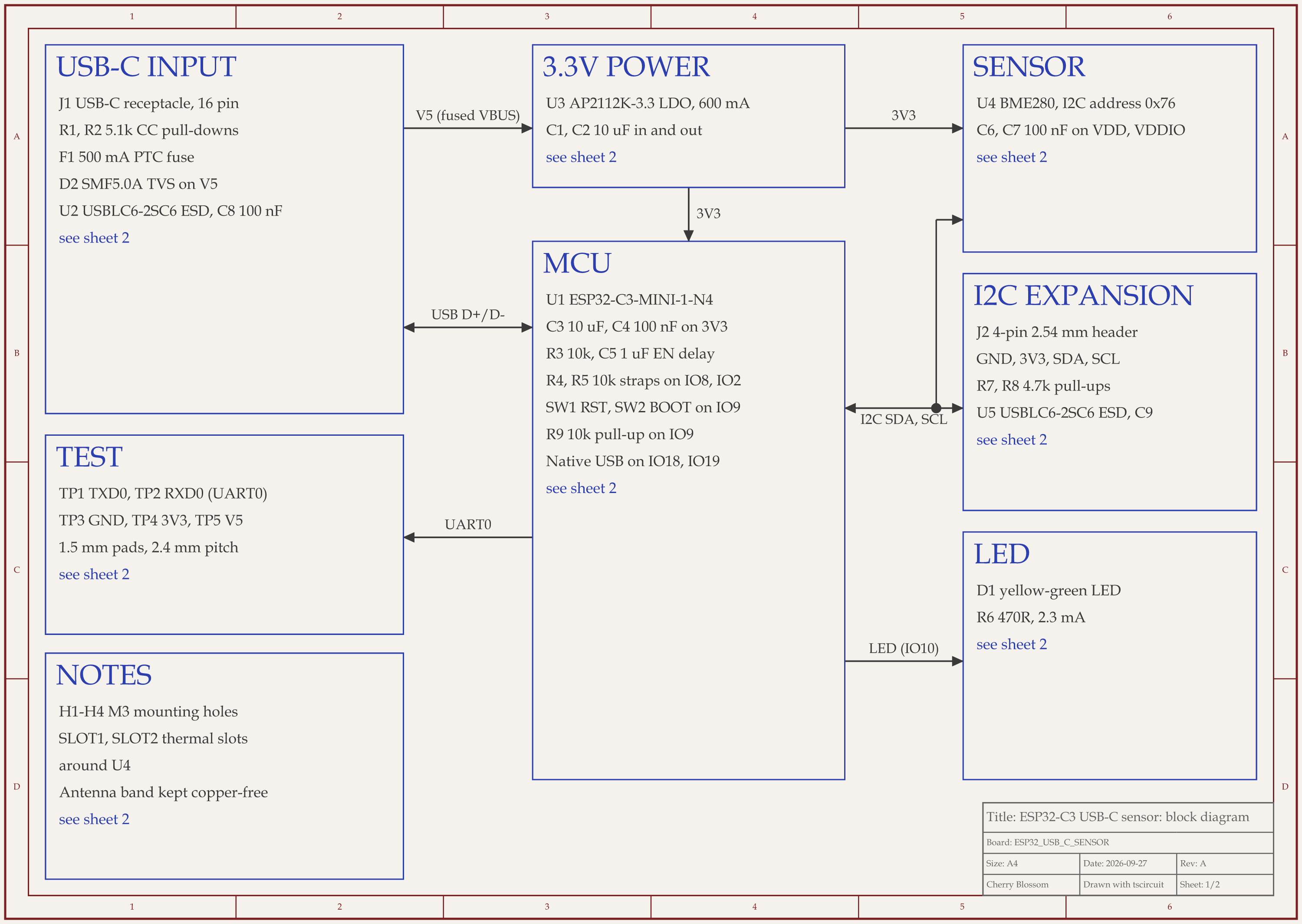
ESP32-C3 USB-C sensor node schematic, sheet 1 of 2: Block diagram
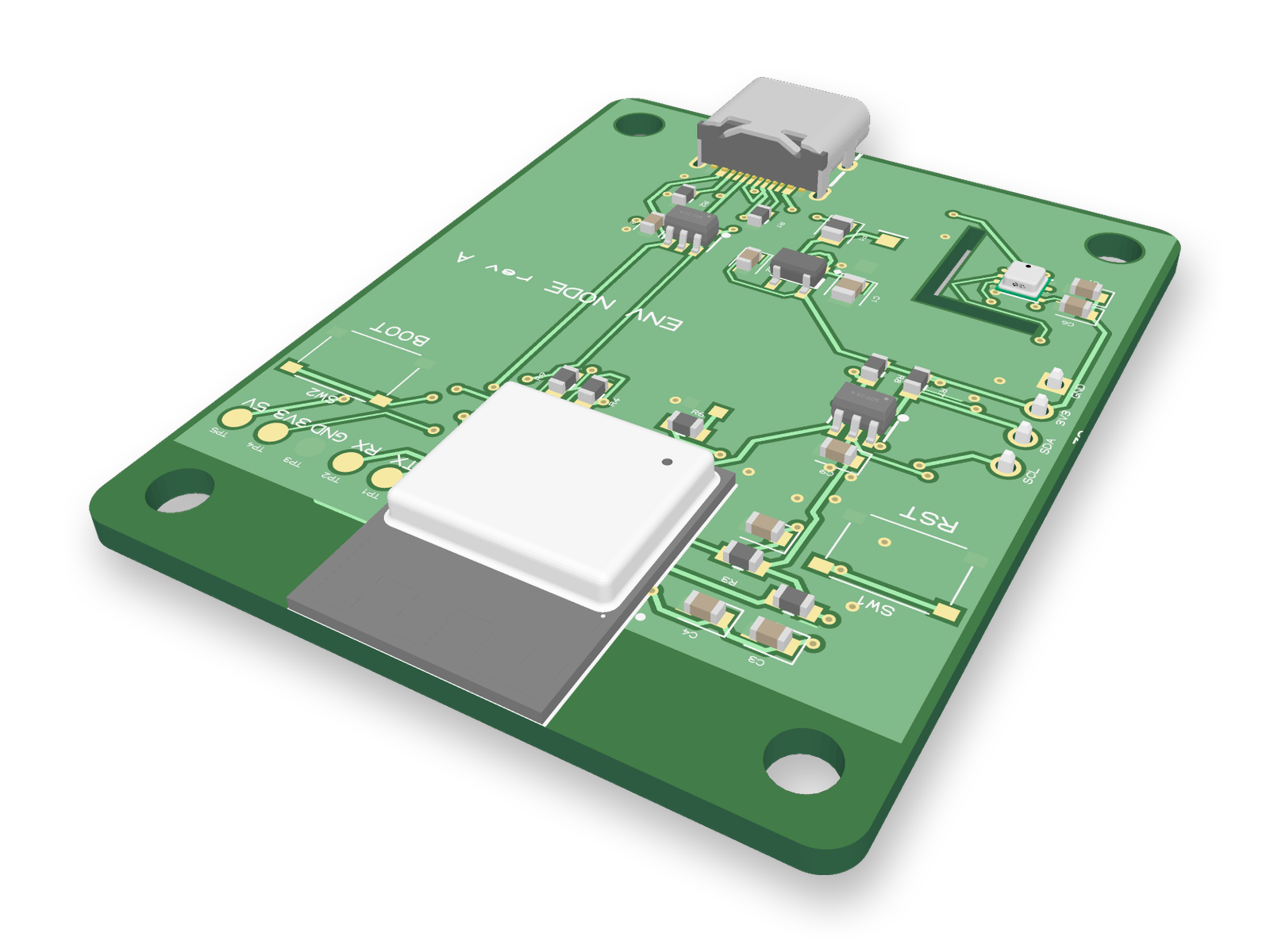
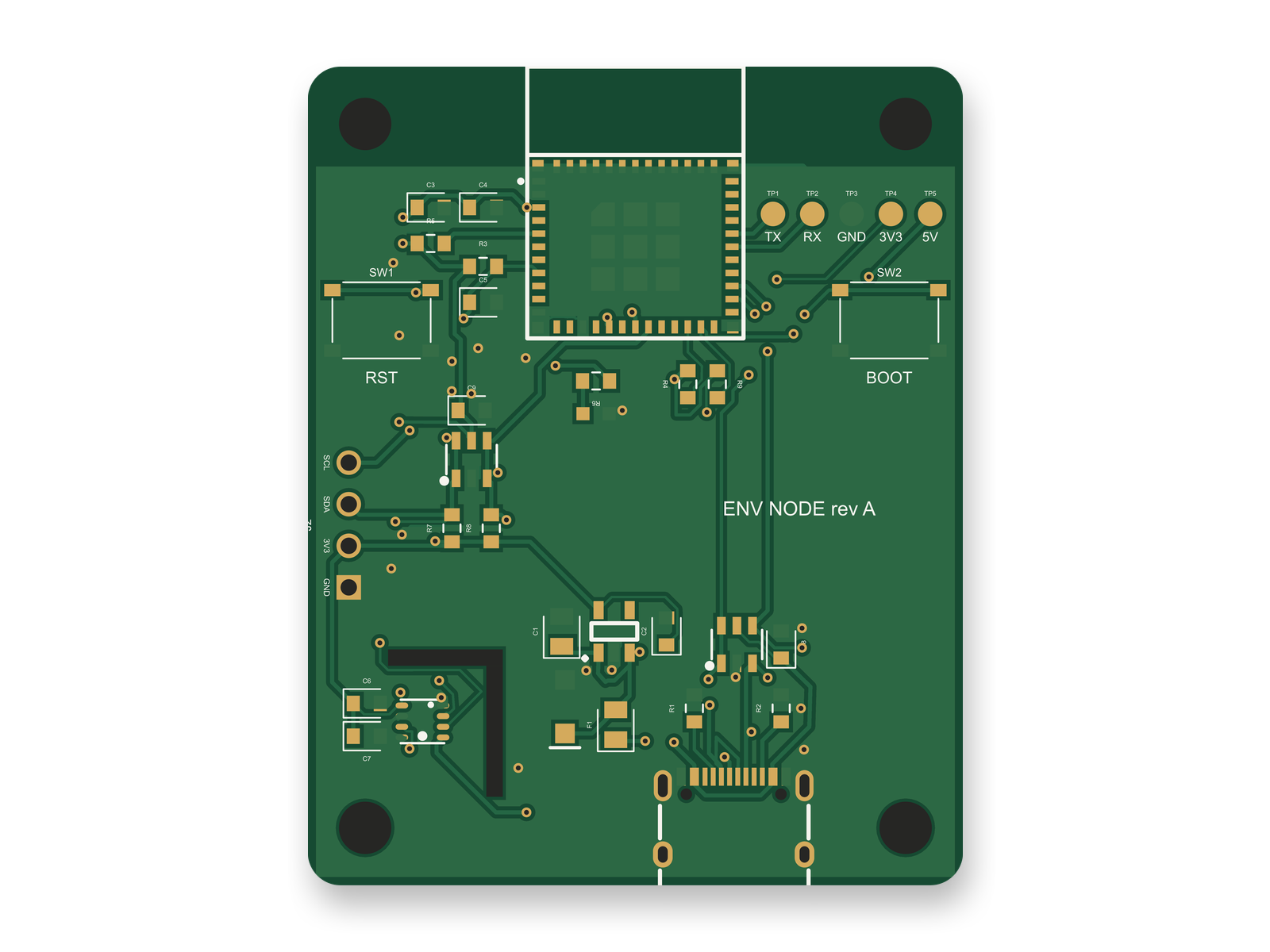
3D render of the ESP32-C3 USB-C sensor nodeRouted PCB layout of the ESP32-C3 USB-C sensor node
The ESP32-C3 sensor board: 40 x 50 mm with a 2 mm corner radius and four M3 holes, as block diagram, layout and 3D render.

We had an AI agent build this ESP32-C3 sensor board with tscircuit, the open source engine behind Cherry Blossom. It ran on our own machine with the tscircuit version and review tool Cherry Blossom's agent uses. The numbers an enclosure needs are all fixed: 40 x 50 mm, 1.6 mm FR4, a 2 mm corner radius and four 3.2 mm holes for M3 screws. The module's antenna sits on the top edge, and both ground pours stop 5.6 mm short of it. An L-shaped 1 mm slot cuts off one corner for the BME280 sensor, to keep heat from the regulator and module away from it.

Two things matter if you check it against a case. The two buttons and the header have no 3D model, so measure their height yourself. And an early version drew its antenna keepout as a copper-coloured hatch in the 3D view, which looked like copper over the antenna. The agent removed it and let the pour outline keep that edge clear. An outside review of the circuit later added five labelled test pads in a row beside the module, below the antenna band. Leave an opening or a removable lid over them if you want to reach the serial port and power rails once the board is in its case. The board has not been made, and a person still needs to confirm the fab can cut the slot.

Choosing

When is Cherry Blossom the better choice?

  • The board is the product, or the enclosure is simple enough to handle with an exported STEP file.

  • You would rather describe the circuit than learn a CAD package with a mechanical side you will not use.

  • You want the board checked against manufacturing rules and orderable from the same place.

  • You want to own the design in open formats: an editable KiCad project and Circuit JSON.

That describes most hardware engineers and makers who landed in Fusion only because EAGLE closed.

When is Fusion the better choice?

  • You are designing a product, and the board and the enclosure need to be modelled together.

  • You have EAGLE designs to carry forward.

  • You want to place and route by hand.

The honest limits. Cherry Blossom is an early beta. You change a board by asking the agent, not by dragging traces yourself, so fine manual layout happens after a KiCad export. It is not a circuit simulator, it has no real-time multi-user editing, and it is not built for high-speed or RF sign-off.

Everything else

What are the best Fusion Electronics alternatives?

1Cherry BlossomOur product

Best for: Going from a plain-English description to a fab-ready board, in the browser

You describe the board in plain English and an AI agent writes it as code, builds it, and shows you the schematic, PCB layout, 3D view and BOM. Footprints come from real part data, and a verification gate checks the board before you can order it. Export Gerbers, an editable KiCad project, a BOM and pick-and-place files, or open Circuit JSON.

Platform
Browser, nothing to install
Pricing
Pro is $20 a month with 4M AI credits and 600 AI actions a day. Ultra is $140 a month with 32M credits and the frontier models. Usage past the allowance is $5 per 1M credits, only if you turn it on. The AI is included, with no API key and no per-seat licence.

2Autodesk Fusion

Best for: Boards designed alongside their enclosure

Mechanical CAD, CAM and CAE with an electronics workspace: schematic capture, real-time DRC and QuickRoute. The official successor to EAGLE.

Platform
Autodesk desktop app with cloud data
Pricing
Monthly or yearly subscription; free personal use with limited electronics
3KiCad

Best for: A free manual editor with no subscription

Open-source schematic capture with SPICE simulation, PCB layout with an interactive router, and a 3D viewer with a raytracer.

Platform
Windows, macOS, Linux
Pricing
Free
4EasyEDA

Best for: Free design with JLCPCB ordering built in

Std and Pro editors, both free, in the browser or as desktop clients, with parts from LCSC and one-click ordering from JLCPCB.

Platform
Browser and desktop client
Pricing
Free; optional Premium plan

Coming from EAGLE? Our EAGLE alternative post covers where old designs can go.

See it on your own board

The quickest way to judge any of this is to describe a board and read what comes back: the schematic, the layout, and what the verification gate says about it. It runs in the browser, with the AI included.

Questions

The best alternative to Fusion 360 for PCB design, when the board is the whole job, is Cherry Blossom. You describe the board in plain English, an AI agent builds the schematic and PCB layout in the browser, footprints come from real part data, and a verification gate checks every edit against manufacturing rules. You export Gerbers, a BOM, pick-and-place files, an editable KiCad project, and a STEP model you can bring into Fusion or any mechanical CAD tool for the enclosure. Plans start from $20 a month, and there is no CAD suite to install. If you want a free manual editor instead, KiCad is the common choice: open source, with SPICE simulation, an interactive router and a 3D viewer, on Windows, macOS and Linux. EasyEDA is free in the browser with JLCPCB ordering built in. Fusion stays the better fit when board and enclosure must live in one model.

Fusion for personal use is free for qualifying non-commercial hobbyists, but Autodesk says it has limitations around electronics compared with the paid subscription. Commercial use needs a monthly or yearly Fusion subscription.

Cherry Blossom exports the board as STEP, GLB and glTF, which you can bring into mechanical CAD tools for enclosure work. It also exports Gerbers, a BOM, pick-and-place files and an editable KiCad project.

No. Cherry Blossom starts from a plain-English description of the board. If you need to reopen EAGLE designs, Fusion or KiCad are the tools that import them.

Describe a board. See what comes back.

Schematic, layout and a verification gate, in the browser. Exports to Gerbers and KiCad.