Alternatives

Cherry Blossom vs Skimatly: a Skimatly alternative

Skimatly and Cherry Blossom begin in the same place: you describe a circuit in plain English. Skimatly turns that into a schematic draft in a KiCad style. Cherry Blossom turns it into the schematic, the PCB layout, a BOM and fab files, and checks the board before you can order.

By the Cherry Blossom team

The short answer

The best Skimatly alternative is Cherry Blossom: you describe the circuit in plain English, as you would in Skimatly, and get a schematic, PCB layout, 3D view, BOM and fab-ready Gerbers, checked against manufacturing rules before you order.

You can sign up today with no waitlist, and the board exports as an editable KiCad project.

Skimatly suits people who only want a schematic draft to review and can wait for closed beta access; its pricing and export support have not been announced.

The difference

Why look for a Skimatly alternative?

Skimatly calls itself an AI schematic generator that turns natural language into IEEE-standard schematics with KiCad-quality symbols. Its about page says it was founded in 2025 to get people from an idea to a reviewable schematic draft faster, and it names students, makers, engineers and hardware startups as its audience.

There are two reasons you might look past it. The first is access: it is in closed beta, and you join a waitlist. The second is scope. Its site talks about schematics throughout and does not describe PCB layout, so a draft from Skimatly still has to be laid out somewhere else before it becomes a board.

Cherry Blossom treats the schematic as one step of several. An agent in a cloud sandbox writes the board as tscircuit code, builds it, and shows the schematic, PCB layout, 3D view and BOM together. Footprints come from real part data, a verification gate checks each AI edit, and a DRC check runs before you order through the PCBWay hand-off.

Side by side

How do Skimatly and Cherry Blossom compare?

  • Input

    Cherry Blossom

    Plain-English description

    Skimatly

    Plain-English description

  • Output

    Cherry Blossom

    Schematic, PCB layout, 3D, BOM, fab files

    Skimatly

    Schematic draft

  • PCB layout

    Cherry Blossom

    Yes

    Skimatly

    Not described on its site

  • Exports

    Cherry Blossom

    Gerbers, KiCad project, BOM, pick-and-place, STEP, Circuit JSON

    Skimatly

    To be announced as the product matures

  • Availability

    Cherry Blossom

    Open sign-up, early beta

    Skimatly

    Closed beta with a waitlist

  • Pricing

    Cherry Blossom

    Free editor; AI from $20/mo Pro, $140/mo Ultra

    Skimatly

    Not yet announced

Skimatly details from skimatly.xyz and its FAQ, September 2026.

We built one

What does a schematic draft leave out on a switching supply?

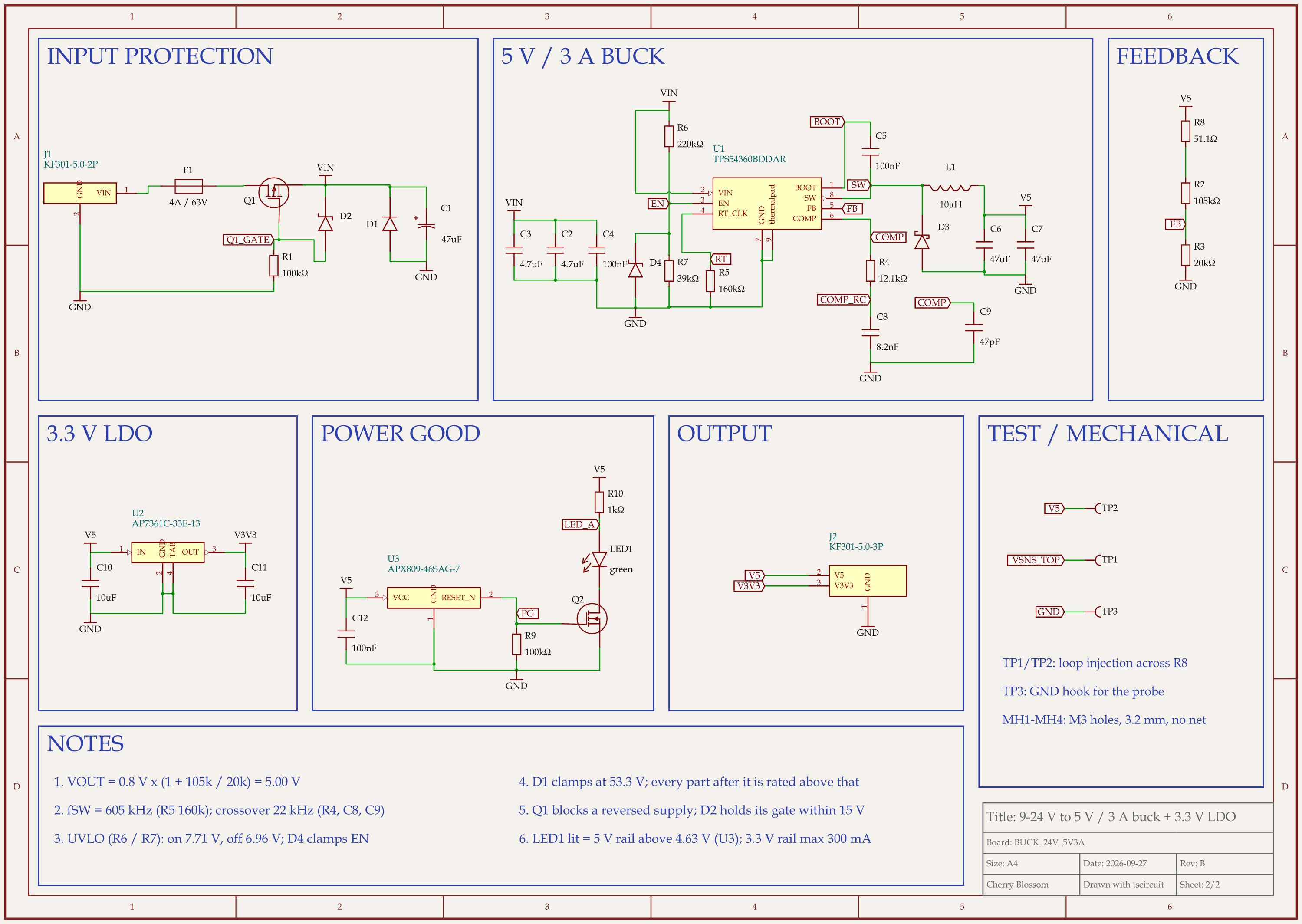
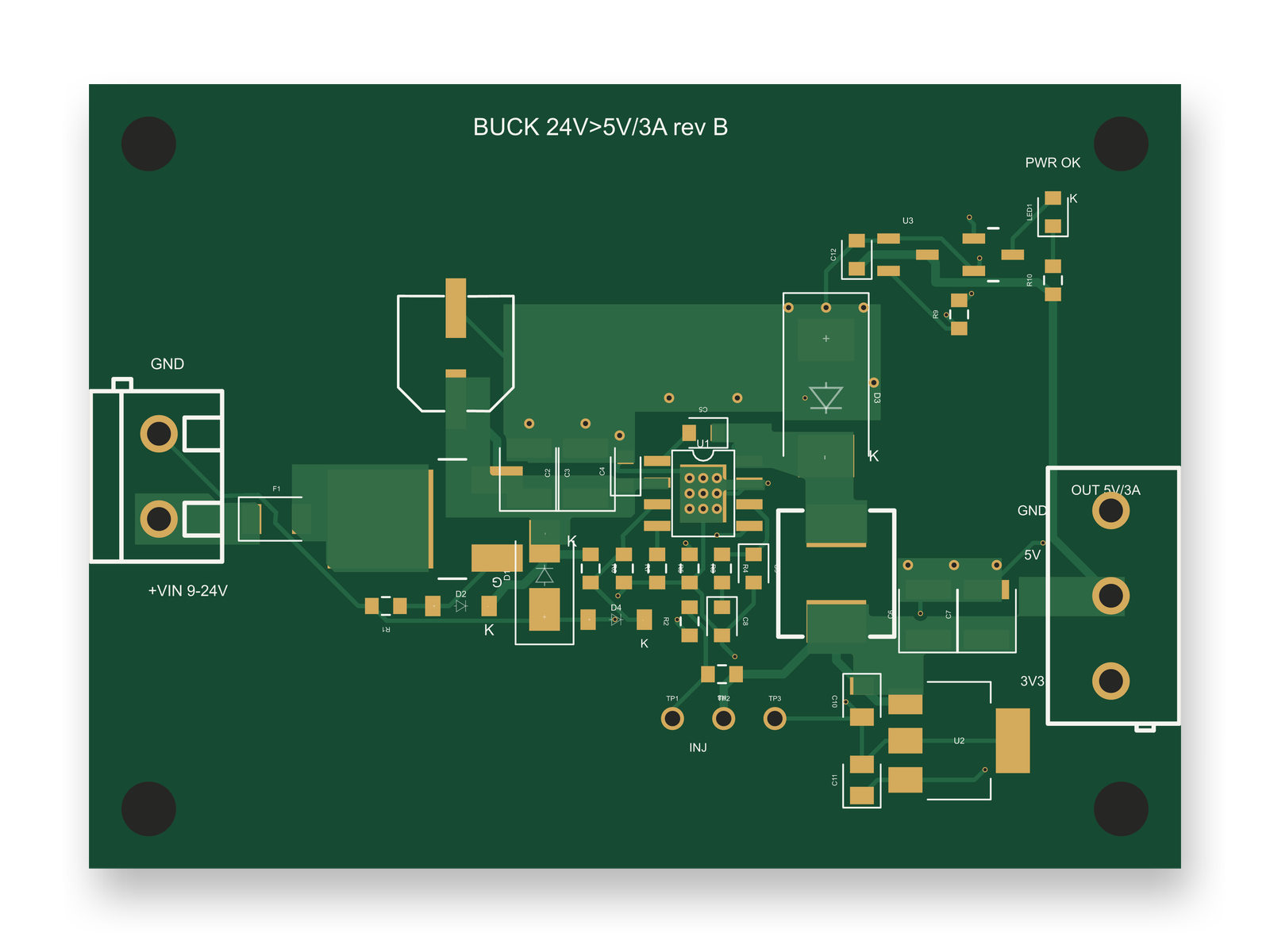
9-24 V to 5 V 3 A buck board schematic, sheet 2 of 2: SchematicRouted PCB layout of the 9-24 V to 5 V 3 A buck board
Rev B of a 24 V to 5 V, 3 A buck board: the schematic, then the 2-layer layout modelled on TI's reference layout.

It leaves out the layout, and a switching supply's layout needs choices the schematic never shows. An AI agent built this 9 to 24 V in, 5 V at 3 A board with tscircuit, the open-source engine Cherry Blossom runs on, on our own machine, using the same version and review tool as Cherry Blossom's agent. Once the schematic was done, the layout still needed these decisions:

  • Input capacitors, converter and catch diode placed as in TI's reference layout, with the 100 nF capacitor closest to the input pin.

  • Copper pours on the 3 A paths, and the power nets routed first at 0.5 mm.

  • The bootstrap capacitor straight across the top of the chip, on a 2.56 mm trace with no vias. In rev A that trace was about 10 mm long, with two vias, on the bottom layer.

It is not perfect. The ground path from the input capacitors to the catch diode runs about 12 mm over the top of the chip, as in TI's layout, and could be shorter. Late circuit changes reach the layout too. When an outside review added a zener diode to the enable pin, it needed a spot of its own: free space under the enable resistors, on a 4 mm trace, and no other part moved. The redone layout scored 88 out of 100 in our review. The board has not been built.

Access

Can you use Skimatly today?

Not without an invitation. Skimatly's FAQ says it is a working product in closed beta, that you join a waitlist to be considered for access, and that there is no public launch date yet. Pricing will be announced closer to launch. The company says it is exploring models for students, makers and professionals, including accessible entry points.

Cherry Blossom is also a beta, but anyone can sign up. The Free plan is the full editor, by hand, with no AI. Pro adds the AI for $20 a month, with 4M AI credits and 600 AI actions a day. Ultra is $140 a month with 32M credits and the frontier models. Usage past the allowance is $5 per 1M credits, only if you turn it on. There is no API key to connect and no per-seat licence. Plans are on the pricing page.

Who should wait

When is Skimatly the better choice?

Skimatly may suit you if this sounds like your project.

  • You only need a schematic draft to review, and you will do the layout yourself in KiCad or another tool.

  • You can wait for beta access and would like to help shape an early product with your feedback.

Who should switch

When is Cherry Blossom the better choice, and how do you start?

  • You want to go past the schematic to a routed board and fab-ready Gerbers.

  • You want to start today without a waitlist.

  • You want a board checked against manufacturing rules before ordering.

  • You want an editable KiCad project and open Circuit JSON you can take elsewhere.

Starting is the same move you would make in Skimatly: describe the circuit in plain English. The agent drafts the schematic and keeps going to the layout, as the prompt-to-PCB walkthrough shows. If the schematic was all you were after, export the KiCad project and carry on in KiCad from there.

Current limits. Cherry Blossom is an early beta. It is not a circuit simulator, it has no real-time multi-user editing, and it is not built for high-speed or RF sign-off.

Everything else

What else turns text into a circuit?

1Cherry BlossomOur product

Best for: Going from a plain-English description to a fab-ready board, in the browser

A full schematic and PCB editor in the browser with an AI agent, Sakura, built in. Describe the board in plain English and Sakura finds real parts, draws and tidies the schematic, then asks before it places and routes the PCB. Edit anything by hand, then export Gerbers, an editable KiCad project, a BOM, pick-and-place, STEP or open Circuit JSON.

Platform
Browser, nothing to install
Pricing
The Free plan is the full editor, by hand, with no AI. Pro adds the AI for $20 a month, with 4M AI credits and 600 AI actions a day. Ultra is $140 a month with 32M credits and the frontier models. Usage past the allowance is $5 per 1M credits, only if you turn it on. There is no API key to connect and no per-seat licence.

2Skimatly

Best for: Natural-language schematic drafts in a KiCad style

Turns a plain-English circuit description into an IEEE-standard schematic draft with KiCad-quality symbols. In closed beta; export support to be announced.

Platform
Web, closed beta
Pricing
Not yet announced

If schematics are the whole job, the best AI schematic generator roundup compares the tools that do only that. For the full board, see the roundup of AI PCB design tools.

See it on your own board

The quickest way to judge any of this is to describe a board and read what comes back: the schematic, the layout, and what the verification gate says about it. It runs in the browser, with the AI included from the Pro plan up.

Questions

The best Skimatly alternative is Cherry Blossom, because it starts from the same plain-English description and goes much further. Skimatly turns a description into a schematic draft with KiCad-style symbols. It is in closed beta with a waitlist, its pricing has not been announced, its FAQ says export support will be announced as the product matures, and its site does not describe PCB layout. Cherry Blossom has an AI agent carry the design through to a PCB layout, a 3D view, a BOM and fab-ready Gerbers. A verification gate checks every AI edit, footprints come from real part data, and a design rule check runs before you can order. Anyone can sign up today, it runs in the browser, and the board exports as an editable KiCad project. If a schematic draft is all you need and you can wait for access, Skimatly may suit you. If you want a board you can manufacture, pick Cherry Blossom.

Skimatly has not announced pricing. Its FAQ says pricing will be announced closer to public launch and that it is exploring options for students, makers and professional users.

Its site and FAQ describe schematic drafts only and do not mention PCB layout. If you need a layout from the same description, Cherry Blossom does both.

Skimatly says it is built around a KiCad-style schematic workflow, and that specific import and export support will be announced as the beta stabilises. Cherry Blossom exports an editable KiCad project today.

Describe a board. See what comes back.

Schematic, layout and a verification gate, in the browser. Exports to Gerbers and KiCad.

By signing up, you agree to our Terms of Service and Privacy Policy.