Compared

What is the best AI for circuit design in 2026? The model matters less than the checks around it

People asking for the best AI for circuit design usually mean one of two things: which model (GPT, Claude, Gemini) is best at electronics, or which tool to open. We answer both. The first now has a public benchmark. The second depends on what the tool does when the model is wrong, which is still often.

By the Cherry Blossom teamUpdated November 3, 2026

The short answer

The best AI for circuit design in 2026 is Cherry Blossom for anyone who wants a working board: you describe the circuit in plain English, and Sakura, the built-in AI agent, draws the schematic and then the layout with footprints from real part data, while a Checks panel lists errors and warnings before you export. See the prompt to PCB page.

That check matters because no model is right every time. On EEBench, the one public benchmark that builds and simulates AI-designed circuits, GPT-6 Astra led at 69.3% as of 4 September 2026, ahead of Claude Opus 5 at 61.6%, so the best model still gets about three real tasks in ten wrong.

Flux is the next pick if you want to edit by hand with AI beside you. Circuit Mind and Celus fit teams that work from formal requirements. A general chatbot is fine for learning how a circuit works.

The models

Which AI model is best at circuit design?

EEBench is an electrical engineering agent benchmark built by the atopile team. Models submit designs as code; the benchmark builds each one, extracts the circuit and BOM, and runs SPICE simulations and design checks against real manufacturer specifications. Their write-up explains the method.

EEBench leaderboard, top five, 4 September 2026

  • GPT-6 Astra

    Score

    69.3% (±10.7)

    Cost per task

    $0.83

    Time per task

    1m46s

  • Claude Opus 5

    Score

    61.6% (±6.0)

    Cost per task

    $2.38

    Time per task

    13m1s

  • Grok 4.6

    Score

    57.1% (±9.9)

    Cost per task

    $2.11

    Time per task

    35m26s

  • Claude Fable 5.1

    Score

    56.4% (±10.1)

    Cost per task

    $2.92

    Time per task

    10m52s

  • Gemini 3.8 Flash

    Score

    55.4% (±10.4)

    Cost per task

    $1.38

    Time per task

    9m47s

Source: EEBench, by atopile. Scores move; check the live board before quoting them. We covered this in more depth in our GPT-6 Astra post.

Two things matter more than the order. The error bars are wide enough that the top two overlap, so the ranking is less settled than a list makes it look. And the ceiling is low: the best model available fails about three circuit tasks in ten. The failures are often subtle, such as a capacitor with the right nominal value that loses most of its capacitance at the working voltage.

Model or tool

Should you use a chatbot or a circuit design tool?

A chatbot only sees text. It cannot build your design, look up a footprint or run a design rule check unless something around it does. A circuit design tool is that something: it gives the model real part data, turns its output into a schematic and board, and checks the result.

  • Use a chatbot to learn how a circuit works, compare topologies, or sanity-check a value. It is quick and usually cheap.

  • Use a tool when the output has to be a board: a schematic with real part numbers, footprints that match, and files a fab will accept.

  • Use both if you like code. Frameworks like tscircuit and atopile let a general coding agent write the circuit, and the framework builds it. EEBench itself works this way.

The tools

Which AI circuit design tools handle mistakes best?

Ranked on how fast each tool gets you from an idea to a board you can manufacture, and how it checks the model's output along the way.

1Cherry BlossomOur product

Best for: Going from a plain-English description to a fab-ready board, in the browser

A full schematic and PCB editor in the browser with an AI agent, Sakura, built in. Describe the board in plain English and Sakura finds real parts, draws and tidies the schematic, then asks before it places and routes the PCB. Edit anything by hand, then export Gerbers, an editable KiCad project, a BOM, pick-and-place, STEP or open Circuit JSON. More than 100 people at companies in over 20 countries use it.

Platform
Browser, nothing to install
Pricing
The Free plan is the full editor, by hand, with no AI. Pro adds the AI for $20 a month, with 4M AI credits a month. Ultra is $140 a month with 32M credits and the frontier models. More credits past the allowance are $5 per 1M credits, bought up front only if you want them. There is no API key to connect and no per-seat licence.
2Flux

Best for: An AI that designs alongside you in a full browser editor

Flux's AI turns a plan into a schematic, reads datasheets to choose parts, sizes passives and pull-ups, and runs ERC and DRC continuously. You can override anything by hand.

Platform
Browser
Pricing
Free Explore plan after a 14-day trial; AI on paid plans, metered in ACUs
3Circuit Mind

Best for: Teams designing from a hardware architecture

Generates schematics and BOMs from functional blocks and constraints, with verification checks, FMEA and derating outputs, then exports to ECAD.

Platform
Not stated on its site
Pricing
Individual, Professional and Enterprise tiers; prices not published
4Celus

Best for: Requirement-first design with a handoff to Altium, Cadence or Siemens

Agents gather requirements question by question, search component data and produce a reference schematic and BOM with alternates for your EDA tool.

Platform
Hands off to your EDA tool
Pricing
Not published
5JITX

Best for: High-frequency boards where AI edits code and simulation validates it

AI writes Python design code, the engineer approves it, and HFSS validates the result. Aimed at complex boards in aerospace and high-tech.

Platform
Local install
Pricing
Free for open-source designs; Enterprise quote-based
6Trace

Best for: Prompt to routed board from a desktop app or CLI

Generates multi-sheet schematics, checks distributor stock, places and routes, and runs DRC. Also reviews existing KiCad designs.

Platform
Desktop (macOS) and CLI
Pricing
Pro $29.99 a month, as listed on Trace's pricing page, September 2026
7tscircuit

Best for: Bringing your own coding agent

An MIT-licensed framework for circuits as TypeScript, built for AI agents to write. Outputs schematic, PCB, fab files and KiCad. The checking is up to you.

Platform
Browser playground or local CLI
Pricing
Free and open source
8atopile

Best for: Circuits as code, from the team behind EEBench

Open-source code-based electronics design with its own language and an in-browser editor. We found no built-in AI in its docs; a coding agent can write the code. Still under heavy development.

Platform
Browser editor or local
Pricing
Open source
We built one

How often was the AI wrong on a real board?

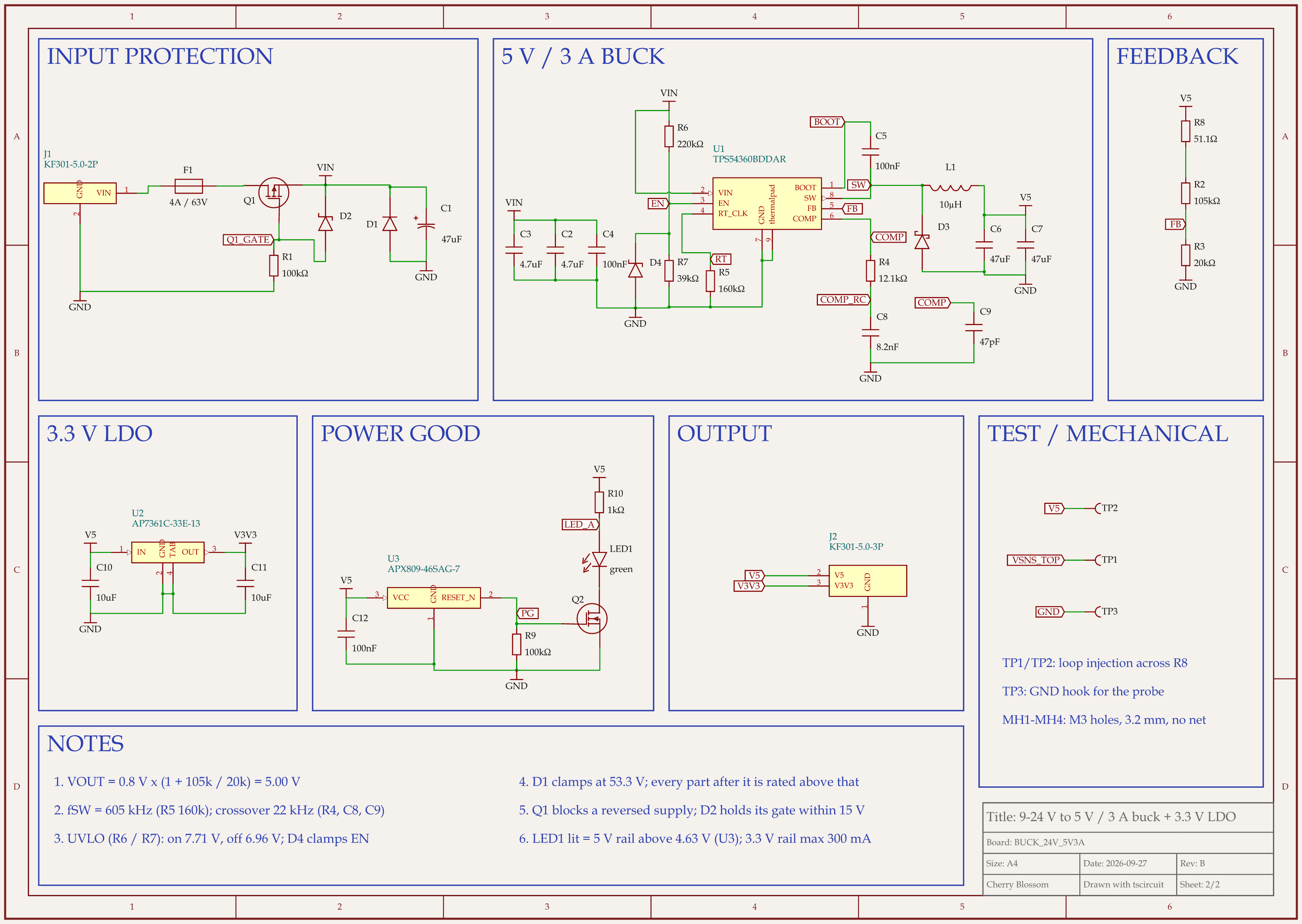
9-24 V to 5 V 3 A buck board schematic, sheet 2 of 2: Schematic
Rev B of a 24 V to 5 V, 3 A buck board with a 3.3 V rail, after an outside review of the circuit.

We gave an AI agent one board: a buck converter taking 9 to 24 V down to 5 V at 3 A, with a 3.3 V rail. It worked in tscircuit, the open-source engine and review tool an earlier version of Cherry Blossom used, on our own machine. It took seven layout rounds, which our review scored 45, 58, 70, 82, 85, 84 and 88.

The 85 did not hold. That round passed every automatic check, but its surge clamp let 38.9 V through to a converter rated for 30 V at most, so we rescored it 72 and the converter was replaced. An outside review of the circuit then scored it 78: with the datasheet's worst-case tolerances, the chip might never turn on from a 9 V supply. A resized divider and a zener on the enable pin raised that to 86, and the layout redone around them scored 88. Both misses are the kind of subtle miss the EEBench section above describes: nothing looked wrong until someone compared two datasheet numbers.

What worked was tying each value to the datasheet. Take the output capacitors. The board uses two 47 µF parts because after DC bias they give about 58.3 µF, against a 35.1 µF minimum for dropping a full 3 A load. The board has not been built or bench tested.

Where does Cherry Blossom fit?

We built Cherry Blossom on the assumption that the model will be wrong some of the time. Sakura works through tools in a real editor, and you can undo any change. Parts come from supplier records instead of the model's memory, Sakura reads the datasheets of the parts it uses, and the Checks panel lists errors and warnings against the design rules before you export. The models are ours to manage: Sakura 2 Base on Pro, with Sakura 2 High added on Ultra.

That is why it ranks first for building a real board. It runs in the browser with nothing to install, and you can export an editable KiCad project and Gerbers. If you need to simulate a circuit, pair it with a simulator; routing by hand happens in the same editor, or in KiCad. The main roundup covers layout-only tools.

What it does not do. Cherry Blossom is an early beta. Circuit simulation is coming but not here yet, and it imports KiCad projects today, with import from Altium, EAGLE, Cadence Allegro, PADS and EasyEDA coming. It has no comments or team management, and it is not built for high-speed or RF sign-off.

See it on your own board

The quickest way to judge any of this is to describe a board and read what comes back: the schematic, the layout, and what the Checks panel says about it. It runs in the browser, with the AI included from the Pro plan up.

Questions

The best AI for circuit design in 2026 is Cherry Blossom for anyone who wants a board that works. You describe the circuit in plain English, and Sakura, the built-in AI agent, draws the schematic and then the layout with footprints from real part data, while a Checks panel lists errors and warnings before you export. That check matters because no model is right every time. On EEBench, the one public benchmark that builds and simulates AI-designed circuits, GPT-6 Astra led at 69.3% as of 4 September 2026, ahead of Claude Opus 5 at 61.6%, so the best model still gets about three real tasks in ten wrong. Cherry Blossom runs in the browser and exports Gerbers and an editable KiCad project. Flux is the next pick if you want to edit by hand with AI help, and Circuit Mind and Celus suit teams working from formal requirements.

It can propose one, and the newest models are measurably better at it, but on its own a chatbot does not build, check or simulate what it writes. Connected to Cherry Blossom through its [MCP server](/docs/mcp), on every plan including Free, ChatGPT or Claude can draw the circuit in a real editor with real parts, where the Checks panel checks it. Either way, a person needs to review the output before you order anything.

On EEBench as of 4 September 2026, GPT-6 Astra scored 69.3% and Claude Opus 5 scored 61.6%, with overlapping error margins. Astra was also cheaper and faster per task. Scores change, so check the live leaderboard.

An electrical engineering benchmark for AI agents, built by atopile. It builds each submitted design, extracts the circuit and BOM, and runs SPICE and design checks against real manufacturer specifications.

Describe a board. See what comes back.

Schematic, layout and a Checks panel, in the browser. Exports to Gerbers and KiCad.

By signing up, you agree to our Terms of Service and Privacy Policy.