Compared

Circuit design software in 2026: what to use for each job

Circuit design software is a wide category. It includes tools for drawing a schematic, for simulating how a circuit behaves, and for turning it into a printed circuit board, and now there are tools where an AI drafts some or all of that for you. The right pick depends on which job you are doing, so this roundup is sorted by job rather than by brand.

By Arnaud and Anass

The short answer

The best circuit design software in 2026 is Cherry Blossom for anyone whose circuit needs to become a real board: you describe it in plain English and get a checked schematic, PCB layout and fab files in the browser.

To draw circuits by hand for free, KiCad covers schematic, simulation and layout, and professional teams often pay for Altium Designer or Cadence OrCAD X. To simulate before you build, LTspice is the free simulator to pair with Cherry Blossom for analog and power circuits.

By job

Which circuit design software fits which job?

  • Description to fab-ready board

    Best pick

    Cherry Blossom

    Also good

    Price of best pick

    $20/mo Pro, $140/mo Ultra, AI included

  • Schematic to PCB, free

    Best pick

    KiCad

    Also good

    EasyEDA

    Price of best pick

    Free

  • Schematic to PCB, professional

    Best pick

    Altium Designer

    Also good

    OrCAD X

    Price of best pick

    Annual subscription

  • Design together in a browser

    Best pick

    Flux

    Also good

    EasyEDA

    Price of best pick

    Free plan; paid AI

  • Analog and power simulation

    Best pick

    LTspice

    Also good

    OrCAD X (PSpice), KiCad

    Price of best pick

    Free

  • Microcontroller simulation

    Best pick

    Proteus

    Also good

    Price of best pick

    Paid licence

  • AI schematic for your EDA tool

    Best pick

    Celus

    Also good

    Circuit Mind

    Price of best pick

    Not published

From each vendor's own pages, September 2026. See sources.

The list

What is the best circuit design software?

1Cherry BlossomOur product

Best for: Going from a plain-English description to a fab-ready board, in the browser

You describe the board in plain English and an AI agent writes it as code, builds it, and shows you the schematic, PCB layout, 3D view and BOM. Footprints come from real part data, and a verification gate checks the board before you can order it. Export Gerbers, an editable KiCad project, a BOM and pick-and-place files, or open Circuit JSON.

Platform
Browser, nothing to install
Pricing
Pro is $20 a month with 4M AI credits and 600 AI actions a day. Ultra is $140 a month with 32M credits and the frontier models. Usage past the allowance is $5 per 1M credits, only if you turn it on. The AI is included, with no API key and no per-seat licence.
2KiCad

Best for: Designing and building boards for free

A free, open-source suite (GPL v3) for Windows, macOS and Linux. You get schematic capture with an electrical rules check, ngspice simulation from the schematic, a PCB editor with an interactive push-and-shove router and scriptable DRC, and bundled libraries of symbols, footprints and 3D models. It imports Eagle and Altium designs.

Platform
Windows, macOS, Linux
Pricing
Free
3Altium Designer

Best for: Professional PCB teams

Hierarchical schematics with SPICE simulation built in, schematic and PCB dynamically linked, and components that carry 3D models, datasheets and live supply chain data. Altium Develop adds a shared cloud workspace with unlimited reviewers.

Platform
Desktop, with cloud workspace
Pricing
Annual subscription; extra Altium Develop authors are $995 a year each, as listed on Altium's pricing page, September 2026
4Cadence OrCAD X

Best for: Small and medium businesses that simulate heavily

Schematic capture, PSpice simulation (DC, AC, transient, Monte Carlo, worst case), PCB layout and design-for-manufacturing checks, with a Live BOM for part availability and real-time collaboration on layouts.

Platform
Desktop, with cloud collaboration
Pricing
Standard, Professional and Professional Plus tiers; free trial
5EasyEDA

Best for: Free browser-based design for hobby and small commercial boards

Schematic and PCB in the browser, free for everyone, commercial use included. The Standard edition is simple, with basic simulation, for designs up to 300 devices. The Pro edition handles far larger boards.

Platform
Browser and desktop
Pricing
Free; Premium storage from $19.9 a month billed annually, as listed on EasyEDA's pricing page, September 2026
6Flux

Best for: Teams that design together, with an AI copilot

A full ECAD in the browser with real-time collaboration, live parts data and an AI assistant that helps with parts, datasheets and design review. The manual editor is free, and AI usage is metered.

Platform
Browser
Pricing
Free Explore plan; paid plans meter AI in Agent Compute Units
7LTspice

Best for: Simulating analog and switching power circuits

Analog Devices' free SPICE simulator, with schematic capture, a waveform viewer and libraries of tens of thousands of models. It is fast on switching regulators. It does no PCB layout.

Platform
Desktop
Pricing
Free
8Proteus

Best for: Embedded projects and teaching

Schematic capture, PCB layout and simulation of complete embedded systems, including microcontrollers running your code, with virtual instruments. It includes AI assistants for industry (ProPilot) and education (ProTutor).

Platform
Desktop
Pricing
Paid licences; see Labcenter's site
9Celus

Best for: Generating a schematic and BOM from requirements, for your EDA tool

AI agents capture your requirements through guided questions, match trusted reference designs, and generate a schematic with a full BOM and alternates, handed off natively to Altium, Cadence, Siemens, Fusion or KiCad.

Platform
Online, with hand-off to your EDA tool
Pricing
Not published; contact Celus
10Circuit Mind

Best for: Engineering teams turning block diagrams into verified schematics

Takes functional requirements and block diagrams and generates schematics, BOMs, verification checks and reports such as FMEA and derating, with exports to ECAD tools.

Platform
Online; request access or a demo
Pricing
Individual, Professional and Enterprise tiers; prices not published
Where AI fits

Should you use AI circuit design software?

AI circuit design tools fall into two groups. Celus and Circuit Mind work at the front of the process. They turn requirements into a schematic and a BOM, and you finish the job in Altium, Cadence, KiCad or another tool. Cherry Blossom covers the whole path, which is why it tops this list. You describe the board, an agent writes the schematic and layout as tscircuit code with footprints from real part data, and a verification gate checks the board against manufacturing rules before you can order it through PCBWay. See how prompt to PCB works.

Checking matters with any AI tool. On EEBench, atopile's circuit benchmark, the best model scores 69.3% on circuit tasks (our write-up). That is why Cherry Blossom runs every edit through a verification gate before a board can be ordered, rather than trusting the model, and why you can open the KiCad export to review the schematic in a familiar tool.

What Cherry Blossom does not do. Cherry Blossom is an early beta. You change a board by asking the agent, not by dragging traces yourself, so fine manual layout happens after a KiCad export. It is not a circuit simulator, it has no real-time multi-user editing, and it is not built for high-speed or RF sign-off.

Pro is $20 a month with 4M AI credits and 600 AI actions a day. Ultra is $140 a month with 32M credits and the frontier models. Usage past the allowance is $5 per 1M credits, only if you turn it on. The AI is included, with no API key and no per-seat licence.

We built one

How readable is a schematic an AI draws?

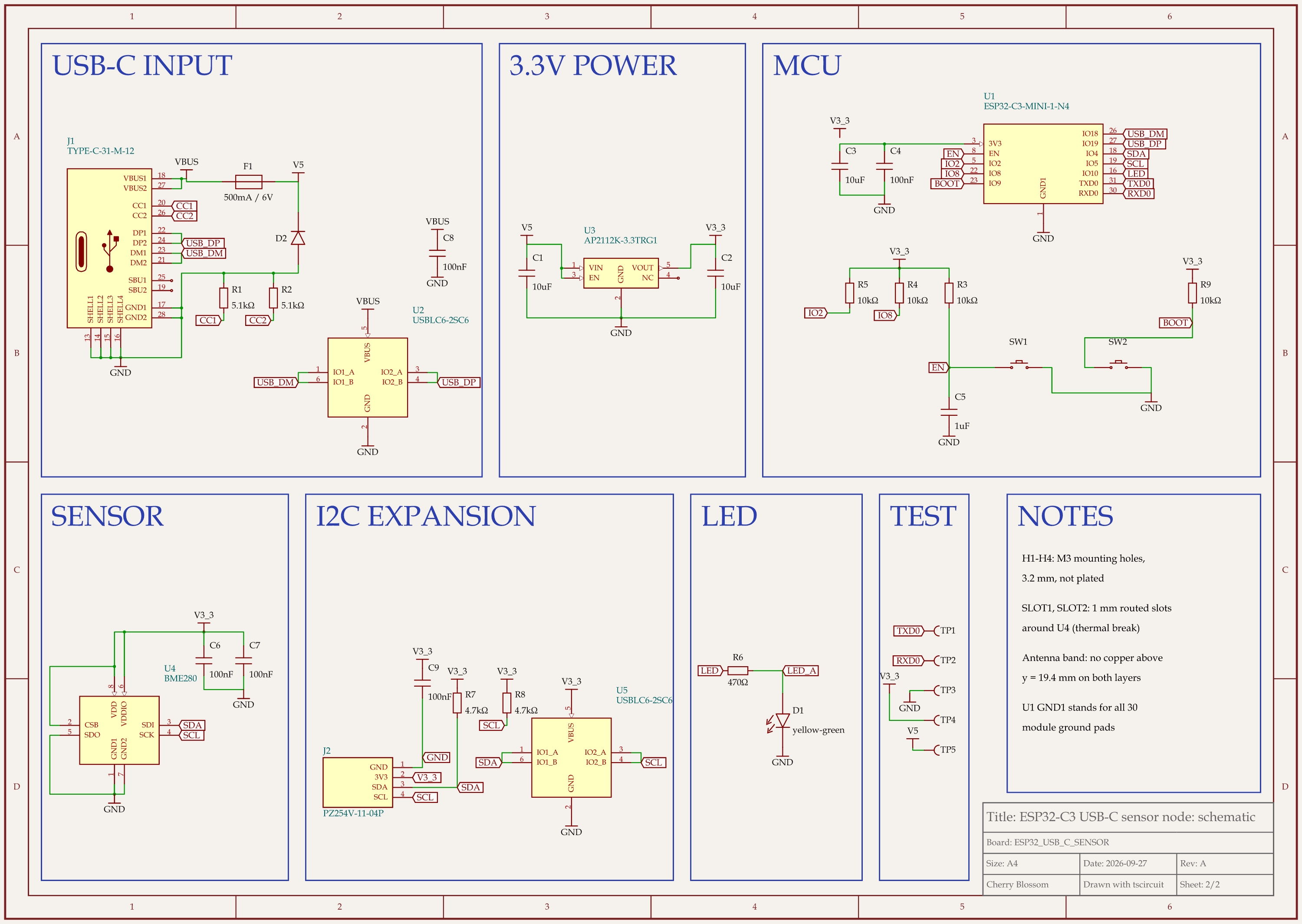
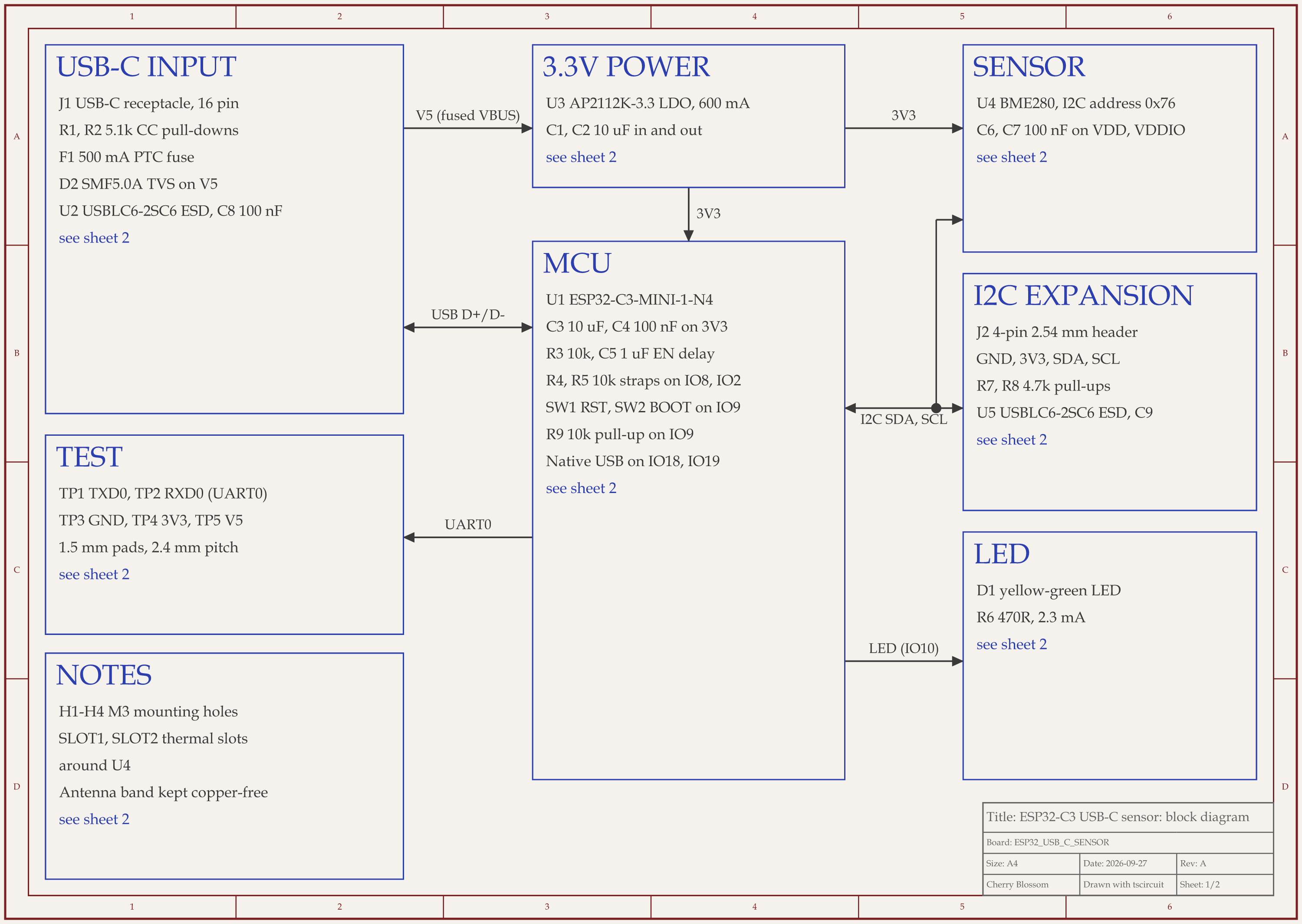
ESP32-C3 USB-C sensor node schematic, sheet 1 of 2: Block diagramESP32-C3 USB-C sensor node schematic, sheet 2 of 2: Schematic
The ESP32-C3 USB-C sensor schematic: a block diagram sheet, then one box per function.

An AI agent built this ESP32-C3 sensor board with tscircuit, the open source engine behind Cherry Blossom, on our own machine and with the tscircuit version and review tool Cherry Blossom's agent uses. The circuit is short. A 500 mA PTC fuse and a TVS clamp diode protect the USB-C power, one USBLC6 ESD chip guards the USB data lines and another the I2C header, and an AP2112K regulator makes 3.3 V for the ESP32-C3 module, a BME280 sensor on I2C and a status LED. Five test pads bring out the UART, ground and both supply rails.

The electrical score barely moved across three review rounds: 21, 21, then 22 out of 25. The drawing is what changed. After round one, the rubric gave the schematic 13 out of 20. Blocks were scattered over a wide sheet, a ground and LED wire crossed the page, and the module's hidden ground pads had no explanation. Round two packed the blocks into two rows (USB, regulator and chip on top, sensor and LED below) and added a note that GND1 stands for all 30 module ground pads. That lifted it to 16 out of 20.

Later passes split the drawing into two sheets: a block diagram, then a schematic with one box per function, where every net that leaves a box ends in a label instead of a long wire. An outside review of the circuit gave the drawing 21 out of 25 and the whole design 74 out of 100. Most of the lost points were for missing protection, missing test points and an LED footprint that would have mounted the LED backwards, not for the drawing. With those fixed, the design scored 92 (the drawing 22 of 25) and the reworked layout 85. Two things are still open: the USB shield goes straight to ground with no RC filter, and two test pad wires take a small detour to their power symbols. The board has not been made or tested.

Choosing

How do you choose circuit design software?

  • Name the output first. A PCB, a simulation result and a schematic for someone else to lay out each point to different tools.

  • If the output is a real board and you want it fast, start with Cherry Blossom: it goes from a description to checked fab files.

  • If you want to learn to draw boards by hand, KiCad or EasyEDA cost nothing and lead all the way to a real board.

  • If you simulate more than you build, LTspice or OrCAD X with PSpice will suit you better than a PCB-first tool.

  • If a team works on the same design, compare how each tool shares work: live editing in Flux, cloud workspaces in Altium and OrCAD X, Git with KiCad files.

  • If you want AI to do the drafting, decide whether you want a schematic for another tool (Celus, Circuit Mind) or a finished board (Cherry Blossom).

For deeper comparisons, see schematic capture software, circuit simulation software and the AI PCB design tools roundup.

See it on your own board

The quickest way to judge any of this is to describe a board and read what comes back: the schematic, the layout, and what the verification gate says about it. It runs in the browser, with the AI included.

Questions

The best circuit design software in 2026 is Cherry Blossom for anyone who wants a circuit turned into a real board. You describe the circuit in plain English, and an AI agent builds the schematic, PCB layout, 3D view and bill of materials in the browser, with footprints from real part data and a verification gate that checks every edit against manufacturing rules. It exports Gerbers and an editable KiCad project, and plans start from $20 a month. It does not simulate, so pair it with LTspice, which is free and fast for analog and power circuits. If you want to draw circuits by hand for free, KiCad covers schematic capture, ngspice simulation and PCB layout. Professional teams often pay for Altium Designer or Cadence OrCAD X, and Celus and Circuit Mind generate schematics for an existing EDA tool.

KiCad is the most complete free circuit design software, with schematic, simulation and PCB layout. EasyEDA is free in the browser, including for commercial use. LTspice is free for simulation.

Yes. Cherry Blossom builds the schematic and PCB layout together from a plain-English description and checks them against manufacturing rules before you can order. Celus and Circuit Mind generate schematics and BOMs from requirements and hand them to your EDA tool. With any of them, an engineer should review the result.

The main professional suites are Altium Designer, Cadence OrCAD X and Allegro X, Siemens Xpedition and Zuken CR-8000, and KiCad is the main free option. For simulation, LTspice and PSpice (built into OrCAD X) are the usual names.

No. Cherry Blossom does not include circuit simulation. It designs boards from a description and checks them against manufacturing rules. For simulation, use LTspice, KiCad's ngspice integration or PSpice.

Describe a board. See what comes back.

Schematic, layout and a verification gate, in the browser. Exports to Gerbers and KiCad.