Guide

Free PCB footprint libraries: where to get footprints you can trust

A footprint is the copper pattern a part solders to, and one wrong pad can scrap the board. Several large footprint libraries are free and mostly good. People and generators still make mistakes when they draw them, so the last step is always the same: hold the footprint up against the datasheet.

By the Cherry Blossom team

The short answer

The best PCB footprint library pick in 2026 is Cherry Blossom, the one worth paying for: its agent takes footprints from real part data as it builds your board, and a verification gate checks every edit, so you skip the hunt and the guesswork.

If the budget is zero, the free PCB footprint libraries are the choice. KiCad users should start with KiCad's own libraries, which ship with the installer and allow commercial designs. For a specific part, SnapMagic Search (formerly SnapEDA), Ultra Librarian and SamacSys offer free footprints in the major ECAD formats, and EasyEDA's library suits boards built at JLCPCB. Check any free footprint against the datasheet before you order.

The libraries

Where can you get PCB footprints you can trust?

Ranked by how quickly each gets correct footprints onto a board you can order, then by format coverage and licence.

1Cherry BlossomOur product

Best for: The one worth paying for: footprints from real part data, checked on a real board

A full schematic and PCB editor in the browser with an AI agent, Sakura, built in. Describe the board in plain English and Sakura finds real parts, draws and tidies the schematic, then asks before it places and routes the PCB. Edit anything by hand, then export Gerbers, an editable KiCad project, a BOM, pick-and-place, STEP or open Circuit JSON.

Platform
Browser, nothing to install
Pricing
The Free plan is the full editor, by hand, with no AI. Pro adds the AI for $20 a month, with 4M AI credits and 600 AI actions a day. Ultra is $140 a month with 32M credits and the frontier models. Usage past the allowance is $5 per 1M credits, only if you turn it on. There is no API key to connect and no per-seat licence.
2KiCad libraries

Best for: KiCad users who want footprints that ship with the tool

The official symbol, footprint and 3D model libraries, community contributed and hosted on GitLab, and included with the KiCad installer. Licensed CC-BY-SA 4.0 with an exception that frees designs made with them from the licence.

Platform
KiCad (files readable by other tools that import KiCad)
Pricing
Free
3SnapMagic Search (SnapEDA)

Best for: A specific part in almost any ECAD format

Free symbols, footprints and 3D models for what it lists as 10 million parts, for 20+ design tools including Altium, KiCad, Eagle, OrCAD, PADS and Fusion. Its site describes automated manufacturability checks on footprints.

Platform
Browser download, 20+ ECAD formats
Pricing
Free for designers; paid credits for custom parts made to order
4Ultra Librarian

Best for: The widest spread of CAD formats

Free symbols, footprints and 3D models, which it describes as over 16 million verified parts, in over 30 CAD formats including Altium, Cadence, KiCad, OrCAD, PADS, Pulsonix and Quadcept.

Platform
Browser download, 30+ CAD formats
Pricing
Free downloads with registration; paid librarian services
5SamacSys (Component Search Engine)

Best for: Free parts, with a paid custom-part service behind them

Free symbols, footprints and 3D models for millions of components from Supplyframe's SamacSys, with direct downloads into Altium, KiCad, Cadence, PADS, Zuken and more. A paid librarian service builds IPC-compliant parts to spec.

Platform
Browser download into the major ECAD tools
Pricing
Free for engineers; paid custom part service
6EasyEDA library

Best for: EasyEDA users building at JLCPCB

EasyEDA's site describes millions of free component libraries with symbols, footprints and 3D models, tied to the LCSC parts catalogue.

Platform
EasyEDA (browser and desktop)
Pricing
Free
Side by side

How do the footprint sources compare?

  • Cherry Blossom

    Size (as stated)

    Footprints from real part data, per board

    Formats

    Editable KiCad project, Gerbers

    Licence or terms

    Plan terms

    Cost

    Free editor; AI from $20/mo Pro, $140/mo Ultra

  • KiCad libraries

    Size (as stated)

    Bundled with KiCad

    Formats

    KiCad

    Licence or terms

    CC-BY-SA 4.0 with design exception

    Cost

    Free

  • SnapMagic Search

    Size (as stated)

    10M parts

    Formats

    20+ ECAD tools

    Licence or terms

    See site terms

    Cost

    Free; custom parts paid

  • Ultra Librarian

    Size (as stated)

    16M+ parts

    Formats

    30+ CAD formats

    Licence or terms

    See site terms

    Cost

    Free with registration

  • SamacSys

    Size (as stated)

    Millions of parts

    Formats

    Altium, KiCad, Cadence, PADS, Zuken and more

    Licence or terms

    See site terms

    Cost

    Free; custom parts paid

  • EasyEDA library

    Size (as stated)

    Millions of parts

    Formats

    EasyEDA

    Licence or terms

    See site terms

    Cost

    Free

Part counts are each vendor's own claim, from their sites in September 2026. Custom-part credit packs start at 5 credits for $135, as listed on SnapMagic's pricing page, September 2026.

Checking

Is a free footprint safe to use?

Usually, but check it first. Footprints are drawn from datasheet dimensions, by people or by generators, and either can copy a mistake faithfully. A footprint can be dimensionally perfect and still wrong for your board: the right package with the wrong pin numbering, a thermal pad with no paste pattern, or a land pattern sized for a different density level than your assembler wants.

  • Pin 1 and pad numbering match the datasheet's pinout, not only the package outline.

  • Pitch, pad size and row spacing match the manufacturer's recommended land pattern.

  • Exposed and thermal pads have a sensible paste pattern and, if needed, vias.

  • The courtyard leaves room for your assembler, and the silkscreen does not sit on pads.

  • The 3D model lines up with the pads, or your enclosure check will be wrong too.

  • Print the layout at 1:1 and lay the real part on it if you have one.

We built one

Does an automatic footprint check catch a wrong footprint?

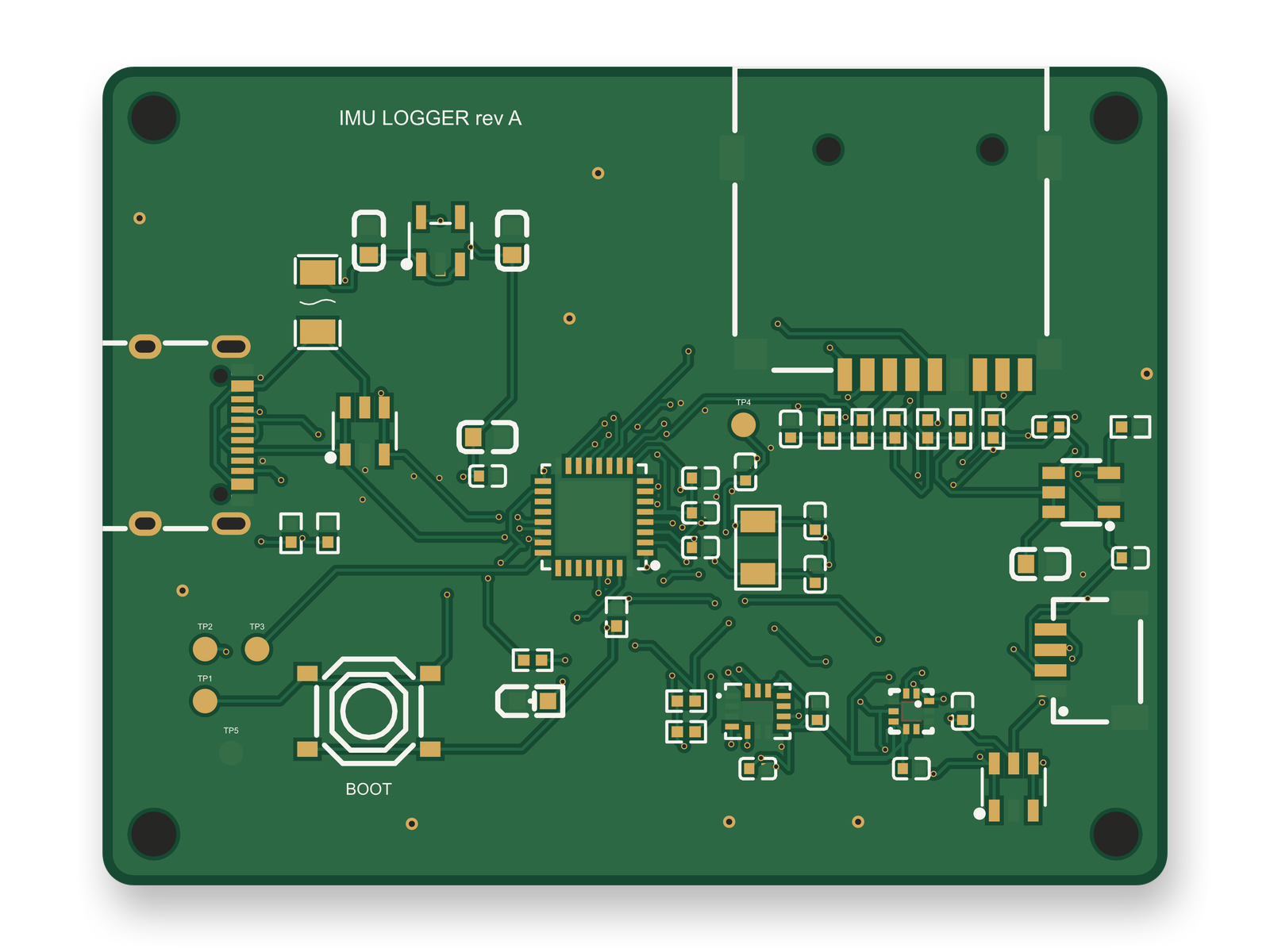
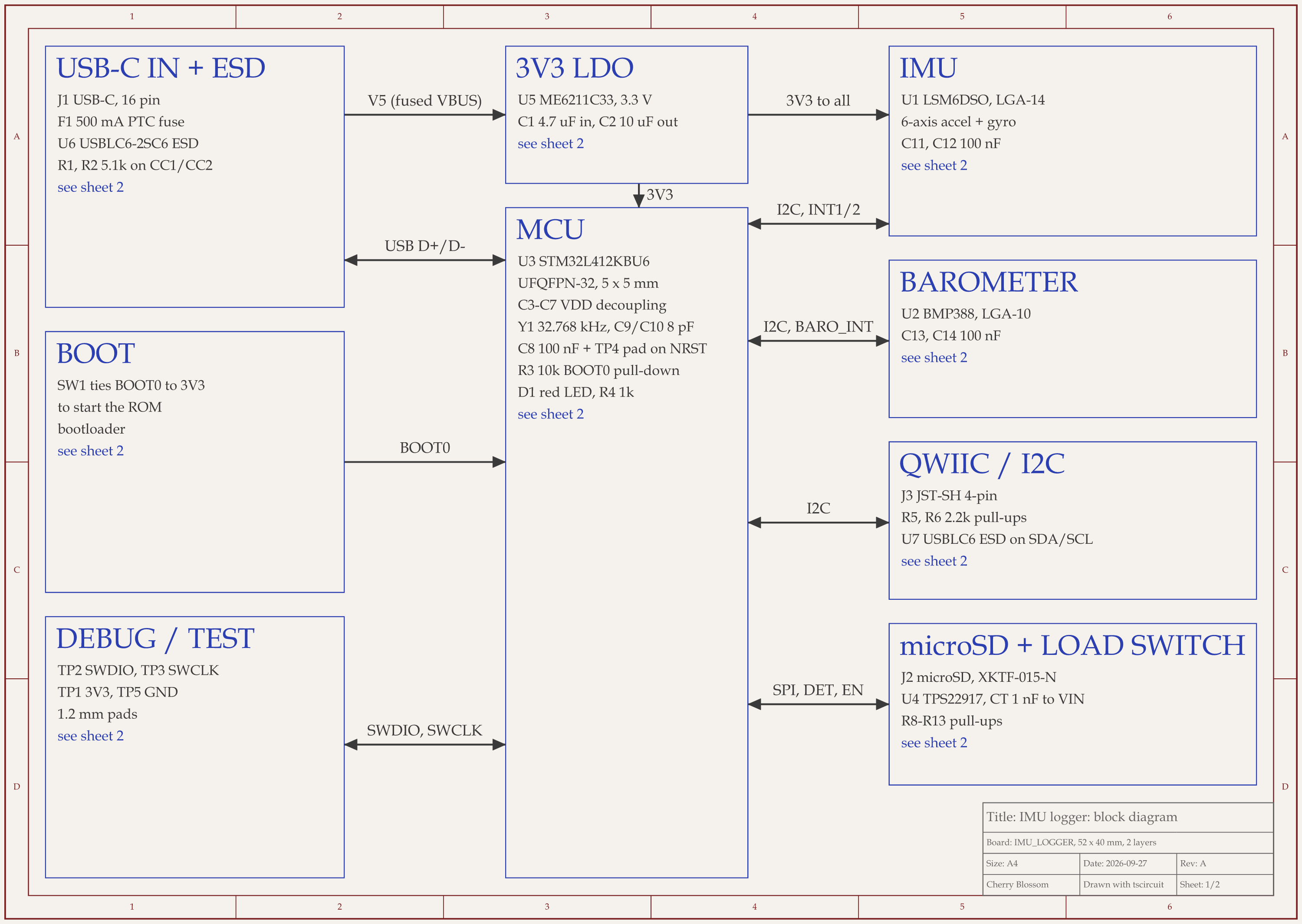
STM32 motion logger schematic, sheet 1 of 2: Block diagramRouted PCB layout of the STM32 motion logger
An STM32 motion logger, 52 x 40 mm on 2 layers. Every land pattern on it comes from the part's own JLC record.

Not always. An AI agent built this logger with tscircuit, the open-source engine Cherry Blossom runs on, using the same tscircuit version and review tool as Cherry Blossom's agent, on our own machine. We chose parts with awkward footprints on purpose. For each one, we typed the generic footprint a person would write by hand and measured it against the pads in the part's JLC record.

  • "lga14" for the LSM6DSO motion sensor passed the build's footprint check. Its pads were up to 0.41 mm off, and four corner pads touched.

  • "lga10" for the BMP388 barometer also passed, with pin 1 on the wrong side of the package.

  • The QFN-32 footprint string for the STM32 was flagged, and rightly: its thermal pad overlapped all 32 signal pads.

  • "jst4_sh" for the Qwiic connector was flagged too. Its signal row and mounting pads were swapped, 6.39 mm off.

The check compares only the outer box of the copper, so a footprint of the right size that is rotated or renumbered gets through. That is why pin 1 comes first in the list above. The first layout scored 82 of 100 after 10 rounds, short of our 85 target. Then an outside reviewer read the datasheets and found a mistake every automatic check had passed: the load switch's timing capacitor went to ground, where TI's pin table says it connects to the input. That review scored the circuit 68, then 86 once the capacitor was moved and a reset pad and connector ESD protection were added. The redone layout also scored 86, with 0 DRC errors. Before ordering, a person still has to check the pick-and-place rotations (JLC uses its own zero orientation) and run a fab DRC on the Gerbers.

Licences

Can you use free footprints in a commercial product?

For KiCad's libraries the answer is written down. They are licensed CC-BY-SA 4.0, and the copyright holder waives the share-alike article for designs and generated files that use the library data. You can ship a closed, commercial board built with them. The share-alike terms only apply if you redistribute the libraries themselves.

The download sites have their own terms of use rather than one open licence. They are written for engineers using the parts in their own designs. If you plan to redistribute a library you assembled from them, read the terms on each site first.

Skipping the step

Can you avoid hunting for footprints at all?

Yes, and that is why Cherry Blossom is first. One reason AI board tools get footprints wrong is that a language model will happily invent one. Cherry Blossom does not let it. When you describe a board, the agent takes footprints from real part data rather than guessing them, and a verification gate checks each AI edit against manufacturing rules before the board can be ordered. When you export to KiCad, the footprints travel with the editable project, so you can check them there against the datasheet like any other. If you only need one part's footprint, our SnapEDA alternatives post covers the download sites in more depth.

Limits to know. Cherry Blossom is an early beta. It is not a circuit simulator, it has no real-time multi-user editing, and it is not built for high-speed or RF sign-off.

See it on your own board

The quickest way to judge any of this is to describe a board and read what comes back: the schematic, the layout, and what the verification gate says about it. It runs in the browser, with the AI included from the Pro plan up.

Questions

Where can I download free PCB footprints? The best pick for footprints you can trust is Cherry Blossom, the one worth paying for, because its agent takes footprints from real part data while it builds your board and a verification gate checks every edit. If the budget is zero, download from KiCad's official libraries, SnapMagic Search (formerly SnapEDA), Ultra Librarian, SamacSys or EasyEDA's built-in library. KiCad's libraries ship with the installer and are licensed for commercial designs. SnapMagic lists 10 million parts for 20+ ECAD tools. Ultra Librarian lists over 16 million parts in over 30 CAD formats. SamacSys, part of Supplyframe, covers Altium, KiCad, Cadence, PADS, Zuken and more. EasyEDA's library is tied to the LCSC catalogue, which suits boards built at JLCPCB. Any free footprint still needs a check against the datasheet's recommended land pattern before you order boards.

Yes. SnapEDA now operates as SnapMagic Search, and its pricing page says it is and will always be free for designers. It sells credits for custom symbols and footprints made to order.

Yes. They are licensed CC-BY-SA 4.0 with an exception that waives the share-alike terms for designs and generated files that use them. You only take on the licence's obligations if you redistribute the libraries themselves.

Compare it to the manufacturer's recommended land pattern: pin 1 and pad numbering, pitch, pad sizes, and any thermal pad. Check the courtyard and silkscreen, and if you have the part, print the layout at 1:1 and lay the part on it.

Describe a board. See what comes back.

Schematic, layout and a verification gate, in the browser. Exports to Gerbers and KiCad.

By signing up, you agree to our Terms of Service and Privacy Policy.