Cherry Blossom vs Proteus: the best Proteus alternative for PCB design
Proteus does two jobs: it simulates microcontroller firmware against the circuit, and it lays out the board. Many people who search for a Proteus alternative only need the second one, and want it faster. Cherry Blossom designs the board from a description, checks it before you order, and runs in the browser.
By Arnaud and Anass·
The short answer
The best Proteus alternative for students, makers and engineers who want to turn a circuit into a real board fast is Cherry Blossom: you describe the board in plain English and get a checked schematic, PCB layout and fab files in the browser, with an editable KiCad project to finish in.
Cherry Blossom does not simulate, so pair it with Proteus VSM for firmware co-simulation or KiCad's free SPICE simulator for the analogue side. EasyEDA suits people who want a free browser editor with simple simulation.
The problem
Why do people look for a Proteus alternative?
The licence. Proteus is sold as perpetual licences in bundles, and the free demo is time-limited in simulation.
Layout is the only part they use. If you mostly draw and route boards, you are paying for a simulator you do not run, and there are faster ways to get a board.
They want free SPICE. KiCad ships an integrated SPICE simulator at no cost.
The difference
How is Cherry Blossom different from Proteus?
Proteus Design Suite from Labcenter Electronics combines schematic capture, simulation and PCB layout. Its defining feature is VSM, Virtual System Modelling: you load firmware onto a supported microcontroller on the schematic and co-simulate it inside a mixed-mode SPICE simulation, peripherals included. Labcenter says its PCB products all include an autorouter and basic mixed-mode SPICE simulation. Its education page describes use in schools, colleges and universities, and recent releases added HDI micro-via support and AI-assisted part creation, according to Labcenter's homepage.
Cherry Blossom focuses on getting the board made. You describe the board; an agent writes it as tscircuit code in a cloud sandbox, builds it, and shows the schematic, PCB layout, 3D view and BOM. Footprints come from real part data and a verification gate checks every edit against manufacturing rules. It does not simulate circuits or firmware.
Side by side
How do Proteus and Cherry Blossom compare?
How you design
Cherry Blossom
Describe it; an AI agent builds the board
Proteus
Draw the schematic and lay out the board yourself
Where it runs
Cherry Blossom
Browser
Proteus
Desktop application
Routing
Cherry Blossom
Done by the agent
Proteus
Manual, with an autorouter included
Checks
Cherry Blossom
Verification gate on every AI edit, DRC before ordering
Proteus
Rules checks you run yourself
Simulation
Cherry Blossom
None; pair with Proteus or KiCad
Proteus
Mixed-mode SPICE, plus microcontroller co-simulation (VSM)
Perpetual licences; Enterprise, Platinum or custom bundles
Proteus details from labcenter.com and its pricing page, September 2026.
Cost
What does each one cost?
Labcenter sells Proteus in bundles: Enterprise for commercial PCB design, Platinum with everything it sells, or a custom package where you pick the modules. Its pricing page highlights perpetual licensing and links to a configurator and a full commercial price list. The prices did not display in a form we could quote, so check there. There is a demo version, time-limited only in simulation, and separate education pricing.
Pro is $20 a month with 4M AI credits and 600 AI actions a day. Ultra is $140 a month with 32M credits and the frontier models. Usage past the allowance is $5 per 1M credits, only if you turn it on. The AI is included, with no API key and no per-seat licence. See the pricing page.
Switching
What happens to your Proteus projects?
Cherry Blossom does not open Proteus designs. It starts from a plain-English description, so there is no file migration: existing projects stay in Proteus, and you describe the next board instead of drawing it.
Keeping both is a good setup. Simulate the tricky part of the circuit in Proteus or another SPICE tool, then describe the full board to Cherry Blossom once you know it works, and get back Gerbers, a BOM and an editable KiCad project.
We built one
What is left for you on a board an AI agent laid out?
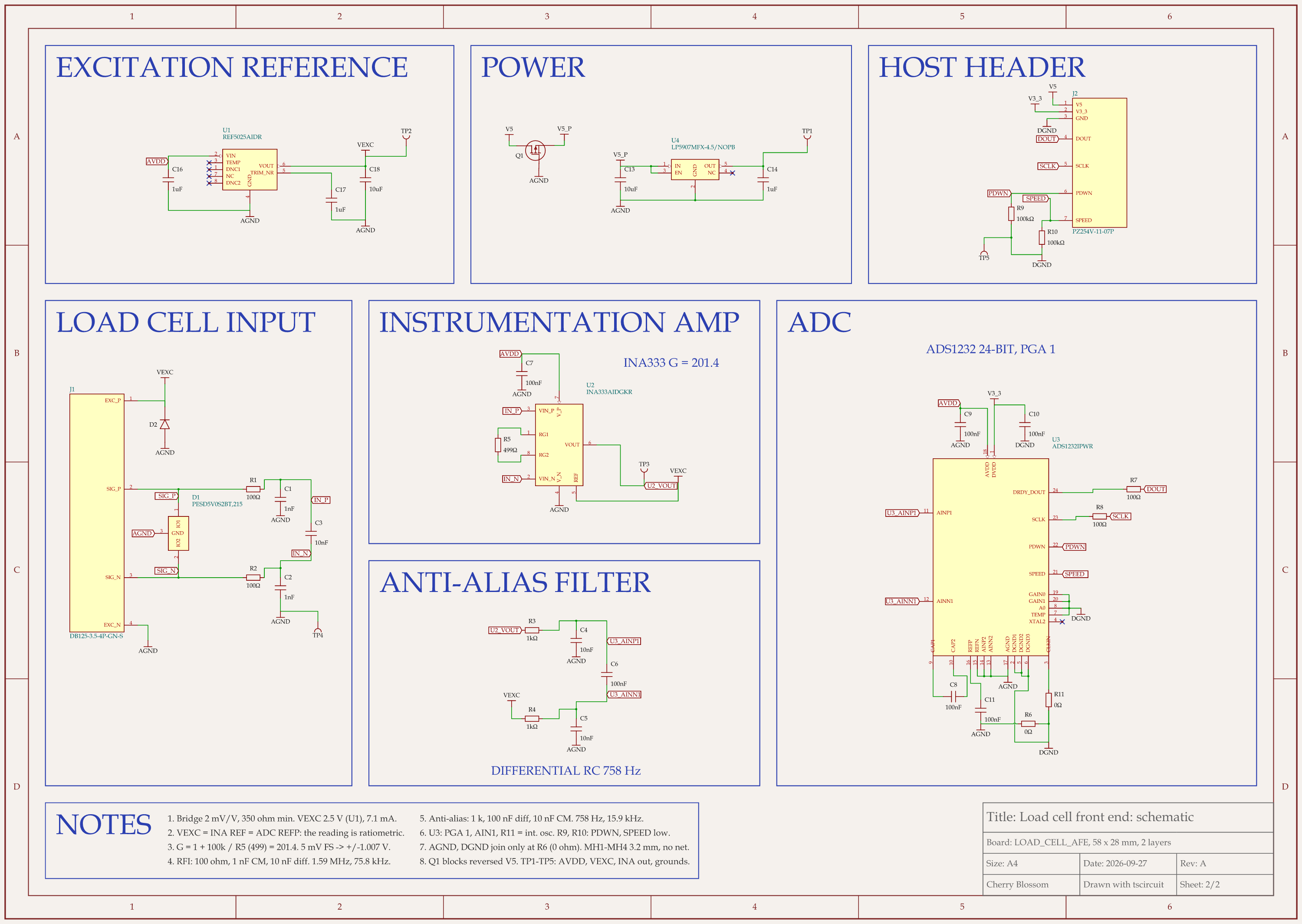
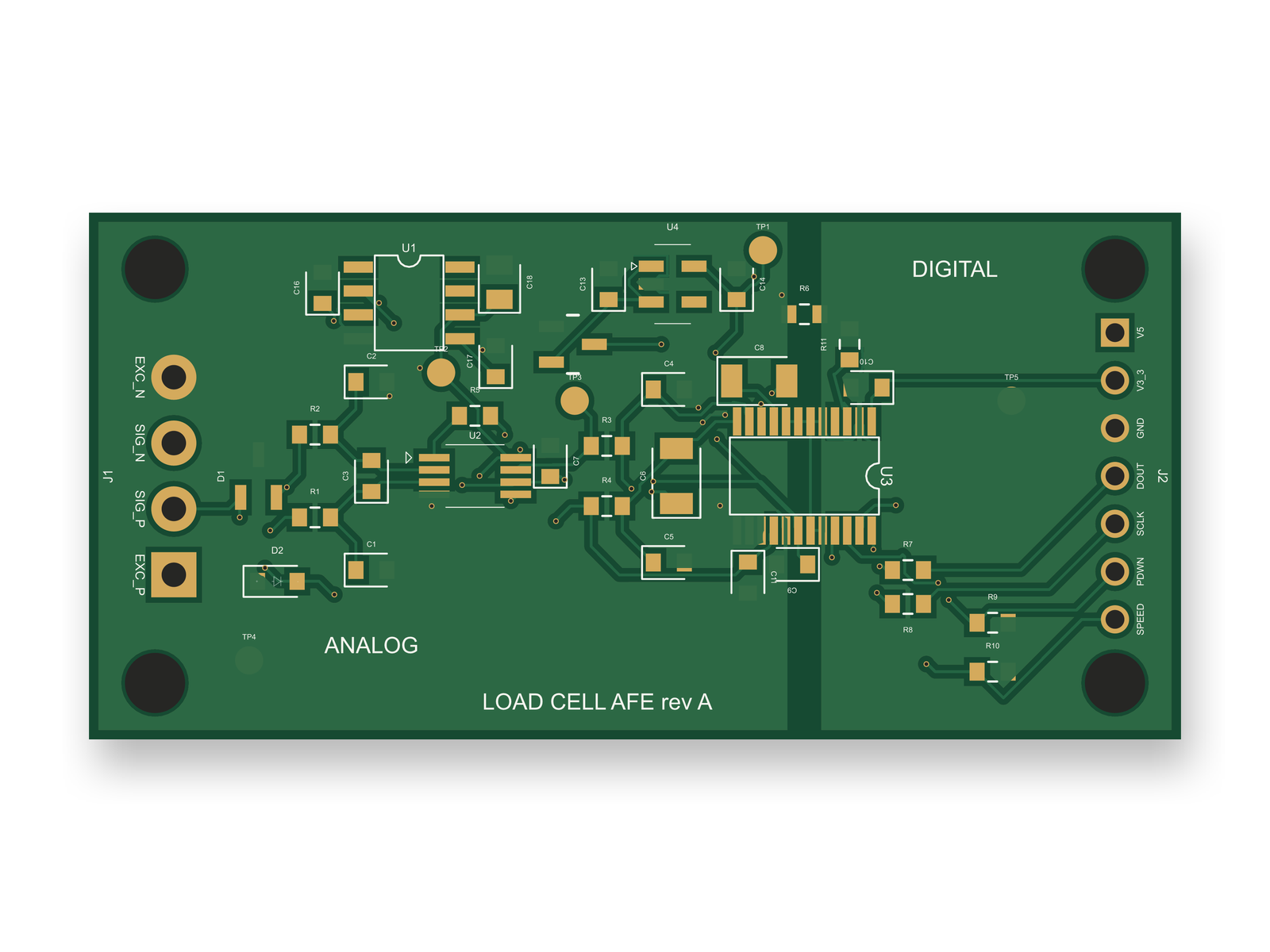
The load cell front end on a 58 x 28 mm, 2-layer board: the schematic and the routed PCB with split analog and digital ground pours.
This is that setup on a circuit that was already known: a load cell front end with an INA333 amplifier and an ADS1232 24-bit ADC, feeding a 7-pin header for whatever microcontroller reads it. An AI agent built it with tscircuit, the open-source engine Cherry Blossom runs on, using the same tscircuit version and the same review tool Cherry Blossom's agent uses, on our own machine. Full routed builds took 44 to 140 seconds. The board has not been fabricated or tested.
The layout work was the kind a Proteus user does by hand. Over three scored rounds the score went from 78 to 84 to 86 out of 100. The agent moved decoupling capacitors to about 2 mm from their pins, put the single 0 Ω tie between analog and digital ground where the 5 V line crosses the split, cut the board from 58 x 34 mm to 58 x 28 mm, and added an ESD diode on the excitation line. An outside review of the circuit then scored it 75, and 87 once six parts were added: a reverse-polarity MOSFET and five test points. The agent placed them without moving any existing part, and the redone layout scored 86. The final build had 0 build errors and 0 DRC errors, and the schematic review found 0 problems on either sheet.
Some things were left for a person. The 5 V line still crosses the ground split, right next to the tie. The review caught that swapped 5 V wires would have put a negative voltage on the regulator's input, which every automatic check had passed; the MOSFET now blocks it, but whether the host header needs ESD parts is still a person's call. The screw terminal's pads and the hand-drawn MOSFET pads were never checked against the makers' drawings. And nothing here runs the firmware that reads the ADC, including the power-down (PDWN) pin toggle the ADS1232 datasheet asks for at power-up. Checking code against the circuit is still what Proteus VSM is for.
Choosing
When is Cherry Blossom the better choice?
The circuit is well understood and the work left is turning it into a board.
You would rather describe the board than draw the schematic and route it.
You want the board checked against manufacturing rules and ready to order through a PCBWay hand-off.
You want to work in the browser, with nothing to install, and finish in KiCad if you need to.
That fits students with a working circuit who need a real board for a project, and educators who want a class to get to hardware sooner.
When is Proteus the better choice?
You need to run microcontroller firmware against the circuit before building it.
You teach embedded systems and want students to debug without hardware.
You want SPICE simulation and PCB layout in one licence you own outright.
The honest limits. Cherry Blossom is an early beta. You change a board by asking the agent, not by dragging traces yourself, so fine manual layout happens after a KiCad export. It is not a circuit simulator, it has no real-time multi-user editing, and it is not built for high-speed or RF sign-off.
Everything else
What are the best Proteus alternatives?
1Cherry BlossomOur product
Best for: Going from a plain-English description to a fab-ready board, in the browser
You describe the board in plain English and an AI agent writes it as code, builds it, and shows you the schematic, PCB layout, 3D view and BOM. Footprints come from real part data, and a verification gate checks the board before you can order it. Export Gerbers, an editable KiCad project, a BOM and pick-and-place files, or open Circuit JSON.
Platform
Browser, nothing to install
Pricing
Pro is $20 a month with 4M AI credits and 600 AI actions a day. Ultra is $140 a month with 32M credits and the frontier models. Usage past the allowance is $5 per 1M credits, only if you turn it on. The AI is included, with no API key and no per-seat licence.
2Proteus Design Suite
Best for: Simulating microcontroller firmware with its circuit
Schematic capture, mixed-mode SPICE and VSM microcontroller co-simulation, and PCB layout with an autorouter, from Labcenter Electronics.
Platform
Desktop
Pricing
Perpetual licences in bundles; time-limited demo; education pricing
3KiCad
Best for: Free schematic, SPICE simulation and layout
Open-source schematic capture with an integrated SPICE simulator and ERC, PCB layout with an interactive router, and a 3D viewer.
Platform
Windows, macOS, Linux
Pricing
Free
4EasyEDA
Best for: Free browser design with simple simulation
Std and Pro editors, both free. Std includes simple circuit simulation; both tie into LCSC parts and JLCPCB ordering.
Platform
Browser and desktop client
Pricing
Free; optional Premium plan
If simulation is the main requirement, our circuit simulation software roundup compares the dedicated simulators and which one to pair with Cherry Blossom.
See it on your own board
The quickest way to judge any of this is to describe a board and read what comes back: the schematic, the layout, and what the verification gate says about it. It runs in the browser, with the AI included.
The best alternative to Proteus for turning a circuit into a real board fast is Cherry Blossom. You describe the board in plain English, an AI agent builds the schematic and PCB layout in the browser, footprints come from real part data, and a verification gate checks every edit against manufacturing rules. You export Gerbers, a BOM, pick-and-place files or an editable KiCad project, and plans start from $20 a month. Cherry Blossom does not simulate, so keep a simulator for that step: Proteus VSM if you co-simulate microcontroller firmware with the circuit, or KiCad's free integrated SPICE simulator for analogue checks. KiCad is also the common free manual editor, open source and available on Windows, macOS and Linux. EasyEDA is free, runs in the browser, and includes simple simulation in its Std edition. The usual flow is to prove the circuit in a simulator, then build the board in Cherry Blossom.
No. Cherry Blossom has no circuit or firmware simulation. It designs the board, checks it against manufacturing rules, and exports fab files. For simulation, use Proteus, KiCad's SPICE simulator or another dedicated tool.
Labcenter offers a demo version that it describes as time-limited only in simulation. Full use needs a licence, sold in bundles with perpetual licensing, and Labcenter lists separate education pricing.
Yes, at different stages. Prove out the circuit or firmware in a simulator such as Proteus, then describe the finished circuit to Cherry Blossom to get a board with Gerbers, a BOM and an editable KiCad project.