Compared

Enterprise AI PCB design software in 2026: a procurement checklist, and who passes it

An enterprise evaluating AI for PCB design is buying two things: the AI, and the terms under which its designs leave the building. The second usually takes longer to approve. We checked each vendor's own pages for the answers a security review and a procurement team will want, and marked what they do not publish.

By the Cherry Blossom team

The short answer

The best enterprise AI PCB design software for getting a first prototype board is Cherry Blossom: an engineer describes the board in plain English, the agent, Sakura, builds a checked schematic and layout from real part data, and the team gets Gerbers and an editable KiCad project with no install and no per-seat licence.

For sign-off and production work, use the AI inside the ECAD platform you already license: Allegro X AI on Cadence, and the AI features in Xpedition and PADS Pro on Siemens. For AI layout across ECAD tools with published enterprise terms, Quilter offers SOC 2 Type II cloud or self-hosting, and JITX Enterprise offers air-gapped installation.

The checklist

What should an enterprise ask an AI PCB vendor?

  • Where does the design go? Vendor cloud, your cloud, or an air-gapped machine.

  • Is it used for training? Some vendors train on synthetic data only; some free tiers use your metadata.

  • What is certified? SOC 2 Type II is the common baseline. Ask for the report, not the badge.

  • What does it connect to? Your ECAD, your PLM, your part library, your SSO.

  • How is it priced? Per seat, per project, per compute unit, or by quote.

  • How fast does an engineer get a board? Time from an idea to checked fab files is what the team feels every week.

Export-controlled work adds its own requirements. None of the vendor pages we read made an ITAR claim we could quote, so if that applies to you, ask each vendor directly and get it in writing.

Side by side

How do enterprise AI PCB tools answer the checklist?

  • Cherry Blossom

    AI does

    Whole board from a prompt

    Hosting

    Cloud, nothing to install

    Security stated

    No compliance claims

    Pricing

    Free editor; AI from $20/mo Pro, $140/mo Ultra

  • Cadence Allegro X AI

    AI does

    Placement, planes, routing

    Hosting

    Within Allegro X

    Security stated

    See Cadence

    Pricing

    Not published

  • Siemens Xpedition

    AI does

    Command prediction, parts Q&A, exploration

    Hosting

    Desktop, cloud-connected

    Security stated

    See Siemens

    Pricing

    Not published

  • Altium Agile Enterprise

    AI does

    Requirements, AI in platform

    Hosting

    Altium 365 cloud

    Security stated

    Altium 365 SOC 2 Type II

    Pricing

    Contact sales

  • Quilter

    AI does

    Placement, routing

    Hosting

    Cloud or self-hosted

    Security stated

    SOC 2 Type II, TLS 1.3, AES-256

    Pricing

    Per project

  • JITX Enterprise

    AI does

    Code-based layout, HFSS loop

    Hosting

    Local, air-gapped option

    Security stated

    Proprietary designs local by default

    Pricing

    Custom

  • Celus

    AI does

    Requirements to schematic

    Hosting

    Integrates over MCP

    Security stated

    Data stays in your systems

    Pricing

    Not published

  • Circuit Mind

    AI does

    Architecture to schematic

    Hosting

    Not stated

    Security stated

    Not stated

    Pricing

    Enterprise tier

  • Flux Enterprise

    AI does

    Whole board

    Hosting

    Browser

    Security stated

    SOC 2, SLA

    Pricing

    Custom

  • Trace Enterprise

    AI does

    Whole board

    Hosting

    Private infrastructure

    Security stated

    SSO, audit logs

    Pricing

    Custom

"Not stated" or "See vendor" means we could not find it on the vendor's own public pages in September 2026, not that it does not exist.

The vendors

Which enterprise AI PCB design tools should be on a shortlist?

1Cherry BlossomOur product

Best for: Going from a plain-English description to a fab-ready board, in the browser

A full schematic and PCB editor in the browser with an AI agent, Sakura, built in. Describe the board in plain English and Sakura finds real parts, draws and tidies the schematic, then asks before it places and routes the PCB. Edit anything by hand, then export Gerbers, an editable KiCad project, a BOM, pick-and-place, STEP or open Circuit JSON.

Platform
Browser, nothing to install
Pricing
The Free plan is the full editor, by hand, with no AI. Pro adds the AI for $20 a month, with 4M AI credits and 600 AI actions a day. Ultra is $140 a month with 32M credits and the frontier models. Usage past the allowance is $5 per 1M credits, only if you turn it on. There is no API key to connect and no per-seat licence.
2Cadence Allegro X AI

Best for: Enterprises standardised on Cadence

Generative AI inside the Allegro X Design Platform that automates placement, power plane creation, metal pour and critical-net routing. No new vendor relationship if you already license Allegro X.

Platform
Allegro X Design Platform
Pricing
Not published; contact Cadence
3Siemens Xpedition and PADS Pro

Best for: Enterprises standardised on Siemens

Siemens describes three kinds of AI: command prediction, design space exploration, and a chatbot over interactive datasheets for component selection.

Platform
Desktop, with cloud connectivity
Pricing
Not published; contact Siemens
4Quilter

Best for: AI layout across mixed ECAD, with self-hosting

Physics-driven placement and routing for Altium, Cadence, KiCad, OrCAD and Xpedition designs. SOC 2 Type II, TLS 1.3 and AES-256, and a Kubernetes-native self-hosted option. Quilter says it trains on synthetic boards, not your data.

Platform
AWS cloud or self-hosted
Pricing
Per project, by unrouted pins; no seat licences
5Altium Agile Enterprise

Best for: Altium shops that need governance across design and release

Altium Designer plus Altium 365 with governance over approvals, changes, access and releases, and AI integrated into the platform. Altium 365 is SOC 2 Type II certified.

Platform
Desktop plus Altium 365 cloud
Pricing
Contact Altium
6JITX Enterprise

Best for: Defence and high-frequency teams that need air-gapped tools

Code-based design with AI proposing edits and HFSS validating them. Enterprise adds proprietary designs hosted locally by default, air-gapped installation, and Siemens Xpedition, Mentor and PLM integration.

Platform
Local install
Pricing
Custom
7Celus

Best for: Front-end schematic generation that reads only what you expose

Requirements to reference schematic and BOM, handed to Altium, Cadence, Siemens, Fusion or KiCad. Celus says the agent reads only what you expose, live, over MCP, and your data stays in your systems.

Platform
Integrates with your EDA tool
Pricing
Not published
8Circuit Mind

Best for: Architecture-level design with FMEA and derating

Generates schematics, BOMs and verification from functional requirements, with FMEA, derating and ICD outputs. Has an Enterprise tier; its security terms were not on the pages we could read.

Platform
Not stated
Pricing
Enterprise tier; not published
9Flux Enterprise

Best for: Teams moving to a browser ECAD with an AI agent

Flux's Enterprise plan lists SOC 2, an SLA (2-hour response, 24-hour unblock), hidden workspaces and invoiced billing.

Platform
Browser
Pricing
Custom
10Trace Enterprise

Best for: Prompt-to-board with private infrastructure

Trace's Enterprise tier lists private infrastructure, SSO, audit logs and dedicated support.
Platform
Desktop and CLI
Pricing
Custom
We built one

What should the review record of an AI-built board show?

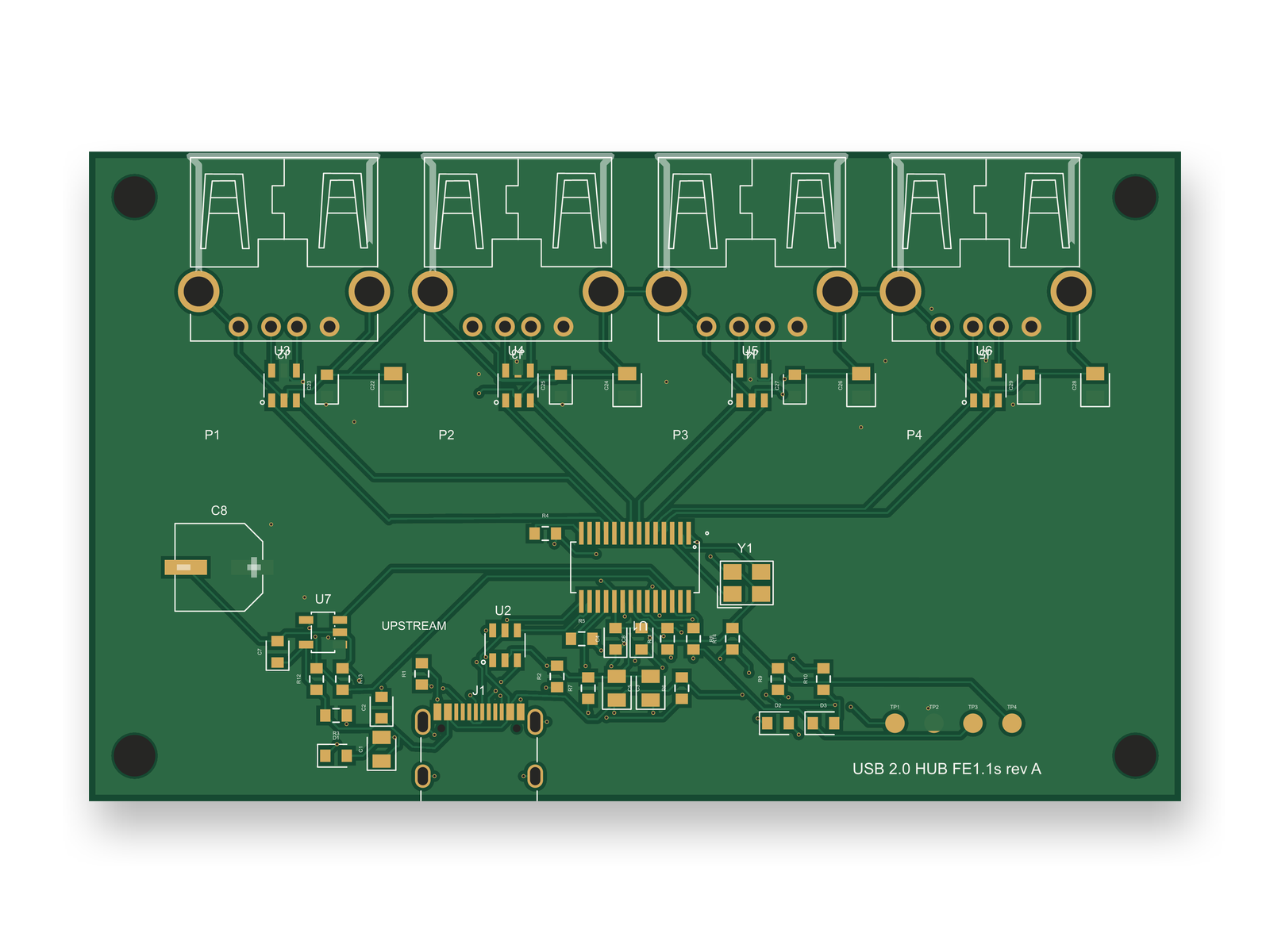
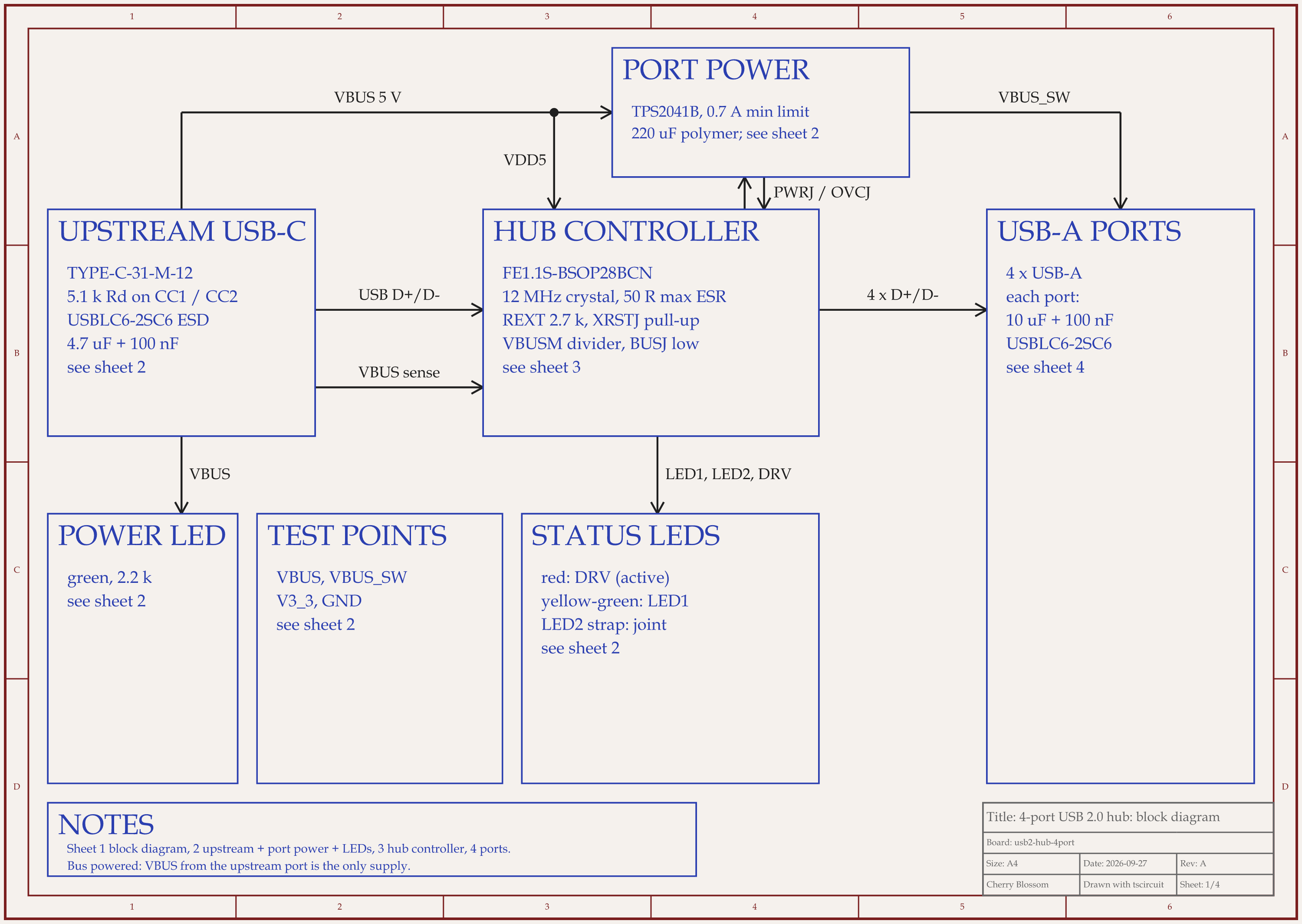
4-port USB 2.0 hub schematic, sheet 1 of 4: Block diagramRouted PCB layout of the 4-port USB 2.0 hub
An AI-built 4-port USB 2.0 hub after an outside circuit review and a redone layout: block diagram and PCB.

A team signing off AI output needs more than the final picture. It needs to know what the tool tried, what failed and what it skipped. We kept that record for a 4-port USB 2.0 hub. An AI agent built it on our own machine with tscircuit, the open-source engine an earlier version of Cherry Blossom used, running the tscircuit version and review tool that earlier version's agent ran. A strict review rubric scored every round out of 100.

Scores out of 100, round by round

  • First build

    Scores by round

    45, 45, 62, 64, 70, 72, 66, 76, 76, 80

    Where it ended

    80, at the 10-round cap

  • Outside review of the circuit

    Scores by round

    66, 89

    Where it ended

    89, passed

  • Layout redone for the new parts

    Scores by round

    70, 72, 72, 60, 55, 80

    Where it ended

    80, at the 6-round cap

Each pass used its own rubric: the whole board, then the circuit, then the layout.

Three things in that record matter to a reviewer. The tool can fail quietly: in round 1 the router laid no traces and the build still reported success, and in the redo a build reported 0 DRC errors while the top copper pour shorted the USB-C connector's ground and supply pads. Only a separate short check, tsci check shorts, caught those 4 shorts. The score went down as well as up, from 72 to 66 when a keepout backfired and from 72 to 55 during the redo, so one final number hides the path. And the finished build still carries warnings, including 3 LED footprints that match the supplier's copper only 79 %.

Ask any AI vendor for the same: the round-by-round log, the warnings left in the build, and the list of what a person must still do. For this hub that list includes controlled impedance on the USB pairs, signal copper to clear off the ground planes and a wider upstream supply trace. It ended below our 85 bar and has not been fabricated.

Our part

Where does Cherry Blossom fit in an enterprise?

At the front of the flow, where speed matters most. An engineer can describe a test jig, a demo board or a proof of concept in a sentence, have it checked in the Checks panel, and export it to KiCad or order it from a board house such as PCBWay. There is no per-seat licence to budget and nothing to install. The production board then goes through sign-off in Allegro, Xpedition or Altium.

Cherry Blossom publishes no SOC 2 report or other compliance claim and has no self-hosted option, so use it where your policy allows a cloud tool. Check that policy before putting any design into one.

What it does not do. Cherry Blossom is an early beta. It is not a circuit simulator, it has no comments or team management, and it is not built for high-speed or RF sign-off.

For individual professionals choosing tools, see AI PCB tools for professionals. For team setups, see Cherry Blossom for startups. For the overall ranking, see the main roundup.

See it on your own board

The quickest way to judge any of this is to describe a board and read what comes back: the schematic, the layout, and what the Checks panel says about it. It runs in the browser, with the AI included from the Pro plan up.

Questions

The best enterprise AI PCB design software for getting a first prototype board fast is Cherry Blossom. An engineer describes the board in plain English, and the agent, Sakura, builds the schematic and layout with footprints from real part data, lists errors and warnings in a Checks panel, and exports Gerbers and an editable KiCad project. It runs in the browser with no install and no per-seat licence. It makes no compliance claims, so use it where your policy allows a cloud tool. For sign-off and production layout, use the AI inside the ECAD you already license: Allegro X AI on Cadence, or the AI features in Siemens Xpedition and PADS Pro. For AI layout across mixed ECAD tools, Quilter offers SOC 2 Type II cloud or a self-hosted option, and JITX Enterprise offers air-gapped installs. Ask each vendor for the compliance report itself.

Quilter offers a self-hosted Kubernetes deployment, and JITX Enterprise offers air-gapped installation. Trace lists private infrastructure on its Enterprise plan. Cadence and Siemens AI features run within their own platforms.

It varies. Quilter says it trains on synthetic boards, except that its free tier uses board metadata. Celus says your data stays in your systems. Ask every vendor in writing, and check the free tier's terms separately from the paid ones.

No. Cherry Blossom makes no enterprise compliance claims and has no self-hosted option. It is an early beta built to get engineers from an idea to a checked prototype board quickly; sign-off stays in your enterprise ECAD.

Describe a board. See what comes back.

Schematic, layout and a Checks panel, in the browser. Exports to Gerbers and KiCad.

By signing up, you agree to our Terms of Service and Privacy Policy.